
6-Core vs. 8-Core CPUs: Which Do You Really Need?
Most modern software is finally catching up to hardware, yet the $100 gap between a 6-core and 8-core processor remains one of the most stressful choices in any PC build. You might worry that saving money today leads to a sluggish system tomorrow or that spending more is just paying for a spec sheet vanity project.
While the 6-core chip is often hailed as the best value, the rise of multi-threaded game engines and intensive background tasks demands a closer look at what those two extra cores actually provide.
Key Takeaways
- Architecture and IPC (Instructions Per Clock) often matter more than raw core count; a newer 6-core CPU frequently beats an older 8-core model in speed and efficiency.
- Gaming performance relies heavily on single-core clock speeds, meaning a 6-core processor typically provides identical frame rates to an 8-core version in most current titles.
- Moving to an 8-core CPU improves 1% lows and reduces micro-stuttering in complex, open-world games by providing more headroom for background tasks.
- Professional tasks like 4K video rendering and 3D modeling scale directly with core count, offering measurable time savings when upgrading to an 8-core chip.
- Higher core counts increase the system’s total power draw and heat output, often requiring a more expensive cooling solution and a motherboard with high-quality voltage regulators.
Beyond the Core Count
Raw numbers often create a misleading picture of total processor power. While a higher core count suggests more muscle, the actual speed of a system depends on how efficiently those cores communicate and process instructions.
Modern computing relies on a complex balance between physical hardware and the logical ways software utilizes that hardware to manage data.
Cores and Threads: SMT and Hyper-Threading
Physical cores are the actual processing units on the silicon, but Simultaneous Multithreading, or Hyper-Threading in Intel terms, allows each core to act as two logical processors. This means a 6-core chip offers 12 threads and an 8-core chip offers 16 threads.
These extra threads do not double the performance, but they allow the CPU to manage background tasks more effectively by filling in the tiny gaps in a core’s workload. For the average user, this results in a more responsive system where one heavy application is less likely to freeze the entire computer.
Instructions Per Clock and Generational Gains
Instructions Per Clock, or IPC, is a measure of how much work a processor can finish in a single cycle. This is why a new 6-core processor frequently beats an 8-core processor from three years ago.
If the newer architecture can handle 20% more data per clock cycle, the raw core count becomes less relevant. When choosing between these two tiers, the age of the architecture often dictates the real-world speed more than the number of cores listed on the box.
Architecture and Cache Distribution
The way cores are physically arranged on the chip, such as AMD’s chiplet design, influences how fast they can share information. L3 cache serves as a high-speed memory pool that sits right next to the cores; a larger cache can significantly reduce the time a processor spends waiting for data from the slower system RAM.
Many 8-core processors come with larger cache pools, which can provide a performance boost in specific tasks like gaming, even if the software isn’t using all eight cores at once.
Gaming Performance and User Experience

Gaming has traditionally relied on the speed of a single core rather than the total number of cores available. While this is changing as developers find new ways to distribute workloads, the processor’s clock speed and architecture still dictate the maximum frame rate in most titles.
The choice between 6 and 8 cores often comes down to how much headroom you want for the most demanding software.
Single-Threaded vs. Multi-Threaded Games
The majority of games today still put the heaviest load on one or two primary cores that handle physics and game logic. Because of this, a 6-core CPU with a high boost clock often performs identically to an 8-core CPU in many popular titles.
For players who focus on esports or older games, the extra two cores of an 8-core chip may sit idle, offering no tangible benefit to the frames per second displayed on the screen.
Frame Consistency and 1% Lows
Where 8-core processors show their strength is in frame consistency, specifically regarding “1% lows.” While the average frame rate might be similar between both CPUs, 8-core chips often provide a smoother experience in open-world games or titles with high NPC counts. The extra cores handle the sudden bursts of background data more gracefully, which helps prevent the tiny, jarring stutters that can ruin the feeling of fluid movement during intense gameplay.
The Influence of Modern Console Architecture
Current gaming consoles like the PS5 and Xbox Series X are built on 8-core architectures. Because developers optimize games for these consoles first, those optimizations naturally carry over to the PC versions.
As the current console generation matures, more games are being designed with the assumption that 8 cores are available. This makes the 8-core PC processor a more attractive option for users who want to match the baseline hardware standards of the modern gaming industry.
Productivity, Streaming, and Professional Workloads

Professional applications are built to take advantage of every bit of hardware you can throw at them. Unlike gaming, where cores often sit idle, tasks like video editing and 3D rendering are designed to split their workload into as many pieces as possible.
In these scenarios, the 25% increase in physical cores between a 6-core and an 8-core chip can lead to direct, measurable time savings.
Parallel Processing in Creative Suites
Applications used for video rendering or file compression are perfectly suited for high core counts. When you export a 4K video, the software assigns different segments of the video to each available thread.
An 8-core processor can typically finish these renders significantly faster than a 6-core counterpart. For professionals who deal with tight deadlines, these saved minutes add up over the course of a work week, making the higher core count a practical investment for efficiency.
Multitasking and Live Content Creation
Streaming your gameplay to an audience requires your computer to play the game, encode the video, and manage several background apps like Discord or OBS simultaneously. A 6-core CPU can struggle to keep up with high-bitrate encoding while running a demanding game, leading to dropped frames for the viewers.
The 8-core CPU provides the necessary breathing room to handle the heavy lifting of video encoding without stealing resources from the game itself, ensuring a high-quality broadcast.
Identifying Software Performance Ceilings
Not all professional software scales infinitely. Some photo editing tools and CAD programs still rely heavily on single-core performance and may not show any improvement when moving from 6 to 8 cores.
It is important to check the specific requirements of the tools you use most. If your primary work involves software that hits a ceiling at 6 cores, spending extra money on more cores will result in diminishing returns rather than a faster workflow.
Thermal, Power, and System Requirements
The physical reality of running more cores is that they require more energy and generate more heat. Moving from a 6-core to an 8-core processor changes the requirements for the rest of your build, from the power supply to the cooling solution.
These hidden costs should be factored into the total price of the upgrade.
Thermal Design Power and Cooling Needs
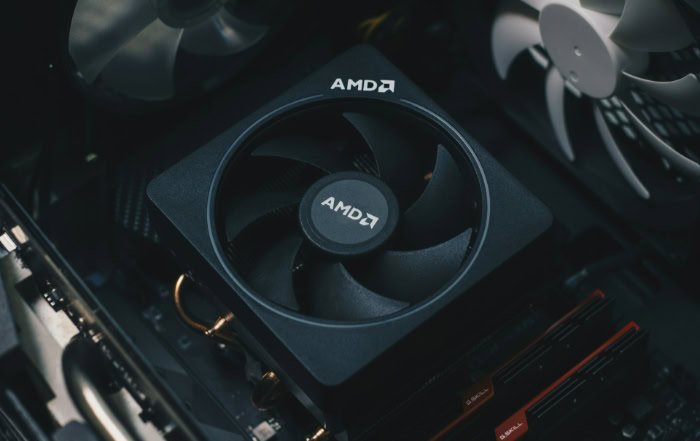
The Thermal Design Power, or TDP, is higher on 8-core models because more silicon is active at any given time. A standard air cooler that works perfectly for a 6-core chip might struggle to keep an 8-core chip from thermal throttling under a full load.
To maintain high clock speeds during long work sessions or gaming marathons, 8-core users often need to invest in more robust air coolers or liquid cooling loops, which adds to the overall system cost.
Power Consumption and PSU Planning
Eight cores drawing maximum power can put a significant strain on a budget power supply. When planning a build, you must ensure that the power supply has enough capacity to handle the CPU’s peak draw alongside a modern graphics card.
While 6-core chips are generally very efficient, 8-core chips can have much higher power spikes, meaning you might need a PSU with a higher wattage rating to ensure system stability and prevent unexpected shutdowns.
Motherboard VRM Quality and Stability
The Voltage Regulator Modules, or VRMs, on a motherboard are responsible for delivering clean power to the processor. A cheap motherboard might have weak VRMs that overheat when trying to feed an 8-core CPU during intensive tasks.
While most modern motherboards handle 6-core chips with ease, moving to the 8-core tier requires a more durable motherboard with better heat sinks on the power delivery components to avoid performance drops.
Value Assessment and Investment Strategy
Choosing between these two processor tiers is ultimately a financial decision based on how long you plan to keep your computer. The best value is not always the cheapest option, but rather the one that provides the most utility for the longest period without requiring an immediate upgrade.
Price-to-Performance Ratios
When you look at the cost per core, the 6-core processor almost always wins. It offers the majority of the performance needed for modern tasks at a significantly lower entry price.
However, the 8-core chip often justifies its premium for users who do more than just basic gaming. If the 25-30% price increase results in 30% faster render times for your job, the extra cost pays for itself very quickly.
Balancing the Component Budget
A common mistake is overspending on a CPU and being forced to buy a weaker graphics card. For a gaming-focused build, a 6-core CPU paired with a powerful GPU will almost always outperform an 8-core CPU paired with a mid-range GPU.
It is vital to look at the system as a whole; ensure that the extra money spent on those two additional cores isn’t creating a bottleneck in another part of the hardware configuration.
Extended Utility and Future Needs
While a 6-core processor is more than enough for today’s software, an 8-core chip provides a longer window of relevance. If you plan to keep your PC for four or five years, the extra threads will help the system stay responsive as future software becomes more demanding.
Choosing the 8-core option is often less about what you need this morning and more about ensuring the machine remains capable of handling the applications and games that will be released several years from now.
Conclusion
Deciding between 6 and 8 cores comes down to your daily workflow and how often you engage in heavy multitasking. For most users focused on gaming and general office work, a 6-core processor remains the most sensible choice because it offers peak performance without the added thermal or financial burden.
However, if your work involves regular video editing, high-quality streaming, or intensive 3D rendering, the extra two cores transition from a luxury to a necessity. It is always better to buy for the software you use today rather than chasing a theoretical future that may never arrive.
By matching your hardware to your actual habits, you ensure a balanced system that delivers speed where it matters most while staying within a reasonable budget.
Frequently Asked Questions
Is 6 cores enough for gaming in 2026?
Yes, a 6-core processor is currently the standard for high-performance gaming. Most modern titles rely on fast single-core speeds rather than a high number of total cores; therefore, you will not see a significant frame rate drop compared to 8-core models. This allows you to spend more of your budget on a better graphics card.
Will an 8-core CPU make my computer last longer?
An 8-core CPU offers better longevity because it can handle the increasing demands of future software and operating system updates. As developers optimize more games for the 8-core hardware found in modern consoles, having those extra threads will help prevent your system from feeling slow in three or four years.
Does having 8 cores help with streaming on Twitch?
Yes, the extra cores in an 8-core processor provide the necessary headroom to play a game and encode a high-quality video stream simultaneously. While 6-core chips can handle basic streaming, they often struggle with high-bitrate encoding. This leads to dropped frames or stuttering that can negatively impact the viewing experience for your audience.
Do I need a special cooler for an 8-core processor?
You will likely need a more robust cooling solution for an 8-core processor than you would for a 6-core model. Because 8-core chips generate more heat during heavy workloads, a basic stock cooler might lead to thermal throttling. Investing in a high-quality air cooler or a liquid cooler ensures consistent performance.
Is a new 6-core chip better than an old 8-core chip?
A modern 6-core processor often outperforms an older 8-core model due to improvements in architecture and instructions per clock. Raw core count is less important than the efficiency of the silicon itself. Newer chips can process data much faster, which typically results in better gaming performance and a more responsive system.
About the Author: Julio Caesar


