
Are Ergonomic Keyboards Worth It? The True Cost of Comfort
That familiar ache in your wrists at 4 PM isn’t a badge of honor. It is a warning sign.
While computer hardware has advanced rapidly, the standard keyboard remains a flat rectangular slab that forces our hands into unnatural contortions for hours on end. You have likely seen the alternatives, yet the hesitation is real.
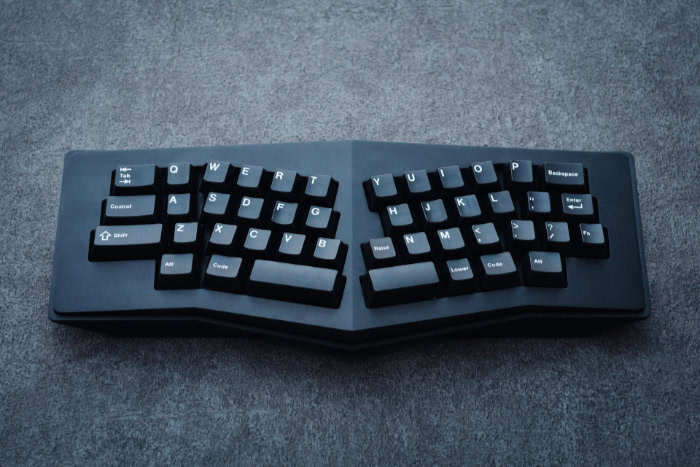
Ergonomic keyboards promise relief but often resemble split alien artifacts with price tags that make your wallet weep.
Why spend hundreds of dollars to relearn how to type on a device that looks broken? We will weigh the physiological relief against the financial impact and the frustration of rewriting your muscle memory.
It is time to determine if switching to an ergonomic setup is a necessary medical investment or just an expensive luxury for desk enthusiasts.
The Physiological Argument
Most people view a keyboard merely as an input device, yet for the human body, it represents a repetitive stress hazard. The standard QWERTY layout was designed for mechanical efficiency rather than human comfort, forcing our anatomy to conform to the machine.
Switching to an ergonomic alternative is primarily about correcting these geometric mismatches to reduce the physical toll of daily typing.
The Strain of Standard Keyboards
The primary issue with a standard flat keyboard is the position it forces upon your hands. To align your fingers with the home row on a straight rectangular board, you must bend your wrists outward.
This creates ulnar deviation, a lateral bending of the wrist that compresses the carpal tunnel. Simultaneously, laying your hands flat requires pronation, which involves twisting the bones in your forearm so your palms face down.
Holding this twisted, bent position for hours creates static muscle tension that eventually leads to pain and fatigue.
Impact on RSI and Carpal Tunnel
It is important to set realistic expectations regarding medical claims. While ergonomic keyboards are powerful tools for comfort, they are not magical medical devices that instantly heal severe injuries.
If you already suffer from advanced Carpal Tunnel Syndrome or severe Repetitive Strain Injury (RSI), a new keyboard alone may not cure the condition. Instead, these devices act as preventative measures.
They reduce the active strain on tendons and nerves, allowing inflammation to subside over time. They stop you from damaging yourself further, creating the necessary environment for recovery.
Correcting Shoulder and Neck Alignment
The benefits of ergonomic design extend up the arms to the shoulders and neck. Standard keyboards are narrow, forcing users to squeeze their elbows toward their ribs and roll their shoulders forward to reach the keys.
This “hunch” contributes significantly to upper back pain and neck strain. Ergonomic boards, particularly split models, allow you to position the keys at shoulder width.
This opens the chest and lets the shoulders relax into a neutral, downward position, effectively fixing posture from the hands up.
Learning Curves and Productivity
The financial cost of an ergonomic keyboard is obvious, but the cost in time and patience is often overlooked. Moving from a standard staggered layout to an ergonomic one requires rewriting years of muscle memory.
This transition period is significant and serves as the main barrier to entry for many potential users.
The Valley of Frustration
New users often encounter a difficult period immediately after unboxing their new device. For the first two to four weeks, typing feels clumsy and foreign.
Brain signals that used to result in a letter appearing on screen now result in errors or hesitation. This phase is often called the “valley of frustration.”
It tests your patience as simple tasks take twice as long, and the fluid connection between thought and text is temporarily broken.
Words Per Minute Impact
You should expect your typing speed to plummet initially. A typist who normally achieves 80 words per minute (WPM) might drop to 30 or 40 WPM during the first week.
This drop can be alarming for professionals who rely on speed for their workflow. However, this deficit is temporary.
Most users return to their baseline speed within a month. Many eventually exceed their old records because ergonomic layouts often reduce the distance fingers must travel to reach specific keys.
Adapting to Layout Changes
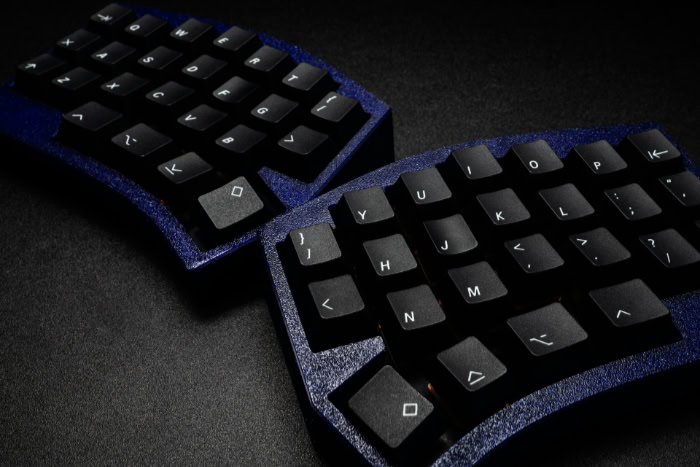
The difficulty of the transition depends heavily on the layout. High-end ergonomic boards often abandon the traditional “staggered” brick-laying pattern of keys for “ortholinear” (grid) or columnar layouts.
These straight vertical columns align better with the natural movement of fingers but feel alien at first. Your fingers “know” that the ‘C’ key is down and to the right of ‘D’.
On a columnar board, it might be directly below. Retraining your brain to accept this new map takes conscious effort.
The Challenge of Device Switching
Once you acclimate to a split, tented, columnar keyboard, returning to a standard laptop keyboard can feel restrictive. The muscle memory for the ergonomic layout can interfere with your ability to type proficiently on standard office equipment.
Users who switch constantly between a specialized workstation and a generic laptop often find themselves in a perpetual state of adjustment, never fully settling into a rhythm on either device.
Analyzing Hardware Features

When you spend significantly more on an ergonomic keyboard, you are paying for adjustable geometry and specialized hardware designed to fit the human form. These features differentiate a true ergonomic tool from a standard keyboard with a slightly curved plastic shell.
Split Versus Unibody Designs
Ergonomic keyboards generally fall into two categories. Unibody designs keep the keys on a single frame but curve the surface to guide hands into a better position.
These are easier to learn but offer limited customization. Split designs separate the keyboard into two independent halves connected by a cable.
This allows you to place the halves exactly shoulder-width apart, offering infinite adjustability to suit broad or narrow frames. While split boards look more intimidating, they offer the highest level of ergonomic correction.
Tenting and Tilting
“Tenting” refers to raising the inner edge of the keyboard so the thumb side is higher than the pinky side. This angle mimics the natural handshake position of the hand, significantly reducing the forearm twist (pronation) required to type.
High-end boards allow you to adjust this angle, from a subtle 5 degrees to a near-vertical 90 degrees. This feature is often the most effective at relieving tension in the forearm muscles.
Mechanical Versus Membrane Switches
Many ergonomic enthusiasts insist on mechanical switches, not just for the sound, but for the feel. Mechanical switches actuate, or register the keypress, before the key hits the bottom of the board.
This allows you to type without “bottoming out” with force, reducing the impact shock on your finger joints. While cheaper ergonomic boards use rubber dome membranes that require a full press, mechanical switches offer a consistent, lighter resistance that can reduce finger fatigue over long sessions.
Programmability and Layers
The physical shape is only half the story. Premium ergonomic keyboards come with software that allows you to reprogram every key.
They often utilize “layers,” which function like the Shift key on steroids. By holding a thumb key, the entire keyboard changes function; the number row might become function keys, or the right hand might become a number pad.
This system keeps your hands on the home row, eliminating the need to stretch for distant keys like Backspace, Enter, or the arrow keys.
The Financial Investment and Product Lifespan
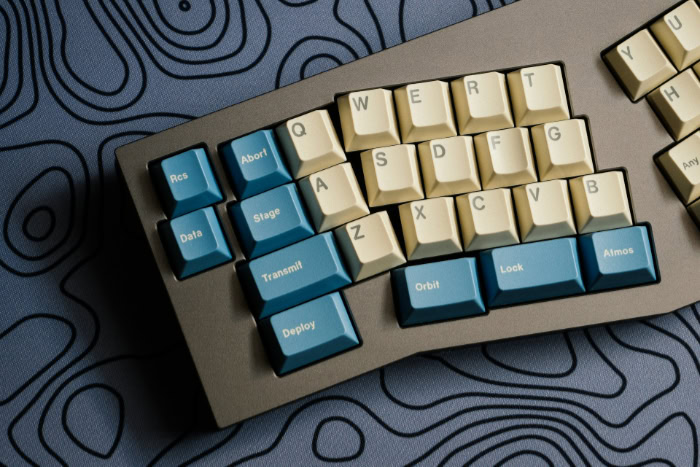
The sticker shock associated with ergonomic keyboards is real. Seeing a price tag of $300 or more for a computer peripheral can be difficult to justify when a standard office keyboard costs less than a lunch.
However, evaluating these devices solely on their upfront cost ignores the broader context of build quality, repairability, and the sheer amount of time you spend using them.
Breaking Down the Price Tiers
There is a massive divide between entry-level ergonomic boards and enthusiast-grade equipment. At the $50 to $100 range, you typically find “unibody” membrane keyboards.
These offer a fixed, curved shape that improves wrist angle but lacks customization. They are mass-produced plastic devices similar to standard office equipment.
Conversely, keyboards in the $300 range, such as the Moonlander or Kinesis Advantage, are often produced in smaller batches with higher-grade materials. You are paying for research, niche manufacturing, and premium components like mechanical switches and onboard memory.
Build Quality and Repairability
One of the distinct advantages of high-end mechanical ergonomic boards is their longevity. A standard membrane keyboard is essentially disposable; when a key becomes mushy or breaks, the entire unit usually ends up in a landfill.
Premium ergonomic boards often feature “hot-swappable” sockets, meaning you can pull out a faulty switch and snap in a new one without soldering. Cables are detachable and replaceable.
This modularity transforms the keyboard from a disposable consumable into a serviceable tool that can last for a decade or longer.
Resale Value and Risk Mitigation
Because these devices are specialized and built to last, they maintain a surprisingly high value on the secondary market. If you purchase a high-end board and find that you simply cannot adjust to the layout, you can typically sell it to another enthusiast for a small loss rather than a total loss.
This active resale market lowers the financial risk of trying a radically different input device. It provides an exit strategy that does not exist for cheaper, mass-market peripherals.
The Cost Per Hour Perspective
The best way to frame the cost is to calculate the price per hour of use. If you work at a computer full-time, you likely spend more hours touching your keyboard than you spend in your car or on your living room couch.
A $350 keyboard used for five years averages out to pennies per day. When compared to other professional tools or even a quality mattress, investing in the primary interface between your mind and your work is often logically sound.
Who Should Buy One?

An ergonomic keyboard is not a universal requirement for every computer user. For some, the benefits will never outweigh the cost and the frustration of the learning curve.
Determining whether to make the switch depends largely on your daily habits, your current physical health, and your willingness to adapt.
The Essential User
For individuals already experiencing wrist pain, numbness, or tingling, this switch is not really a choice. It is a medical necessity.
If you are a software engineer, a writer, or a data analyst who spends eight to ten hours a day typing, the strain on your hands is an occupational hazard. In this context, the keyboard serves as protective equipment.
Continuing to use a damaging setup when symptoms are present risks long-term injury that could jeopardize your ability to work. For this group, the price is irrelevant compared to the cost of physical therapy or surgery.
The Preventative User
This category includes professionals who do not yet have chronic pain but want to ensure they never do. These users view their body as an asset to be protected.
They are willing to endure a month of slow typing and frustration to secure long-term comfort. If you value optimizing your workspace and have the patience to retrain your muscle memory, an ergonomic board offers a significant upgrade to your daily quality of life.
The immediate payoff is comfort; the long-term payoff is health.
The Casual User
If you primarily use your computer for browsing the web, gaming, or occasional emails, an expensive ergonomic setup is likely overkill. The physiological stress of using a standard keyboard for an hour or two a day is minimal for most people.
Furthermore, the productivity dip during the learning phase may be annoying enough to discourage casual use entirely. For gamers specifically, unless you are willing to map custom layers for movement keys, the non-standard layout of many ergonomic boards can be more of a hindrance than a help.
Conclusion
Switching to an ergonomic keyboard is a commitment that goes beyond the checkout button. You are investing significant money and weeks of frustration to rewrite your muscle memory for the sake of your health.
However, this device is not a cure-all on its own. It must work in tandem with a properly adjusted chair and monitor to truly alleviate strain.
For professionals who rely on their hands to make a living, preserving that functionality is worth every penny and every moment of initial clumsiness.
Frequently Asked Questions
Do ergonomic keyboards cure carpal tunnel?
Ergonomic keyboards are designed to reduce strain and prevent new injuries rather than cure existing medical conditions. They help by keeping your wrists in a neutral position to relieve pressure on the median nerve. If you already have severe symptoms, you should consult a doctor before relying solely on a change in hardware.
How long does it take to get used to an ergonomic keyboard?
Most users need about two to four weeks to feel comfortable and return to their previous typing speed. The first week often involves a significant drop in words per minute and increased typos. Consistency is critical during this period to retrain your muscle memory effectively without reverting to old habits.
Can you use an ergonomic keyboard for gaming?
You can use them for gaming, but they may require some setup. Split keyboards are actually excellent for gaming because you can move the right half out of the way to give your mouse more space. However, you might need to remap certain keys if the layout differs significantly from standard WASD placement.
Why are ergonomic keyboards so expensive?
These keyboards are often produced in smaller batches using higher quality materials than standard office equipment. The price reflects the cost of research, specialized manufacturing molds, and premium components like mechanical switches. Additionally, many offer programmable software and onboard memory that standard mass-market keyboards simply do not provide.
Is a split keyboard better than a curved unibody one?
Split keyboards offer superior ergonomics because you can position the halves to match the exact width of your shoulders. This eliminates the need to hunch forward or bend your wrists outward. Unibody curved boards are easier to learn but do not offer the same level of adjustability for your upper body posture.
About the Author: Elizabeth Baker


