
Are Mechanical Keyboards Worth It? What You Need to Know
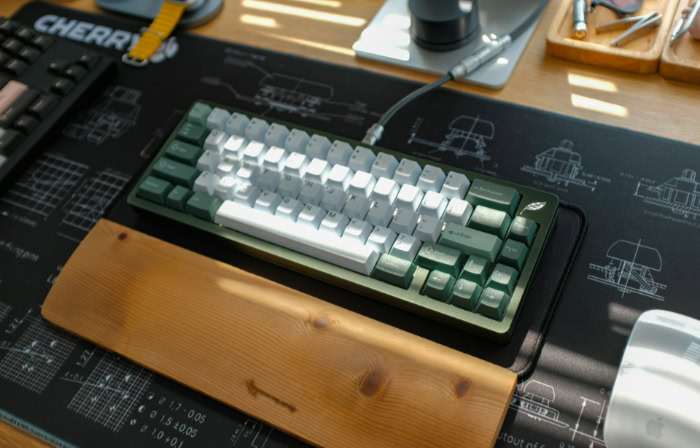
Most of us spend hours every day pressing buttons on a cheap, mushy plastic keyboard without giving it a second thought. Yet, optimizing your typing setup could drastically improve your daily comfort and productivity.
You have likely seen the heavy, tactile mechanical boards that dominate modern workstations. They carry a premium price tag that makes standard membrane models look like throwaway toys.
This massive price gap leaves many wondering if the hype is actually justified. Spending significantly more money on a basic computer peripheral might seem absurd to a casual user, but a premium typing instrument completely alters the sensory experience.
Key Takeaways
- Mechanical keyboards use individual metal springs and switches rather than a single rubber sheet, allowing the computer to register keystrokes before you press the button completely down.
- While standard membrane options wear out after a few million presses, mechanical switches are rated to survive up to one hundred million keystrokes without losing their original feel.
- The tactile feedback of mechanical switches prevents finger fatigue by training typists to avoid bottoming out against the plastic baseplate during long sessions.
- Hot-swappable circuit boards let users pull out and replace individual broken switches or change the typing feel without needing to buy a brand new device or use a soldering iron.
- Upgrading to a mechanical setup introduces noticeable noise, heavy physical weight, and the necessity of learning about different switch types to match your specific acoustic environment and desk height.
The Core Differences
Every modern computer keyboard relies on a physical mechanism to register your inputs, but the underlying technology varies wildly. The standard models bundled with most desktop computers operate on a fundamentally different design philosophy than their premium mechanical counterparts.
To evaluate their true value, you must first look under the plastic caps to see how the hardware actually functions.
The Anatomy of a Membrane Keyboard
Most affordable computer keyboards utilize a membrane system. Beneath the surface, these devices feature a single large sheet made of silicone or rubber domes.
When you press a button, the plastic cap pushes down on a corresponding rubber dome. This dome collapses and forces a conductive pad to make contact with the printed circuit board beneath it.
This closes the electrical circuit and registers your input. Because you are squishing a rubber dome, the typing feel is generally described as mushy or soft.
Furthermore, you must push the button all the way down to the plastic base to ensure the input is registered. This action is known as bottoming out.
Over months of use, the rubber material degrades and loses its elasticity, resulting in an inconsistent and sluggish typing feel.
The Anatomy of a Mechanical Keyboard
Mechanical boards replace the single rubber sheet with individual, self-contained switches for every single button. A full-size board contains over one hundred separate mechanical switches soldered or plugged into the circuit board.
Inside each switch is a plastic stem, a coiled metal spring, and metal leaf contacts. When you press down, the stem travels downward and compresses the spring, allowing the metal leaves to touch and send an electrical signal to the computer.
Because the mechanism relies on a physical spring rather than a collapsing rubber dome, the resistance is smooth and highly predictable.
Tactile Feedback and Actuation Points
The most significant advantage of a mechanical switch is the actuation point. This is the exact moment the computer registers your keystroke.
On a membrane board, actuation only happens at the very bottom of the press. Mechanical switches register the input midway through the downward travel.
You do not need to smash the button into the plastic base for the letter to appear on your screen. This precise actuation fundamentally changes the sensory experience of typing.
Tactile switches feature a small physical bump halfway through the press to let your fingers know the exact moment the input was registered. This immediate physical feedback trains your fingers to stop pressing early and move on to the next letter.
The Practical Benefits of Upgrading

The shift from a rubber dome to a metal spring provides advantages that extend far beyond a satisfying typing sound. Upgrading your daily peripheral translates into measurable improvements in physical comfort, computing performance, and financial value over time.
Typing Comfort and Ergonomic Impact
Typing thousands of words a day on a standard membrane board requires constant bottoming out, which sends tiny shockwaves up your fingers with every single stroke. Over a long shift of coding or writing, this repetitive impact contributes significantly to hand fatigue.
Because mechanical switches actuate halfway down, experienced typists learn to glide their fingers across the board without slamming the plastic caps into the baseplate. The spring pushes the finger back up naturally.
Additionally, the resistance and feel of a mechanical switch remain entirely consistent over the entire lifespan of the device.
Performance Advantages for Gaming
Competitive video games require rapid, simultaneous inputs. Membrane boards often suffer from ghosting, a hardware flaw where pressing multiple buttons at once causes the keyboard to freeze or drop inputs.
Mechanical boards feature NKRO, meaning the internal processor can scan and register every single switch simultaneously without error. Gamers also benefit from linear mechanical switches, which lack the tactile bump and offer a completely smooth downward travel.
This allows for incredibly rapid, stutter-free repeated presses during high-stress competitive matches.
Long-Term Durability and Financial Value
Membrane devices are cheap to produce, but their rubber components typically wear out or become unpleasantly stiff after five to ten million presses. In contrast, mechanical switches are rated for fifty to one hundred million presses before failing.
While the initial purchase price of a mechanical unit is substantially higher, the cost per year is often lower. Buying one premium mechanical device that lasts a decade makes more financial sense than replacing a degraded twenty-dollar membrane board every two years.
Build Quality and Personalization

The premium price tag of a mechanical board pays for more than just the metal springs. Manufacturers design these devices as robust, highly customizable pieces of hardware tailored to specific aesthetic tastes and professional workflows.
Material Quality and Construction
A standard membrane device is almost entirely composed of thin, injection-molded plastic that flexes under pressure. Premium mechanical boards utilize heavy-duty plastic or solid aluminum frames to eliminate bending entirely.
Inside, a thick metal backplate provides immense structural rigidity. The caps you touch also feature upgraded materials.
Cheaper boards use ABS plastic, which is smooth but prone to developing a greasy shine after a few months of skin contact. High-end boards utilize PBT plastic, a denser material with a subtle texture that resists shine and fading for years.
Customization of Form Factors and Layouts
Mechanical boards are available in a variety of physical sizes to match different desk spaces and needs. Full-size layouts include the number pad and all function rows, making them ideal for data entry.
Tenkeyless models cut off the number pad to give your mouse more room to move. Smaller layouts, like seventy-five percent or sixty percent boards, aggressively condense the remaining buttons by removing navigation clusters and function rows entirely.
This allows users to select a compact, efficient layout that strictly matches their daily productivity workflow.
The Advantage of Hot-Swappability
Historically, replacing a broken mechanical switch required taking the board apart and melting the metal solder. Today, many modern circuit boards feature hot-swappable sockets.
These specialized sockets allow users to simply pull out an old switch with a specialized tool and push a new one right into place. This feature lets you repair a dead switch in seconds or completely change the typing feel of the board by swapping out the entire set of switches without buying a new device.
The Potential Drawbacks and Challenges

Despite their clear advantages in build quality and comfort, mechanical boards introduce several compromises. Upgrading requires you to manage a few distinct physical and logistical challenges that might not suit your specific lifestyle.
The Noise Factor and Acoustic Environments
Mechanical switches are inherently louder than rubber domes. Even linear and tactile switches produce a noticeable clack when bottoming out or snapping back into place.
Clicky switches intentionally feature a small plastic jacket designed to generate a loud, high-pitched click on every stroke. This acoustic output makes them incredibly disruptive in shared office spaces, quiet classrooms, or households with sleeping family members.
Managing this noise often requires buying specialized dampening rings or selecting silent switch variants.
Weight, Portability, and Physical Adjustments
The robust metal plates and thick cases that make mechanical boards durable also make them incredibly heavy. They are difficult to pack into a laptop bag and cumbersome for frequent travel compared to thin, lightweight membrane alternatives.
Furthermore, mechanical boards sit much higher off the desk. This taller profile forces your wrists to bend upward at an uncomfortable angle unless you purchase and adjust to a padded wrist rest.
Choice Paralysis and Technical Complexity
Shopping for a simple computer accessory quickly becomes overwhelming when faced with the sheer volume of enthusiast options. You must choose between red, blue, or brown switches, evaluate different stabilizer brands, and decide if the internal mechanisms require manual lubrication.
This technical complexity creates a massive barrier to entry. Properly researching, purchasing, and maintaining a customized mechanical board requires a significant time investment that a standard user might find frustrating.
Who Is It Actually Worth It For?

Deciding to purchase a mechanical board requires balancing the high upfront cost and potential noise against the massive gains in comfort and durability. Analyzing your daily computer habits will quickly reveal if the upgrade is a practical necessity or an unnecessary expense.
The Professional Typist, Programmer, or Writer
People who type for a living will see the most immediate return on their investment. If you write code, draft articles, or spend eight hours a day managing emails, the ergonomic consistency and tactile feedback are invaluable.
Preventing finger fatigue and reducing typos directly improves your daily workflow. For high-volume typists, the improved hardware is a strict productivity upgrade.
The Gamer
Competitive gamers who play fast-paced shooters or complex strategy games require the speed and precision of linear mechanical switches. The guarantee of perfectly registered inputs via simultaneous scanning hardware justifies the cost when split-second reactions matter.
However, casual players who only log a few hours a week in slower, narrative-driven games will likely find that a standard membrane board handles their inputs perfectly well.
The Budget-Conscious or Casual User
If you only use your computer to browse the internet, pay bills, and occasionally send an email, a standard scissor-switch or membrane model remains the most sensible choice. The physical benefits of a mechanical board only manifest during prolonged, continuous use.
While entry-level mechanical boards exist at lower price points, a reliable membrane keyboard provides perfectly acceptable performance for light, everyday computing tasks without the added noise and technical fuss.
Conclusion
Purchasing a mechanical keyboard means accepting a high upfront cost, dealing with a heavier piece of hardware, and managing increased noise levels. However, these compromises buy you a device offering unparalleled durability, ergonomic comfort, and extensive physical customization.
The decision ultimately rests on your daily typing volume. If you only use your computer for light browsing, a standard rubber dome model is perfectly fine.
Conversely, if you write code, draft articles, or compete in fast-paced games for hours a day, a mechanical keyboard stops being a luxury and becomes an essential productivity tool that protects your hands and improves your performance.
Frequently Asked Questions
Why are mechanical keyboards so expensive?
Mechanical keyboards cost more because they use individual mechanical switches for every single button instead of a cheap rubber sheet. Manufacturers also construct them with heavy metal backplates, durable plastic frames, and higher quality plastic caps that resist shining over time.
Are mechanical keyboards always loud?
No, mechanical keyboards do not have to be loud. While clicky switches intentionally make a loud noise, you can purchase linear or silent tactile switches that operate quietly. Adding specialized dampening rings to the buttons also helps reduce the clacking sound in shared offices.
Do I really need a wrist rest for a mechanical keyboard?
Yes, you generally need a wrist rest to maintain comfortable ergonomics. Because mechanical boards contain metal plates and large internal switches, they sit much higher off your desk than a flat membrane model. A padded rest prevents your wrists from bending upward at a painful angle.
What does it mean if a keyboard is hot-swappable?
A hot-swappable keyboard allows you to remove and replace the individual internal switches without using a soldering iron. This feature means you can easily fix a broken button or completely change the physical typing feel of the board in minutes using a simple plastic pulling tool.
How long do mechanical keyboards usually last?
A quality mechanical keyboard will typically last for decades of heavy use. The individual metal springs and switches are rated to survive up to one hundred million presses before failing. This massive lifespan easily outlasts the rubber domes found in standard cheap computer peripherals.
About the Author: Julio Caesar


