
How to Choose the Right Smartphone: What You Actually Need

Walking into a carrier store or scrolling through tech sites often feels like staring at a wall of identical black rectangles. The sheer volume of options makes a simple upgrade feel like a complex research project.
You might worry about overspending on features you will never use or buying a device that becomes obsolete in six months. The truth is that the “best” smartphone does not exist in a vacuum; it is simply the one that handles your specific daily tasks without friction.
To help you filter through the noise, we will break down the essential criteria: operating systems, realistic budget tiers, display quality, performance specs, and camera capabilities. By focusing on these five pillars, you can find a device that serves you well without breaking the bank.
Choosing Your Ecosystem: iOS vs. Android
Selecting an operating system is the first and most critical step in buying a new smartphone. This choice dictates more than just the icons on your screen; it determines which apps you can use, how your phone communicates with your other gadgets, and how much control you have over the device.
The Connectivity Factor
Your existing technology collection should heavily influence your decision. Apple designed its products to work best with other Apple products.
If you own a MacBook, iPad, or Apple Watch, an iPhone allows you to move photos instantly via AirDrop, copy text on one device and paste it on another, and sync messages automatically. These features create a convenient but exclusive network that can be difficult to leave once you are established within it.
Android takes a more open approach to connectivity. These phones integrate much better with Windows computers, allowing for simple drag-and-drop file transfers without needing specialized software like iTunes.
Google’s operating system also supports a wider range of third-party accessories. You can use almost any brand of smartwatch or Bluetooth earbuds with an Android phone and retain full functionality, whereas many accessories have limited features when paired with an iPhone.
User Interface and Customization
Apple prioritizes consistency and simplicity. The iOS interface remains largely the same across all their devices, which makes it easy to learn and use.
The system is locked down to ensure security and stability, meaning there is very little chance of accidentally messing up the software. This “walled garden” approach ensures a smooth experience, but it restricts how much you can change the look and feel of the phone.
Android appeals to users who want ownership over how their device functions. You can place app icons anywhere on the screen, install entirely new home screen layouts, and access the file system just like you would on a computer.
This flexibility extends to where you get your applications; while Apple restricts you to their App Store, Android allows “sideloading” apps from other sources. This freedom offers power and personalization but comes with a slightly higher learning curve and security responsibility.
Hardware Variety
Hardware selection represents the most visible divide between the two platforms. Choosing iOS means you are limited to the models Apple releases.
While these devices consistently offer premium build quality and high performance, there are only a few size and price options available at any given time.
Android offers a massive spectrum of manufacturers and form factors. You can choose a Google Pixel for a clean software experience, a Samsung Galaxy for productivity features, or brands like Xiaomi and OnePlus for rapid charging capabilities.
Furthermore, Android is currently the only place to find cutting-edge designs like foldable phones or devices with built-in styluses. If you have a specific hardware requirement that Apple does not meet, the Android market almost certainly has a device that does.
Defining Your Budget and Understanding Price Tiers
Setting a budget is the most effective way to narrow down the massive list of available smartphones. Prices range from under $200 to well over $1,500, yet the relationship between price and performance is rarely linear.
A device that costs twice as much is usually not twice as fast or capable. Manufacturers separate their products into distinct tiers, and knowing what you sacrifice or gain at each price point helps you find the best value for your money.
The Mid-Range Sweet Spot
The segment between $400 and $600 arguably offers the best value for the average consumer. In the past, buying a non-flagship phone meant tolerating slow performance and blurry screens, but that gap has closed significantly.
Manufacturers now equip these mid-range devices with high-quality OLED displays, all-day battery life, and processors that are more than capable of handling social media, navigation, and light gaming without stuttering.
Cost-cutting in this tier usually happens in areas that affect the “feel” of the phone rather than its core function. You might get a plastic back instead of glass, or the phone might lack wireless charging.
The cameras are generally excellent in daylight but may struggle slightly more in low light compared to top-tier models. For the vast majority of users, these trade-offs are barely noticeable during daily use, making this category the logical choice for anyone who wants a reliable device without paying a premium.
Premium Flagships and Diminishing Returns
Smartphones priced over $1,000 represent the absolute peak of current technology, but they also represent the point of diminishing returns. When you pay this premium, you are often funding research and development for niche features rather than essential utility.
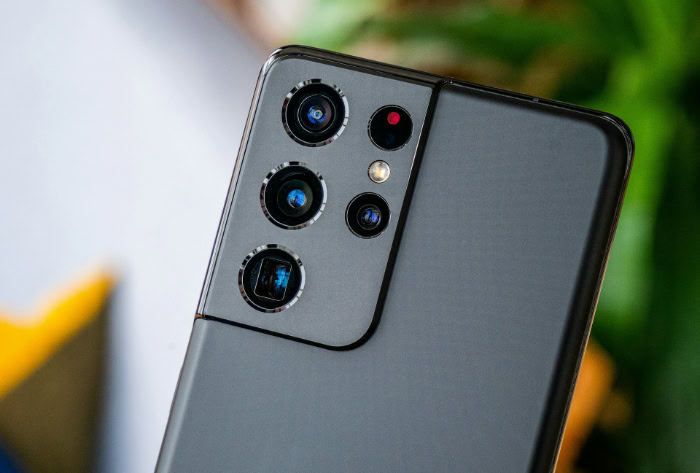
The extra cost pays for specific luxuries like titanium frames, periscope zoom lenses that can capture clear images from hundreds of feet away, or the ability to record video in 8K resolution.
Most users will rarely utilize the full potential of a “Pro” or “Ultra” model. Browsing the web, texting, and taking photos of receipts look almost identical on a $1,000 phone and a $600 phone.
Unless you are a content creator who needs professional-grade video tools or a mobile gamer who demands the highest possible frame rates, the extra hundreds of dollars spent here often go toward potential capabilities rather than actual daily benefits.
New vs. Previous Generation Flagships
A savvy alternative to buying a brand-new mid-range phone is purchasing a flagship model from one or two years ago. High-end phones depreciate quickly.
Once a new version launches, the previous iteration often drops in price to compete directly with modern mid-range devices. The advantage here is that older flagships retain their premium build quality.
They often feature better water resistance ratings, superior camera stabilization, and wireless charging, which new mid-range phones might omit.
Software support remains the main variable to watch with this strategy. Since the phone is already a year or two old, it will have fewer years of security updates remaining compared to a device released today.
However, if the manufacturer originally promised four or five years of support, a slightly older flagship can still offer a premium experience for several years at a fraction of its original launch price.
Display and Form Factor

The screen serves as your primary window into the digital world, so its quality directly dictates your daily experience more than almost any other component. You interact with the display every time you check a notification, watch a video, or type a message.
While internal specifications determine how fast a phone runs, the screen determines how good that content looks and feels.
Screen Technology and Quality
Most smartphones today utilize either LCD or OLED technology. LCD panels rely on a constant backlight to illuminate the entire screen, which helps produce natural colors and keeps costs down.
However, because the backlight stays on even when displaying dark images, blacks can appear dark gray, and contrast is limited.
OLED panels, often marketed as AMOLED by brands like Samsung, operate differently by allowing each individual pixel to light up or turn off completely. This capability creates “true blacks” and significantly higher contrast ratios, making colors appear more vibrant.
Since black pixels require zero energy, using “Dark Mode” on an OLED device can noticeably extend battery life. For anyone who watches frequent movies or plays graphics-heavy games, the superior contrast of an OLED panel provides a substantial visual upgrade over standard LCDs.
Refresh Rates and Motion Smoothness
Refresh rate refers to how many times per second the display updates its image, measured in Hertz (Hz). For years, the industry standard was 60Hz, which is perfectly adequate for reading and basic apps.
However, stepping up to 90Hz or 120Hz creates a dramatic difference in how the phone feels to use.
High refresh rates make scrolling through social media feeds look fluid and system animations appear instant. The phone feels faster and more responsive to your touch, even if the internal processor is identical to a model with a slower screen.
Gamers particularly benefit from 120Hz displays, as the smoother motion allows for quicker reaction times. The only downside is that higher refresh rates consume more power, though many modern devices mitigate this by automatically lowering the rate when you are viewing static images.
Ergonomics and Size
Selecting the right form factor involves a direct trade-off between immersion and portability. Large screens, often exceeding 6.7 inches, offer a fantastic canvas for watching videos, editing photos, and typing with two hands.
The downside is that they can be cumbersome to hold for long periods, difficult to use with one hand, and may not fit securely in shallow pockets.
Compact phones are easier to manage and less likely to weigh you down, but they provide less screen real estate for multitasking. Beyond just height and width, weight distribution plays a major role in comfort.
A heavy phone with sharp, squared-off edges can become painful to hold after thirty minutes, whereas a device with curved edges might sit more comfortably in the palm. It is always wise to physically handle a device in a store to ensure it does not feel too heavy or slippery for your specific grip.
Performance Essentials: Processor, Storage, and Battery

Performance specifications often look like a confusing soup of acronyms and numbers on a retail box. However, these components determine how long your phone lasts on a single charge, how many photos you can save, and if apps open instantly or lag.
You do not need the most powerful engine for a daily commute, and similarly, you do not need the fastest supercomputer chip just to text and browse the web.
Matching the Processor to the Use Case
The processor, or System on Chip (SoC), acts as the brain of the device. Marketing materials often push the narrative that faster is always better, but most users will never push a top-tier chip to its limit.
If your daily routine consists of checking emails, streaming music, and scrolling through social feeds, a mid-range processor offers more than enough speed. These efficiency-focused chips often run cooler and consume less power than their high-performance counterparts, which can actually result in better battery life for casual users.
Power users require a different approach. If you play graphically intense games like Genshin Impact, render 4K video clips, or run complex emulation software, investing in a high-end chip like the Snapdragon 8 Gen series or Apple’s Pro silicon is necessary.
These processors contain powerful graphics units and neural engines designed to sustain heavy workloads without stuttering or overheating. Buying a budget chip for these tasks will result in dropped frames and a sluggish interface, ruining the experience you bought the phone for.
RAM and Storage Requirements
Storage capacity fills up faster than many people anticipate. Operating systems and pre-installed apps can easily occupy over 20GB of space before you even take your first photo or download a single game.
Consequently, 128GB has become the practical minimum for modern smartphones. Choosing 256GB provides a safer buffer if you plan to keep the phone for several years, record high-definition video, or store your music library locally rather than streaming it.
Relying solely on cloud storage is an option, but internal storage is always faster and accessible without a data connection.
Random Access Memory (RAM) functions as the device's short-term workspace. Higher RAM allows you to keep more apps open in the background without them reloading when you switch back.
For Android users, 8GB is currently the standard for smooth performance; anything less may cause apps to close aggressively to save memory. iPhones manage memory differently due to iOS optimization, so they can perform tasks smoothly with less RAM on paper.
If you frequently jump between navigation, music, and messaging apps, prioritizing higher RAM ensures the phone remains responsive under the load.
Endurance and Charging
Battery life is often reduced to a single number measured in milliamp-hours (mAh), but this specification only tells half the story. A massive battery can drain quickly if paired with an inefficient processor or a poorly optimized display.
Real-world endurance depends heavily on how the software manages power consumption. A phone with a 4,000mAh battery and a highly efficient chip might outlast a phone with a 5,000mAh battery and a power-hungry screen.
Reviews from actual users usually provide a more accurate picture of longevity than the official spec sheet.
Charging speed has become just as important as total capacity. Modern fast-charging technology can take a dead phone to 50% in under fifteen minutes.
High-wattage charging changes how you use your device, as you no longer need to plug it in overnight. A quick top-up while getting ready in the morning is often sufficient for the whole day.
However, not all phones include the necessary fast charger in the box, so you may need to budget for a compatible adapter to get the maximum speeds advertised by the manufacturer.
Camera Capabilities

Smartphone cameras have effectively replaced dedicated point-and-shoot devices for most people. Manufacturers know this and aggressively market their devices based on photographic potential, often printing massive numbers on the back of the phone to signal quality.
However, a higher number on the spec sheet does not automatically result in a better image.
Megapixels vs. Sensor Size
Marketing teams frequently use megapixel counts to imply superiority. You will often see budget phones boasting 108 or 200 megapixels while significantly more expensive models stick with 12 or 50.
The reality is that packing more pixels onto a small sensor can actually hurt image quality. A camera sensor is like a bucket collecting rain; a larger bucket catches more water.
If you split that bucket into tiny compartments to represent the pixels, you do not catch more water; you just have smaller samples.
When pixels are too small, they struggle to gather enough light information, which leads to grainy or muddy photos in dim environments. The physical size of the sensor is a much more reliable indicator of potential quality.
A larger sensor captures more light data, producing richer colors, less noise, and better natural depth. If you have to choose between a high megapixel count on an entry-level phone and a lower count on a premium device with a large sensor, the larger sensor will almost always win.
Lens Versatility
Modern devices usually feature multiple lenses on the back, but quantity does not equal utility. Manufacturers sometimes inflate the lens count by adding low-quality “macro” or “depth” sensors that contribute very little to the final image.
You should focus your attention on the three distinct focal lengths that genuinely expand your creative options: the main wide lens, the ultrawide, and the telephoto.
The ultrawide lens is essential for capturing scenic vistas or fitting a large group of friends into a single frame without backing up. On the other end of the spectrum, a telephoto lens provides optical zoom, allowing you to get close to a subject without losing detail.
Digital zoom simply crops the image and degrades the quality, so if you frequently take photos at concerts, sporting events, or of distant architecture, a dedicated telephoto lens is a mandatory feature.
Computational Photography
The physical glass and sensors are only part of the equation. The most significant advancements in recent years have come from computational photography, which is the software processing that occurs after the image is captured.
Your phone effectively acts as a high-speed computer, instantly taking multiple exposures at different brightness levels and stitching them together to create a single, balanced image.
This processing power drives features like Night Mode, which can turn a dark scene into a clear, usable photo without the harshness of a flash. It also powers Portrait Mode, which artificially blurs the background to mimic the look of professional equipment.
When comparing smartphones, looking at how the software handles skin tones, shadows, and high-contrast lighting is often more important than the raw hardware specifications. A smart algorithm can frequently rescue a photo that average hardware would miss.
Making the Right Choice
Finding the perfect smartphone is not about finding the device with the highest numbers on the box. It is about self-awareness.
By now, you should realize that chasing the absolute highest specifications is often a waste of money if those features do not align with your daily habits. Prioritizing a great screen and battery life over a professional-grade camera might save you hundreds of dollars if you rarely take photos.
The most satisfied users are those who identify exactly what they need and, more importantly, what they can live without.
Before handing over your credit card, look at one final detail: the software promise. Manufacturers now state clearly how many years of security updates they will provide.
A slightly more expensive phone that receives updates for five years offers better value than a budget device that becomes insecure after two. This support window determines whether your device remains safe and functional down the road or becomes electronic waste prematurely.
You now possess the framework to look past the flashing advertisements and aggressive sales tactics. Focus on the ecosystem that suits you, the performance that matches your workload, and the features that actually improve your day.
When you strip away the marketing hype and focus on these fundamentals, the confusing market becomes much easier to manage. You are ready to choose a device that serves you, rather than one that just looks good on paper.
About the Author: Julio Caesar


