
Is Buying a Used Mining GPU Worth the Risk? Pros and Cons
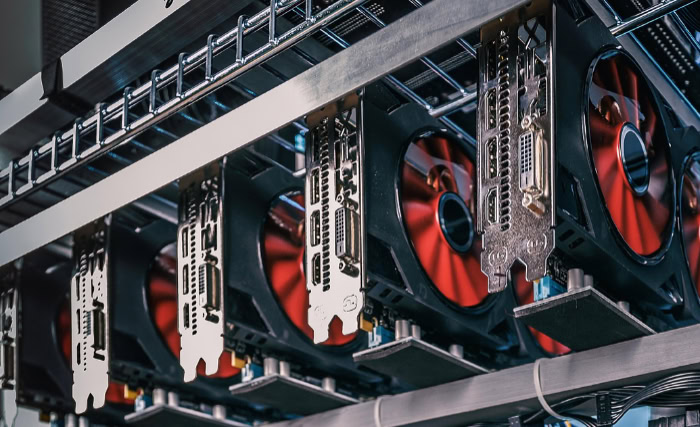
You spot a high-end graphics card listed for nearly half its original price. It seems perfect until the description admits it came from a cryptomining farm.
This scenario defines the current secondhand market. Thousands of powerful GPUs are flooding auction sites at bargain rates, but they carry the heavy stigma of 24/7 abuse.
Buyers face a harsh dilemma between pocketing massive savings or risking cash on a potential paperweight.
Fortunately, the danger is often overstated. Buying an ex-mining GPU is much safer than popularly believed, provided you can distinguish between silicon stress and simple mechanical wear.
Silicon Reliability: Dispelling the “Burnt Out” Myth
The prevailing fear among PC builders is that a mining GPU is akin to a car engine that has been redlined for 100,000 miles. Buyers envision a silicon chip that is exhausted, degraded, and on the verge of total failure.
In reality, the graphics processing unit (GPU) core is incredibly resilient. The actual silicon inside the card is rarely the point of failure, and in many specific scenarios, a mining card may have experienced less physical stress than a card used for hardcore gaming.
Thermal Cycling vs. Constant Load
The greatest enemy of electronics is not necessarily heat itself, but the fluctuation of heat. Materials expand as they warm up and contract as they cool down.
A gaming card experiences this constantly. A gamer might ramp up a demanding title, spiking the temperature to 80°C, then close the game, causing the card to rapidly cool to 30°C.
This cycle repeats thousands of times over the life of the card. This expansion and contraction can cause microscopic fractures in the solder joints connecting the GPU to the circuit board.
Mining cards, conversely, usually run at a steady, constant temperature for weeks or months at a time. This thermal consistency creates a stable environment that reduces mechanical stress on the solder balls.
The Efficiency Incentive
There is a misconception that miners run their cards at maximum power to squeeze out every drop of performance. This is rarely true for competent operations.
Electricity is the primary operating cost for a mining farm. Running a card at maximum voltage produces diminishing returns in hashrate while drastically increasing power bills and heat output.
To maximize profit, miners typically “undervolt” their equipment. They limit the power draw to the sweet spot where efficiency is highest.
As a result, many ex-mining cards have spent their lives running at lower voltages and cooler core temperatures than their gaming counterparts.
Electromigration Reality
The physical phenomenon responsible for chip death is called electromigration, where electrons gradually displace atoms in the semiconductor material, eventually breaking circuits. While this is a real physical process, modern silicon is engineered to withstand this for a very long time.
Under normal operating conditions, including 24/7 usage, significant electromigration typically takes decades to occur. A GPU will become obsolete and unable to run modern software long before the silicon physically fails from electron wear.
The Real Risks: Mechanical Wear and Memory Fatigue

While the primary silicon core is likely robust, the surrounding components tell a different story. A graphics card is an assembly of various parts, some of which are mechanical or highly sensitive to heat.
When you purchase a used mining card, you are not gambling on the GPU die itself. You are betting on the condition of the cooling solution and the video memory modules.
These are the areas where 24/7 operation leaves its mark.
Fan Failure Rates
Cooling fans are the most common failure point on ex-mining cards. Unlike solid-state electronics, fans are mechanical devices with ball bearings or fluid dynamic bearings that have a finite lifespan.
Gaming usage is intermittent, giving these mechanical parts time to rest. Mining usage forces these fans to spin continuously, often at fixed high speeds, for thousands of hours without pause.
It is highly probable that a used mining card will arrive with fans that wobble, rattle, or have seized completely. Buyers should factor the cost of a replacement fan kit into their budget immediately.
VRAM Temperature Stress
While miners undervolt the core to save power, they often overclock the Video RAM (VRAM). Algorithms used for cryptocurrencies like Ethereum were memory-intensive, meaning the speed of the memory dictated the mining performance.
This leads to a scenario where the GPU core is cool, but the memory modules are pushed to their thermal limits. This is particularly problematic with GDDR6X memory found on high-end cards like the RTX 3080 or 3090, which naturally runs very hot.
Prolonged exposure to extreme heat can degrade memory chips, leading to artifacts (visual glitches) or instability during gaming.
Thermal Interface Material Degradation
Between the heatsink and the hot components lies the thermal interface material (TIM), consisting of thermal paste and thermal pads. These materials are not permanent.
Under the constant heat of a mining rig, thermal paste can dry out and become chalky, losing its ability to transfer heat effectively. Similarly, cheap thermal pads often used by manufacturers can degrade or leak silicone oil onto the circuit board.
A card that has mined for a year or two will almost certainly require disassembly to apply fresh paste and new pads to restore safe operating temperatures.
Software Hurdles: The Custom BIOS Issue

Hardware condition is only half the equation. A mining card may look pristine physically but behave erratically once installed in a gaming PC.
This is often due to modifications made to the card’s firmware, known as the BIOS (Basic Input/Output System). Professional miners frequently alter this software layer to optimize the card for crunching numbers rather than rendering graphics.
The Mechanics of Mining BIOS
To achieve higher hashrates and lower power consumption, miners flash custom BIOS versions onto their cards. These modified versions often tighten memory timings specifically for mining algorithms.
While this makes the card efficient for computing hashes, it often renders the card unstable for 3D rendering. A gamer using a card with a mining BIOS might experience frequent crashes, blue screens, or an inability to install standard graphics drivers.
The driver may detect the modified signature and refuse to function, or the aggressive memory timings may simply cause the system to freeze when playing a game.
The “Bricked” Card Risk
Resolving a BIOS issue requires “flashing” the card back to its original factory settings. This process involves finding the correct stock BIOS file for that specific model and using software tools to overwrite the mining firmware.
While not impossible, it carries significant risk. If the computer loses power or crashes during the flashing process, the card can become “bricked,” meaning it is rendered completely unusable.
Some cards have a dual-BIOS switch that offers a backup, but many cheaper models do not, making this a nerve-wracking process for novices.
Video Output Limitations
In some extreme cases, or with specific mining-focused card variants (often labeled as P104 or P106), the video output ports may be disabled or physically absent. Even on standard cards, a custom mining BIOS might disable the HDMI or DisplayPort outputs to prevent the operating system from trying to use the card for display duties.
Restoring video output might require a complex workaround involving integrated graphics or a second GPU to handle the flashing process, adding another layer of difficulty for the average user.
Pre-Purchase Vetting: How to Evaluate the Seller

Finding a diamond in the rough requires scrutinizing the person selling the hardware just as closely as the hardware itself. The history of a graphics card is defined by its previous owner, and the difference between a well-maintained component and a piece of electronic scrap often comes down to the environment in which it operated.
Buyers must become detectives, analyzing seller descriptions and photos to determine if a card was treated as a valuable asset or a disposable tool.
Miner Profile: Pro vs. Amateur
It sounds counter-intuitive, but buying from a large-scale “industrial” mining operation is often safer than buying from a casual hobbyist. Professional miners view their hardware as capital investments.
They typically run their cards in climate-controlled warehouses with massive airflow, and they aggressively undervolt the hardware to maximize profit margins. These cards are often kept clean and cool.
Conversely, the “bedroom miner” often runs a rig in a standard PC case with poor ventilation, or in a hot garage without dust filtration. These amateur setups are far more likely to subject the card to high temperatures and fluctuating humidity, leading to the type of damage that shortens component lifespan.
Assessing the Physical Environment
High-resolution photos are your best resource for spotting red flags. Look closely at the heatsink fins and the backplate.
A light dusting is normal, but thick, caked-on dust suggests the card choked for air during its operation. Watch out for signs of corrosion on the metal bracket or white powdery residue on the circuit board, which indicates the rig was kept in a humid environment.
Humidity is a silent killer for electronics. Additionally, check for pet hair or evidence of smoking.
These contaminants can coat the internal components and are notoriously difficult to clean, often leaving a lingering smell when the card heats up.
Warranty and Return Policies
The final safety net is the platform you choose for the transaction. Buying a used mining GPU always carries a risk that the card is dead on arrival.
Platforms with robust buyer protection, such as eBay, offer a money-back guarantee if the item does not match the description or fails to work. This protection is worth the slightly higher price tag compared to local cash deals.
Meeting a stranger in a parking lot for a cash transaction offers zero recourse if you get home and find out the card is broken. Unless you can see the card running a stress test in person, stick to platforms that hold the seller accountable.
Post-Purchase Validation: Testing and Maintenance

Once the package arrives, the real work begins. You should never install a used mining card into your main system and immediately start gaming.
It requires a thorough inspection and a series of stress tests to ensure stability. Treat the card as a project that needs validation before it earns a permanent spot in your computer.
This process confirms you received a working product and helps identify any immediate maintenance needs.
Visual Inspection Checklist
Before plugging the card in, perform a physical exam. Spin each fan blade gently with your finger.
The fans should rotate smoothly and continue spinning for a few seconds before coming to a soft stop. If a fan stops instantly or feels “gritty,” the bearing is likely shot.
Next, inspect the edges of the thermal pads sandwiched between the cooler and the board. If they look wet or appear to be dripping, the thermal pads have leaked silicone oil, which attracts dust and reduces cooling efficiency.
Finally, scan the printed circuit board (PCB) for any deep scratches or knocked-off capacitors, which are common if the card was handled roughly during bulk removal from a mining rig.
Stress Testing Protocol
If the physical check passes, install the card and run dedicated stress-testing software. Tools like FurMark or Heaven Benchmark push the GPU core to its thermal limit, allowing you to see if the card overheats or shuts down under load.
For memory testing, software like OCCT is invaluable. It can detect errors in the VRAM that might not cause an immediate crash but will corrupt data over time.
While the test runs, watch your monitor closely for “artifacts.” These appear as flashing colors, random geometric shapes, or “snow” on the screen.
Artifacts are the primary symptom of dying video memory and are a clear sign that the card is defective.
The Maintenance Requirement
Buyers should expect that even a functional mining card will need physical maintenance. The thermal paste applied at the factory degrades over time, often turning into a hard, dry substance that no longer transfers heat effectively.
To restore the card to its original performance, you will likely need to disassemble the cooler, clean off the old residue with isopropyl alcohol, and apply high-quality thermal paste. Replacing the thermal pads on the memory modules is also recommended.
While this voids the factory warranty, most mining cards are already out of warranty, making this a necessary step to ensure the hardware runs cool and quiet for years to come.
Conclusion
Buying a used mining GPU is a calculated gamble rather than a reckless one. While the graphics processor itself is likely in excellent condition, the surrounding components like fans and memory modules often bear the scars of constant operation.
These cards represent incredible value for hardware enthusiasts willing to perform basic maintenance, such as repasting the thermal compound or flashing a stock BIOS. However, for users seeking a simple plug-and-play experience, the potential troubleshooting required makes a standard used card a safer bet.
A good rule of thumb is to look for a discount of at least 30% compared to non-mining counterparts to justify the effort required to restore the card to peak condition.
Frequently Asked Questions
Do mining cards die faster than gaming cards?
Mining cards do not necessarily die faster than gaming cards. The constant temperature of mining is often safer for the silicon chip than the fluctuating temperatures of gaming. However, mechanical parts like cooling fans wear out significantly quicker and may need replacement immediately upon purchase.
Will a mining GPU have lower performance in games?
A well-maintained mining GPU should perform identically to a new card once cleaned and reset. If performance is low, it is usually due to thermal throttling from dried thermal paste or a custom mining BIOS that needs to be flashed back to stock settings.
How do I know if a card has a mining BIOS?
If you install the card and cannot install official drivers, or if the card crashes immediately when launching a 3D game, it likely has a mining BIOS. You can verify this by checking the clock speeds against the manufacturer's official specifications using free tools like GPU-Z.
Are there specific mining cards I should avoid?
Avoid cards with GDDR6X memory, such as the RTX 3080 or 3090, unless you are comfortable replacing thermal pads. These memory modules run extremely hot during mining and degrade faster than standard memory. You should also avoid cards physically modified with zip ties or removed heatsinks.
What is the first thing to do with a used mining card?
Inspect the card physically for damage or corrosion before plugging it in. Once installed, run a stress test like FurMark or OCCT for at least 30 minutes. Monitor the temperatures closely during this time to ensure the fans are working and the thermal paste has not dried out.
About the Author: Julio Caesar


