
Mechanical vs. Membrane Keyboards: Pros, Cons, and Choices

Every PC setup relies on one critical input device that defines your daily interaction with the machine. For many users, the choice between mechanical and membrane keyboards creates unnecessary confusion.
Membrane boards represent the standard, budget-conscious option found in most offices. They utilize a rubber layer to register inputs and offer a softer, quieter experience.
On the opposing side sits the mechanical keyboard. These performance-focused peripherals use individual physical switches to deliver crisp tactile feedback and precision.
Selecting the right option requires looking past the trends. It comes down to your specific budget, your working environment, and your personal preference for how a switch should respond.
Under The Hood: How They Work
To the untrained eye, two keyboards might appear identical from the outside. They both feature the same QWERTY layout and rows of plastic caps, yet the technology underneath those caps creates a radically different user experience.
The internal architecture determines everything from durability to the physical sensation of typing.
The Membrane Mechanism
The vast majority of modern keyboards rely on membrane technology because it is inexpensive and easy to manufacture. This design utilizes three distinct plastic layers.
The top and bottom layers contain conductive traces, while a middle “spacer” layer keeps them apart. When you press a key, you push down on a rubber dome or silicone pressure pad.
This dome collapses, pushing the top layer through a hole in the spacer to touch the bottom layer.
This contact closes the electrical circuit and sends a signal to your computer. The defining characteristic of this mechanism is the requirement to “bottom out.”
You must press the key all the way down to the plastic base to register a character. If you stop pressing halfway, the rubber dome will not collapse fully, the circuit will remain open, and no letter will appear on the screen.
The Mechanical Mechanism
Mechanical keyboards abandon the single-sheet design in favor of individual switches for every single key. Each switch is a self-contained unit composed of a housing, a stem, a spring, and metal contacts.
When you press a key, the stem moves downward and allows the metal contacts to touch, registering the keystroke.
A major advantage here is the “actuation point.” Unlike membrane boards, a mechanical switch registers the input before you press the key all the way down.
The signal is sent often halfway through the stroke. This allows for a lighter touch since you do not need to slam the key against the baseplate to type.
The spring inside the switch then provides resistance to return the key to its original position, readying it for the next press immediately.
Structural Differences
The build materials used to support these mechanisms vary significantly. Membrane keyboards usually consist of plastic shells holding lightweight plastic sheets.
This makes them portable but often results in a board that flexes or bends under heavy typing pressure.
Mechanical boards require a sturdy frame to mount the individual switches. Manufacturers typically use a steel or aluminum backplate to secure the switches in place.
This adds significant weight to the peripheral, but it also provides a stable, rigid platform. The keyboard stays planted on the desk during intense use, and the lack of flex leads to a more solid typing feel.
Typing Experience And Performance

The technical construction of a keyboard directly translates into how it feels under your fingers. This sensation influences your typing speed, accuracy, and general comfort.
While a casual user might not notice the nuances immediately, the difference becomes apparent during extended sessions of writing or gaming.
Tactile Feedback And Consistency
Membrane keyboards are frequently described as feeling “mushy.” Because they rely on a rubber dome collapsing, the resistance is not linear.
You feel a bit of resistance at the top, and then the dome gives way suddenly. The sensation is soft and cushioned, which some users prefer.
However, rubber degrades over time. An older membrane board may have keys that feel stiff or unresponsive compared to others on the same unit.
Mechanical switches offer a crisp and consistent response. Depending on the switch type, the travel can be smooth or have a deliberate tactile bump that lets your finger know the press has registered.
This clarity helps typists develop a rhythm. You do not have to guess if a key was pressed hard enough.
This leads to less finger fatigue since you stop unconsciously pounding the keys to ensure registration.
Speed And Responsiveness
The internal spring in a mechanical switch serves a vital function beyond resistance. It ensures a high return rate.
As soon as you lift your finger, the key snaps back to its neutral position almost instantly. This allows for rapid-fire typing or double-tapping in games without waiting for a rubber dome to slowly reshape itself.
Actuation force also plays a role. Mechanical switches are available with varying spring weights, meaning you can choose a keyboard that requires very light pressure or one that requires a heavy hand.
This customization allows users to match the hardware to their natural typing style. A lighter actuation force can significantly improve reaction times in fast-paced scenarios.
Ghosting And Rollover
Input precision is critical for gamers and fast typists. Membrane keyboards often suffer from “ghosting” or low rollover counts.
Because of the shared circuitry grids on the plastic sheets, the keyboard may fail to register a press if you hold down too many keys simultaneously. It might simply ignore the third or fourth key you press, or it might register a key you didn’t press at all.
Mechanical keyboards typically support N-Key Rollover (NKRO). This means every single key is scanned independently.
You could press all 104 keys at the exact same time, and the computer would see 104 inputs. While you will rarely need to press that many keys, this feature ensures that complex combinations used in gaming or software shortcuts are never missed or misinterpreted.
The Auditory Environment: Noise Levels

Sound is often the most polarizing aspect of the keyboard debate. The noise a keyboard produces changes how you perceive the quality of the device and determines where you can use it.
For some, the rhythmic clatter of a keyboard is a satisfying soundtrack to productivity. For others, particularly those sitting nearby, it can be a source of frustration.
The Mechanical Sound Profile
Mechanical keyboards are generally louder than their counterparts, but the type of sound depends on the switch color. “Clicky” switches, often color-coded Blue, feature a physical mechanism that makes a sharp, high-pitched click at the actuation point.
This is the loudest option and mimics a typewriter. “Tactile” switches (Brown) omit the click but keep the physical bump, resulting in a moderate sound.
“Linear” switches (Red/Black) are the quietest mechanical option as they have no bump or click mechanism.
However, the switch is only half the story. Even with silent switches, a mechanical keyboard generates noise when the plastic keycap hits the metal backplate (bottoming out) and when the spring snaps the key back up.
This creates a distinct “clack” that resonates more than on a plastic membrane board.
The Membrane Sound Profile
Membrane keyboards are engineered for silence. The rubber domes and silicone pads act as natural sound dampeners.
There is no hard plastic striking hard plastic. Instead, you have plastic pushing into soft rubber.
The resulting sound is a dull, low-volume thud.
This sound profile is uniform across almost all membrane boards. Because there are no metal springs or loose stems rattling around, the acoustic footprint is minimal.
This makes them the default choice for environments where silence is golden.
Social Suitability
Your environment dictates which technology is appropriate. A mechanical keyboard with clicky Blue switches is rarely welcome in a shared open-plan office, a quiet library, or a bedroom shared with a sleeping partner.
The piercing noise can travel surprisingly far. While you can dampen mechanical boards with O-rings or choose silent switches, they will typically remain louder than a standard membrane board.
Membrane keyboards fit seamlessly into social spaces. They are unobtrusive and polite.
If you are working late at night in a dormitory or taking notes in a quiet meeting, the membrane keyboard ensures your work does not become a distraction to everyone around you.
Durability, Maintenance, And Hygiene
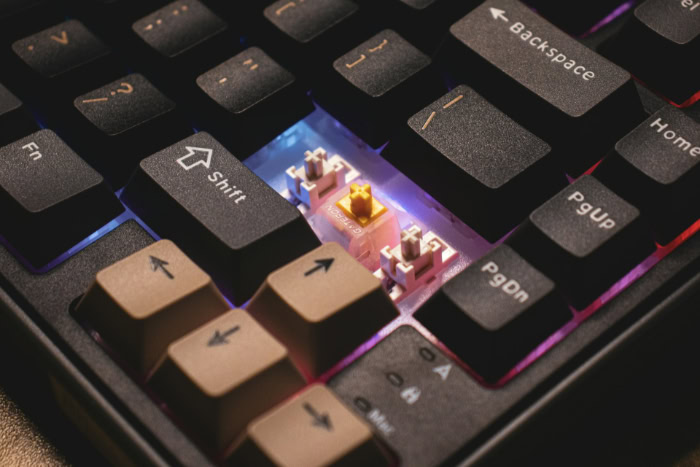
A keyboard is one of the most frequently handled objects in any home or office. It endures thousands of strikes per hour, accumulates dust, and occasionally faces the threat of spilled drinks.
While the initial typing feel is important, the long-term reliability of the device often dictates its true value. The structural differences between mechanical and membrane boards result in vastly different lifespans and maintenance requirements.
Lifespan And Wear
The longevity of a keyboard is measured in keystrokes. Standard membrane keyboards are typically rated for 5 to 10 million presses per key.
While this sounds like a high number, heavy typists and gamers can burn through that lifespan surprisingly quickly. More importantly, the rubber domes degrade physically over time.
As the rubber ages, it dries out and stiffens. This changes the feel of the board, making some keys harder to press than others and resulting in an inconsistent typing experience after a year or two of heavy use.
Mechanical keyboards operate in a different league regarding endurance. Individual mechanical switches are usually rated for anywhere between 50 million and 100 million keystrokes.
Since the mechanism relies on a metal spring rather than degrading rubber, the typing feel remains consistent for the entire life of the board. A mechanical switch pressed for the millionth time will feel almost identical to the first time you pressed it.
Cleaning And Repair
Hygiene is a major factor for peripherals. Mechanical keyboards offer a distinct advantage here due to their modular design.
You can easily pull off the keycaps with a simple tool to clean out crumbs, dust, and hair that accumulates between the switches. Furthermore, if a specific switch breaks, many modern mechanical boards offer “hot-swappable” sockets.
This allows you to pull out the broken switch and plug in a new one without soldering, extending the device’s life indefinitely.
Membrane keyboards are notoriously difficult to deep clean. The keys are often integrated into the frame or difficult to remove without snapping the plastic clips.
Because the mechanism is a single printed circuit sheet, you cannot repair a specific key. If the letter “E” stops working on a membrane board, the entire unit is effectively broken and must be replaced.
Resistance To Elements
While mechanical boards win on repairability, membrane boards often win on survivability against accidents. The solid rubber or silicone sheet that covers the circuit board acts as a natural barrier.
If you spill a small amount of water on a membrane keyboard, the liquid often sits on top of the rubber layer without reaching the sensitive electronics underneath.
Mechanical keyboards are generally more vulnerable to liquid damage. Because the switches are open mechanisms mounted on a plate, a spill can easily seep inside the switch housing or flow down to the printed circuit board (PCB), causing short circuits.
While some water-resistant mechanical models exist, the standard membrane design offers better inherent protection against the coffee spills typical of office environments.
Price, Customization, And Aesthetics

The gap between these two technologies is most visible when you look at the price tag and the potential for personalization. For some users, a keyboard is simply a tool that needs to be functional and cheap.
For others, it is a hobby and a centerpiece of their desk setup.
The Cost Of Entry
Price is usually the deciding factor for general consumers. Membrane keyboards dominate the budget market.
You can easily find a functional membrane board for $10 to $50. The manufacturing process is streamlined and uses inexpensive materials, making these boards the logical choice for bulk purchasing in schools or corporate offices.
If you only use your computer occasionally, a membrane board offers the functionality you need without hurting your wallet.
Mechanical keyboards require a more significant financial commitment. Entry-level models typically start around $60, while premium boards can easily exceed $200.
You are paying for the complex assembly of over 100 individual switches, sturdier build materials, and research into switch ergonomics. For someone who spends eight hours a day typing or gaming, this higher upfront cost pays off in comfort and durability, but it remains a steep barrier for casual users.
Aesthetics And Build Quality
The visual appeal and physical heft of the keyboard often correlate with the price. Membrane keyboards are usually lightweight and constructed entirely of plastic.
While high-end gaming membrane boards exist with RGB lighting, they often lack the premium weight and rigidity of their mechanical counterparts.
Mechanical keyboards frequently feature backplates made of aluminum or steel, giving them a solid, heavy feel that stays planted on the desk. This category also drives the market for aesthetic features like per-key RGB lighting, where users can program specific lighting patterns for different games or applications.
The build quality generally feels more substantial, serving as a piece of desk furniture rather than just a peripheral.
Personalization
The ability to customize a keyboard is almost exclusively the territory of mechanical boards. The mechanical keyboard community has created a massive ecosystem of aftermarket parts.
Users can replace their stock keycaps with sets offering different colors, fonts, and profiles. You can even buy “artisan” keycaps, hand-sculpted designs that look like miniature works of art, to place on specific keys like Escape.
Beyond cosmetics, enthusiasts can modify the feel of the board by lubricating switches or installing sound-dampening foam inside the case. Membrane keyboards, by contrast, are “what you see is what you get.”
With non-standard key shapes and integrated components, there is very little room for a user to change the look or feel of a membrane board after purchase.
Conclusion
Choosing between these two technologies involves balancing your bank account against your desire for tactile satisfaction. Membrane boards offer a quiet, low-cost solution that gets the job done, while mechanical boards provide a superior, customizable typing experience at a higher price and volume.
It is a classic exchange of silence and savings versus precision and endurance.
If you are equipping a large office, working in a shared library, or simply need a functional device for occasional web browsing, the membrane keyboard is the rational choice. Its natural resistance to spills and unobtrusive sound profile make it the polite option for social spaces.
There is no need to overspend on high-performance switches if your primary activity involves light administrative work or casual home use.
For those who live at their desks, the mechanical keyboard is less of a luxury and more of an ergonomic necessity. Writers, programmers, and competitive gamers benefit immensely from the consistency and accuracy these switches provide.
The ability to customize the actuation force and physical feedback can reduce strain during marathon sessions. If you view your computer as your primary workbench, the initial investment in a mechanical board pays dividends in daily comfort.
In the end, the best keyboard is simply the one that feels right under your fingertips. Ignore the aggressive marketing campaigns that insist you need expensive gear to be productive.
Assess your environment, define your budget, and choose the tool that makes your interaction with the screen as seamless as possible.
About the Author: Julio Caesar


