
Red vs. Brown vs. Blue Mechanical Switches: How to Choose

Spending hours working or gaming on hardware that feels mushy, causes finger fatigue, or creates disruptive noise ruins your daily focus and productivity. Upgrading to a mechanical setup fixes these issues, but the actual performance of your board relies entirely on the hidden springs and stems beneath each cap.
Manufacturers standardize these components by color, with Red, Brown, and Blue forming the primary foundation for linear, tactile, and clicky feel. Each option delivers a completely distinct combination of sound output, physical resistance, and actuation speed.
Comparing how these options function across daily work sessions, shared spaces, and competitive gaming reveals how simple physical mechanics shape your entire experience, guiding you toward the exact match for your personal typing style and acoustic needs.
Key Takeaways
- Red switches feature a smooth, linear movement with a light 45-gram actuation force, making them fast and quiet for competitive gaming but prone to typos during typing.
- Brown switches utilize a 45 to 55-gram tactile bump without an audible click, offering a balanced compromise that reduces typing errors while keeping noise low enough for office settings.
- Blue switches require a heavier 50 to 60-gram actuation force and rely on a click jacket mechanism that delivers distinct physical and acoustic feedback for dedicated typists.
- Blue switches are generally too disruptive for open offices or shared environments due to their sharp, high-pitched acoustic output, whereas Red and Brown switches blend easily into ambient background noise.
- Testing switches on a standalone tester board or choosing a hot-swappable board allows you to try different physical resistance levels and swap switch types without soldering.
Fundamentals of Mechanical Keyboard Switches
Every mechanical switch operates on simple internal physics, transforming physical pressure into digital signals. Before selecting a specific color profile, understanding how internal components move and how performance is measured provides a clear foundation for evaluating feel and responsiveness.
Anatomy and Operation of Key Switches
A mechanical switch consists of four essential internal parts housed within a self-contained plastic casing. At the top sits the stem, which extends upward to hold the plastic cap while guiding the downward motion during a press.
Inside the housing, a small metal spring provides resistance, pushing the stem back upward when pressure releases. Metal contact leaves rest alongside the stem; as the stem moves downward, its angled legs allow these metal leaves to touch, completing an electrical circuit and registering the input instantly.
Core Performance Metrics: Actuation Force, Travel Distance, and Tactility
Evaluating how a switch feels relies on three primary measurement standards. Actuation force, measured in grams, defines the exact weight required to push the stem down far enough to trigger the metal contacts.
Travel distance measures physical depth; pre-travel indicates how far the stem moves before registering an input, while total travel distance measures the full distance to the bottom of the housing. Tactility refers to the physical sensation felt during a press, ranging from a smooth, linear motion to a deliberate bump, ending in the bottom-out feel when the stem strikes the inside base.
Overview of the Switch Color Coding System
To make these mechanical variations easy to identify, manufacturers created a standardized color classification originally popularized by Cherry MX. This system assigns specific colors to match performance traits, allowing users to immediately identify internal behavior.
Switches broadly fall into three functional groups based on feel: Linear variants offer smooth motion without physical resistance, Tactile variants feature a soft bump mid-stroke, and Clicky variants combine that physical bump with an audible click mechanism.
Detailed Profiles of Red, Brown, and Blue Switches
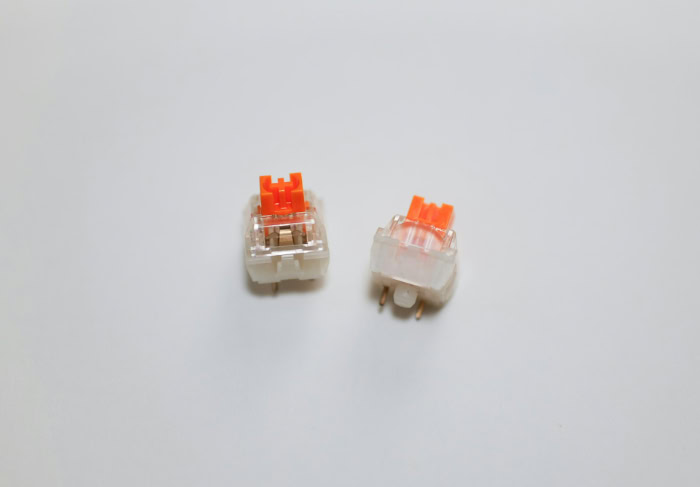
The three primary switch categories represent distinct engineering approaches designed for specific preferences. Analyzing Red, Brown, and Blue switches individually reveals how subtle changes in stem geometry and spring weight alter the physical and acoustic typing experience.
Red Switches: Linear Smoothness and Speed
Linear Red switches feature a completely straight stem path that allows the switch to move downward smoothly without any physical resistance or interruptions. With a light actuation force of roughly 45 grams, these switches require minimal finger effort to press, making them exceptionally quiet and fast.
The primary advantage of this linear profile is fluid action, enabling effortless double-tapping and reduced hand strain during extended sessions. However, the lack of physical feedback means users must rely entirely on visual cues or full bottom-out contact to confirm inputs, which can lead to accidental presses or minor typing typos.
Brown Switches: Tactile Feedback and Balance
Brown switches represent a hybrid design that incorporates a gentle physical bump near the actuation point while omitting any artificial click sound. Operating with a medium force between 45 and 55 grams, they offer moderate resistance that lets typists feel the precise instant an input registers.
The main benefit of this tactile profile is versatility, offering clean feedback for accurate typing while maintaining a quiet enough sound profile for shared environments. The main drawback is that dedicated click enthusiasts or heavy-handed typists may find the tactile bump too subtle, making it feel slightly mushy compared to sharper options.
Blue Switches: Clicky Auditory Feedback
Blue switches incorporate a two-piece click jacket mechanism that creates a sharp audible snap alongside a prominent physical bump. Requiring a higher actuation force around 50 to 60 grams, they deliver firm resistance and immediate confirmation of every press.
The chief advantage of clicky switches is exceptional typing precision; the distinct sound and bump allow typists to quickly develop a rhythm without pressing down to the bottom baseplate. Conversely, the loud acoustic output makes Blue switches ill-suited for quiet spaces, open offices, or shared streaming environments where high sound levels become distracting.
Comparative Evaluation of Key Performance Metrics

Directly comparing Red, Brown, and Blue switches side by side highlights how physical differences translate into performance variations. Evaluating tactile feel, volume output, and input responsiveness helps clarify which mechanism best aligns with specific usage needs.
Tactile Feel and Physical Resistance
The physical feeling of each switch type creates a unique sensation under the fingers. Red switches provide a completely uninterrupted travel path from top to bottom, demanding uniform pressure throughout the stroke.
Brown switches introduce a soft, controlled resistance point mid-travel, giving finger pads a subtle indication that actuation occurred. Blue switches produce a firm, snappy bump that requires deliberate force to push past.
Over long typing or gaming sessions, the light resistance of Red switches minimizes finger fatigue, whereas the higher force requirements of Blue switches can build hand tension for lighter typists.
Acoustic Profile and Volume Output
Acoustic performance varies dramatically across the color spectrum. Red switches generate a muted, deep sound created primarily when the stem hits the bottom casing or snaps back up to the top.
Brown switches add a subtle mechanical sliding noise, producing a soft thud that remains quiet enough for quiet environments. Blue switches feature a high-pitched metallic click that carries across a room.
In open offices or setups with active microphones, Blue switches can easily leak background noise into voice calls, while Red and Brown switches maintain acceptable sound levels.
Key Actuation Speed and Responsiveness
Input speed depends on how quickly a switch registers a press and resets for the next stroke. Linear Red switches excel in rapid-fire responsiveness because the stem moves freely without bumping past structural obstacles, allowing rapid repetitions near the actuation point.
Brown switches require slightly more intent due to the tactile bump, though the reset point remains relatively high in the stroke path. Blue switches have a wider gap between actuation and reset points because of the floating click mechanism, meaning the stem must travel further back upward before it can be pressed again, slightly reducing maximum double-tap speeds.
Primary Use Cases and Application Suitability

Different computing tasks place unique demands on physical input controls. Evaluating how switch mechanics line up with specific activities like competitive gaming, extensive coding, or working in shared environments ensures optimal comfort and functionality.
Suitability for Fast-Paced Video Games
Competitive esports titles, particularly first-person shooters and MOBAs, require immediate input response and rapid directional shifts. Red linear switches remain the classic favorite for competitive gaming because their smooth, frictionless travel allows instant double-tapping and seamless hold-and-release actions without passing over a physical bump.
Brown tactile switches serve as an excellent compromise for hybrid gamers who spend equal time gaming and typing, offering enough bump resistance to prevent accidental ability triggers while remaining responsive enough for fast movement. In contrast, Blue clicky switches create distinct drawbacks in fast-paced gaming; the higher force requirement increases finger fatigue during long gaming sessions, and the wide distance between actuation and reset points can hinder rapid double-tapping during intense play.
Efficiency for Text Entry and Software Development
Tasks involving heavy text creation, such as copywriting and software development, benefit greatly from deliberate tactile feedback. Blue switches provide deep physical and acoustic satisfaction for dedicated typists, offering a crisp click that confirms every character entry and reduces double-stroke mistakes.
Brown switches achieve a similar error-reduction benefit through their tactile bump, providing finger-pad confirmation without the sharp noise output, making them a top choice for programmers working long hours. Light Red switches, while effortless to press, present a higher potential for unintended typos during fast typing, as the light resistance allows accidental finger rests to register unintended letters on adjacent controls.
Appropriateness for Shared Office Spaces
Environmental surroundings significantly dictate which switch mechanisms are practical for daily use. In cubicles, open-plan offices, classrooms, or shared home workspaces, ambient sound levels impact everyone nearby.
Red and Brown switches maintain low acoustic levels, producing soft thuds or muted sliding sounds that easily blend into standard office background noise. Blue switches, with their loud, high-pitched click mechanisms, prove disruptive in professional or quiet settings and often draw complaints from coworkers or family members.
As a result, Red and Brown switches represent office-acceptable hardware choices, while Blue switches remain best reserved for private rooms or dedicated home setups.
Key Decision Factors for Switch Selection

Selecting the ideal mechanical switch requires evaluating physical typing habits alongside environmental constraints. Balancing personal ergonomics, noise limits, and hands-on testing leads to a choice that feels comfortable over long hours of daily use.
Personal Ergonomics and Keypress Habits
Matching individual typing strength with appropriate switch resistance prevents unnecessary physical fatigue and discomfort. Typists who press down heavily benefit from higher actuation forces like those found in Blue switches, as the added resistance cushions strong inputs and prevents harsh bottom-out impacts against the baseplate.
Conversely, typists with a light touch prefer the low force requirement of Red switches, which allows effortless inputs with minimal finger strain. Paying attention to wrist comfort and bottom-out tendencies helps determine whether a lighter linear setup or a firmer tactile profile offers healthier ergonomics for long desk sessions.
Environment and Noise Tolerances
Personal feel preferences must always be balanced against surrounding ambient noise tolerances. Even if a typist prefers loud auditory feedback, shared living or working conditions may necessitate a quieter alternative.
For users who enjoy tactile feel but need noise control, aftermarket dampening modifications provide practical compromises. Installing small rubber O-rings beneath each cap dampens the harsh sound of the stem striking the housing base, muting bottom-out noise without changing the core actuation response of Red or Brown switches.
Trial Methods and Physical Switch Testers
Because descriptive text cannot fully replicate physical sensation, testing hardware prior to purchase provides essential insight. Standalone switch tester boards hold multiple switch variants side by side, allowing users to press Red, Brown, and Blue options directly to compare resistance, travel distance, and sound.
Visiting local electronics retailers for in-person demonstrations offers another practical way to feel different setups. Alternatively, choosing a hot-swappable board platform allows users to easily pull out individual switches and swap in new types at home without soldering, offering total flexibility to adjust switch feel over time.
Conclusion
Selecting between Red, Brown, and Blue mechanical switches comes down to how sound, feel, and physical resistance align with your daily computing needs. Red switches provide a smooth, fast linear motion ideal for rapid gaming inputs; Brown switches offer a balanced tactile bump that boosts typing accuracy without excessive noise; Blue switches deliver a firm, clicky response with high auditory feedback for maximum typing satisfaction.
Finding the ideal setup requires matching your personal typing pressure against your workspace environment and primary tasks. Evaluating these physical mechanics ensures long-term ergonomic comfort, optimal input speed, and a quiet or clicky acoustic output tailored to your preference.
Frequently Asked Questions
Which switch type is best for both gaming and typing?
Brown switches offer the best balance for people who split their time between typing and gaming. Their gentle tactile bump provides physical feedback that reduces typing errors without introducing loud noise. Because they lack a heavy click mechanism, they remain responsive enough for fast movement in games while staying quiet enough for shared rooms or office spaces.
Why are Red switches considered the best choice for competitive gaming?
Red switches are preferred for competitive gaming because their smooth linear motion enables faster rapid-fire inputs. Without a physical bump or mechanical click to press through, your fingers encounter uniform resistance from top to bottom. This low 45-gram actuation force minimizes hand fatigue during intense sessions and allows instant double-tapping during fast gameplay.
Are Blue switches too loud for an open office environment?
Yes, Blue switches are generally too loud for open offices because their click mechanism makes a high-pitched noise. The distinct click jacket snaps sharply with every single press, which easily carries across quiet work areas or into open microphones. Red or Brown switches are much better suited for professional shared spaces.
How can I make my mechanical switches quieter?
Installing rubber O-rings beneath your caps is the simplest way to reduce bottom-out noise on mechanical switches. These small rubber rings cushion the impact when the stem strikes the plastic housing, muting the deep thud of full presses. Adding rubber O-rings dampens acoustic output effectively without changing the core tactile feedback or actuation speed of Red or Brown switches.
What is a hot-swappable keyboard and why should I get one?
A hot-swappable keyboard allows you to change mechanical switches without soldering any electrical components. This feature lets you easily pull out individual switches using a simple hand tool and plug in new variants. It provides total flexibility to test Red, Brown, and Blue options on a single board until you find your preferred setup.
About the Author: Julio Caesar


