
What Is a Floppy Disk Drive? How It Shaped Early Computing
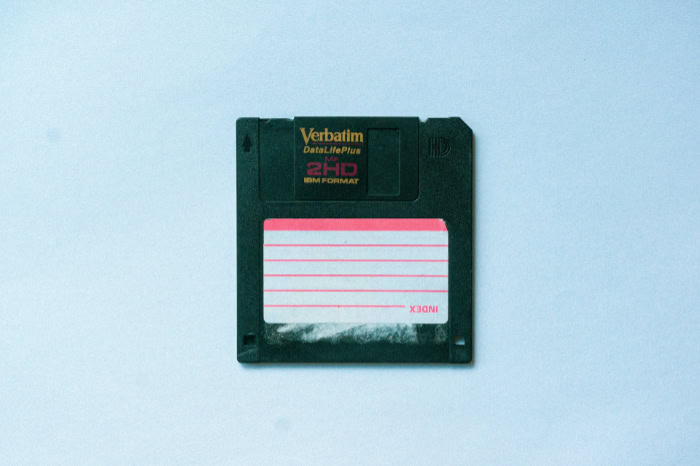
Every time you click a floppy disk icon to save a document, you are interacting with a ghost of computing history. Before cloud storage and high capacity flash drives, the Floppy Disk Drive (FDD) served as the primary gateway to personal computing.
This hardware device allowed users to read and write data onto thin, magnetic disks housed in protective plastic shells. It provided the first real portable storage solution, making it possible to carry programs and files between different machines.
While physical disks have largely vanished from modern desks, their impact remains visible in the software icons used every day. From the massive 8 inch platters of the 1970s to the pocket sized 3.5 inch disks of the 1990s, the FDD defined an era of technology.
It functioned as the essential boot device for millions, shaping how software was distributed and accessed for decades.
Key Takeaways
- Floppy disk drives were the primary method for software distribution and data portability for over twenty years.
- The hardware evolved from large 8 inch formats to the rigid 3.5 inch disks used throughout the 1990s.
- Storage is handled through electromagnetic induction on a thin plastic film coated with magnetic particles.
- Physical vulnerabilities like heat and magnetic interference often lead to data loss or “bit rot” over time.
- Modern solutions like USB drives and emulators allow users to access legacy files on contemporary machines.
Evolution of Formats and Internal Hardware
Floppy disk drives were engineered through several phases of miniaturization and refinement. Early computing required a method to load programs quickly without the massive expense of a hard drive.
Engineers developed a system where a motorized drive would spin a circular piece of magnetic film inside a protective sleeve. As the technology matured, the size of the drive decreased while the storage density grew.
This evolution led to a variety of mechanical designs that defined different eras of the personal computer.
Three Standard Disk Formats
The first widely used format was the 8 inch drive, which appeared in the late 1960s. These drives were massive by modern standards and were primarily used with mainframe computers and early industrial workstations.
By the late 1970s, the 5.25 inch drive became the standard for home computers like the Apple II and the original IBM PC. These disks were flexible and easily damaged, which earned them the “floppy” nickname.
The final major evolution was the 3.5 inch drive. Developed by Sony, this format replaced the soft sleeve with a rigid plastic shell and a sliding metal shutter, making the disks much more durable and small enough to fit in a shirt pocket.
Core Internal Components
Inside the drive, a spindle motor rotates the disk at a consistent speed, usually between 300 and 360 RPM. While the disk spins, a pair of read/write heads move across the surface.
Unlike a hard drive where the heads hover just above the platter, floppy drive heads make physical contact with the magnetic media. To move these heads to the correct position, the drive uses a stepper motor.
This motor moves the head assembly in precise increments, or steps, to align with specific circles of data on the disk.
Mechanics of Magnetic Storage

The underlying science of a floppy drive relies on the relationship between electricity and magnetism. Unlike optical discs that use lasers to read data, floppy drives use electromagnetic induction.
This process allows the hardware to alter the physical state of the disk surface and read it back later. This method of storage required a highly coordinated effort between the drive electronics and the magnetic coating on the disk.
Principles of Data Encoding
The disk itself consists of a thin circular piece of plastic coated with iron oxide or a similar magnetic material. When the drive writes data, it sends an electric current through the read/write head, which creates a magnetic field.
This field aligns the tiny magnetic particles on the disk in specific directions. These different orientations represent the zeros and ones of binary data.
When reading, the process is reversed. As the disk spins, the magnetized particles move past the head and induce a small electrical current that the computer interprets as data.
Formatting and Data Organization
A blank disk is essentially a chaotic field of magnetic particles. Before it can be used, the drive must format the disk by creating a map of tracks and sectors.
Tracks are concentric circles that run around the disk, while sectors are segments that divide each track like slices of a pie. This organizational structure allows the operating system to find specific files quickly.
Without this map, the computer would have no way to know where one file ends and another begins.
Physical Write Protection
To prevent accidental deletion or overwriting of important data, floppy disks included a physical safety feature. On 5.25 inch disks, this was a small notch on the side of the sleeve that could be covered with a piece of tape.
On 3.5 inch disks, a small plastic slider in the corner served the same purpose. When the slider was moved to open a hole, a sensor inside the drive would detect the light or physical gap and disable the write head.
This provided a simple but effective way to lock the data.
Impact on Early Computing History

During the rise of the home computer, the floppy disk drive was the primary bridge between the user and the software. Before the internet offered instant downloads, every piece of code had to be physically moved from one place to another.
This reality forced the floppy drive into a position of high importance for every computer owner. It dictated how users interacted with their machines from the moment they turned the power switch on.
Distribution of Software and Systems
For over two decades, the floppy disk was the only practical way to sell and install software. Operating systems like MS-DOS or early versions of Windows were sold in boxes containing multiple disks.
Users would insert the first disk, run the installer, and then wait for a prompt to insert the next one in the sequence. Large applications or games could require a dozen or more disks.
This physical distribution model created a massive industry for disk duplication and led to the iconic colorful labels that many older users remember.
The Role of Booting
In the years before internal hard drives were affordable, a computer had no way to store its own operating system when the power was turned off. This made the floppy drive an essential boot device.
When a user turned on their computer, the machine would immediately check the floppy drive for a disk containing the system files. If no disk was present, the computer often could not function.
This meant that the floppy disk was not just a storage tool, it was the “key” required to start the computer and begin working.
Legacy of the A and B Drive Letters
The influence of the floppy drive is still present in every modern Windows computer through the drive lettering system. In the early days, most computers had two floppy drives, which were assigned the letters A: and B: by the operating system.
When hard drives became standard, they were assigned the next available letter, which was C:. Even though most modern computers no longer have floppy drives, the letters A: and B: remain reserved in the Windows environment as a tribute to the hardware that started the personal computer movement.
Storage Constraints and Physical Failures

While the floppy disk drive was a significant advancement for its time, it was far from a perfect storage medium. Users frequently dealt with a variety of technical hurdles that made data management a stressful experience.
These limitations eventually paved the way for more robust technologies that could handle the demands of growing file sizes and the need for long term reliability.
Capacity Limits
Early disks held only a few hundred kilobytes, which was sufficient for simple text files or basic code. As software became more complex, capacity increased to double-density and then high-density standards.
The 1.44 MB high density disk became the most common version, but even this was quickly outpaced by the size of digital photos and complex documents. By the late 1990s, users often had to split large files across multiple disks, a tedious process that highlighted the urgent need for larger storage solutions.
Environmental Vulnerabilities
The physical design of the floppy disk made it susceptible to many environmental hazards. Because the magnetic film was exposed or protected only by a thin shutter, dust and debris could easily scratch the surface.
Furthermore, since the data was stored magnetically, placing a disk near a speaker, a monitor, or even a refrigerator magnet could instantly corrupt the contents. Heat was another major enemy, as high temperatures could warp the plastic disk and render it unreadable by the drive heads.
Bit Rot and Degradation
Unlike a printed book or a modern solid state drive, the data on a floppy disk is not permanent. Over time, the magnetic charges on the disk surface begin to weaken and lose their orientation, a phenomenon known as bit rot.
This means that a disk stored in a drawer for twenty years might appear perfectly fine on the outside but fail to load when inserted into a drive. This natural degradation makes floppy disks a poor choice for archiving important historical information over long periods.
Modern Methods of Access

Even though most computer manufacturers stopped including internal floppy drives by the mid 2000s, the technology still survives in specific pockets of the world. For the sake of nostalgia, digital archaeology, or industrial necessity, people still find ways to bridge the gap between vintage magnetic media and contemporary operating systems.
These solutions ensure that the data stored on old disks is not lost forever.
External USB Drives
For individuals who find a box of old disks in an attic, the easiest solution is a USB floppy disk drive. These external units are small, portable, and typically work as plug and play devices on modern computers.
They allow users to transfer old resumes, family photos, or early creative projects to a modern hard drive or cloud account. While these drives are generally slower than the original internal versions, they provide a functional link to personal history.
Maintenance of Legacy Systems
There are several high stakes industries where floppy disks remain a daily reality. Some older commercial aircraft still use floppy disks to load navigation and flight management data.
Similarly, older medical imaging equipment and heavy duty CNC machining tools in factories were built to last for decades and rely on floppy interfaces that are expensive or impossible to upgrade. In these specific environments, the floppy drive remains a necessary part of the functional infrastructure.
Hardware Emulators
For hobbyists and industrial operators who want to move away from failing physical disks, floppy emulators have become a popular alternative. Devices like the Gotek drive replace the physical floppy drive hardware entirely.
Instead of inserting a magnetic disk, the user plugs a USB flash drive into the emulator. The vintage computer sees the USB stick as a library of hundreds of virtual floppy disks.
This allows old machines to remain operational without the risk of mechanical failure or the difficulty of finding new magnetic media.
Conclusion
The floppy disk drive provided the foundation for how we move and store information today. By allowing users to carry files from one office to another, it turned the computer into a truly personal tool.
Its mechanical design and magnetic storage principles were impressive for the time, though they eventually reached their physical limits. As files grew larger and more complex, the industry moved toward higher capacity options like CDs and flash storage.
While the hardware has mostly disappeared from our desks, its influence remains in the save icons and drive letters we use every day.
Frequently Asked Questions
Why is the save icon a floppy disk?
The save icon remains a floppy disk because it was the standard way to store data during the early years of personal computing. Even though the physical hardware is no longer used, the image became a universal symbol for saving files. It serves as a visual shorthand that users recognize regardless of their language.
How much data can a standard floppy disk hold?
Most people remember the 3.5 inch high density disk, which has a capacity of 1.44 megabytes. While this was enough for several text documents or small programs, it is extremely small by today’s standards. A single modern smartphone photo would often require multiple floppy disks just to store the file data.
Can you still buy floppy disks today?
While major electronics stores no longer stock them, floppy disks are still available through specialty online retailers and surplus suppliers. These are primarily used by hobbyists who maintain vintage computers or by industries with older machinery. Production has largely stopped; therefore, most available disks are remaining stock from previous decades.
Why did computers stop having floppy drives?
Computer manufacturers removed floppy drives because file sizes grew too large for the 1.44 megabyte limit. The introduction of rewritable CDs and affordable USB flash drives provided much faster and more reliable alternatives. As the internet made software downloads common, the need for physical disks to install programs quickly disappeared.
What is a floppy disk emulator?
A floppy disk emulator is a hardware device that replaces an old disk drive in a computer or industrial machine. It allows the user to plug in a USB drive that contains digital images of floppy disks. The computer interacts with the emulator as if it were a physical drive.
About the Author: Elizabeth Baker


