
What Is a Mechanical Keyboard? Benefits and Layouts

Every click and press on a keyboard should feel deliberate, yet most users settle for the soft, mushy resistance of a standard membrane board. A mechanical keyboard changes that dynamic by replacing cheap rubber pads with high-quality, individual spring-activated switches.
This hardware choice transforms a basic peripheral into a precise instrument built for speed and tactile satisfaction. While membrane boards rely on a pressure pad to register a stroke, mechanical versions use physical metal contacts to ensure every hit is accurate and crisp.
Enthusiasts and professionals are moving toward these boards to improve their typing speed, reduce hand fatigue, and enjoy a level of durability that standard hardware simply cannot match. Moving away from generic office equipment allows for a customized typing experience that prioritizes feel, sound, and long-term reliability over mass-produced convenience.
Key Takeaways
- Mechanical keyboards utilize individual springs and physical metal contacts to register inputs, providing more precision than standard rubber dome layers.
- Users can select between linear, tactile, or clicky switches to achieve their preferred balance of typing sound and physical resistance.
- Internal switches register a press before the button hits the bottom of the frame, which can significantly increase typing speed and efficiency.
- Durable materials like PBT plastic and metal mounting plates ensure the hardware remains functional for decades rather than just a few years.
- Various layout options, ranging from full-sized to compact 60 percent designs, allow users to optimize their desk space and improve ergonomic comfort.
Mechanical Engineering vs. Membrane Design
Standard typing devices rely on a simple, cost-effective layer system. Modern mechanical boards use a more complex, individual approach for every single input.
This distinction changes the way users interact with their computers and impacts the overall feel of every press.
Standard Rubber Dome Systems
Most office peripherals use a membrane system consisting of three plastic layers. Underneath the buttons sits a rubber dome that collapses when pressed.
This collapse pushes a conductive trace onto a circuit board to register the input. Because the rubber provides the resistance, the feel is often described as soft or mushy.
These systems require the user to push the button all the way down to ensure the contact layers touch, which can lead to missed inputs if the press is too light.
Individual Mechanical Switches
Mechanical boards replace the rubber sheet with individual, self-contained switches for every button. Each switch contains a physical spring and metal contact points.
When a user presses a button, the internal parts move against the spring until the metal pieces touch, sending the signal to the computer. This design offers a consistent feel that does not degrade as quickly as rubber components, ensuring that the tenth million press feels the same as the first.
Actuation and Bottoming Out
A significant advantage of this hardware is the actuation point. On a membrane board, a user must press the button until it hits the bottom of the frame to complete the circuit.
Mechanical switches register the stroke halfway through the press. This allows for a lighter touch and faster typing since the user can move to the next input before the current button is fully depressed.
This efficiency is why many high speed typists prefer mechanical hardware.
Tactile Response and Reset Points
The physical design allows users to feel exactly when the computer registers the input. Many switches provide a physical sensation or a sound at the moment of contact.
This feedback helps typists recognize their work without looking at the screen. The reset point, where the switch returns to its original position, is also much faster.
This allows for rapid, repeated presses that are difficult to achieve on standard office hardware.
Switch Varieties and Internal Components

The specific feel of a board depends on the internal switch selected during the build process. Manufacturers color code these units to help users identify the specific resistance and sound profile of each model.
Selecting the right variety depends on whether a user prioritizes silence, speed, or physical feedback.
Smooth Linear Switches
Linear switches provide a consistent, uninterrupted movement from the top of the press to the bottom. There is no bump or click during the stroke.
Many gamers prefer these because the lack of resistance allows for rapid, fluid movements during intense sessions. Red switches are the most common version of this design; they offer a quiet and predictable experience that works well in shared spaces.
Tactile Feedback Switches
Tactile switches incorporate a small physical bump in the middle of the stroke. This bump aligns with the moment the switch registers the input.
It provides a helpful confirmation for typists without creating a loud noise. Brown switches are the standard for this category, balancing professional utility with a satisfying physical response.
They are often the preferred choice for those who spend long hours writing or coding.
Audible Clicky Switches
Clicky switches are designed for those who enjoy the sound of a traditional typewriter. They feature both a physical bump and a sharp, audible click. This provides high levels of sensory feedback for every single input. Blue switches are the most famous clicky model, though their loud nature often makes them less suitable for shared office environments where the noise might be a distraction.
Internal Anatomy of a Switch
Every unit consists of four main parts that work together. The stem defines the feel and holds the plastic cap in place. The housing protects the internal parts and guides the vertical movement. A copper spring provides the resistance and determines how much force is needed to press the button. Finally, the metal contact points bridge the circuit to send the data to the computer once the stem reaches the actuation height.
Physical Construction and Component Materials
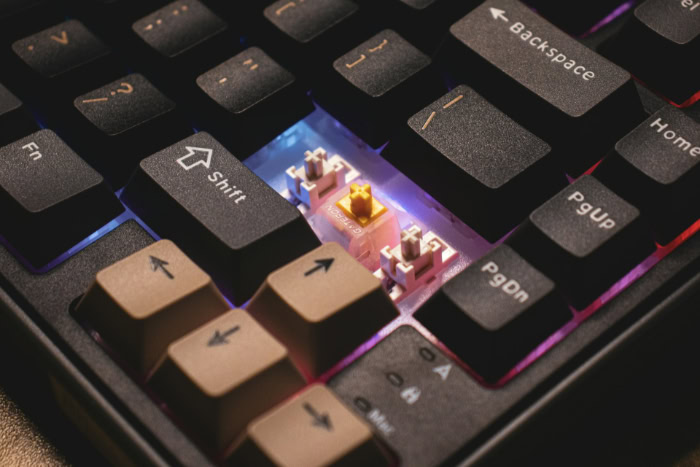
The exterior parts of the board are just as important as the internal switches. The materials used for the outer shell and the plastic buttons influence both the sound of the typing and the long-term endurance of the device.
High quality materials prevent the hardware from feeling flimsy or wearing down over time.
Plastic Button Materials
Buttons are usually made from one of two plastics. ABS is a common, lightweight material that feels smooth but can develop a shiny, greasy look over time as the plastic wears down.
PBT is a denser, more durable alternative. It has a textured finish that resists wear and does not become shiny even after years of heavy use.
PBT is generally preferred by enthusiasts for its premium feel and resistance to heat.
Support Plates and Case Materials
The frame of the board holds everything together. Heavy aluminum or steel plates are often placed inside the case to provide weight and prevent the board from sliding during use.
These metal components also change the acoustics, helping to create a deeper sound. Plastic cases are lighter and more portable, but they may produce a higher pitched noise.
The combination of the plate and case determines the overall stiffness of the typing surface.
Hot Swappable Circuit Boards
Older models required users to solder switches onto the circuit board, making repairs difficult. Modern enthusiast boards often feature hot swappable sockets.
This allows users to pull out a switch and push in a new one without using any tools or heat. This flexibility makes it easy to try different switch types or replace a single broken part without buying a completely new device.
Stabilization Components
Larger buttons, such as the space bar or the shift buttons, require extra support to stay level. Stabilizers are small parts located on either side of the main switch to keep the button balanced.
They prevent the button from wobbling or tilting when pressed on the edges. High quality stabilizers ensure that a press on the far side of the space bar feels exactly the same as a press directly in the center.
Performance and Physical Advantages

Beyond the internal parts, these devices offer specific functional benefits for daily use. Users often find that moving to a mechanical system improves their interaction with their computer over long periods.
The physical design supports both faster input speeds and a more comfortable experience for the hands.
Extended Hardware Endurance
Standard office boards usually fail after five to ten million presses because the internal rubber parts lose their elasticity. Mechanical switches are rated for fifty to one hundred million presses.
This means the hardware remains functional for decades rather than a few years. Even if a single switch fails, it can often be replaced without discarding the entire unit, making the device a durable long-term investment.
Simultaneous Input and Anti-Ghosting
Standard hardware can sometimes fail to recognize multiple buttons pressed at once, which is a problem for gamers or fast typists. Mechanical boards often feature N-Button Rollover.
This allows the computer to register every single input regardless of how many buttons are held down at the same time. It ensures that complex commands are executed perfectly without any missed signals or hardware errors.
Improved Typing Efficiency
Because these switches require different amounts of pressure to activate, users can choose a model that fits their personal hand strength. Using a switch that requires less force can prevent finger strain during long work days.
This customization often leads to a higher words per minute count as the user becomes more comfortable and confident in their typing rhythm.
Simplified Maintenance and Repair
Dust and debris eventually find their way into any typing deck. Mechanical boards are designed with removable button caps, making it easy to access the areas underneath for deep cleaning.
This accessibility keeps the hardware looking new and prevents sticky buttons or malfunctioning switches caused by dirt buildup.
Layout Options and Connectivity

Choosing a layout is a matter of balancing utility with desk space. While the traditional model remains popular, many modern users opt for smaller versions that remove unnecessary buttons to improve posture and portability.
The shape of the board dictates how much room is left for other peripherals like a mouse.
Traditional Full-Size Boards
The 100% layout is the standard configuration found in most office settings. It includes a dedicated number pad on the right side, a row of function buttons across the top, and a set of arrow buttons.
This is the best choice for users who do heavy data entry or frequently use calculators. It provides every possible function without needing to memorize secondary command layers.
Streamlined Tenkeyless Designs
The Tenkeyless or 80% layout removes the number pad but keeps the rest of the board intact. This creates more room on the desk for mouse movement, which is helpful for both gaming and general office work.
Many people find this more ergonomic because it allows their arms to stay closer together, reducing shoulder strain during long sessions at the computer.
Specialized Compact Layouts
Small layouts like 60% or 75% remove even more buttons, such as the function row or arrow buttons, to save space. These functions are still accessible through a modifier button, similar to how a laptop operates.
These designs are highly portable and popular among users who want a minimalist look for their workspace or need to travel with their equipment frequently.
Connectivity and Data Transfer
Users must also decide between a wired connection or wireless technology. USB cables offer the fastest response times and never require charging, which is ideal for high performance tasks.
Wireless options, including Bluetooth and specialized receivers, provide a cleaner look by removing cables from the desk. However, wireless models require battery management and can sometimes experience interference from other nearby electronics.
Conclusion
A mechanical keyboard is more than a simple input device; it is a personalized tool that enhances performance through superior engineering. By choosing specific switches and high grade materials, users create a typing environment that suits their exact tactile preferences.
The physical feedback and sturdy construction elevate the act of typing from a chore into a precise, satisfying experience. These devices represent a shift in how people view their hardware.
No longer treated as a disposable plastic accessory, the board becomes a specialized instrument designed for comfort, accuracy, and lasting utility in any professional or recreational setting.
Frequently Asked Questions
Are mechanical keyboards louder than membrane ones?
Many mechanical boards produce more sound due to the physical impact of the internal switch components. However, users can choose silent linear switches or add rubber dampeners to reduce noise. While clicky switches are intentionally loud, many modern options are quiet enough for a professional office or a shared living space.
Do mechanical keyboards work for gaming?
These devices are highly popular for gaming because they offer faster actuation and better reliability under pressure. Linear switches provide the smooth movement needed for rapid inputs, while features like N-button rollover ensure that every complex command is registered correctly. They provide a clear advantage over standard membrane boards during intense play.
How long does a mechanical keyboard last?
Most mechanical switches are rated for at least fifty million presses, which is ten times the lifespan of a standard rubber dome board. The use of premium plastics and metal mounting plates further ensures that the hardware remains functional and aesthetically pleasing even after many years of heavy daily use.
Can I change the switches on my keyboard?
If your device features a hot swappable circuit board, you can replace the switches without any soldering. This allows you to test different tactile profiles or repair a single broken unit easily. If the board is not hot swappable, changing the switches requires desoldering and technical expertise to complete the task.
Why are mechanical keyboards more expensive?
The higher cost reflects the complexity of the build and the quality of the materials used. Each button requires an individual mechanical switch rather than a single inexpensive plastic sheet. The inclusion of metal plates, high grade plastics, and customizable electronics adds to the production costs and the final retail price.
About the Author: Julio Caesar


