
What Is a Soundbar? Better Sound for Your TV
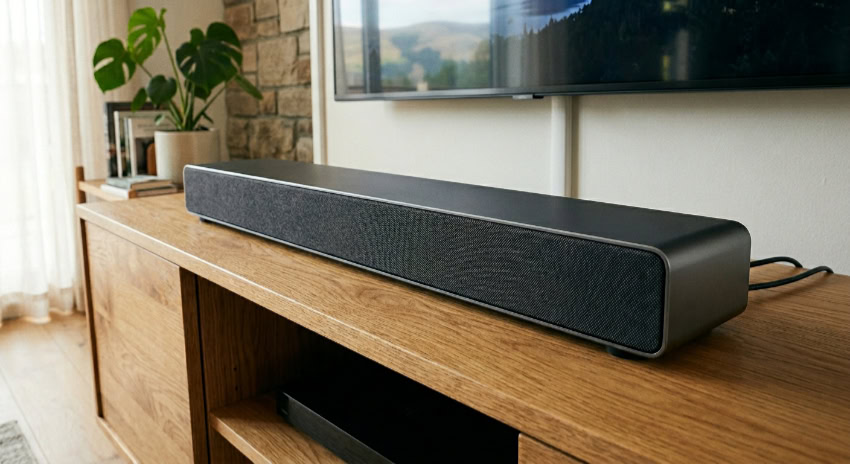
You just bought a stunning 4K flat-screen TV, but as soon as the actors start talking, you have to crank the volume to an obnoxious level just to hear them. This frustrating experience happens because modern, ultra-thin televisions physically lack the internal space needed to house decent speakers, leaving you with weak audio that usually fires backward or straight into the floor.
A soundbar is the straightforward fix for this glaring flaw. It is a sleek, low-profile device packed with multiple internal speakers designed to project crisp dialogue and robust sound directly toward your couch.
Upgrading your daily viewing experience does not require tangled wires or complicated equipment.
Key Takeaways
- A soundbar drastically improves flat-screen television audio by housing multiple forward-facing speakers in a single, low-profile cabinet.
- Audio specifications like 5.1.2 provide an exact map of the hardware, detailing the number of main speakers, subwoofers, and upward-firing drivers.
- Purchasing a unit with a dedicated center channel is vital because it isolates human dialogue and prevents background music from drowning out spoken words.
- HDMI ARC or eARC is the optimal connection method because it supports uncompressed audio formats and allows your television remote to control the speaker volume.
- You can ensure optimal acoustics by matching the physical length of the bar to your screen size and selecting a wattage rating suited for your room dimensions.
The Anatomy and Design of a Soundbar
A soundbar physically separates itself from other home audio solutions through its unique shape and internal component layout. Rather than relying on multiple bulky boxes placed around a room, this device packages its acoustic technology into a streamlined casing.
Familiarizing yourself with how these physical components work together helps explain why they are so effective at upgrading your television audio.
The All-in-One Form Factor
The defining physical trait of a soundbar is its long, low-profile cabinet. This elongated shape is deliberately designed to house multiple individual speaker drivers in a single, compact unit.
By arranging these internal speakers side-by-side, manufacturers can project audio across a wider area while keeping the entire device small enough to fit directly beneath a modern television. This unified form factor simplifies setup significantly, requiring only one main unit to produce clear, directional audio.
Component Separation (The Bar vs. The Subwoofer)
While the main unit handles most of the audio work, it is physically limited in what it can produce. The slender shape of the bar is perfectly suited for projecting mid-to-high frequencies, which include human vocals, dialogue, and sharp instruments.
However, producing deep bass requires moving a large amount of air, which demands a physically larger speaker cabinet. This is why most setups rely on a separate, dedicated box known as a subwoofer.
The subwoofer takes over the heavy lifting for low-frequency bass effects, such as explosions in action movies or the deep thump of a bass guitar, allowing the main bar to focus purely on acoustic clarity.
Aesthetics and Space-Saving Appeal
Traditional surround sound setups often involve running long cables across the floor to connect multiple bulky speaker boxes. A soundbar offers a highly sought-after minimalist design that integrates cleanly into modern living rooms.
By packing the primary speakers into one sleek bar and utilizing wireless connections for the subwoofer, this audio solution completely avoids the visual clutter of traditional systems. The slim profile rests elegantly on a media console or mounts flush against a wall, preserving valuable floor space while maintaining a clean, contemporary aesthetic.
Audio Channels and Jargon

Shopping for a new audio system often means looking at confusing product names and specifications filled with decimals and technical terms. These numbers and acronyms actually provide a clear map of exactly what acoustic hardware is hidden inside the casing.
Learning to read these specifications makes it easy to evaluate how immersive the final listening experience will be.
Understanding the Numbering System
Audio channels are represented by a simple numbering sequence, such as 2.0, 2.1, 3.1, or 5.1.2. The first digit represents the number of main, ear-level speakers built into the bar.
For example, a “3” means there is a left, right, and center speaker. The second digit indicates the presence of a subwoofer; a “1” means a subwoofer is included, while a “0” means it is not.
The third digit, if present, tells you how many upward-firing speakers are dedicated to bouncing sound off the ceiling for overhead effects. Therefore, a 5.1.2 system features five main speakers, one subwoofer, and two upward-firing drivers.
The Crucial Role of the Center Channel
A frustrating issue with standard television audio is struggling to hear what actors are saying over loud background music or sound effects. A soundbar featuring at least three main channels (Left, Right, and Center) is vital for solving this problem.
The dedicated center channel is tasked almost entirely with reproducing human dialogue. By isolating spoken words into their own speaker driver, the system prevents voices from getting muddied or overpowered by the music and action sequences coming from the left and right channels.
Spatial Audio and 3D Sound
Modern home audio has moved beyond simple stereo sound thanks to advanced formats like Dolby Atmos and DTS:X. These technologies create a three-dimensional surround-sound illusion without requiring speakers physically placed behind you.
Soundbars equipped with these spatial audio formats utilize specialized upward-firing or side-firing drivers. These drivers push sound waves at precise angles so they bounce off your ceiling and side walls before reaching your ears.
This acoustic trickery tricks your brain into hearing an airplane flying overhead or a car rushing past your left side.
Connectivity Options and Installation Setup

Getting the best possible sound from your new device requires properly linking it to your television and home network. Modern units offer a variety of wired and wireless connection methods, each serving a specific purpose.
Setting up the hardware correctly ensures you get the highest quality audio without dealing with irritating sync issues or blocked sensors.
Wired TV Connections (HDMI ARC/eARC vs. Optical)
There are two primary ways to physically connect a soundbar to a television. An optical cable is a reliable standard that uses light to transmit digital audio, but it has limited bandwidth and cannot support advanced 3D audio formats.
HDMI ARC (Audio Return Channel) or the newer HDMI eARC are the heavily preferred methods. HDMI eARC offers much higher bandwidth, allowing uncompressed audio formats like Dolby Atmos to pass through cleanly.
Furthermore, using HDMI ARC/eARC allows your television and audio unit to communicate, meaning you can control the sound volume using your existing TV remote rather than juggling multiple controllers.
Wireless Audio Streaming
These devices are not limited strictly to television and movie audio. Most modern options double as highly capable home stereo systems for music.
Through built-in Bluetooth, Wi-Fi, Apple AirPlay, or Google Chromecast, you can effortlessly stream music, podcasts, and audiobooks directly from your smartphone or tablet. Wi-Fi-based streaming options like AirPlay and Chromecast typically offer higher fidelity than standard Bluetooth, preventing audio quality drops while keeping your mobile device fully usable for other tasks.
Placement and Mounting Solutions
Proper positioning drastically impacts how well your audio system performs. If you place the unit on an entertainment center, it should sit flush with the front edge of the furniture to prevent sound waves from bouncing off the tabletop surface.
You must also ensure the unit is low enough that it does not block the television’s infrared sensor, which would stop your TV remote from working. Alternatively, mounting the device directly to the wall just beneath the screen provides a sleek, floating look while guaranteeing an unobstructed path for the sound to travel toward your seating area.
Soundbars Compared to Alternative Audio Systems

Consumers looking to upgrade their living room acoustics usually choose between several distinct categories of audio equipment. Comparing these product types highlights exactly what makes the soundbar format unique.
Understanding how it stands up against built-in hardware, expensive theater setups, and portable speakers clarifies why it remains a highly popular choice for home entertainment.
Soundbars vs. Built-In TV Speakers
Ultra-thin televisions physically lack the internal volume needed to house powerful audio drivers. Built-in TV speakers frequently point downward or backward, resulting in flat, distant audio with practically zero bass response.
A dedicated soundbar pushes audio directly forward into the room. Because it has larger drivers and a separate power source, the upgrade is immediately noticeable.
You gain a wider soundstage, massively improved dialogue clarity, deep bass capabilities, and a significantly higher overall volume ceiling without audio distortion.
Soundbars vs. Dedicated Home Theater Systems (AV Receivers)
A traditional home theater setup relies on a bulky Audio-Video (AV) receiver connected to multiple passive speakers via long runs of speaker wire. While an AV receiver setup offers superior modularity and top-tier audio separation, it is highly complex to install and incredibly expensive.
Soundbars present a highly effective alternative through plug-and-play simplicity. They offer exceptional audio performance at a fraction of the cost, requiring essentially zero technical knowledge to set up while avoiding the hassle of running wires through your walls.
Soundbars vs. Standard Bluetooth Speakers
Many people attempt to use standard portable Bluetooth speakers to boost their television audio, only to be disappointed. Portable Bluetooth speakers are designed primarily for mobile music listening and often suffer from noticeable latency.
This latency causes a frustrating lip-sync lag where the actors’ moving mouths do not match the words you hear. A dedicated TV soundbar eliminates this problem through wired connections that guarantee perfect video-audio synchronization.
Furthermore, soundbars feature specific television inputs and audio processing chips that portable speakers simply lack.
Essential Buying Considerations

Finding the perfect audio equipment involves matching the hardware specifications to your specific living environment. Before making a purchase, you must evaluate the physical dimensions of your room, your future expansion plans, and your current smart home ecosystem.
Looking at these factors ensures you buy a system that fits your lifestyle perfectly.
Sizing the Soundbar to the TV and Room
A major consideration is matching the physical length of the soundbar to the size of your television screen. Aesthetically, the audio unit should not be wider than the television itself, with a good rule of thumb being to buy a bar that roughly matches the width of your screen or is slightly shorter.
Furthermore, you must choose the right audio output power based on the square footage of your room. A small bedroom will easily be filled by a lower-wattage system, but a massive open-concept living room requires a higher-wattage unit and a powerful subwoofer to ensure the bass reaches the seating area effectively.
Expandability and Modular Upgrades
Not every buyer wants to purchase a massive surround sound system all at once. Several manufacturers offer modular soundbar ecosystems that allow you to space out your purchases over time.
You can buy the main bar first to instantly improve your television dialogue, and then add compatible wireless rear satellite speakers months or years later. Some brands even allow you to swap in a larger, more powerful subwoofer down the line.
Checking for this expandability ensures your audio system can grow alongside your budget or move with you into a larger house.
Smart Home Integration
Many premium audio units do much more than play television sound. Evaluating the inclusion of built-in voice assistants, like Amazon Alexa or Google Assistant, is highly recommended if you already use smart home devices.
With these assistants built directly into the casing, the soundbar functions as a central hub. You can use vocal commands to pause your movie, adjust the volume, turn off your smart lights, or check the weather, effectively turning your television audio equipment into an interactive smart home controller.
Conclusion
A soundbar fundamentally transforms your daily viewing experience by delivering a massive acoustic upgrade without the visual clutter and frustrating complexity of traditional home theater systems. By consolidating the primary speakers into a sleek, manageable profile, you gain crystal-clear dialogue and robust sound right out of the box.
In the end, evaluating the channel configurations, choosing the correct connectivity method, and matching the hardware to your room size will guarantee you select the perfect audio solution for your home.
Frequently Asked Questions
Do I really need a subwoofer with my soundbar?
A subwoofer is highly recommended if you want to feel deep bass and low-frequency action effects. While the main bar handles vocals and instruments perfectly, it lacks the physical size required to push enough air for heavy bass. Adding a dedicated subwoofer dramatically improves the overall acoustic depth.
Can I use my TV remote to control the soundbar volume?
You can easily use your television remote to adjust the volume if you connect the devices using an HDMI ARC or eARC cable. This specific connection method allows the two pieces of hardware to communicate with each other. Optical cables do not support this convenient control feature.
What does a 3.1 channel system actually mean?
This numbering system directly explains the speaker layout inside the hardware. The three indicates the bar contains a left, right, and center speaker for clear dialogue. The one indicates the system comes with a separate subwoofer to handle deep bass effects during movies and music.
Why is there a delay between the video and the audio?
Audio delay usually occurs when using a standard Bluetooth connection because wireless signals take longer to process than wired signals. You can permanently eliminate this frustrating lip-sync lag by connecting the unit to your television using a dedicated HDMI or optical cable instead of Bluetooth.
Will a soundbar sound better than my built-in TV speakers?
A soundbar will sound significantly better because it uses larger, forward-facing speakers powered by dedicated internal amplifiers. Built-in television speakers are incredibly small and usually point downward or backward, which causes the audio to sound distant and flat. An external unit projects robust sound directly toward your seating area.
About the Author: Julio Caesar


