
What Is an AIO Cooler? Pros, Cons, and Risks

Building a high-performance PC often forces a difficult compromise between aesthetics and efficiency. Giant metal heatsinks might keep temperatures down, but they also dominate the interior of your case and block the view of your components.
On the other side sits custom liquid cooling, which looks incredible yet requires intimidating maintenance and technical skill. The All-In-One (AIO) cooler eliminates this trade-off completely.
As a pre-assembled closed-loop solution, an AIO combines the superior heat transfer of water with the plug-and-play simplicity of a standard fan. It circulates coolant through a sealed system to manage the intense heat of modern processors without requiring you to ever fill a reservoir or tighten a fitting.
These devices bridge the gap effectively to offer builders a sleek, silent, and powerful way to maximize hardware potential.
Anatomy Of An AIO Cooler
Liquid cooling systems rely on specific engineering principles to move heat away from sensitive components efficiently. While they may appear to be simple devices from the outside, the internal mechanism involves a precise coordination of fluid dynamics and surface area management to function correctly.
The Pump And Water Block Combo
The primary component of an AIO is the unit that mounts directly onto the processor. In custom loops, the water block and the pump are often separate distinct parts.
AIOs integrate both into a single housing to save space and simplify installation. The base of this unit features a copper plate, known as the cold plate, which sits flush against the CPU heat spreader.
Inside the housing, a small pump pushes coolant over micro-fins on the back of the copper plate, absorbing heat instantly before cycling the fluid out toward the rest of the system.
Radiator Density And Design
Once the liquid absorbs heat, it travels to the radiator. This component acts as a large heat exchanger consisting of flat tubes and folded metal fins.
The effectiveness of a radiator depends heavily on its Fins Per Inch (FPI) count. A higher FPI density offers more surface area for heat dissipation but requires fans with higher static pressure to push air through the resistance.
As the coolant flows through the radiator channels, the fins transfer the thermal energy to the passing air, significantly lowering the liquid's temperature before it returns to the pump.
The Sealed Ecosystem
The defining characteristic of an AIO is its closed-loop design. Manufacturers assemble, fill, and seal these units at the factory.
This creates a vacuum-tight environment that prevents leaks and eliminates the need for user maintenance. Unlike open-loop systems that require periodic refilling or algae treatment, an AIO functions as a “set and forget” solution.
The tubing connecting the block to the radiator is typically made from low-permeation rubber with braided sleeving to minimize evaporation and protect the loop from physical damage.
The Physics Of Heat Transfer
The cooling cycle operates on a continuous loop of thermal exchange. The process begins when the CPU generates heat, which transfers to the copper cold plate.
The circulating liquid absorbs this energy and carries it away from the socket area. The pump forces this heated fluid through the tubing and into the radiator.
There, fans blow cool ambient air across the fins, extracting the heat from the liquid and exhausting it out of the PC case. The cooled fluid then travels back to the block to repeat the cycle.
Performance And User Experience

Builders often debate the merits of liquid versus air cooling based on raw cooling power and daily usability. While high-end air coolers can rival liquid cooling in certain scenarios, AIOs offer distinct advantages regarding how they handle heat spikes, manage noise, and physically interact with the rest of the computer hardware.
Thermal Efficiency And Capacity
Water has a much higher thermal mass than air or copper heat pipes alone. This allows the liquid inside an AIO to absorb a significant amount of heat energy before the temperature of the fluid actually rises.
This property, known as “soak time,” makes AIOs particularly effective for modern processors that boost to high wattages for short periods. An air cooler might spike in temperature immediately, whereas liquid takes longer to saturate, keeping the CPU cooler during burst workloads or extended gaming sessions.
Acoustic Profiles
Noise character differs significantly between the two cooling methods. Air coolers rely entirely on fan speed to control temperatures, meaning the fans often ramp up and down aggressively as the CPU load changes.
This creates a noticeable “whine” that varies in pitch. AIOs tend to operate with a more consistent acoustic profile.
The pump emits a steady, low-level hum that usually fades into the background. Because the liquid temperature changes slowly, the radiator fans do not need to ramp up instantly, resulting in smoother and less distracting fan curves.
Visual Appeal And Clearance
Aesthetics often drive the decision to switch to liquid cooling. High-performance air coolers are typically massive blocks of aluminum that sit directly in the center of the motherboard.
They can obscure the view of the motherboard, block RGB lighting, or interfere with taller memory modules. An AIO relocates the bulk of the cooling potential to the edge of the case.
This leaves the area around the CPU socket open, providing a clean look that showcases the RAM and motherboard design.
Physical Safety During Transport
Large dual-tower air coolers can weigh over a kilogram, hanging sideways off the motherboard. This creates significant torque on the PCB and the CPU socket.
If a PC with a heavy air cooler is shipped or moved carelessly, the physical stress can crack the motherboard traces or damage the mounting bracket. AIOs remove this risk almost entirely.
The heavy radiator bolts directly to the steel chassis of the case, while the pump block mounted to the CPU is lightweight and places minimal strain on the socket.
Sizing And Compatibility

Selecting the correct AIO involves more than just picking a brand. You must match the cooler's physical dimensions to your case's capabilities and your processor's thermal output.
Performance scales with size, but bigger is not always better if the unit does not fit the chassis.
Radiator Standards
AIO sizes follow the standard dimensions of computer fans, typically 120mm or 140mm. The most common radiator sizes are 120mm, 240mm, 280mm, and 360mm.
A 240mm radiator supports two 120mm fans, while a 280mm radiator supports two 140mm fans. As the surface area increases, the cooler's ability to dissipate heat improves.
A 360mm unit offers the highest performance for standard consumer cases, capable of handling the hottest flagship processors on the market.
The Double Fan Rule
A common misconception is that any liquid cooler beats an air cooler. This is false.
A single-fan 120mm AIO rarely outperforms a decent air cooler and often costs more. For builders seeking genuine performance upgrades, the “double fan” rule applies.
A 240mm radiator is generally the minimum entry point for superior cooling performance. Unless you are building in a tiny Small Form Factor (SFF) case where space is strictly limited, you should avoid 120mm units in favor of 240mm or larger.
Verification Of Case Fitment
Case specifications are the final authority on what you can install. A case might support three 120mm fans in the front, but that does not guarantee a 360mm radiator will fit.
Radiators add thickness to the fans, potentially colliding with the motherboard, graphics card, or RAM. You must check the case manual for “Radiator Support” rather than just “Fan Support.”
Additionally, check the clearance depth to ensure the radiator stack does not interfere with motherboard heatsinks or power cables.
Motherboard And Memory Clearance
One of the most practical benefits of an AIO is RAM compatibility. Large air coolers often hang over the first two memory slots, preventing the use of tall or RGB-lit RAM sticks.
Since the AIO pump block stays within the boundaries of the CPU socket, it allows builders to use memory modules of any height. This freedom simplifies the component selection process, as you do not need to measure the millimeter gap between a heat pipe and your memory heat spreaders.
Installation Best Practices
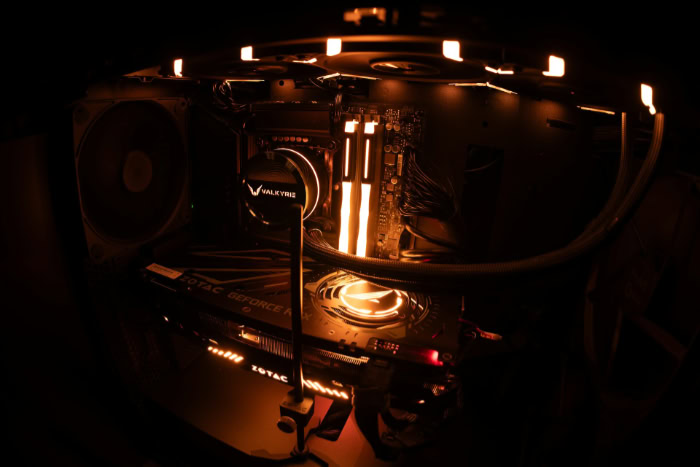
Installing a liquid cooler requires more planning than simply bolting a heatsink to the motherboard. Because these units contain moving fluid and air pockets, the laws of physics and gravity dictate how well they perform.
Proper orientation ensures that the pump stays lubricated and silent, while incorrect placement can lead to annoying noises or premature hardware failure.
Radiator Positioning
The most optimal position for an AIO radiator is at the top of the case, set to exhaust air upwards. This takes advantage of natural convection, where heat rises, and ensures the pump remains at the bottom of the loop.
Front-mounting is a common alternative. While this provides the CPU with fresh, cool air from outside the case, it dumps the radiator's waste heat directly onto your graphics card.
Bottom-mounting is generally discouraged. Placing the radiator on the floor of the case forces the pump to sit higher than the loop's fluid level, which invites air bubbles to gather in the pump mechanism.
The Air Bubble Rule
Every closed-loop cooler contains a small amount of air because liquid expands when heated, requiring an internal air gap to prevent pressure bursts. The “golden rule” of AIO installation is to ensure the pump is never the highest point in the loop.
Air naturally rises to the top of the system. If the pump sits at the highest point, air bubbles will accumulate in the impeller chamber.
This causes a grinding noise known as cavitation and prevents the pump from moving liquid effectively, eventually leading to overheating and failure.
Push vs. Pull Configuration
Fans can be mounted on either side of the radiator. A “push” configuration places fans in front of the radiator to push air through the fins, which is the standard orientation for most builds.
A “pull” configuration mounts fans behind the radiator to pull air through it. Performance differences between the two are negligible for most users.
However, “pull” configurations are often easier to maintain. Dust accumulates on the exposed face of the radiator, and if the fans are behind it, you can easily vacuum or wipe the dust away without removing the fans first.
Managing The Cables
One downside to AIOs is the cable clutter they introduce. A standard air cooler requires a single cable for the fan.
An AIO, conversely, requires power for the pump, a tachometer cable for the motherboard to read pump speed, power cables for the radiator fans, and often multiple RGB lighting cables. Managing these wires requires patience.
Many modern AIOs include a controller hub or a “daisy-chain” feature for the fans to reduce the number of cables running to the motherboard, but builders should still plan their cable routing in advance to keep the system tidy.
Reliability And Lifespan

While AIOs offer superior aesthetics and burst performance, they introduce complexity that impacts long-term reliability. Unlike a block of metal and a fan, a liquid cooler has multiple points of potential failure.
The Reality Of Leaks
The most common fear among new builders is that water will leak onto their expensive components. In the early days of liquid cooling, this was a valid concern.
However, modern manufacturing standards have made catastrophic leaks extremely rare. Manufacturers pressure-test units before they leave the factory to ensure seal integrity.
While the risk is never zero, it is statistically low enough that millions of these units are sold annually without widespread issues.
Permeation And Evaporation
Although AIOs are sold as “sealed” units, they are not hermetically sealed like a spacecraft. The rubber tubing is slightly permeable, meaning microscopic amounts of liquid vapor slowly escape through the tube walls over time.
This process is very slow, but it is inevitable. After five to seven years of operation, the liquid level inside the loop may drop enough to impact cooling performance or cause the pump to run dry.
This natural evaporation effectively sets the maximum lifespan of the device.
Pump Failure Indicators
The pump is the heart of an AIO and is usually the first component to fail. Unlike a fan, which might just spin slower as it ages, a pump failure is often binary; it works, or it does not.
The most common warning sign is a loud grinding or rattling noise coming from the CPU block, indicating the impeller is failing or struggling with air bubbles. The other sign is a sudden, unexplained spike in CPU temperatures while the fans are still spinning at full speed, indicating the fluid is no longer circulating.
The Non-Serviceable Design
The most significant drawback of an AIO compared to air cooling is its disposable nature. If a fan dies on an air cooler, you can unclip it and replace it for a few dollars.
If the pump dies on an AIO, the entire unit is effectively scrap waste. You cannot easily open the block to replace the motor or refill the fluid without damaging the factory seal.
Consequently, when an AIO reaches the end of its life, the user must purchase a completely new cooling solution.
Conclusion
All-In-One liquid coolers successfully bridge the gap between basic air cooling and complex custom loops. They offer the thermal efficiency required for high-performance computing while maintaining an installation process that is nearly as simple as mounting a standard fan.
This balance makes them an attractive option for builders who want the benefits of water cooling without the need for regular maintenance or the fear of assembling a custom loop.
These units are ideal for enthusiasts running powerful processors that generate significant heat, as well as gamers who prioritize a clean aesthetic with visible components. If you care about low noise levels under load and want an unobstructed view of your motherboard, an AIO is likely the right fit.
Conversely, if you prioritize absolute reliability or are working with a strict budget, a traditional air cooler is a safer investment. Air coolers do not suffer from pump failure and can theoretically last indefinitely with simple fan replacements.
In the end, the decision comes down to your specific needs. While an AIO will eventually need replacement due to mechanical wear or fluid evaporation, it provides a level of cooling power that modern high-wattage chips often demand.
For those seeking top-tier performance and a premium look, the AIO remains the standard for contemporary PC builds.
Frequently Asked Questions
Do AIO coolers leak often?
Modern manufacturing has made leaks extremely rare, though the risk is never zero. Most units feature reinforced tubing and pressure-tested seals to prevent accidents during normal operation. If a leak does occur, it is usually due to physical damage during installation or a manufacturing defect covered by the warranty.
How long does an AIO cooler last?
Most AIO coolers function effectively for five to seven years. The lifespan is limited by the mechanical pump wearing out or the liquid slowly permeating through the tubes over time. Once the pump dies or the fluid level drops significantly, the entire unit requires replacement.
Do I need to refill the liquid?
You never need to refill or change the fluid in an All-In-One cooler. These units are permanently sealed closed-loop systems designed to run without maintenance for their entire lifespan. Opening the block or tubes will break the vacuum seal, introduce air bubbles, and void the manufacturer warranty immediately.
Is liquid cooling better than air cooling?
Liquid cooling generally handles sudden heat spikes better than air due to the high thermal mass of water. While top-tier air coolers can match the sustained performance of a 240mm AIO, liquid coolers run quieter under load and look cleaner. Air coolers are simpler and more durable, but bulky.
Is a 120mm AIO worth buying?
A 120mm AIO is rarely worth the cost compared to a standard air cooler. It lacks the surface area required to dissipate heat efficiently for modern high-power CPUs. You should only choose a 120mm model for very small cases where a larger air tower physically will not fit.
About the Author: Elizabeth Baker


