
What Is Apple TV and How Does It Work?
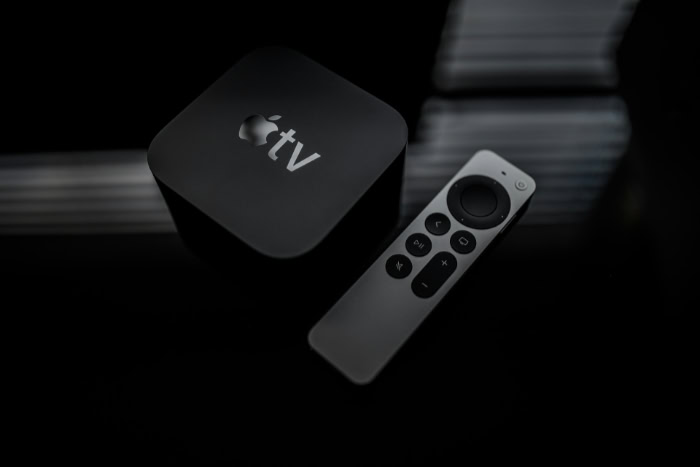
If the name “Apple TV” leaves you confused, you are not alone. Apple frustratingly applies the same label to three distinct products: a physical device, a software application, and a monthly subscription service.
It is a naming convention that creates unnecessary chaos for consumers trying to upgrade their entertainment setup.
The physical Apple TV hardware serves as a powerful streaming media player. It connects directly to your television to bypass slow internal menus and delivers high-quality video and audio from the internet.
This guide separates the hardware from the similar-sounding services to show you exactly how the box functions.
Decoding The Three “Apple TVs”
Apple creates significant confusion by using nearly identical names for three completely different products. Consumers often struggle to determine if they need to buy a physical device or simply sign up for a website.
To make an informed purchase, you must distinguish between the physical media player, the application that organizes content, and the subscription service that provides original shows.
Apple TV 4K: The Hardware
When most people ask “What is Apple TV,” they are referring to the physical hardware. The Apple TV 4K is a small, matte black set-top box that sits near your television.
It acts as a dedicated computer for your living room entertainment. You connect it to your TV using an HDMI cable, and it takes over the screen to provide a faster, cleaner, and more powerful interface than standard smart TV software.
Its primary job is to process high-quality video and audio data from the internet and display it on your screen.
The Apple TV App: The Software
The Apple TV App is a piece of software. It functions as a digital video player and a library for your content.
While this app comes pre-installed on the Apple TV box, it is not exclusive to Apple hardware. You can find the Apple TV App on many third-party devices, including Samsung or LG smart TVs, Roku sticks, Amazon Fire TV devices, and gaming consoles like PlayStation or Xbox.
This app aggregates movies and shows from various sources into one location, allowing you to access your iTunes purchases or subscribed channels without needing the physical Apple box.
Apple TV+: The Service
Apple TV+ is the paid, monthly subscription service that competes directly with Netflix, Hulu, and Disney+. This service lives inside the Apple TV App.
It features exclusive “Apple Originals” content that you cannot watch anywhere else, such as Ted Lasso, Severance, or The Morning Show. You do not need to own the physical Apple TV box to subscribe to Apple TV+; you only need a device that can run the Apple TV App.
How The Hardware Works: Connection And Setup

Setting up the hardware is designed to be straightforward for users of any technical skill level. The device acts as a bridge between your internet connection and your television screen.
It bypasses the often sluggish built-in operating systems of smart TVs to deliver a smoother and more responsive viewing experience.
The “Plug And Play” Mechanism
The physical setup involves two primary connections. First, the device requires power from a standard wall outlet.
Second, it must transmit audio and video signals to your display. You achieve this by connecting an HDMI cable from the back of the Apple TV box to an available HDMI port on your television.
Once connected, you simply switch your TV input to the corresponding channel. The box then wakes up and displays its interface on your screen.
Internet Connectivity And Streaming
The Apple TV box does not store movies or shows on an internal hard drive in the traditional sense. Instead, it relies on a robust internet connection to “stream” content.
This means the device pulls data from the cloud in real-time as you watch it. You can connect the box to the internet using Wi-Fi or, for a more stable connection, a hardwired Ethernet cable.
While the device does have storage capacity (usually 64GB or 128GB), this space is reserved primarily for installing applications and games rather than storing video files.
The Operating System (tvOS)
Once the device is running, you interact with an operating system called tvOS. This software presents a clean, grid-based “home screen” filled with rectangular icons for your apps, similar to the layout of an iPhone or iPad.
You control this interface using the Siri Remote. This remote features a touch-sensitive clickpad that allows you to swipe your thumb to scroll through lists or click to select items.
It also includes a microphone button; holding this down lets you use voice commands to search for specific movie titles, open apps, or check the weather.
Content, Apps, and Associated Costs

A common misconception is that buying the hardware automatically grants access to all premium content. It is important to view the Apple TV box as a platform or a vessel.
While it provides the means to watch content, the content itself often requires separate transactions or subscriptions.
The One-Time Hardware Cost
The Apple TV 4K is a one-time hardware purchase. You pay the upfront cost to own the box, the remote, and the power cable.
There is no monthly rental fee for the device itself, unlike the cable boxes leased out by traditional television providers. Once you buy the unit, it is yours to keep and use indefinitely without recurring hardware charges.
Accessing Third-Party Services
To watch content, you must download applications from the built-in App Store. Popular third-party services like Netflix, Hulu, YouTube, Disney+, and Amazon Prime Video all have dedicated apps available for download.
It is vital to note that purchasing the Apple TV box does not make these services free. You must still log in with your existing credentials or sign up for new accounts.
If you do not have a paid subscription to Netflix, downloading the Netflix app on your Apple TV will not allow you to watch shows until you pay Netflix directly.
The “Single Sign-On” Feature
For users who still subscribe to traditional cable or satellite packages, the “Single Sign-On” feature simplifies the login process. You can enter your cable provider credentials once in the system settings.
The Apple TV then automatically authorizes any supported apps that are part of your cable package. This saves you from the tedious task of typing in your username and password for every individual channel app, such as ESPN, TNT, or FX.
Renting And Buying Movies
Beyond subscription apps, the Apple TV serves as a digital video store. Using the Movies or TV Shows interface (often integrated into the main Apple TV App), you can purchase or rent individual titles.
This operates on a transactional basis similar to buying a DVD or renting a tape from a video store. The cost is charged to the credit card associated with your Apple ID.
This option is ideal for watching new releases that are not yet available on streaming services or for building a permanent digital library of your favorite films.
Benefits And Ecosystem Integration

While many modern televisions come with built-in streaming apps, the dedicated Apple TV hardware offers distinct advantages regarding speed, user experience, and how it connects with other devices. The value of the box lies less in what you can watch and more in the quality of the interface and the unique features available to those already invested in Apple products.
Performance And Privacy
One of the most noticeable upgrades the Apple TV provides is speed. Most smart TVs use underpowered processors that can make navigating menus feel sluggish or choppy.
In contrast, the Apple TV uses the same powerful chips found in iPhones. This results in fluid animations, instant app launching, and zero lag when switching between services.
Furthermore, the user interface is notably cleaner. Unlike many smart TV platforms that clutter the screen with sponsored content and advertisements, the Apple TV home screen displays only the apps you have chosen to install.
Privacy is another significant differentiator. Manufacturers of affordable smart TVs often subsidize the low hardware cost by tracking user viewing habits and selling that data to advertisers.
Apple maintains a stricter stance on privacy. They utilize technology that obscures user data and minimizes tracking, ensuring that your viewing history remains more private than it would be on standard television operating systems.
The Apple Ecosystem Features
The device truly shines when paired with other Apple hardware. The “AirPlay” feature allows you to wirelessly stream video, music, or photos from an iPhone, iPad, or Mac directly to the television with a single tap.
This makes sharing vacation photos or watching a video from a website effortless.
Audio integration is equally robust. If you want to watch a movie late at night without disturbing others, you can pair AirPods directly to the box for private listening.
Alternatively, you can connect HomePod speakers to create a wireless home theater system. The box also integrates services like Apple Fitness+ and Apple Arcade.
Fitness+ displays your real-time heart rate and workout metrics from your Apple Watch on the TV screen, while Arcade allows you to play high-quality games using PlayStation or Xbox controllers.
Smart Home Hub
Beyond entertainment, the Apple TV acts as a central command center for a smart home. It functions as a “hub” for HomeKit and Matter-enabled accessories.
This means the box stays connected to the internet 24/7, allowing you to control smart lights, thermostats, and security cameras from your phone even when you are miles away from home. It also processes automation routines, such as turning off the lights automatically when everyone leaves the house, ensuring your smart home runs smoothly in the background.
Compatibility And Limitations

Before purchasing an Apple TV, it is necessary to understand the technical requirements and how the device interacts with different smartphones. While the hardware is universally compatible with modern televisions, the user experience varies significantly depending on whether you use an iPhone or an Android device.
TV Requirements
The fundamental requirement for using an Apple TV box is a television with an HDMI port. Virtually every flat-screen TV manufactured in the last decade possesses this connection.
You do not need a specialized “smart” TV to use the box; in fact, the Apple TV can turn an older, “dumb” HD television into a modern streaming device.
However, to fully utilize the capabilities of the Apple TV 4K model, your television must support 4K resolution. Using the box with a standard 1080p HD screen works perfectly fine, but you will not see the increased sharpness of 4K content.
Additionally, to experience the richest colors and contrast, your TV should support High Dynamic Range (HDR) or Dolby Vision. If your TV lacks these features, the Apple TV will automatically adjust its output to match the best possible quality your screen can handle.
The Mobile Device Factor
The type of smartphone you own plays a massive role in the overall experience. For iPhone owners, the integration is seamless.
During setup, you simply hold your phone next to the box to automatically transfer your Wi-Fi settings and Apple ID credentials, saving you from typing out complex passwords with a remote. Furthermore, the iPhone serves as a convenient tool for daily use; a digital remote appears in your phone's Control Center, and you can use your phone’s keyboard to type search queries on the TV.
For Android users, the experience is functional but limited. You can still use the Apple TV as a high-end streaming player, but you lose the “magic” of the ecosystem.
You cannot use an Android phone to type on the TV, nor can you “cast” content from an Android device to the screen, as the box does not support Google Cast (Chromecast). Consequently, while the device works for Android households, the high price point is harder to justify without the remote control and setup conveniences available to iPhone users.
Conclusion
The Apple TV hardware stands apart as a premium vessel for streaming media, distinct from the similarly named app or subscription service. It functions as a dedicated, high-performance engine for your television designed to replace the often sluggish software built into most screens.
While the price point is noticeably higher than competing streaming sticks, the value lies in the refinement of the user experience. You are paying for a completely ad-free interface, strict data privacy, and a processor that ensures apps load instantly and video plays without stuttering.
For those already using iPhones or iPads, the device offers a level of integration that no other player can match. The ability to use your phone as a remote, share audio to AirPods, and access photos on the big screen makes it a logical extension of your existing devices.
However, this level of performance is not a strict necessity. If you are satisfied with the speed of your current Smart TV or if your household primarily uses Android phones, the Apple TV box may feel like an unnecessary expense.
It is ultimately a luxury upgrade designed for viewers who prioritize speed, privacy, and usability over the lowest possible price.
About the Author: Elizabeth Baker


