
What Is Google Nest? Making Your Home Smarter
Smart technology has matured beyond novelty gadgets into fully integrated ecosystems that actively manage your daily life. Google Nest stands at the center of this shift as the overarching brand for all of Google’s connected hardware.
It represents the strategic unification of the “Google Home” smart speakers and the automation pedigree of Nest Labs into a single cohesive family. The result is a system where security cameras, thermostats, and displays communicate seamlessly rather than acting as isolated tools.
The Evolution of the Brand
Google Nest did not start as a single unified vision. It is the result of merging two distinct technological paths that eventually converged to simplify the smart home market.
Initially, consumers had to choose between products from Nest Labs, an independent company focused on automation, and Google’s own developing line of smart speakers. Over time, Google recognized that maintaining two separate identities for compatible devices created confusion.
The solution was to bring everything under one roof, resulting in the ecosystem we see today.
From Separate Entities to a Single Family
The brand originated with Nest Labs, a company famous for reinventing the unglamorous home thermostat. Their “Learning Thermostat” was distinct because it looked modern and programmed itself based on user behavior.
Google acquired Nest Labs in 2014, but for several years, the two operated somewhat independently. While Nest focused on cameras and smoke detectors, Google developed its own “Google Home” brand for its smart speakers to compete with Amazon Echo.
This meant a user might own a “Google Home Mini” speaker and a “Nest Cam,” and while the devices worked together, the branding suggested they were from different worlds.
The Unification Rebrand
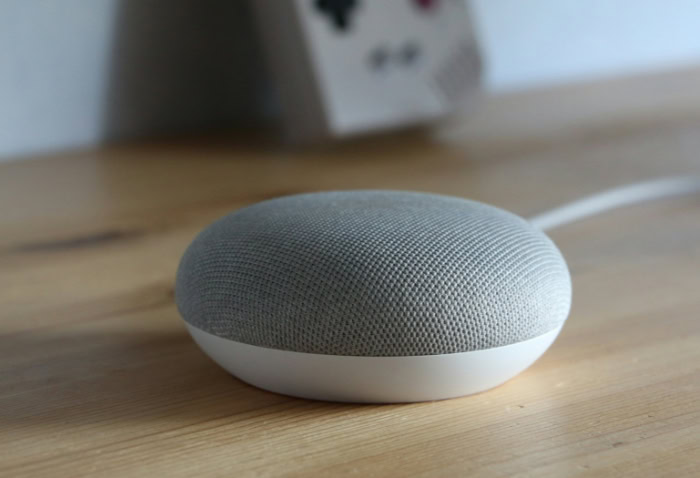
Google eventually restructured its hardware division to eliminate this separation. The shift became official when the popular “Google Home Mini” was updated and renamed the “Google Nest Mini.”
This change signaled a new naming convention that persists today. “Nest” now refers specifically to the physical hardware you place in your house.
In contrast, “Google Home” generally refers to the software platform and the app used to control those devices. This distinction helps clarify the ecosystem: you buy Nest devices and control them with the Google Home app.
Current Market Identity
Today, Google Nest represents a complete portfolio of home automation hardware. It stands as one of the three primary competitors in the smart home space, rivaling Amazon’s Alexa ecosystem and Apple’s HomeKit.
The brand identity is built around the concept of the “helpful home,” where products are not just remote-controlled gadgets but active participants in managing household tasks. The consolidation allows Google to present a unified front, offering a seamless experience where a doorbell from the Nest line communicates instantly with a display from the same family.
The Software and Intelligence
Hardware requires intelligent software to be useful. The physical devices in the Nest lineup act as vessels for Google’s artificial intelligence and cloud services.
This integration allows a simple plastic speaker or a glass display to function as a personal assistant, a security guard, and a home manager simultaneously. The software ecosystem is divided into three main components: the voice assistant, the management app, and the integration with broader Google services.
Google Assistant Integration
Google Assistant acts as the operating system for Nest devices. It is the voice AI that processes commands, answers queries, and controls connected electronics.
Unlike earlier voice command systems that required specific robotic phrasing, Google Assistant utilizes advanced natural language processing. This allows it to comprehend context and intent.
You can ask follow-up questions without repeating the subject, and the conversation flows naturally. A feature called Voice Match further enhances this personalization.
The device analyzes the unique frequency of your voice to distinguish you from other family members, ensuring that when you ask for “my schedule,” it reads your calendar entries rather than your partner's.
The Google Home App Control Center
While voice commands are convenient, they are not always the best way to manage complex settings. The Google Home app serves as the visual dashboard for the entire ecosystem.
This application is where users perform the initial setup of new devices, organize them into specific rooms, and adjust technical settings like Wi-Fi passwords or camera sensitivity. The app also provides remote access capabilities.
You can check the status of your locks, view live camera feeds, or adjust the thermostat from a different city or country, provided your phone has an internet connection.
Integration with the Google Ecosystem
The strength of Google Nest lies in its connection to the wider suite of Google services. The devices do not operate in a vacuum; they pull data from the tools many people use daily.
When you ask about your commute, the system pulls real-time traffic data from Google Maps. When you ask for a cooking tutorial, smart displays pull video content directly from YouTube.
If you subscribe to YouTube Music, your listening history and playlists are immediately available on your speakers. This tight integration means the system effectively anticipates needs based on the data already present in your Google account.
The Hardware Product Lineup
The Google Nest hardware family covers almost every aspect of home management. The product line is categorized by function, ranging from simple audio devices to complex climate control and security systems.
Each category is designed to work independently but functions best when connected to the others, creating a mesh of sensors and controls throughout the residence.
Smart Speakers and Audio
The entry point for most users is the smart speaker. The Google Nest Mini is the smallest option, a compact, puck-sized device designed for bedside tables or small rooms.
It offers surprisingly clear sound for its size but is primarily built for voice interaction and controlling other devices. For users who prioritize music quality, the Google Nest Audio offers a larger profile with robust bass and volume capabilities.
These speakers also function as an intercom system and, in some configurations, help extend Wi-Fi signals.
Smart Displays
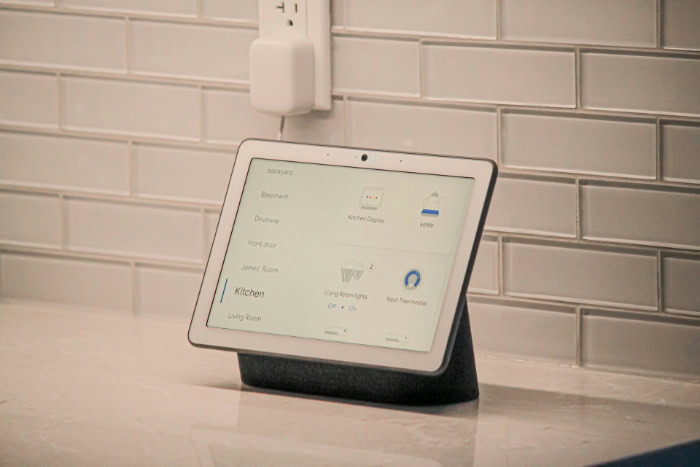
Smart displays, primarily the Nest Hub and Nest Hub Max, add a visual dimension to the voice assistant. These devices feature touchscreens that allow users to view recipes, watch streaming content, and see visual controls for lights and thermostats.
The interface shifts throughout the day, showing news in the morning and soothing images at night. The Nest Hub also includes Sleep Sensing technology, which uses radar (Soli technology) to track sleep patterns from the bedside table without requiring the user to wear a specialized watch or tracker.
Climate Control
The device that launched the brand, the Nest Learning Thermostat, remains a central part of the lineup. Its primary claim to fame is its ability to learn the household's schedule.
After a week of manual adjustments, the thermostat begins to build a schedule automatically, turning the heat down when the house is empty and warming it up before residents return. It focuses heavily on energy efficiency, often guiding users to eco-friendly temperatures to save money on utility bills.
Remote sensors can also be placed in different rooms to ensure the temperature is balanced throughout the home, not just in the hallway where the thermostat sits.
Security and Safety
Google Nest offers a comprehensive suite of security products. This includes the Nest Cam series, which covers indoor, outdoor, battery-powered, and wired options.
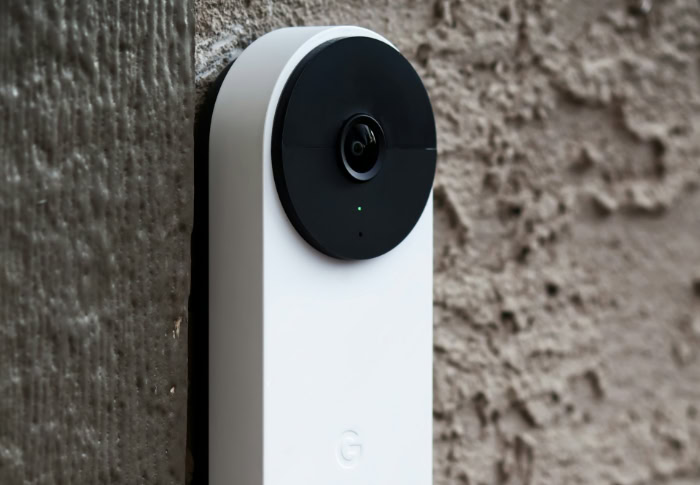
These cameras feature onboard intelligence that can differentiate between people, animals, and vehicles, reducing false alarms. The Nest Doorbell adds another layer, offering package detection and facial recognition to announce familiar visitors.
For internal safety, Nest Protect serves as a smart smoke and carbon monoxide detector that speaks to alert you of danger and sends notifications to your phone. The ecosystem also integrates with the Nest x Yale Lock, a keyless deadbolt that allows for secure entry via passcodes or the app.
Connectivity and Wi-Fi
To ensure all these devices stay online, Google offers Nest Wifi. This is a mesh internet system designed to replace traditional routers.
Instead of a single box trying to broadcast a signal to the entire house, a mesh system uses multiple access points to blanket the home in Wi-Fi. This eliminates dead zones and ensures that cameras in the backyard or speakers in the attic maintain a strong connection.
Interestingly, the Nest Wifi points also double as smart speakers with Google Assistant built-in, adding functionality to the networking hardware.
Functionality and Use Cases

Owning Google Nest hardware changes how a household functions on a daily basis. The true value of these devices is found in their ability to automate mundane tasks and streamline communication between family members.
Once the sensors and speakers are in place, the system transitions from a collection of plastic gadgets into a cohesive utility that manages the home environment, entertainment, and interpersonal connection.
Home Automation and Control
The most immediate benefit of the system is the ability to control the physical environment through voice commands or the app. While Google makes its own hardware, the platform serves as a universal remote for thousands of other devices.
You can ask Google to dim Philips Hue lights, turn on a TP-Link smart plug connected to a coffee maker, or lower Hunter Douglas motorized blinds. This centralization means you do not need to open five different apps to shut down the house for the night.
The “Routines” feature takes this concept further by chaining multiple actions to a single trigger phrase. Instead of issuing separate commands for every device, you can set up a “Good Morning” routine.
When you say this phrase, the system can simultaneously turn on the bedroom lights, read the weather forecast, play the morning news, and adjust the thermostat to a comfortable daytime temperature. These custom scripts allow the technology to adapt to your specific habits rather than forcing you to adapt to the interface.
Communication and Intercom
Smart speakers effectively function as a modern intercom system. The “Broadcast” feature allows a user to record a short voice message on their phone or one speaker, which is then played instantly on every other Google Nest device in the house.
This eliminates the need to shout up the stairs to call everyone for dinner. If specific rooms need to be reached, the message can be targeted to just those speakers.
Beyond internal communication, the devices support external voice and video calls through Google Meet. Smart displays are particularly useful here.
They allow for hands-free video chatting while cooking or working. The camera on the Nest Hub Max, for instance, can frame the user automatically, panning and zooming to keep them in view as they move around the kitchen.
Media and Entertainment
Audio distribution is a major component of the Nest experience. The system supports multi-room audio, allowing you to group speakers together.
You can have the same playlist syncing perfectly across the living room, kitchen, and bedroom, effectively filling the entire home with music. Alternatively, different streams can play in different rooms if family members have separate tastes.
The underlying technology for this is “Casting.” Originally developed for the Chromecast dongle, this protocol is built into Nest speakers and displays.
It allows you to tap a button on your smartphone within apps like Spotify, YouTube Music, or Pocket Casts to send the audio directly to the superior speakers of the Nest device. This hands-off approach keeps your phone free for other tasks without interrupting the music.
Ecosystem, Compatibility, and Privacy

A smart home ecosystem is only as good as the devices it supports and the trust it maintains with the user. Google has spent years building partnerships to ensure that its platform works with as many third-party products as possible.
Simultaneously, the company has had to address growing concerns regarding data privacy, implementing both physical and software-based controls to give users command over their personal information.
“Works with Google Home” and Matter
When shopping for smart home gear, the “Works with Google Home” badge indicates that a product will integrate seamlessly with your Nest setup. This program includes a vast array of brands, from LiFX lightbulbs to Arlo security cameras.
It ensures that you are not locked into buying only Google-branded hardware to expand your system.
Google is also a major proponent of “Matter,” a newer industry standard designed to make smart home devices universally compatible. Matter allows devices from different ecosystems to talk to each other locally, without relying entirely on the cloud.
This results in faster response times and greater reliability. A Nest thermostat, for example, can act as a controller for Matter-enabled devices, bridging the gap between different brands and simplifying the setup process for new accessories.
Subscription Services and Nest Aware
While most Nest devices function well out of the box, Google offers a paid subscription service called Nest Aware to unlock advanced capabilities. Without a subscription, cameras typically offer only a limited view of past events, often just the last three hours of snapshots.
Nest Aware expands this functionality significantly. It provides extended video history, allowing users to review footage from days or weeks prior.
It also enhances the intelligence of the alerts. Instead of notifying you about every motion, the system can distinguish between a person, a package, or a stray cat.
Furthermore, Nest Aware enables speakers to listen for critical sounds like breaking glass or the alarm of a standard smoke detector, sending an alert to your phone if these emergency noises are detected while you are away.
Privacy and Data Security
Given that these devices include microphones and cameras, privacy is a primary concern for many users. Google has introduced physical hardware switches to address this.
Smart speakers have a dedicated mute switch that physically disconnects the microphone circuitry, indicated by orange LEDs. Smart displays often include a physical shutter that slides over the camera lens, ensuring no video can be captured.
On the software side, Google provides a central dashboard for data management. Users can review their interaction history and listen to the audio snippets recorded after the “Hey Google” wake word.
The system offers options to delete this data manually or set it to auto-delete after a specific period, such as 3 or 18 months. This transparency allows users to decide exactly how much information they are comfortable sharing with the company to improve the AI's accuracy.
Conclusion
Google Nest is more than just a label for smart speakers. It represents a comprehensive hardware suite that relies on Google Assistant to automate daily routines and simplify household management.
From adjusting the thermostat to locking the front door, these devices function collectively to create a living space that actively responds to your voice and presence.
The real value of this technology appears when you move beyond a single device. A standalone speaker is useful for checking the weather, yet a fully connected ecosystem offers a significantly higher level of utility.
When cameras, displays, and sensors communicate with one another, the home feels less like a collection of gadgets and more like a unified system that proactively helps you manage your day.
Deciding if this specific ecosystem is right for you depends largely on your existing digital habits. If you already rely on Google Maps, Calendar, and Android phones, Nest is the logical extension of that experience.
However, those who prioritize Apple products or prefer the specific skill sets of Amazon Alexa might find those platforms better suited to their needs. The most effective smart home is simply the one that integrates most naturally with the tools you already use.
About the Author: Elizabeth Baker


