
What Is Microsoft Edge? More Than Just a Chrome Clone

For years, the blue “e” icon on your desktop was often just a tool used to download Google Chrome. Microsoft Edge has changed that narrative completely.
It is now a robust, cross-platform web browser developed by Microsoft that runs seamlessly on Windows, macOS, iOS, and Android.
Unlike the notorious Internet Explorer of the past, the modern Edge is built on the Chromium open-source project. Because it shares this powerful foundation with Google Chrome, it delivers the fast speeds and broad website compatibility that modern users demand.
You might still wonder if it is actually worth using or if you should stick to your current habits. This guide explains exactly what the browser offers, how it stands apart from the competition, and why it comes pre-installed on your device.
Evolution and Architecture
Microsoft has spent the last decade aggressively reworking how its browser operates to shed the negative reputation associated with its predecessors. The current version of Microsoft Edge bears little resemblance to the browsers that came before it.
By abandoning its proprietary technology in favor of industry standards, Microsoft created a tool that prioritizes compatibility and user experience over exclusivity.
Moving Past Internet Explorer
For a long time, Internet Explorer was the default gateway to the internet for millions of users, yet it became infamous for slow speeds and security vulnerabilities. Microsoft initially attempted to replace it with a browser simply called “Microsoft Edge” (now referred to as Legacy Edge), which used a unique engine known as EdgeHTML.
While it was faster than Explorer, it struggled to display many modern websites correctly. Microsoft eventually made the difficult choice to discontinue Legacy Edge entirely.
The current browser serves as the permanent replacement for both Internet Explorer and the old version of Edge, ending the era of incompatibility that frustrated Windows users for years.
The Chromium Advantage
The most significant shift in the browser's history was the adoption of the Chromium open-source project. This is the same underlying code that powers Google Chrome.
For the average user, “Chromium-based” means that websites work exactly as they are intended to. In the past, developers optimized their sites primarily for Chrome, leaving other browsers with broken layouts or non-functioning buttons.
Now that Edge runs on the same engine, pages load with the same speed and visual accuracy found in Chrome. This foundation allows the browser to adhere to the latest web standards immediately, ensuring that no user is left behind when web technologies advance.
Available on All Devices
A major limitation of Microsoft’s older browsers was their restriction to the Windows operating system. The modern Edge breaks this pattern by being fully cross-platform.
It is available for download on macOS, iOS, Android, and even Linux. This expansion allows for true continuity.
A user can start reading an article on a Windows laptop and pick up exactly where they left off on an iPhone or an Android tablet. Because the browser is no longer tied strictly to Windows updates, Microsoft can release new features and security patches to all these platforms simultaneously.
Productivity and Interface Tools
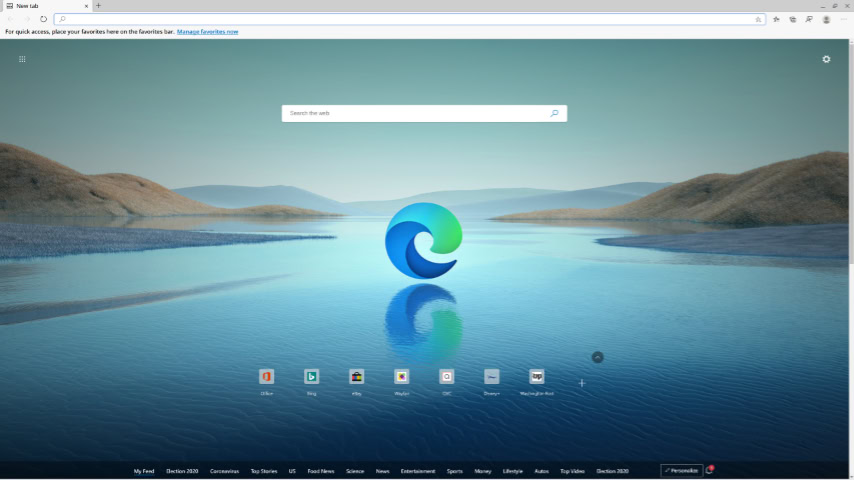
Modern web browsing often involves juggling dozens of open tabs and scattering information across multiple sources. To address this, Edge includes several built-in interface options designed to streamline how users organize their digital workspace.
These tools focus on reducing visual clutter and helping users manage information without needing third-party extensions.
Vertical Tabs and Layout
Most browsers arrange tabs in a horizontal strip across the top of the window, but this design becomes problematic when too many tabs are open. The titles disappear, and the tabs shrink to tiny icons.
Edge offers a native “Vertical Tabs” feature that moves the tab strip to the left side of the screen. This layout utilizes the extra width found on modern widescreen monitors.
It allows users to see the full title of each page, making it much easier to distinguish between multiple open documents or search results.
Collections for Research
While standard bookmarks are useful for saving favorite sites, they are often poor tools for active research. The “Collections” feature provides a more dynamic way to gather information.
Users can drag and drop images, text snippets, and hyperlinks into a dedicated side panel. This creates a visual group of content that is easy to export to Word or Excel.
It is particularly useful for students writing papers or shoppers comparing products across different retailers, as it keeps related items together without cluttering the bookmark bar.
Distraction-Free Reading
Many websites are crowded with flashing advertisements, pop-up videos, and confusing sidebars that make reading difficult. The “Immersive Reader” mode solves this by stripping away everything except the main content.
With a single click, the browser reformats the page into clean, easy-to-read text. Users can customize the background color, adjust the font size, and even have the text read aloud to them.
This tool is built directly into the address bar and activates whenever the browser detects an article.
Split Screen and PDF Editing
Multitasking usually requires opening two separate browser windows and manually resizing them. Edge simplifies this with a native split-screen function that allows users to view two tabs side-by-side within a single window. This is ideal for comparing documents or writing an email while referencing a web page.
Additionally, the browser includes a robust PDF reader that goes beyond simple viewing. It allows users to highlight text, draw directly on the document, and fill out forms, often eliminating the need for dedicated PDF software.
Performance, Security, and AI Integration

A browser must be more than just feature-rich; it needs to be fast, secure, and intelligent. Microsoft has integrated advanced resource management and artificial intelligence directly into the interface to compete with the market leaders.
These additions aim to protect user data and ensure the computer runs smoothly, even when dozens of tabs are open.
Managing System Resources
Web browsers are notoriously demanding on computer memory (RAM) and battery life. Edge combats this reputation with “Efficiency Mode” and “Sleeping Tabs.”
When a user has not interacted with a tab for a set period, the browser puts that tab to sleep, releasing system resources for other active applications. This significantly reduces the strain on the computer's memory.
For laptop users, these optimizations extend battery life by minimizing the power consumption of background processes, a distinct advantage over competitors that often drain resources aggressively.
Built-In Safety Measures
Security is handled through a multi-layered approach involving “Tracking Prevention” and “Microsoft Defender SmartScreen.” Tracking prevention gives users control over how they are monitored across the web, offering three distinct levels: Basic, Balanced, and Strict.
The Balanced setting, which is on by default, blocks trackers from sites the user has not visited. Meanwhile, SmartScreen acts as a vigilant gatekeeper. It analyzes web pages in real-time to identify and block potential phishing scams or malicious software downloads, alerting the user before any damage can occur.
Copilot Assistance
The most recent major addition to the browser is the deep integration of artificial intelligence through Microsoft Copilot. Located in a dedicated sidebar, this AI assistant allows users to interact with the web in new ways.
A user can ask Copilot to summarize a long article, generate a draft for an email, or answer complex questions without ever leaving their current tab. This integration transforms the browser from a passive window into an active assistant that helps process and generate information on the fly.
Compatibility and the Chrome Connection

Switching browsers used to feel like a risky move that could result in broken websites and lost tools. Because Microsoft Edge is built on the same Chromium engine as Google Chrome, these concerns are largely a thing of the past.
The shared architecture ensures that the transition is seamless. Users do not need to relearn how the web works or sacrifice their favorite utilities just to try a different browser.
Access to Chrome Extensions
One of the biggest hesitations users face when leaving Google Chrome is the fear of losing their extensions. Password managers, ad blockers, and grammar checkers are essential parts of the daily workflow.
Microsoft Edge solves this by offering full support for extensions from the Chrome Web Store. While Microsoft maintains its own curated library of add-ons, the browser does not restrict users to that marketplace.
You can navigate directly to the Chrome Web Store, search for your favorite tools, and install them just as you would on Chrome. This compatibility means that virtually every plugin created for Google’s browser works perfectly on Edge without any modification.
Moving Data from Other Browsers
Microsoft has streamlined the setup process to ensure that new users do not have to start from scratch. When you launch the browser for the first time, it offers a straightforward migration tool designed to pull data from your previous browser.
This includes importing bookmarks, saved passwords, payment information, and browsing history. The process takes only a few seconds and results in a familiar environment immediately.
You do not need to manually export files or re-enter sensitive login details. The browser effectively mirrors your old digital setup, allowing you to pick up your work instantly.
Consistent Website Performance
In the era of Internet Explorer, users frequently encountered websites that looked broken or failed to load because developers only tested them on Chrome. The move to a Chromium foundation has eliminated this frustration.
Since Edge renders code exactly the same way Chrome does, websites behave identically on both platforms. Banking portals, streaming services, and complex web applications no longer distinguish between the two browsers.
This rendering consistency guarantees that if a site works on Google Chrome, it will work on Microsoft Edge, removing the compatibility headaches that plagued Microsoft’s earlier attempts at web browsing.
System Integration and User Management

Microsoft Edge is not merely a standalone application installed on your computer. It serves as a core component of the Windows ecosystem.
Microsoft has woven the browser deeply into the operating system to ensure stability and seamless performance. This deep integration offers significant benefits for synchronization and updates, but it also creates friction for users who prefer alternative software and find the browser difficult to remove.
Integration with Windows
The browser functions as an extension of the Windows operating system itself. Unlike third-party browsers that rely on their own background update services, Edge often updates directly through the Windows Update mechanism.
This ensures that security patches are applied automatically alongside system improvements. Furthermore, the browser is hardwired to handle specific system tasks.
When you click a link in the Windows Help menu, open a result from the Taskbar search, or interact with widgets in the Start Menu, the system automatically routes these requests through Edge. This occurs even if you have set a different browser, such as Firefox or Chrome, as your default for general web surfing.
Syncing Across Devices
To maximize the utility of the browser, Microsoft encourages users to sign in with a Microsoft Account. Doing so activates a robust synchronization engine that bridges the gap between different devices.
A user can look up a recipe on their Windows desktop and have that history instantly available on their iPhone or Android device. This syncing capability extends to saved passwords, favorites, and open tabs.
It provides a cohesive experience similar to the Apple ecosystem, ensuring that your digital identity follows you regardless of the hardware you are currently using.
Default Settings and Uninstallation Issues
A frequent point of confusion is the difficulty associated with uninstalling the browser. Because Edge powers various web-based components of the Windows interface, Microsoft does not provide a standard “Uninstall” button in the Settings menu.
Removing the files forcibly can sometimes lead to system instability or broken search features. Additionally, users often encounter prompts after system updates asking them to restore Edge as the default browser.
Microsoft positions this as a “recommended” setting for optimal performance and battery life, though many users view it as an aggressive tactic to maintain market share. This persistence highlights the browser's role as an unremovable pillar of the modern Windows experience.
Conclusion
Microsoft Edge has successfully redefined its identity. It is no longer just a placeholder icon or a utility used solely to download a different browser.
It has matured into a fast, secure, and versatile application that stands on its own merits. By combining the universal compatibility of the Chromium engine with unique innovations like vertical tabs and AI integration, it offers a browsing experience that rivals and often exceeds the capabilities of Google Chrome.
It has proven itself to be a serious piece of software rather than a lingering relic of the Internet Explorer era.
While Microsoft’s persistence in promoting the browser can sometimes feel intrusive, dismissing the software based on its aggressive marketing would be a mistake. The tangible benefits it provides are hard to ignore.
It manages computer memory more efficiently than many competitors, helping to extend battery life on laptops while keeping the system responsive. The addition of built-in tools for research and distraction-free reading further adds to its value.
If you have been ignoring the browser out of habit or past frustration with Microsoft products, it might be time to reconsider. Microsoft Edge delivers a polished, modern experience that justifies its place on your taskbar.
About the Author: Julio Caesar


