
32GB vs. 64GB RAM: Which Capacity Do You Actually Need?

System memory requirements have shifted dramatically, finally stripping 16GB of its long-held title as the undisputed standard for power users. Today, the real hardware debate lies strictly between 32GB and 64GB of RAM.
The core dilemma for any PC builder is simple. You must find the exact sweet spot that maximizes daily performance while avoiding a massive overspend on unnecessary capacity.
The Mechanics of RAM Capacity and System Performance
Before spending a premium on large memory kits, you must first recognize how capacity physically interacts with your computer. System memory functions strictly as a temporary workspace for active tasks.
It holds the data your processor needs immediately, preventing the system from fetching information from much slower permanent storage drives. Grasping this basic mechanical relationship makes it significantly easier to diagnose performance issues and choose the correct capacity for your specific daily tasks.
The Concept of Diminishing Returns
The easiest way to visualize system memory is to compare it to a physical office desk. If your desk is too small, your paperwork stacks up and spills over.
You are forced to constantly shuffle files in and out of a filing cabinet to get any work done, which slows down your productivity. Upgrading to a larger desk solves this problem by giving you enough space to lay out all your active documents.
However, if you upgrade to a massive boardroom table but still only work with the same small stack of papers, you will not work any faster. The extra surface area simply sits empty.
RAM works exactly the same way. Unused memory provides absolutely zero performance benefit, meaning that installing 64GB of RAM in a system that only ever actively uses 24GB is a waste of hardware.
How Operating Systems Manage Memory
Modern operating systems like Windows 11 and macOS are incredibly efficient at utilizing available memory. They dynamically allocate RAM based on current demand.
They will proactively cache frequently used applications to make them launch faster. If you launch a heavy program and exceed your physical RAM limit, the operating system intervenes.
It utilizes a process called page filing or swap memory. The OS temporarily moves background data from your RAM onto your storage drive to free up space for active tasks.
Even with the fastest NVMe SSDs on the market, storage drives are drastically slower than physical RAM. When your computer is forced to rely on page filing, you will immediately experience severe system slowdowns, stuttering, and delayed application responses.
Identifying True Hardware Bottlenecks
Many users incorrectly assume that a sluggish PC needs a memory upgrade. Before making a purchase, you should monitor your actual system resource consumption.
Open Task Manager on Windows or Activity Monitor on macOS during your heaviest typical workload. Leave your most demanding game or editing software running while you check your performance graphs.
If your memory usage sits at 90 percent or higher, a RAM upgrade will noticeably improve your experience. Conversely, if your memory usage hovers around 50 percent but your CPU or disk usage is pinned at maximum capacity, buying more RAM will not fix your performance issues.
Your CPU or storage drive is the true bottleneck limiting your system.
Gaming, Streaming, and Everyday Multitasking

For years, 16GB was the absolute ceiling for a high-performance gaming computer. Game engines have recently scaled up their complexity, featuring massive open worlds, high-resolution textures, and heavy background scripts that demand far more temporary workspace.
The way modern users interact with their computers has also shifted. Gamers rarely play in isolation anymore, preferring dynamic setups with secondary monitors and multiple background applications.
Standard AAA Gaming
Modern AAA gaming is the primary reason the 16GB standard has become obsolete. Titles with massive environments and uncompressed textures will easily consume 12GB to 14GB of memory entirely on their own.
Once you factor in the 4GB to 6GB required just to keep Windows 11 running smoothly, a 16GB system is instantly pushed into page filing territory. For any standard high-end gaming machine today, 32GB is the optimal capacity.
It provides enough overhead to comfortably load massive game assets without forcing the operating system to juggle background data.
The Outliers: Simulations and Mods
While 32GB handles almost all standard gaming seamlessly, specific outliers absolutely justify the jump to 64GB. Large-scale simulations like Microsoft Flight Simulator track immense amounts of real-time geographical data and physics calculations, which can quickly saturate 32GB of memory.
Highly modded games present another massive resource drain. Titles like Cities: Skylines can easily consume 40GB or more if you load them with thousands of custom community assets, high-resolution building models, and complex traffic management scripts.
For simulation enthusiasts and heavy modders, 64GB prevents the severe stuttering associated with asset loading.
The Heavy Multitasker
Most users do not close every single application before launching a game. The modern heavy multitasker typically utilizes a dual-monitor setup.
While a demanding game runs on the primary screen, the secondary screen might host broadcasting software like OBS Studio, a voice chat client like Discord, and a hardware-accelerated web browser loaded with dozens of active tabs. Browsers are notorious memory hogs, and video broadcasting software requires significant overhead to encode footage on the fly.
In these complex scenarios, 32GB offers a comfortable buffer. However, streamers who rely on heavy visual overlays, instant replay buffering, and multiple camera feeds will often push past that limit, making 64GB a safer bet for uninterrupted broadcast stability.
Content Creation and Professional Workflows

Professional creative workloads operate on a completely different scale compared to consumer gaming. In professional environments, system memory translates directly into saved time.
Running out of RAM during a client project causes software crashes, corrupted save files, and severe rendering delays. For these users, over-allocating memory is a basic necessity to maintain a stable, profitable workflow.
High-Resolution Video Editing
Video editing software handles massive amounts of uncompressed data. Applications like Adobe Premiere Pro, After Effects, and DaVinci Resolve load video files directly into memory to allow seamless timeline scrubbing.
Editing standard 1080p footage runs perfectly fine on 32GB. Once you transition to 4K or 8K timelines, multiple camera angles, and heavy color grading nodes, that memory is consumed instantly.
Motion graphics work is even more punishing. After Effects utilizes RAM preview to playback animations in real time, and it will happily consume every gigabyte of memory installed in your system.
For high-resolution editors and motion graphic artists, 64GB is universally considered the minimum starting point.
3D Modeling and Rendering
Working with 3D software requires enough system memory to hold complex geometry, massive polygon counts, and high-resolution textures simultaneously. Programs such as Blender, Maya, and AutoCAD demand incredible amounts of RAM just to keep the application viewport stable while the artist works.
If the scene complexity exceeds the physical memory capacity, the software will lag, freeze, or crash entirely during active modeling. Furthermore, during the final rendering process, the CPU requires immediate access to all scene assets.
Having 64GB or more ensures that complex architectural visualizations and detailed character models can be manipulated and rendered without relying on sluggish storage drives.
Software Development and Virtualization
Software developers running advanced local environments cannot compromise on memory capacity. Modern programming workflows often require running multiple Virtual Machines, massive local databases, and containerized applications through Docker.
Each of these virtual environments requires its own dedicated block of system RAM to function. A developer might allocate 8GB to a Linux VM, 16GB to a local testing server, and 8GB to a database, leaving very little room for the host operating system and code editors.
Compiling massive codebases also benefits heavily from abundant memory. For virtualization and enterprise-level software development, 64GB is an absolute necessity to run multiple isolated environments simultaneously.
Hardware Configurations, Speeds, and System Stability
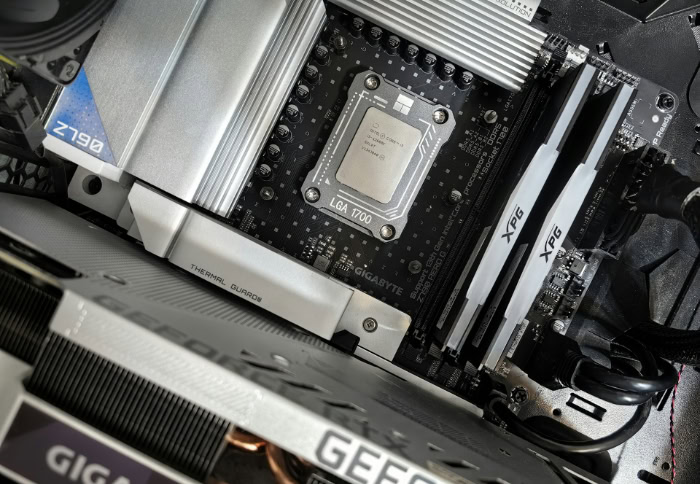
Upgrading your system memory involves more than simply snapping a few sticks into the motherboard. The physical arrangement of your hardware directly impacts how fast your computer can access stored data.
Modern processors are highly sensitive to memory configurations, and pushing your capacity to 64GB can introduce unexpected technical hurdles. Careful planning is required to ensure your high-capacity setup operates at its advertised speeds without causing system crashes.
Dual-Channel Versus Quad-Slot Configurations
Most consumer processors operate using dual-channel memory architecture. This means the CPU communicates most effectively when data flows through two dedicated parallel lanes.
Purchasing a two-stick kit, such as two 16GB or two 32GB modules, aligns perfectly with this design. Filling all four available slots on a motherboard forces the processor's memory controller to work much harder to manage the electrical signals across four separate physical modules.
While a four-stick configuration looks visually impressive, it introduces additional stress that can severely limit how fast the memory can run.
The DDR5 Speed Penalty
The transition to current-generation DDR5 memory has made four-slot configurations especially problematic. DDR5 operates at incredibly high frequencies, making the electrical signaling far more sensitive to physical interference.
If you attempt to run 64GB by combining four 16GB sticks, the motherboard will often struggle to maintain system stability. To prevent the computer from crashing, the motherboard will automatically drop the memory speed well below the advertised rates.
You might purchase a blazing fast 6000MHz kit, only to find your system forces it down to a sluggish 4000MHz just to boot properly. For high-speed DDR5 setups, using exactly two modules is practically a strict requirement.
Matching Memory to the Motherboard and Processor
Before purchasing any large memory kit, you must verify compatibility with your specific hardware. Every motherboard manufacturer provides a Qualified Vendor List on their official website.
This document details the exact memory models that have been physically tested and verified to work on that specific board. Furthermore, the processor itself dictates the maximum memory speed it can comfortably handle.
Pairing an ultra-fast 64GB kit with a mid-range processor often results in frustrating boot loops or blue screen errors. Cross-referencing the Qualified Vendor List ensures your chosen memory will operate at peak performance right out of the box.
Budget Allocation and Smart Purchasing Strategies

Building or upgrading a personal computer is fundamentally an exercise in resource management. Every dollar spent on excessive memory capacity is a dollar taken away from other crucial components.
Creating a balanced machine requires careful budget allocation to ensure no single part drastically outpaces the rest of the system. Analyzing the true cost of a memory upgrade prevents you from wasting funds that could be better spent elsewhere.
The Opportunity Cost of a 64GB Upgrade
A high-quality 64GB memory kit carries a significant price premium over a standard 32GB kit. You must evaluate the opportunity cost of that extra expense.
If you are strictly gaming and doing everyday multitasking, the extra 32GB will likely sit completely unused. Taking the money saved by sticking with 32GB and applying it toward a higher-tier graphics card or a faster processor will yield a massive, highly noticeable improvement in frame rates and overall system responsiveness.
Spending heavily on unnecessary RAM while settling for a weaker graphics card is a common mistake that severely cripples gaming performance.
The Start Small Upgrade Strategy
For users unsure of their exact memory requirements, adopting a staggered upgrade path is a smart financial strategy. You can purchase a standard 32GB kit consisting of two 16GB modules, leaving the remaining two motherboard slots completely open.
This allows you to monitor your system performance during your heaviest workloads over a few months. If you consistently max out your memory while editing video or running complex software, you can easily purchase a matching secondary kit later.
This approach protects your initial budget while keeping the door open for future expansion. Just remember that older DDR4 systems handle four simultaneous sticks much better than modern DDR5 setups, so factor your motherboard generation into this plan.
Evaluating Upfront Costs Versus Total Machine Value
The amount you spend on memory should always scale proportionally with the total value of your computer build. Installing a premium 64GB kit into a budget-tier machine is a massive financial misstep.
A low-end processor and a slow storage drive will severely bottleneck your system long before you ever manage to consume 64GB of temporary workspace. As a general rule, heavy investments in maximum memory capacity should be reserved for high-end workstations and enthusiast-level gaming rigs.
Balancing your budget ensures every component works in harmony to deliver the best possible computing experience.
Conclusion
Choosing between 32GB and 64GB of RAM ultimately comes down to accurately assessing your daily software demands. For the vast majority of PC builders, 32GB is the perfect capacity.
It provides plenty of overhead for the most demanding modern games, heavy web browsing, and standard dual-monitor multitasking. Stepping up to 64GB only makes sense when your specific workload will actively consume that extra physical space.
The dedicated gamer should confidently stick to 32GB and funnel their remaining budget into a better graphics card. The hybrid user handling light video editing or streaming alongside gaming can usually thrive on 32GB, but should ideally consider a motherboard with room to expand.
Finally, specialized professionals working with 4K video timelines, complex 3D rendering, or multiple virtual machines must view 64GB as a mandatory baseline to ensure a stable, crash-free workflow.
Frequently Asked Questions
Will upgrading to 64GB RAM increase my gaming FPS?
Upgrading to 64GB of RAM will not noticeably increase your frame rates unless you are currently running out of memory. If your system already has 32GB, games have plenty of workspace. Upgrading your graphics card or processor is the best way to directly boost your gaming performance.
Is it safe to mix different brands of RAM?
Mixing different brands or speeds of RAM is highly discouraged. Doing so often leads to system crashes, blue screens, or forced speed reductions. You should always buy matching kits from a single manufacturer to ensure your memory modules share the exact same timings and electrical tolerances.
Do I need 64GB of RAM for video editing?
You only need 64GB if you regularly edit 4K or 8K footage, utilize heavy visual effects, or work with complex color grading nodes. For standard 1080p video editing, 32GB is completely sufficient. Professional motion graphics software like After Effects will heavily benefit from the larger capacity.
Why is my DDR5 memory running slower than advertised?
Your motherboard will automatically drop RAM speeds to maintain system stability if you install four high-capacity DDR5 modules. The current generation of memory is highly sensitive to physical interference. Using a two-stick configuration is the most reliable way to achieve the maximum advertised speeds on your box.
Can I start with 32GB and upgrade to 64GB later?
You can start with a two-stick 32GB kit and add two more sticks later, provided your motherboard has four available slots. However, adding two more sticks to a modern DDR5 system might force the memory to run at slower speeds to keep the entire machine stable.
About the Author: Julio Caesar


