
Are CPU Coolers Universal? Sockets and Fit Explained
CPU coolers are not strictly universal components that fit every machine out of the box. While the direct answer is “no,” the reality offers more flexibility than you might expect.
Many modern aftermarket options feature adaptable mounting hardware designed to bridge the gap between different manufacturers and generations. This distinction is vital for anyone hoping to reuse a premium heatsink on a new build or switching from an Intel system to an AMD platform.
Compatibility rests on three specific pillars. You must ensure the mounting bracket matches your motherboard socket, the physical dimensions fit inside your case without blocking RAM, and the thermal performance rates sufficiently for your processor.
Ignoring these details often results in hardware that physically connects but fails to protect your investment.
The Socket Barrier: Why Motherboards Dictate Fit
The motherboard serves as the foundation for every component in a computer, and the specific connection point for the processor largely determines which cooling solutions are viable. This interface is strictly regulated by physical dimensions and architectural requirements that vary significantly between manufacturers and even between different product generations.
A cooler must align perfectly with the mounting holes surrounding the processor to apply the correct amount of pressure. Without this precise alignment, heat transfer fails, and the system cannot operate safely.
The CPU Socket
A socket acts as the physical and electrical bridge between the central processing unit and the main circuit board. While its primary function involves hundreds or thousands of pins transmitting data and power, the physical structure around these pins defines cooler compatibility.
As processors grow more complex and powerful, the number of pins often increases, forcing the socket to change shape or size. A larger surface area for the chip necessitates a wider spacing for the mounting holes.
This physical evolution means a cooling mechanism designed for a small, square socket from five years ago likely cannot stretch to cover a modern, rectangular high-performance chip.
Intel Versus AMD Architecture
The two dominant processor manufacturers utilize distinct engineering philosophies that prevent cross-compatibility without specific adapters. Intel typically uses a square arrangement for its mounting holes.
The distance between these holes varies by a few millimeters depending on the socket class, but the fundamental four-point layout remains consistent. AMD often employs a rectangular hole pattern.
Furthermore, many AMD motherboards come with a pre-installed backplate and plastic retention brackets that clip onto the cooler, whereas Intel systems traditionally require the user to install a backplate specific to the cooler. A heatsink built exclusively for an Intel hole pattern simply will not line up with the rectangular geometry of an AMD board.
Generational Shifts in Design
Socket designs rarely stay static for long. As technology progresses, engineers alter the physical footprint of the processor to accommodate new features.
A prime example is the transition from Intel’s long-running LGA 1151 to the newer LGA 1700. The newer socket is vertically longer and has a lower stack height.
This shift meant that older coolers not only lacked the correct hole spacing but also failed to make proper contact with the CPU surface because they were positioned too high. Similarly, AMD’s shift from AM4 to AM5 maintained the backplate compatibility but changed other variables.
These generational updates frequently render older mounting hardware obsolete, leaving users with a functional cooler that physically cannot attach to a new motherboard.
Stock Coolers Versus Aftermarket Solutions

When purchasing a new processor, the package often includes a basic thermal solution known as a stock cooler. These units differ fundamentally from the robust heat sinks sold separately by third-party specialists.
While both devices serve the same basic purpose of dissipating heat, their approach to compatibility separates them into two distinct categories.
Limitations of Boxed Coolers
Stock coolers are mass-produced to meet the minimum requirements of the specific processor they accompany. Manufacturers like Intel and AMD design these units with a singular focus: fitting the socket of that specific CPU generation.
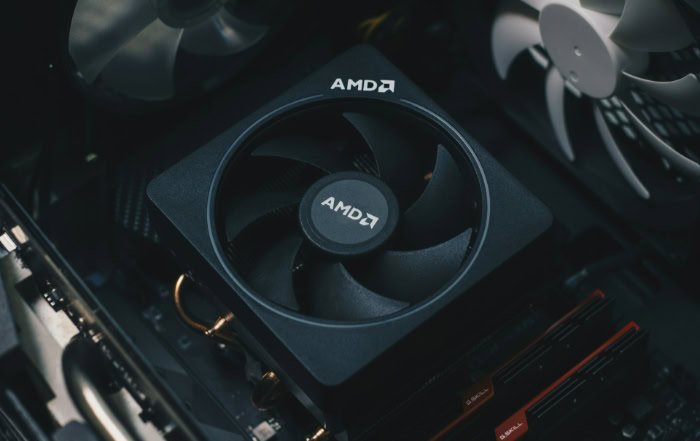
For instance, the “Wraith” coolers included with Ryzen processors utilize a mounting mechanism that works exclusively with AMD retention brackets. They lack the adjustable arms or interchangeable brackets necessary to fit an Intel board.
Because they are cost-effective inclusions meant for a specific product line, they are almost never interchangeable across brands and rarely work well across different generations without significant modification.
Versatility of Aftermarket Coolers
Third-party manufacturers such as Noctua, Corsair, and Cooler Master operate with a different business model. Their goal is to sell a single product that works for the widest possible audience.
To achieve this, aftermarket coolers typically ship with a broad assortment of mounting hardware. A single box might contain a backplate for Intel’s consumer sockets, another for their high-end desktop line, and a set of clips or screws for AMD’s various platforms.
This built-in adaptability makes aftermarket solutions a safer investment for long-term use. If you switch from one brand to another, chances are the necessary bracket is already sitting in the accessories box that came with your cooler.
Determining Your Cooler Category
Identifying whether you have a stock or aftermarket unit is usually straightforward. Stock coolers generally bear the logo of the CPU manufacturer on the fan hub and feature a compact, top-down airflow design.
They are often relatively small to ensure they fit in any standard case. Aftermarket coolers prominently feature the branding of a cooling company and often utilize a “tower” design with heat pipes and a side-mounted fan.
If your cooler required you to assemble a complex mounting bracket from a bag of assorted parts, it is almost certainly an aftermarket unit with multi-socket capabilities.
Mounting Hardware and Retrofitting Options

The metal components that secure a heatsink to the motherboard are just as critical as the fans and fins. This hardware must handle the weight of the cooler and apply firm, even pressure to the processor lid.
Since the holes in the motherboard are just empty pass-throughs, the actual gripping mechanism relies on a system of backplates, standoffs, and brackets.
The Role of Backplates and Brackets
A heavy cooler cannot simply screw directly into the fiberglass of a motherboard without causing damage or warping. To solve this, most systems use a backplate: a metal or rigid plastic frame that sits behind the motherboard.
Screws or standoffs pass through the board to connect this backplate to mounting brackets on the front side. This “sandwich” technique distributes the weight and structural stress.
Because the hole spacing changes between sockets, the backplate must match the specific motherboard layout exactly. If a backplate is designed for a 75mm hole spacing, it cannot physically fit a socket with 78mm spacing, rendering the entire mounting system incompatible.
Manufacturer Upgrade Kits
One major advantage of high-quality aftermarket coolers is the availability of retrofit kits. When a new socket type hits the market, reputable cooling brands often release updated mounting sets that can be purchased separately.
This allows a user to take a high-end cooler purchased five years ago and install it on a brand-new computer. These kits usually consist of a new backplate and the appropriate standoffs to account for any changes in height or hole position.
Before discarding an older premium cooler, checking the manufacturer’s website for a modern mounting kit can save significant money.
Proprietary Locking Mechanisms
Certain cooling solutions utilize unique locking methods that defy cross-compatibility. Intel stock coolers, for example, have historically used a push-pin design that snaps through the motherboard holes without a separate backplate.
Conversely, many AMD iterations rely on a cam-lever system that hooks onto plastic tabs pre-installed on the motherboard. These proprietary designs are often integrated directly into the cooler’s frame.
You cannot remove the push-pins from an Intel stock cooler and replace them with screws for an AMD board because the mounting arms are permanently molded into the plastic or metal housing. This integration is the primary reason why low-cost and stock coolers usually stay with the CPU they were bought with.
Physical Clearance: Will It Fit Inside the Case?
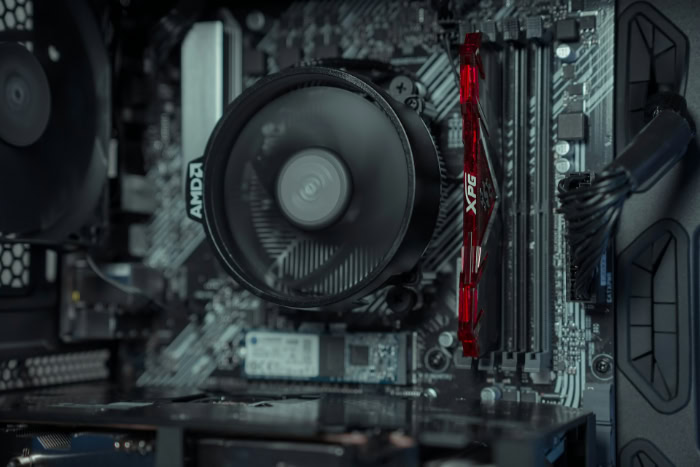
Confirming that a cooler mounts to your motherboard is only half the battle. The other half involves ensuring the assembled components actually fit inside the chassis.
Computer cases vary wildly in shape and size, and high-performance cooling solutions are often the largest internal components in a build. A cooler that creates a perfect seal on the processor is useless if it protrudes so far that the case side panel cannot close, or if it obstructs other vital slots on the motherboard.
Case Width and Cooler Height
The most common clearance issue involves the “Z-axis,” or the height of the cooler standing up from the motherboard. Air coolers, particularly high-end tower models, can be surprisingly tall.
If your computer case is narrow, the copper heat pipes or the top of the fan might extend past the edge of the chassis frame. This prevents the side panel from sliding back into place.
Every case manufacturer lists a specification for “Maximum CPU Cooler Height” in millimeters. You must compare this number against the height of your intended cooler.
A difference of even two millimeters can mean the difference between a completed build and a side panel that permanently bulges outward or refuses to close.
RAM and VRM Clearance
Width and depth are just as critical as height. Large air coolers often feature massive heatsinks that overhang the area surrounding the CPU socket.
This frequently creates a conflict with the memory slots. If you plan to use RAM sticks with tall, decorative heat spreaders or RGB lighting, a bulky CPU cooler might physically block you from installing them.
This interference also applies to the motherboard’s own power delivery cooling. Modern motherboards feature heat sinks over their Voltage Regulator Modules (VRMs).
If a CPU cooler is too wide at the base, it can collide with these motherboard heatsinks, preventing the cooler from making contact with the processor.
Radiator Support for Liquid Coolers
Liquid cooling introduces a different set of spatial challenges. While the block that sits on the CPU is small, the heat is moved to a radiator that must be mounted to the case frame.
Compatibility here depends on radiator size, which usually correlates to standard fan sizes like 120mm, 240mm, or 360mm. However, simply having mounting holes for fans does not guarantee a radiator will fit.
Radiators add significant thickness to the fans. A case might support two 120mm fans at the top, but once you add the radiator’s thickness, the assembly might hit the motherboard heatsinks or RAM modules.
Checking the case specifications for “Radiator Support” rather than just “Fan Support” is essential to avoid this frustration.
Thermal Compatibility: The Performance Trap

Ensuring a cooler fits physically is a matter of geometry, but ensuring it fits thermally is a matter of physics. Not all coolers are created equal, and the ability to bolt a cooler onto a motherboard does not guarantee it can handle the heat output of the processor installed there.
A budget cooler and a flagship processor might share the same socket type, but pairing them together often leads to disappointment and wasted potential.
Physical Fit Versus Functional Fit
The industry has standardized mounting mechanisms to the point where a twenty-dollar cooler can mechanically attach to a five-hundred-dollar processor. This creates a deceptive situation where a user assumes that because the parts connect, they are compatible.
This is incorrect. A low-profile cooler designed for a quiet office PC has a limited amount of metal and airflow capability.
If you attach this weak cooling solution to a high-performance workstation chip, the cooler will physically sit in place perfectly, but it will fail to move the heat away fast enough once the computer is turned on and put under load.
Thermal Design Power
To help users match coolers to processors, manufacturers use a metric called Thermal Design Power, or TDP. Measured in Watts, this rating roughly indicates the maximum amount of heat a component generates under typical loads.
If a CPU has a TDP of 125 Watts, you need a cooler rated to dissipate at least 125 Watts of heat. Ideally, you want a cooler with a higher rating to ensure quiet operation.
If you pair a 65-Watt cooler with a 125-Watt CPU, the math simply does not work.
The processor will generate heat faster than the cooler can release it into the air, leading to a rapid temperature spike.
The Risk of Undersizing
When a cooler cannot keep up with the processor’s heat output, the system engages a safety mechanism known as thermal throttling. The CPU intentionally slows itself down, reducing its speed and voltage to lower its temperature and prevent permanent damage.
This means you effectively lose the performance you paid for. An undersized cooler turns a fast, expensive processor into a slow, inefficient one.
In extreme cases, the system may shut down entirely to protect itself during intensive tasks like gaming or video rendering. Choosing a cooler with ample thermal headroom ensures your processor can run at its advertised speeds without hitting these safety limits.
Conclusion
Finding the right CPU cooler requires balancing three distinct requirements. You must first verify that the mounting hardware matches your motherboard socket, then confirm the physical dimensions fit within your case, and finally ensure the thermal capacity meets or exceeds your processor’s output.
Reusing an old cooler is often possible with aftermarket models that offer upgrade kits, but stock coolers generally belong to the specific CPU they came with. Always consult the official specification sheets for both your case and processor before installation.
Ignoring these specifications often leads to frustrated builds and wasted money, so taking the time to verify compatibility is the smartest step you can take.
Frequently Asked Questions
Can I use an old cooler on a new CPU?
It depends on the cooler brand and model. Many premium aftermarket coolers support new sockets if you purchase a separate mounting adapter kit from the manufacturer. However, older stock coolers or budget models usually lack this support and will not fit newer motherboard layouts.
How do I know if a cooler fits my case?
Check the “Maximum CPU Cooler Height” specification listed on your computer case manufacturer’s website. Compare this number to the height of the cooler you want to buy. You need at least one or two millimeters of extra clearance to ensure the side panel closes properly.
Do all CPU coolers come with thermal paste?
Most new coolers include thermal paste, either pre-applied to the copper base or as a small tube in the accessory box. If you are reusing an old cooler, you must clean off the old paste and apply a fresh layer to ensure proper heat transfer.
Is a liquid cooler always better than an air cooler?
Liquid coolers are not inherently better than high-end air coolers for every situation. While large liquid coolers handle extreme heat well, top-tier air coolers often outperform small liquid units and run quieter. Reliability is also higher with air coolers since they have fewer moving parts to fail.
What happens if my cooler is not strong enough?
If a cooler cannot handle your CPU’s heat output, the processor will reach unsafe temperatures quickly. The system will automatically lower the CPU speed to protect itself, which causes significant performance loss. In severe cases, the computer may shut down unexpectedly to prevent permanent hardware damage.
About the Author: Julio Caesar


