
How Long Do SSDs Last? Spot the Warning Signs

Solid-state drives have become the standard storage solution for modern computers, holding everything from cherished family photos to critical work documents. However, these drives have a finite lifespan, meaning your valuable data is eventually at risk if you fail to monitor their health.
For the average consumer, a modern SSD will usually outlast the computer it sits in, often running reliably for five to ten years. Yet, the exact duration depends heavily on specific usage patterns and the wear mechanisms of flash memory.
Key Takeaways
- Modern consumer solid-state drives typically last between five and ten years, heavily depending on how much data you write to them daily.
- Terabytes Written (TBW) is the primary metric manufacturers use to rate drive endurance, indicating the maximum data you can safely write before degradation occurs.
- Leaving 10 to 20 percent of your drive capacity completely empty allows the controller to manage wear leveling and extends the life of the flash memory.
- Monitoring S.M.A.R.T. attributes like Percentage Used and Bad Block Count provides early warnings before a drive suffers a complete failure.
- Running disk defragmentation on solid-state media causes massive amounts of unnecessary wear without offering any performance benefits.
SSD Lifespan Expectations and Core Metrics
Manufacturers evaluate solid-state drives using specific endurance ratings to help users anticipate how long their storage will remain reliable. Since flash memory degrades predictably with use, these metrics provide a reliable framework for estimating hardware failure.
Average Lifespan Expectations in Years
Under normal usage conditions, a modern consumer or enterprise solid-state drive is estimated to last between five and ten years. However, this expected duration fluctuates heavily based on the intensity of the workload applied to the storage.
A casual desktop user who primarily browses the internet and edits basic documents writes very little data, allowing the drive to easily reach the ten-year mark. Gamers experience moderate drive wear due to large game installations and regular updates.
Conversely, users engaged in heavy content creation, such as editing 4K video or rendering 3D graphics, write massive amounts of data daily. This intense workload accelerates degradation and significantly shortens the operational life of the drive.
Terabytes Written (TBW) and Drive Writes Per Day (DWPD)
Terabytes Written (TBW) serves as the primary endurance rating for solid-state storage. This metric indicates the total amount of data you can write to the drive before the memory cells degrade to the point of potential failure.
A higher TBW rating means the drive can endure more write operations over its lifespan. For enterprise and workstation environments, manufacturers often use Drive Writes Per Day (DWPD).
This metric represents how many times the entire capacity of the drive can be written per day over the warranty period. You can calculate your daily write limit by multiplying the DWPD by the total drive capacity.
For example, a 1TB drive with a rating of 0.5 DWPD can safely handle 500 gigabytes of new data every single day for the duration of its warranty.
Mean Time Between Failures (MTBF) and Manufacturer Warranties
Mean Time Between Failures (MTBF) provides a statistical measure of hardware reliability. Expressed in hours, MTBF estimates the average time a large population of identical drives will operate before a non-wear-related failure occurs.
While a rating of 1.5 million hours sounds massive, it simply indicates a very low probability of sudden failure within a large batch of drives during their expected service life. Standard manufacturer warranties typically last either three or five years and correlate directly to the drive’s endurance thresholds.
The warranty expires whichever comes first: the time limit in years or the maximum TBW threshold. Premium drives with higher endurance ratings almost always feature the longer five-year warranty protection.
Mechanisms of SSD Wear and Degradation

Flash memory relies on complex physical processes to store information electronically. The very act of saving files slowly damages the microscopic structures inside the drive.
NAND Flash Cell Architecture and Write/Erase Cycles
Solid-state drives store data within NAND flash memory, which consists of microscopic electronic cells structured in layers. Data is written to these cells by trapping electrons inside an insulated floating gate.
Over time, the process of writing and erasing data damages the microscopic insulator layer. This cycle is formally known as a Program/Erase (P/E) cycle.
As a drive undergoes thousands of P/E cycles, the insulating oxide degrades, making it harder for the cell to trap electrons reliably. It is important to note that merely reading data from a cell has almost no impact on its physical structure.
The degradation is strictly caused by the high voltage required to erase and rewrite information.
NAND Memory Types: SLC, MLC, TLC, and QLC
The physical endurance of a drive is heavily influenced by its specific NAND memory type. Single-Level Cell (SLC) memory stores one bit of data per cell, offering the highest performance and the greatest endurance.
However, SLC is highly expensive and offers low total capacity. Multi-Level Cell (MLC) stores two bits per cell, slightly reducing endurance while increasing storage density.
Most modern consumer drives utilize Triple-Level Cell (TLC) memory, which stores three bits per cell. TLC offers a strong balance of high capacity, reasonable cost, and acceptable endurance for average users.
Quad-Level Cell (QLC) pushes density further by storing four bits per cell. While QLC drives are highly affordable and offer massive storage capacities, they suffer from the lowest endurance ratings and slower write speeds.
Write Amplification Factor and Unpowered Data Retention
Solid-state drives often must write more physical data to the flash memory than the operating system initially requested. This phenomenon is called the Write Amplification Factor (WAF).
Because NAND flash can only be written in pages but must be erased in larger blocks, updating a small file often requires rewriting an entire block of data. A high WAF accelerates cell wear unnecessarily.
Additionally, degraded cells struggle with unpowered data retention. If a heavily worn drive is disconnected from a power source for an extended period, the electrons trapped in the floating gates slowly leak out.
Ambient temperature heavily affects this leakage rate. A drive stored in a hot environment will lose unpowered data much faster than one kept in a cool, climate-controlled room.
Reliability Comparison: SSDs vs. Hard Disk Drives (HDDs)

Comparing solid-state storage to traditional mechanical hard drives requires looking at both physical durability and specific failure patterns. Each technology behaves differently under physical stress and during end-of-life scenarios.
Physical Shock Resistance and Structural Durability
Hard Disk Drives operate using rapidly spinning magnetic platters and mechanical read/write heads that hover microscopic fractions of a millimeter above the disk surface. This mechanical vulnerability makes HDDs highly susceptible to physical shock.
A simple drop or even heavy vibration can cause the reading head to crash into the platter, instantly destroying data. Solid-state drives lack moving parts entirely.
Their data is stored in integrated circuits soldered directly to a printed circuit board. This modern design provides extraordinary resistance to drops, severe vibration, and physical impact, making them vastly superior for laptops and portable enclosures.
Drive Failure Behaviors and Read-Only Mode Transitions
When a mechanical hard drive begins to fail, it typically provides audible warnings. Users might notice gradual mechanical noise, loud clicking, or grinding sounds as the motor struggles or the read heads misalign.
In contrast, solid-state controller failures happen suddenly and usually without any prior acoustic warning. If the controller chip dies, the entire drive drops offline instantly.
However, if the drive reaches its maximum wear limit through standard P/E cycles, modern firmware will often trigger a fail-safe mechanism. The drive will transition into a Read-Only mode.
This state prevents any new data from being written and stops further cell damage, allowing the user to copy their existing files safely to a replacement drive.
Suitability for Cold Storage and Long-Term Data Archival
Long-term power-off stability highlights a distinct difference between the two storage types. Hard Disk Drives store information magnetically.
The magnetic charges on an HDD platter remain highly stable even when the drive sits unplugged on a shelf for a decade. This makes mechanical hard drives excellent for cold storage and long-term data archival.
Solid-state drives rely on trapped electrons that slowly leak over time if not refreshed by a power supply. While perfectly safe for active daily storage, an unpowered solid-state drive may begin losing data after a few years of sitting in a drawer.
Therefore, HDDs remain the recommended choice for archiving backups, while flash media is strictly recommended for active operating systems and frequently accessed files.
Diagnostics and Tools for SSD Health Assessment

Regularly monitoring your solid-state drive is the most effective way to prevent unexpected data loss. By utilizing built-in tracking technologies and dedicated software, users can accurately gauge the remaining life of their storage and replace degrading hardware before a complete failure occurs.
S.M.A.R.T. Monitoring Attributes and Health Metrics
Modern storage drives feature Self-Monitoring, Analysis, and Reporting Technology, commonly abbreviated as S.M.A.R.T. This internal tracking system constantly logs operational data and monitors physical degradation over time.
When assessing the health of a solid-state drive, certain attributes require close attention. The Percentage Used metric provides a direct estimate of how much of the drive’s total write endurance has been consumed.
The Wear Level Indicator tracks the health of individual memory cells, while the Bad Block Count reveals how many storage sectors have permanently failed. A rapid increase in bad blocks strongly suggests the flash memory is nearing the end of its reliable lifespan.
Manufacturer Diagnostic Software and Third-Party Utilities
Most major drive manufacturers provide specialized proprietary software to help users interpret S.M.A.R.T. data. Applications like Samsung Magician and Crucial Storage Executive offer user-friendly interfaces to perform diagnostic scans, update firmware, and optimize drive settings.
These proprietary tools are highly effective but typically only support drives from their specific brand. For a more universal approach, users often rely on cross-platform, third-party utilities.
Open-source monitoring programs can read data from almost any drive brand, providing detailed health diagnostics regardless of the hardware combination inside your computer.
Symptoms of Drive Failure and Operational Warnings
While solid-state drives often fail without the physical noises associated with mechanical hard drives, they still exhibit operational warning signs. Severe performance drops, such as unusually slow boot times or sluggish file transfers, often indicate that the controller is struggling to read degraded memory cells.
Users might also experience unexpected system crashes, sudden read or write errors, and recurring file corruption. These software-level anomalies act as early warning indicators.
If your computer frequently freezes during heavy storage tasks or demands repeated file repairs, the drive controller or the flash memory modules are likely on the verge of complete failure.
Best Practices for SSD Longevity
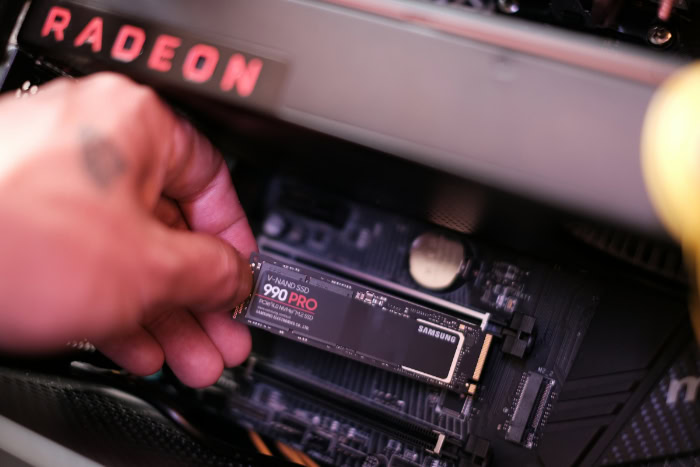
Extending the operational life of your storage requires a combination of automated system maintenance and mindful usage habits. Implementing specific software configurations and physical cooling strategies can significantly reduce hardware wear over the years.
TRIM Command Activation and Storage Garbage Collection
The TRIM command serves as an essential background maintenance tool for modern operating systems. When you delete a file, the operating system simply marks that space as available rather than physically erasing the data.
TRIM notifies the drive which specific data blocks are no longer needed. This process allows the internal storage garbage collection routines to clear those blocks in advance.
By pre-erasing unneeded data, automatic garbage collection ensures the drive can write new files quickly and efficiently, directly reducing unnecessary stress and wear on the flash memory cells.
Over-Provisioning and Storage Capacity Optimization
Maintaining a healthy amount of unallocated reserve space, a practice known as over-provisioning, helps the drive controller manage wear leveling. The controller needs empty space to shuffle data around so that all memory cells degrade at an equal rate.
If a drive is filled to the brim, the controller is forced to continually overwrite the same small cluster of free cells, destroying them rapidly. To ensure optimal health and performance, users should follow a general management rule of leaving 10 to 20 percent of the total drive capacity completely empty.
Avoidance of Unnecessary Write Operations and Defragmentation
Traditional disk defragmentation was designed to organize scattered files on mechanical hard drives to improve read speeds. On a solid-state drive, defragmentation serves no performance purpose because flash memory accesses data instantly regardless of its physical location.
Furthermore, the intense shuffling of files during defragmentation causes massive amounts of unnecessary write operations, heavily damaging the memory cells. To further reduce redundant disk writes, power users often relocate heavy, temporary system files.
Moving internet browser caches, system logs, and temporary swap files to a secondary drive can dramatically decrease the daily write load on a primary operating system drive.
Thermal Management and Heat Prevention
Flash memory chips and drive controllers generate substantial heat during intense read and write operations. While a warm environment is slightly beneficial for writing to NAND cells, excessive operational heat slowly degrades both the flash memory and the sensitive controller chip.
High-performance NVMe drives are particularly susceptible to overheating due to their massive speed and compact size. To prevent thermal throttling and hardware damage, proper cooling strategies are necessary.
Installing passive metal heatsinks helps absorb and dissipate sudden temperature spikes. For heavy continuous workloads, providing active cooling through directed case airflow ensures the drive remains within a safe operating temperature range.
Conclusion
Modern solid-state drives typically provide between five and ten years of reliable service under normal desktop conditions. The exact duration of your hardware depends directly on your daily computing habits, as heavy write workloads degrade flash memory much faster than casual browsing.
By leaving ten to twenty percent of your drive empty for over-provisioning and ensuring TRIM is active, you can significantly reduce wear on the memory cells. Monitoring your hardware with diagnostic software and maintaining proper thermal management will further protect your files.
Adopting these simple maintenance strategies ensures your storage remains fast, healthy, and secure for years to come.
Frequently Asked Questions
How long does an SSD actually last?
A typical solid-state drive lasts between five and ten years under normal daily use. Heavy content creation will shorten this timespan due to frequent data writes, while casual web browsing can extend it. Monitoring your storage health helps you anticipate a replacement before the warranty expires.
Should I defrag my solid-state drive?
You should never defragment a solid-state drive because it damages the memory cells unnecessarily. Flash storage accesses data instantly regardless of where it is physically saved on the chips. Defragmentation forces thousands of redundant write operations that drastically reduce the lifespan of your hardware.
What happens when an SSD finally dies?
A solid-state drive will typically lock itself into a read-only mode when its memory cells reach their maximum wear limit. This built-in safety feature prevents you from saving new files while allowing you to safely copy all your existing data to a new replacement drive.
How much empty space should I leave on my drive?
You should always keep between 10 and 20 percent of your total storage capacity completely empty. The internal controller uses this unallocated space to efficiently shuffle data around the flash memory chips. This process ensures all memory cells wear down evenly and prevents premature failure.
Why is an HDD better for long-term storage?
Traditional hard drives use magnetic platters that hold their data securely for years without needing electricity. Solid-state media relies on trapped electrons that can slowly leak out if the drive remains unplugged for extended periods. This electron leakage causes permanent data loss on unpowered flash storage.
About the Author: Julio Caesar


