
How Long Does a Laptop Last? Lifespan Explained
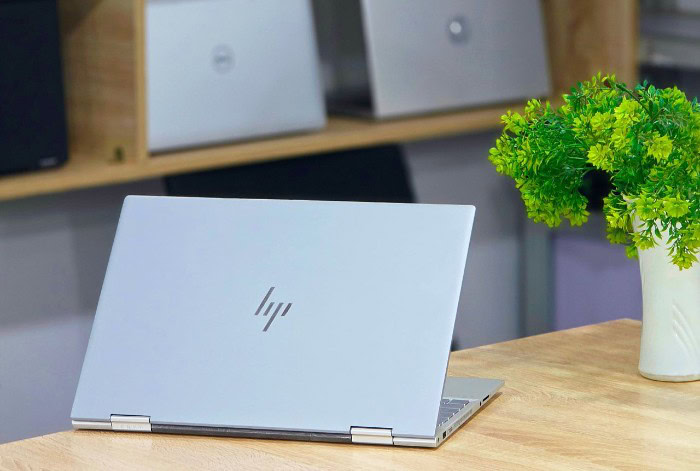
A laptop can represent a major investment, so knowing how long it is likely to remain useful can help you plan repairs, upgrades, and replacement costs. A device may still turn on after many years, but that does not always mean it can deliver the speed, reliability, security, or software support you need.
Laptop lifespan varies because hardware quality, construction, workload, heat, maintenance, and everyday handling all affect how a machine ages. It is also useful to separate physical lifespan, which ends with serious hardware failure, from useful lifespan, which depends on how well the laptop continues to meet current demands.
Knowing what causes laptops to wear out and what warning signs to watch for can help you make better decisions about maintaining, repairing, upgrading, or replacing your device.
Key Takeaways
- Most laptops remain useful for about three to six years, although well-built machines with suitable specifications can continue meeting everyday needs for longer.
- A laptop can still function physically while becoming impractical because of slow performance, outdated hardware, unsupported software, or missing security updates.
- Heat, dust, heavy workloads, drops, spills, and frequent transport can speed up wear, while good ventilation and careful handling can help reduce damage.
- Batteries, cooling fans, storage drives, keyboards, hinges, ports, and displays often cause problems before the processor or memory physically fails.
- Replacing a battery, adding memory, installing an SSD, or repairing a minor fault can extend a laptop’s useful life, but repeated or expensive repairs may make replacement more sensible.
Average Laptop Lifespan
A laptop can remain operational for many years, but its practical lifespan depends on its hardware, construction, workload, and software support. Some machines continue working well beyond the point at which their performance is comfortable for everyday use.
Typical Lifespan Range
For many users, a laptop remains useful for roughly three to six years. A lightly used, well-built machine can sometimes remain practical for longer, while a low-cost or heavily used laptop may start showing limitations sooner.
Continued operation is not the same as satisfactory performance. An older laptop may still start and run basic programs but struggle with newer applications, multitasking, video calls, operating-system updates, or demanding browser workloads.
Its lifespan therefore depends partly on what the owner expects it to do.
Physical Lifespan vs. Useful Lifespan
Physical lifespan refers to the period before a laptop experiences serious hardware failure. A machine may remain physically functional for many years if its motherboard, display, storage, cooling system, and other major parts remain intact.
Useful lifespan is often shorter. It describes how long the laptop can provide acceptable speed, reliability, compatibility, and security for its owner’s needs.
A computer that still powers on may no longer be practical if its hardware cannot run required software or its operating system no longer receives security updates.
Lifespan by Laptop Class
Budget laptops are designed around lower purchase prices, which can mean less powerful hardware, simpler cooling systems, and lighter construction. They can serve basic needs well, but users may notice performance or physical limitations sooner, especially under frequent use.
Mid-range laptops often provide a stronger balance between price, performance, and durability. With suitable specifications and proper care, many remain comfortable for several years without requiring major repairs.
Premium and business laptops commonly use stronger chassis materials, better hinges, more capable cooling systems, and higher-quality components. These features can help them withstand frequent transport and daily professional use.
High-performance laptops, including gaming and workstation models, may have powerful components but also operate under greater thermal and electrical loads. Good cooling and regular maintenance are especially important because sustained demanding workloads can place more stress on internal parts.
Factors That Affect Laptop Lifespan

Two laptops of the same age can be in very different condition. Component quality matters, but daily workload, temperature, handling, and the surrounding environment can have just as much influence on how well a machine ages.
Hardware Quality
The quality and capability of the processor, memory, storage drive, motherboard, display, and supporting electronics affect both reliability and usable performance. Better components do not guarantee a failure-free laptop, but they can provide more performance headroom and reduce the chance that the machine becomes inadequate too quickly.
Specifications also matter over time. A laptop with enough memory and storage for today’s basic tasks may feel restrictive after software becomes more demanding.
Choosing capable hardware at the start can therefore extend the period in which the machine remains comfortable to use.
Build Quality
A laptop’s exterior protects components that are sensitive to movement and impact. Chassis strength, hinge design, keyboard construction, port reinforcement, and display protection all influence how well the machine handles daily use.
Build quality becomes especially important for people who carry their laptops frequently. Repeated opening, closing, packing, and transportation can place stress on hinges, the display frame, charging ports, and other mechanical areas.
Heat and Temperature
Excess heat can accelerate wear on batteries and other internal components. High internal temperatures can also reduce performance because processors often lower their operating speed to control heat.
A well-designed cooling system moves heat away from critical components and pushes warm air out of the chassis. Blocked vents, dust buildup, worn fans, or poor airflow can reduce this cooling ability.
Using a laptop on a hard, stable surface rather than blocking its vents with bedding or soft furniture can help maintain proper airflow.
Usage Intensity
Light tasks such as writing documents, browsing the web, and checking email usually place less stress on a laptop than prolonged gaming, video editing, software development, 3D rendering, or other demanding work.
High-load tasks keep the processor, graphics hardware, cooling system, and battery working harder. This does not mean demanding applications should be avoided, but sustained heavy use makes good ventilation and maintenance more important.
Environment and Physical Care
Dust can enter ventilation openings and gradually reduce cooling efficiency. Moisture and spills may damage electrical components, while drops and impacts can harm the display, chassis, storage, ports, or motherboard.
Frequent travel adds another source of wear. A protective case, careful cable handling, and secure storage can reduce damage during transport.
Avoiding extreme heat, direct sunlight, and damp environments can also protect the laptop and its battery.
Components That Often Limit Laptop Life
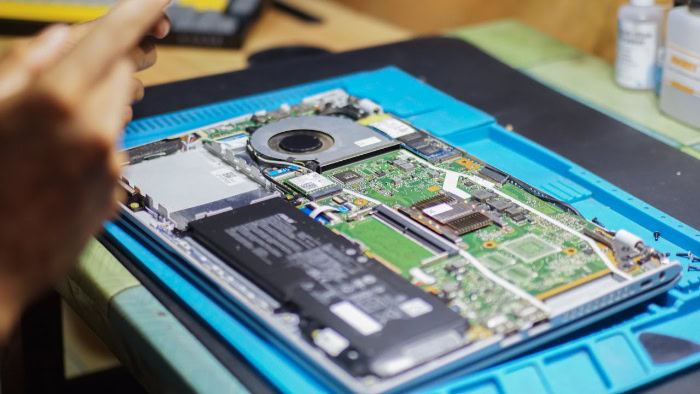
A laptop does not usually wear out all at once. Individual components age at different rates, and replacing one worn part can sometimes keep an otherwise suitable machine in service for several more years.
Battery
Rechargeable laptop batteries gradually lose capacity as they age and go through charge cycles. Over time, a battery that once lasted most of a working day may provide only a few hours or less.
Poor battery life does not necessarily mean the laptop itself is failing. If performance remains satisfactory and a compatible replacement battery is available, replacing the battery can restore much of the machine’s portability.
A swollen battery requires immediate attention because it can place pressure on the trackpad, keyboard, or chassis and may create a safety risk. The laptop should no longer be used normally until the battery has been properly inspected or replaced.
Storage Drive
Modern laptops commonly use solid-state drives, or SSDs, which have no moving mechanical parts and generally provide fast, quiet operation. Older laptops may use mechanical hard drives, which are more vulnerable to damage from shocks and moving parts wearing out.
Possible storage problems include unusually slow file access, corrupted files, repeated errors, failure to boot, or drives that disappear from the operating system. Because storage failure can result in data loss, regular backups remain important even when the laptop appears healthy.
Cooling System
Cooling fans contain moving parts that can wear over time. Dust can also accumulate in fans, vents, and heat sinks, making it harder for the laptop to release heat.
A weakened cooling system may cause louder fan noise, reduced performance, high surface temperatures, or sudden shutdowns. Cleaning blocked vents and replacing worn cooling components can sometimes restore normal temperatures and prevent further damage.
Keyboard, Hinges, Ports, and Display
Mechanical and frequently touched parts often show wear before major electronic components fail. Keyboard switches may stop responding, hinges can loosen, ports can become unreliable, and display cables may develop connection problems.
Repeated plugging and unplugging also places physical stress on charging, USB, audio, and display ports. Careful handling can reduce this wear, but heavily used laptops may eventually require repairs in these areas.
Memory and Processor
Processors and memory modules can continue functioning for many years without physically failing. Their main limitation is often performance rather than durability.
Newer operating systems and applications may require more memory, stronger processors, or newer hardware capabilities. A laptop with a working processor may therefore become too slow for the owner’s workload even though nothing is technically broken.
Signs That a Laptop May Need Repair or Replacement

Age alone does not determine when a laptop should be replaced. Performance problems, battery condition, thermal issues, software support, and repair frequency provide a better indication of its remaining practical value.
Persistent Performance Problems
Slow startup, long application loading times, repeated freezes, and difficulty running several programs at once can indicate that a laptop is struggling.
Some performance problems can be corrected by removing unnecessary software, freeing storage space, reinstalling the operating system, adding memory, or replacing an older drive with an SSD. If the processor or graphics hardware is simply too weak for current tasks, however, software changes may offer only limited improvement.
Short Battery Life
A major reduction in battery runtime is common as a laptop gets older. If the machine still performs well while connected to power, a battery replacement may be more economical than replacing the entire computer.
Replacement becomes less attractive if poor battery life appears alongside other problems such as slow performance, damaged ports, overheating, or unsupported software.
Excess Heat, Noise, or Shutdowns
Fans that run loudly during simple tasks, unusually hot surfaces, or unexplained shutdowns can indicate a cooling problem. Dust buildup, worn fans, dried thermal material, or failing hardware may be responsible.
These symptoms should not be ignored. Persistent overheating can reduce performance and place unnecessary stress on internal components.
Software and Security Limits
A laptop may remain physically sound but become unsuitable if its operating system no longer receives security updates. Unsupported systems can expose users to security problems and may eventually lose compatibility with modern applications.
Driver support can also become limited. Printers, accessories, graphics software, browsers, and other programs may require operating-system versions or hardware capabilities that an older laptop cannot provide.
Frequent Hardware Faults
An isolated repair can be worthwhile, especially if the rest of the laptop remains in good condition. Repeated failures are more concerning.
Problems involving the keyboard, display, ports, storage, battery, or motherboard can add up quickly. If several components need attention within a short period, replacing the laptop may cost less than continuing to repair it.
Ways to Extend Laptop Lifespan and Assess Replacement Value

Good maintenance can reduce unnecessary wear, but every laptop eventually reaches a point where repairs or upgrades stop making financial or practical sense. The best choice depends on the machine’s condition, upgrade options, current value, and the owner’s performance needs.
Preventive Maintenance
Keep ventilation openings clear and avoid using the laptop in conditions that trap heat. Dust around vents should be removed carefully, and deeper internal cleaning may be useful if cooling performance declines.
Keeping the operating system, drivers, and applications updated can also reduce software problems. Adequate free storage space helps the system operate smoothly and leaves room for temporary files, updates, and application data.
Physical care matters as well. Carrying the laptop in a protective sleeve, keeping liquids away from it, and avoiding unnecessary stress on cables and ports can prevent damage that has little to do with the age of the electronics.
Battery Care
Heat is one of the main sources of battery stress, so keeping the laptop properly ventilated benefits battery health as well as other components. Repeatedly exposing the machine to very high temperatures can speed up capacity loss.
Some laptops also provide charging controls that limit the maximum charge level for users who keep the machine connected to power for long periods. Where available, these settings can reduce battery stress.
If the battery becomes the laptop’s main weakness, replacement can be worthwhile. A new battery can restore mobility without requiring the user to replace a computer that still handles everyday tasks comfortably.
Hardware Upgrades
Adding memory can improve multitasking on laptops that provide accessible memory slots. Replacing a mechanical hard drive with an SSD can also produce a noticeable improvement in startup speed, application loading, and general responsiveness.
Upgrade possibilities vary widely between models. Some modern laptops have memory and storage components soldered directly to the motherboard, which limits or eliminates future upgrades.
Before spending money on parts, it is important to check what the specific model supports.
Repair Cost vs. Device Value
Repair decisions should take the laptop’s age, condition, replacement cost, and expected remaining usefulness into account. A relatively inexpensive battery, fan, or storage replacement may be sensible if the laptop still performs well.
A costly motherboard or display repair on an older machine may be harder to justify, especially if other components are also worn. Repeated repair bills can eventually exceed the value gained from keeping the laptop in service.
Performance Needs and Replacement Choice
The laptop’s ability to support the owner’s current workload is often more important than its age. A five-year-old machine may still be suitable for documents, browsing, and video streaming, while a newer low-powered laptop could struggle with demanding creative or technical software.
Replacement makes more sense when upgrades cannot solve performance problems, required software is no longer supported, repair costs are high, or reliability has become poor. If the existing machine still meets daily needs, receives necessary updates, and can be repaired affordably, keeping it in use may provide better value.
Conclusion
A laptop’s lifespan depends on much more than its age. Hardware quality, construction, workload, heat, maintenance, physical care, component wear, and continued software support all affect how long a machine remains dependable.
There is also an important difference between a laptop that still turns on and one that still meets its owner’s needs. Slow performance, limited battery life, unsupported software, or recurring faults can make a functioning computer impractical.
Regular maintenance and affordable upgrades can keep a suitable laptop useful for longer, while battery or component replacement may solve specific problems. Once repair costs rise, upgrade options disappear, or the machine can no longer handle required tasks securely and reliably, replacing it may provide better value.
Frequently Asked Questions
How many years should a laptop normally last?
A laptop will commonly remain useful for about three to six years. Higher-quality models can last longer with careful use and maintenance, while budget or heavily used machines may show limitations sooner. The useful lifespan also depends on performance needs, since basic office tasks require less powerful hardware than gaming or creative work.
Is a five-year-old laptop too old to use?
No, a five-year-old laptop is not automatically too old to use. If it still runs required programs smoothly, receives security updates, has a healthy storage drive, and remains reliable, there may be little reason to replace it. Problems arise when performance, compatibility, security, or repair costs no longer meet your needs.
Can replacing the battery make an old laptop worth keeping?
Yes, replacing the battery can make an older laptop practical again if the rest of the machine works well. Battery capacity naturally decreases with age, but that does not mean the processor, memory, display, or motherboard is worn out. A reasonably priced replacement can restore portability without the cost of buying another computer.
What are the biggest signs that I need a new laptop?
Repeated slowdowns, overheating, shutdowns, hardware faults, and loss of software support are strong signs that replacement may be appropriate. A single problem can often be repaired, but several issues occurring together make further spending harder to justify. Replacement also makes sense when the hardware cannot handle programs you regularly need.
How can I make my laptop last longer?
Keep the laptop cool, clean, updated, and protected from physical damage to reduce unnecessary wear. Avoid blocking ventilation openings, keep enough free storage space, handle ports and hinges carefully, and protect the computer during transport. Replacing a worn battery, adding memory, or upgrading storage can also extend its useful life.
About the Author: Elizabeth Baker


