
Surge Protector vs. UPS: Which Do You Need?

A sudden flicker of the lights followed by the silence of a dead computer often signals more than a temporary inconvenience. That tiny pop you heard could mean your motherboard or hard drive just sustained permanent damage from a high-voltage spike.
Many users mistake a generic power strip for a complete safety solution, only to find their expensive gaming rigs or office workstations ruined after a summer storm. Protecting your gear requires a specific choice between diverting excess electricity and providing a continuous flow of backup power.
Each device serves a unique purpose in a home or office environment. Matching the right hardware to your specific vulnerability ensures that a brief brownout or a lightning strike does not result in a total loss of equipment and data.
Key Takeaways
- Surge protectors are sacrificial devices that use Joules to measure how much excess energy they can absorb before needing replacement.
- A UPS includes a battery that provides a five to fifteen minute window to save work and perform a graceful system shutdown.
- Never connect multiple power strips or surge protectors together, as this increases fire risks and can interfere with UPS sensors.
- Line-Interactive UPS units are ideal for areas with frequent brownouts because they stabilize voltage without draining the internal battery.
- Networking gear like routers should be connected to a UPS to maintain internet access during short power interruptions.
The Surge Protector: Defending Against Voltage Spikes
A surge protector acts as a sacrificial barrier between your expensive electronics and the unpredictable nature of the electrical grid. While most people view them as simple multi-outlet extensions, their primary purpose is to detect and divert excess energy before it reaches sensitive internal circuitry.
By constantly monitoring the incoming voltage, these devices ensure that sudden bursts of electricity do not result in fried components or fire hazards.
How Metal Oxide Varistors Work
Inside most high-quality surge protectors, a component called a Metal Oxide Varistor (MOV) handles the heavy lifting. The MOV acts as a pressure valve for electricity.
Under normal conditions, it offers high resistance and allows the current to flow directly to your devices. When the voltage exceeds a safe threshold, the MOV resistance drops instantly, which forces the excess current into the ground wire and away from your hardware.
This process happens in a fraction of a second, effectively shielding your equipment from damage.
Internal vs. External Power Surges
Most users worry about external surges caused by lightning strikes or downed power lines. While these are the most destructive, they are relatively rare.
Internal surges are far more common and occur dozens of times a day. When large appliances like air conditioners, refrigerators, or vacuum cleaners cycle on and off, they create smaller voltage spikes that travel through the home wiring.
Over time, these repeated micro-surges degrade the delicate components of computers and televisions, leading to premature failure.
Surge Protectors vs. Standard Power Strips
It is a common mistake to assume that every plastic strip with multiple outlets offers protection. A standard power strip is merely an extension cord that provides more plugs.
A true surge protector is identified by its Joule rating, which indicates how much energy the device can absorb before it fails. If a product does not list a Joule rating on the packaging, it is likely a basic power strip that offers zero defense against electrical fluctuations.
Lifespan and Protection Indicators
Surge protection is a consumable resource. Every time an MOV diverts a spike, it wears down slightly.
Eventually, the components lose their ability to shield your gear entirely. Most modern units include a light labeled protected or grounded to show the status of the internal circuitry.
If this light goes out, the device has likely exhausted its capacity and is functioning as a simple power strip, meaning it must be replaced to restore safety.
The UPS: Maintaining Continuity and Stability
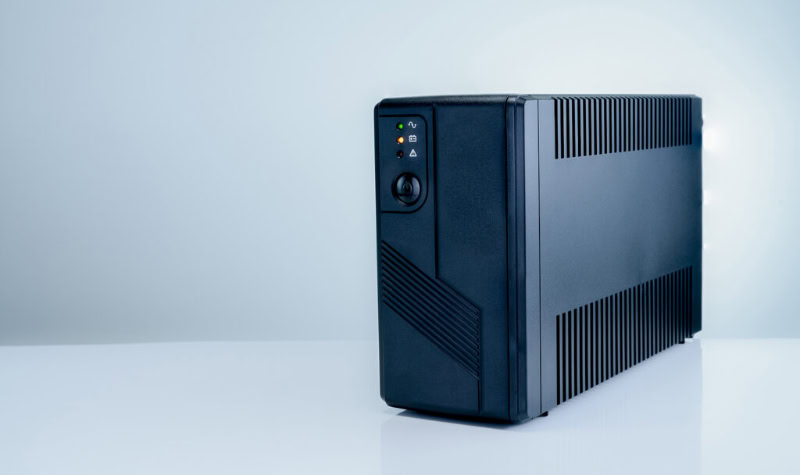
An Uninterruptible Power Supply (UPS) serves as a bridge between the wall outlet and your equipment, providing a constant reservoir of energy. Unlike a surge protector, which only reacts to high voltage, a UPS addresses the complete absence of power.
By housing a large internal battery, it ensures that your devices remain operational even when the grid fails, giving you the time necessary to respond to the situation.
Providing Bridge Power via Internal Batteries
The defining feature of a UPS is its ability to switch to battery power the moment it detects a loss of incoming current. This transition happens so fast that most electronic power supplies do not even register the flicker.
This bridge power is not intended to run a computer for hours of gaming; rather, it provides a crucial window of five to fifteen minutes. This time allows users to save their progress, close sensitive databases, and shut down the system safely.
Managing Brownouts and Dirty Power
Voltage is not always a binary of on or off. Brownouts, or sags in voltage, can be just as damaging as surges.
When the voltage drops too low, power supplies have to work harder to maintain the necessary current, which generates excessive heat and stresses the hardware. A UPS uses Automatic Voltage Regulation (AVR) to stabilize these fluctuations.
It can boost low voltage or trim high voltage back to safe levels without ever switching to the internal battery.
Common UPS Technologies
There are three primary ways a UPS handles power. Standby units are the most affordable, simply waiting for power to fail before switching to the battery.
Line-Interactive units add voltage regulation, making them ideal for areas with frequent brownouts. Double-Conversion or Online systems are the most advanced, constantly running the equipment off the battery while the wall outlet charges it.
This creates an air gap between the grid and the device, ensuring the cleanest possible power for high-end servers.
Protecting Data Integrity and Enabling Shutdowns
For anyone working with data, the sudden loss of power is a nightmare. An unexpected shutdown can corrupt operating system files or destroy hours of unsaved work in a creative application.
Many UPS units include a USB data port that connects to your computer. This allows the UPS to communicate with the operating system, triggering an automated, graceful shutdown if the battery runs low while the user is away from the desk.
Technical Comparisons: Joule Ratings and Capacity

Choosing the right device requires a clear look at how protection and capacity are measured. A surge protector is defined by its ability to absorb a single massive event, while a UPS is defined by how much energy it can output over a specific period.
These metrics do not overlap, and choosing the wrong one can leave your equipment underpowered or unprotected.
Measuring Protection Levels
Surge protectors use Joules to measure their total energy absorption capacity. A higher Joule rating generally means the device can handle more small surges or one very large surge before it dies.
In contrast, a UPS is measured in Volt-Amperes (VA) and Watts. These numbers tell you the maximum load the battery can support.
If you plug a 500-watt gaming PC into a UPS rated for only 300 watts, the unit will overload and shut down immediately during a power failure.
Comparing Response Times
Electronic components are sensitive to even the smallest gaps in power. A surge protector reacts in nanoseconds to clip a high-voltage spike, which is essential for preventing physical damage.
A UPS has a transfer time, which is the period it takes to switch from the wall outlet to the battery. While high-quality units have a transfer time of less than ten milliseconds, some very cheap units might be too slow for sensitive power supplies, causing the computer to reboot anyway.
Physical Footprint and Form Factor
Surge protectors are lightweight, portable, and easy to hide behind furniture or mount under a desk. They generate almost no heat and require no ventilation.
A UPS is a heavy, bulky piece of hardware due to the lead-acid or lithium-ion battery inside. They require adequate airflow to prevent the battery from overheating and usually need to sit on the floor or a sturdy shelf.
Their weight makes them difficult to move once they are installed.
Long-Term Maintenance Requirements
A surge protector is a set it and forget it device, requiring only a periodic check of the indicator light. A UPS requires active maintenance.
The internal batteries have a limited lifespan, typically lasting between three and five years depending on usage and temperature. When the battery fails, the UPS will usually emit a loud, recurring beep to signal that a replacement is needed.
Failing to replace the battery renders the backup function useless.
Application Scenarios: Choosing the Right Device

Not every piece of technology in your home requires a full battery backup. Assigning a UPS to a simple lamp is a waste of resources, while using a basic surge strip for a file server is a risk to your data.
Understanding the value of your equipment and the cost of it suddenly turning off will help you allocate your budget effectively.
Home Offices and Gaming Stations
High-performance computers and Network Attached Storage (NAS) devices are the primary candidates for a UPS. These systems are highly sensitive to power fluctuations and often house critical data or expensive components like high-end graphics cards.
For a gaming PC, a UPS prevents the hardware from crashing during a voltage sag, while for a NAS, it ensures that the hard drives do not suffer mechanical failure or file system corruption during a sudden blackout.
Media Centers and Entertainment
Modern 4K televisions and high-fidelity audio receivers are expensive, but they are not as sensitive to sudden power loss as a computer. In most cases, a high-quality surge protector with a high Joule rating is sufficient for these devices.
However, if you live in an area with frequent brownouts that cause your TV to flicker or reset, a Line-Interactive UPS can help maintain a steady picture and protect the internal power supply from straining.
Low-Sensitivity Household Appliances
Devices with simple motors or heating elements do not require sophisticated power protection. Lamps, coffee makers, and basic kitchen appliances are resilient to most power issues.
A simple surge protector is more than enough for these items. In many cases, these devices draw a high amount of current that could easily overload a standard consumer UPS, potentially damaging the backup unit itself.
Networking Hardware
Maintaining an internet connection during a power outage is a major advantage of the UPS. Modems, routers, and mesh Wi-Fi nodes draw very little power, meaning even a small UPS can keep your home network running for an hour or more during a blackout.
This allows you to stay connected on your laptop or phone to check weather reports or contact emergency services when the rest of the house is dark.
Installation Safety and Configuration Logic

Setting up your power protection correctly is just as important as buying the right hardware. Improper configuration can lead to false sense of security, equipment failure, or even electrical fires.
Following specific safety protocols ensures that your devices are protected without creating new hazards in your home or office environment.
The Dangers of Daisy Chaining
It is tempting to plug a surge protector into a UPS to gain more outlets, but this is a dangerous practice known as daisy chaining. Most UPS manufacturers explicitly warn against this because it can confuse the UPS sensors and cause it to fail during a power event.
Furthermore, it creates a risk of overloading the circuit, which can lead to overheating and fire. Each device should be plugged directly into a grounded wall outlet.
Calculating Your Power Load
To ensure your UPS can handle your equipment, you must calculate the total wattage of everything you plan to plug in. You can usually find the power draw on the back of your electronics or by using a simple watt-meter.
Always leave a safety margin of at least twenty percent. If your computer and monitor together pull 400 watts, you should look for a UPS rated for at least 500 watts to avoid tripping the internal circuit breaker.
Environmental Management
Batteries are sensitive to temperature. Placing a UPS in a cramped, unventilated cabinet will significantly shorten the life of the battery and could cause it to swell or leak.
Ensure there is several inches of space around the unit for airflow. Surge protectors are much more resilient to heat, but they should still be kept away from curtains or upholstery to ensure that any heat generated during a major surge event can dissipate safely.
Layered Protection Strategies
A smart way to manage a household is to use a combination of both devices. You might use a large UPS for your main workstation and networking gear while using surge protectors for the printer, speakers, and lamps.
This strategy provides maximum uptime for your most critical data-driven tasks while keeping your budget under control. By identifying which devices are mission-critical and which are merely convenient, you can build a safety net that covers every vulnerability.
Conclusion
Deciding between these two devices comes down to a choice between protecting your physical components and protecting your active work. While a surge protector is a cost-effective way to shield a television from a lightning strike, it cannot prevent a computer from crashing during a brief power dip.
Evaluating the cost of failure for your specific setup is the best way to determine your needs. If losing five minutes of unsaved data would be a disaster, the investment in a UPS is necessary.
For basic electronics where a sudden shutdown is only a minor annoyance, a high-quality surge protector offers sufficient insurance for your hardware.
Frequently Asked Questions
Can I just plug my surge protector into my UPS to get more outlets?
You should never plug a surge protector into a UPS because it can bypass safety sensors and cause an electrical fire. This practice can also overload the UPS circuitry, making it fail when you need it most. Always plug both devices directly into a wall outlet to ensure they function as the manufacturer intended.
How do I know if my surge protector is still working?
Look for a status light labeled protected or grounded on the housing of the device. If this light is off, the internal components have likely been exhausted from absorbing previous power spikes. At that point, the strip acts as a basic extension cord and no longer shields your equipment from incoming electrical damage.
Is it okay to use a UPS for my kitchen appliances?
It is generally not recommended to use a UPS for appliances like coffee makers or toasters because they draw too much current. These high-wattage devices can instantly trip the internal breaker of a consumer-grade UPS. Stick to using high-quality surge protectors for these types of household items to avoid damaging your backup power unit.
Do I need a UPS if I have a laptop?
Most laptop users do not need a UPS because the laptop has its own internal battery that acts as a backup. However, you might still want a UPS for your external monitors and internet router. This ensures your entire workspace stays active and connected during a brief power outage without interrupting your workflow.
How long will a UPS keep my computer running?
Most standard UPS units provide five to fifteen minutes of power, which is designed for a safe shutdown rather than extended work. The exact time depends on the battery size and how much power your computer draws. It serves as a bridge to save your work before the battery completely dies.
About the Author: Julio Caesar


