
What Is a microSD? A Comprehensive Overview

A single high-resolution photo from a modern smartphone can occupy ten megabytes, while a single minute of 4K video consumes hundreds more. If you rely on your phone or Nintendo Switch for daily entertainment, you will eventually face the dreaded notification that your internal memory is full.
A microSD card solves this problem by packing up to two terabytes of data into a sliver of plastic smaller than a postage stamp. These tiny circuits are the reason your drone can record cinematic flights and your dashcam can log hours of traffic footage without a hitch.
Key Takeaways
- Match your card to your activity by checking the V-rating for video or the A-rating for mobile apps to ensure the hardware can handle the specific data load.
- Verify the maximum storage limit of your host device because older electronics often cannot recognize the higher capacities found in modern SDXC cards.
- Use a high-endurance microSD card for devices like dashcams or security cameras that record continuously, as standard cards will fail quickly under constant write cycles.
- Format your card using the exFAT file system if you need to store individual files larger than 4GB, which is common for 4K video recordings and large game files.
- Avoid unverified third-party sellers to prevent purchasing counterfeit cards that report false storage capacities and eventually lead to permanent data loss.
Physical Design and Evolutionary Context
The physical footprint of a microSD card is its most defining trait; it provides immense storage potential within a package roughly the size of a fingernail. This miniaturization has allowed manufacturers to create slimmer, more powerful mobile devices without sacrificing the ability to store large media libraries.
While the exterior is a simple plastic shell, the interior contains sophisticated flash memory and a controller that manages data flow.
MicroSD Form Factor and Internal Hardware
A microSD card measures approximately 15mm by 11mm and is only 1mm thick. Inside this tiny casing sits a NAND flash memory chip and a controller.
The controller acts as the brain of the card, managing where data is stored and ensuring the memory cells wear out evenly over time. This design allows the card to operate without moving parts, making it much more resistant to physical impact than traditional hard drives.
Evolution from Standard SD and MiniSD
Digital storage has shrunk significantly since the introduction of the original Secure Digital (SD) card in 1999. The standard SD card was followed by the miniSD, which briefly appeared in mobile phones before being eclipsed by the even smaller microSD in 2005.
As mobile phones became thinner and more complex, the microSD became the industry standard because it occupied the least amount of space on a device’s circuit board.
Functional Purpose of the SD Adapter
Most microSD cards are sold with a plastic SD adapter. This adapter is a hollow shell with metal pins that pass the electrical signals from the small card to the larger contact points of a standard SD slot.
This allows a microSD card to be used in older laptops, professional DSLR cameras, and desktop card readers that were originally designed for the larger card format.
Capacity and Speed Specifications
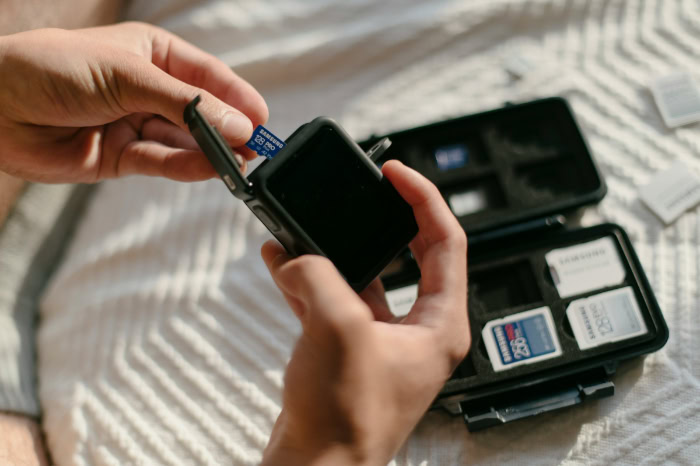
The labels printed on a microSD card serve as a technical shorthand for its performance capabilities. These symbols are not just marketing tools; they indicate the specific standards the card meets for data retention and transfer velocity.
Storage Families and Capacity Limits
MicroSD cards are categorized into families based on their maximum storage potential. SDHC (High Capacity) cards range from 4GB to 32GB and typically use the FAT32 file system.
SDXC (Extended Capacity) cards range from 64GB up to 2TB and use the exFAT system. There is also a newer SDUC (Ultra Capacity) standard that theoretically allows for cards up to 128TB, though these are not yet common in the consumer market.
Speed Class Ratings and Minimum Write Speeds
The oldest speed rating is the Speed Class, represented by a number inside a circle. A Class 10 card guarantees a minimum sustained write speed of 10MB/s.
As technology progressed, the Ultra High Speed (UHS) ratings were introduced. A U1 symbol indicates the same 10MB/s minimum but on a faster bus interface, while a U3 symbol guarantees 30MB/s.
These ratings ensure the card can keep up with the data stream from a camera or phone.
Video Speed Classes for High Resolution Recording
For users recording video, the V-rating is the most critical metric. These ratings, such as V30, V60, or V90, represent the minimum sustained write speed in megabytes per second specifically for video files.
A V30 card is sufficient for most 4K video, while V60 and V90 cards are necessary for professional 8K bitrates or high frame rate cinematography where data is generated at an immense pace.
Application Performance Classes for Mobile Software
If you plan to install apps or games directly onto a card, look for the A1 or A2 ratings. Unlike video recording, which writes a continuous stream of data, apps require high “Random Access” performance.
A2 cards offer significantly higher Input/Output Operations Per Second (IOPS) than A1 cards, allowing apps to launch faster and run more smoothly without the stuttering often associated with external storage.
Device Compatibility and Hardware Integration

Compatibility involves more than just fitting a card into a slot. The host device must possess the internal firmware and hardware controller capable of communicating with the specific generation of the card.
Users must verify their device specifications to avoid purchasing a card that exceeds the hardware’s operational limits.
Common Host Devices and Applications
MicroSD cards are used across a vast array of hardware. Android smartphones and tablets use them for media storage, while the Nintendo Switch relies on them for digital game installations.
Action cameras like GoPros and aerial drones require high-speed cards to capture footage in rugged environments. Additionally, dashcams and security cameras use specialized high-endurance cards for constant, loop-based recording.
Hardware Limitations and Capacity Ceilings
Older electronics often have a ceiling on the maximum storage capacity they can recognize. For example, a legacy smartphone or an older handheld GPS unit might only support SDHC cards up to 32GB.
If a user inserts a 128GB SDXC card into such a device, the card may not be recognized at all, or the device may prompt the user to format it to a smaller, unusable size.
File Systems and Cross-Device Formatting
Formatting a card determines how data is organized and which operating systems can read it. FAT32 is highly compatible but limits individual file sizes to 4GB, which is problematic for long video recordings.
Most modern devices use exFAT, which supports much larger files and is compatible with both Windows and macOS. It is generally best to format the card within the device where it will be used most frequently.
Practical Benefits and Primary Use Cases

The persistence of the microSD format is due to its versatility and physical resilience. Despite the rise of cloud storage, local hardware expansion remains the most reliable way to manage large amounts of data without relying on an internet connection or monthly subscription fees.
Expanding Internal Storage Capacity
The most common use for a microSD card is to bypass the limited internal memory of a device. High-end games for the Nintendo Switch can exceed 30GB, which can consume the entire internal storage of a standard console.
A single card can effectively quadruple or even decuple the available space, allowing users to keep their entire digital library accessible at all times.
Data Portability and Physical Backups
MicroSD cards provide a physical method for moving data between devices. For users in remote areas with slow internet, transferring several gigabytes of drone footage to a laptop via a card is much faster than uploading to a cloud service.
They also serve as an excellent secondary backup for precious photos, providing a tangible copy of data that exists independently of the primary device.
Environmental Durability and Ruggedized Features
Unlike many other forms of technology, microSD cards are often built to survive harsh conditions. Many reputable manufacturers design their cards to be waterproof, shockproof, and resistant to extreme temperatures ranging from freezing to boiling.
They are also shielded against X-rays, ensuring that your data remains intact when passing through airport security scanners.
Selection Criteria and Safety Considerations

Choosing a card requires balancing technical needs with security concerns. The market is saturated with options, but not all cards are created equal.
Buying the wrong card can result in poor performance, while buying from an unverified source can lead to total data loss.
Matching Card Specifications to Specific Activities
The ideal card depends entirely on the intended task. A dashcam requires a “High Endurance” card specifically designed to handle the heat and constant rewriting of video data.
In contrast, a mobile gamer should prioritize an A2-rated card for fast loading times. Purchasing a high-speed professional video card for a simple music player is an unnecessary expense, while using a basic card in a 4K camera will cause recording errors.
Verifying Authenticity and Identifying Counterfeits
The market is plagued by counterfeit cards that report a false capacity to the operating system. A card may appear to have 512GB of space, but it may actually only contain 16GB of actual memory.
Once the real limit is reached, the card will overwrite old data or simply corrupt new files. To avoid this, only purchase from reputable retailers and use free software tools to verify the actual capacity before storing important data.
Balancing Storage Volume and Transfer Performance
There is often a trade-off between how much a card can hold and how fast it can move that data. Higher-capacity cards with professional-grade speed ratings are significantly more expensive.
Users should evaluate whether they truly need the fastest transfer speeds available or if a mid-range card with more storage space provides better value for their specific lifestyle and hardware.
Conclusion
MicroSD cards provide a functional bridge between high-performance hardware and the massive data requirements of modern software. By offering a physical, durable, and expandable storage method, they ensure that devices remain functional long after their internal memory has been exhausted.
These small circuits provide necessary flexibility if you are capturing high-speed aerial footage or managing a massive library of mobile games. Success with this technology relies on recognizing that the symbols etched onto the plastic surface are essential performance benchmarks.
Matching these technical ratings to your specific hardware needs guarantees a stable user experience while protecting your digital assets from corruption or loss.
Frequently Asked Questions
Can I use any microSD card in my phone?
Most modern Android phones support microSD cards, but you must check the maximum capacity your specific device can handle. While many newer phones accept cards up to 2TB, older models might be limited to 32GB or 128GB. Always verify your phone’s specifications to ensure the card is compatible and formatted correctly.
What happens if I buy a card that is too slow for my camera?
If your card write speed is too slow, your camera will likely stop recording or skip frames during high-resolution video capture. This occurs because the hardware generates data faster than the card can save it. Choosing a card with a V30 or V60 rating ensures your device can maintain a steady stream.
Is there a difference between SDHC and SDXC cards?
The main difference lies in the storage capacity and the file system used to organize your data. SDHC cards range from 4GB to 32GB, while SDXC cards offer 64GB to 2TB of space. Most modern gadgets require SDXC for larger file sizes, though very old electronics may only recognize the older standard.
Why do some microSD cards cost way more than others with the same storage?
Higher prices usually reflect faster data transfer speeds or specialized high-endurance hardware designed for constant use. A card meant for a dashcam is built to survive extreme heat and thousands of rewrite cycles, which makes it more expensive than a standard card. You pay a premium for reliability in demanding environments.
How do I know if the microSD card I bought is a fake?
You can identify a counterfeit card by using free computer software to test if the actual storage matches the advertised capacity. Fakes often show a large amount of space but corrupt your files once you exceed a few gigabytes of actual memory. Always buy from verified retailers to avoid these risks.
About the Author: Elizabeth Baker


