
What Is USB4? The Specs and Speeds Explained

Managing a clutter of chargers, display cables, and data cords can make any modern workspace frustrating. USB4 simplifies this mess by consolidating power delivery, high-resolution video, and rapid data transfer into a single, highly efficient protocol.
Developed by the USB Implementers Forum, this standard utilizes the familiar USB Type-C connector to harmonize how computers interact with external accessories. Rather than relying on rigid, separate lanes for different signals, it dynamically manages traffic to prevent bottlenecks and maximize performance.
Key Takeaways
- USB4 merges power, display, and data signals into a single cable by packaging different protocols into unified data packets rather than dedicating physical wires to a single task.
- The protocol offers baseline bi-directional transfer speeds of 20 Gbps and 40 Gbps, while USB4 Version 2.0 supports up to 80 Gbps, or 120 Gbps in asymmetric configurations.
- High-power laptops and peripherals can be fully powered through a USB4 connection due to the mandatory integration of USB Power Delivery, which supports up to 240W of electricity.
- Unlike Thunderbolt 4, which strictly mandates PCIe data tunneling and dual 4K display support, USB4 allows manufacturers to omit these features to lower production costs.
- To simplify buying decisions, the USB-IF replaced complicated generation names with clear, performance-based retail labels on packaging, such as “USB 40Gbps” and “USB 80Gbps”.
Core Concept and Evolution
Connecting modern hardware requires a unified standard capable of managing complex operations without compromising performance. The creation of USB4 addresses this challenge by establishing a highly adaptable framework for hardware communication.
This standard marks a significant departure from previous generations, offering a unified protocol designed to streamline peripheral connectivity.
Technical Definition of USB4
Established by the USB Implementers Forum (USB-IF), USB4 is a high-speed data transmission standard that coordinates how host computers communicate with external devices. It is crucial to distinguish between the USB4 protocol and the physical USB Type-C connector.
The Type-C connector is simply the physical plug, characterized by its oval shape and reversible pin layout. USB4 is the logical protocol, or the underlying system of rules, that dictates how electrical signals transmit through that physical plug.
A device can possess a physical USB-C port without supporting the advanced speeds or capabilities mandated by the USB4 standard.
Historical Evolution from USB 3.x
The path to USB4 arose from a highly fragmented series of updates. Previous iterations, particularly the USB 3.x generation, suffered from confusing naming conventions.
Users had to contend with USB 3.0, USB 3.1, and eventually USB 3.2, which introduced complex sub-variants such as Gen 1, Gen 2, and Gen 2×2. These older generations operated on rigid, static architectural designs.
If a port supported display signals, it had to allocate fixed hardware paths for that display, leaving the remaining lanes locked for basic data. USB4 abandons these rigid hardware splits, moving to a dynamic packet-based communication architecture that treats all outgoing signals as a single, flexible stream.
Connection to Thunderbolt 3 Technology
A major factor in the design of USB4 was Intel’s decision to contribute the Thunderbolt 3 protocol to the USB-IF. Historically, Thunderbolt was a proprietary, highly restricted technology that required expensive licensing and dedicated hardware.
By donating the protocol royalty-free, Intel allowed the USB-IF to absorb the fundamental architecture of Thunderbolt 3 directly into the open USB4 specification. This convergence unified two previously competing platforms, ensuring that the high-speed data lanes and device-chaining abilities of Thunderbolt 3 became standard options within the broader, royalty-free USB ecosystem.
Technical Specifications and Performance Capabilities

Evaluating the practical utility of USB4 requires reviewing its physical performance parameters. The standard defines strict limits for transmission speed, power transmission, and display outputs.
These capabilities allow a single connection to replace several dedicated ports on computers and peripherals.
Data Transfer Speeds and USB4 Version 2.0
The initial release of USB4 offered two baseline speed tiers, providing maximum transfer rates of 20 Gbps and 40 Gbps. However, the subsequent publication of the USB4 Version 2.0 specification significantly increased these performance thresholds.
Version 2.0 introduces a maximum bi-directional signaling rate of 80 Gbps, utilizing a new physical layer architecture. This update also permits asymmetric data transmission.
In this configuration, the connection allocates three lanes for sending data and one lane for receiving, achieving up to 120 Gbps in one direction while maintaining 40 Gbps in the other. This asymmetric mode is particularly useful for driving high-end, bandwidth-intensive external displays.
Power Delivery Limits
USB4 mandates the integration of the USB Power Delivery (USB-PD) standard across all compliant devices. This integration ensures that every certified USB4 port can negotiate power distribution intelligently.
The standard supports various wattage levels, ranging from basic charging to high-power operation. With the introduction of the Extended Power Range (EPR) specification under USB-PD, compatible cables and devices can deliver up to 240W of power at 48V and 5A.
This high ceiling allows users to power demanding hardware, including professional creator laptops and external graphics card enclosures, through the same connection used for data.
Display and Video Output Capabilities
For video transmission, USB4 incorporates native compatibility with DisplayPort Alt Mode. This allows host systems to transmit high-resolution audio and video directly through the USB-C connection.
Because of the massive throughput provided by the protocol, a single USB4 port can easily drive demanding multi-monitor setups. Users can connect dual 4K external monitors at high refresh rates or run a single 8K display.
The protocol handles these video feeds alongside standard data packets, ensuring smooth visual performance without interrupting file transfers or network traffic.
The USB4 Tunnel Protocol Architecture

The operational efficiency of USB4 relies on how it packages and distributes data. Unlike older USB versions, which treated different data types as entirely separate physical signals, USB4 introduces a highly integrated method of packet management.
Definition of the Tunnel Protocol
Tunneling is a mechanism where different data types, such as USB, video, and PCI Express signals, are packaged into standardized data packets before transmission. In older configurations, utilizing an alternate mode required dedicating physical wires inside the cable exclusively to a single signal, like DisplayPort, which completely disabled those wires for standard USB data.
With USB4, the host controller acts as a multiplexer. It translates various protocols into a single, unified stream of data packets, sends them across the cable, and then decodes them at the receiving end.
This encapsulation prevents the physical resource locking common in previous iterations.
Dynamic Bandwidth Allocation
A major advantage of this unified packet stream is the ability to perform dynamic bandwidth allocation in real-time. Instead of reserving static slices of bandwidth for specific functions, the USB4 connection monitors active demands and redistributes resources instantly.
For example, if a user connects a 4K display and an external hard drive to a single port, the system allocates the precise bandwidth required to keep the display running smoothly. If the user stops playing video, the protocol immediately frees that unused bandwidth and reallocates it to speed up active file transfers.
This prevention of data bottlenecks ensures maximum efficiency across multi-device setups.
Support for PCI Express Data
The native integration of PCI Express (PCIe) data tunneling represents a major technical achievement. PCIe is the high-speed system bus that connects internal computer components like graphics cards and solid-state drives.
By tunneling PCIe signals directly over the USB-C cable, USB4 allows external peripherals to communicate with the host processor at near-native speeds. This technical foundation is what allows external Graphics Processing Units (eGPUs) and ultra-fast external storage arrays to interface with laptops, enabling desktop-class processing power on portable machines.
Comparison with Thunderbolt 4
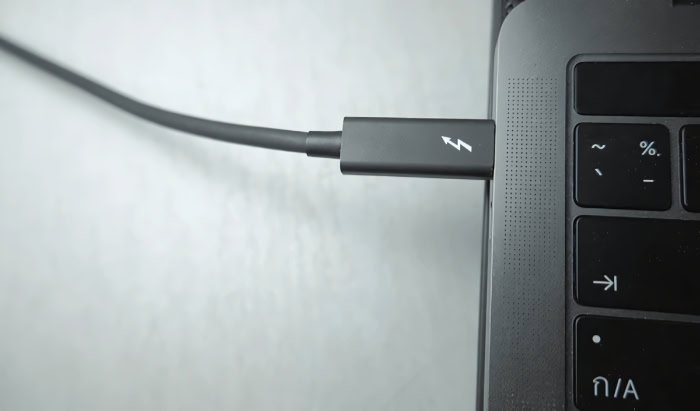
While USB4 and Thunderbolt 4 share a physical connector and overlapping specifications, they serve different roles in the hardware ecosystem. Their similarities frequently lead to consumer confusion, yet their practical deployment remains distinct.
Shared Commonalities and USB-C Integration
USB4 and Thunderbolt 4 share the exact same physical USB Type-C interface, meaning their cables and ports look identical. On a technical level, both standards are capable of reaching a maximum speed of 40 Gbps, and they rely on the same underlying physical layer architectures.
Because of this structural alignment, they are mutually compatible with the same class of passive and active cables. A high-quality cable certified for one standard will generally function at full capacity when plugged into a port utilizing the other standard.
Standard Requirements and Feature Discrepancies
The primary difference between the two standards lies in their minimum performance thresholds. Thunderbolt 4, managed strictly by Intel, mandates a high baseline: every certified host port must support 40 Gbps, PCIe data tunneling at 32 Gbps, and dual 4K external monitors.
In contrast, the USB4 specification allows manufacturers greater flexibility, leaving several advanced features optional. A compliant USB4 port is only required to support a minimum speed of 20 Gbps, a single monitor, and can completely omit PCIe tunneling.
Consequently, a budget laptop with USB4 may not support external graphics cards or dual monitors, whereas a Thunderbolt 4 laptop guarantees these capabilities.
Certification Differences
The paths to certification highlight why these devices vary in cost and capability. Intel maintains strict control over the Thunderbolt 4 brand, requiring manufacturers to submit their hardware to dedicated testing laboratories for rigorous evaluation and pay licensing fees.
This mandatory process ensures highly consistent performance across all Thunderbolt 4 accessories, though it often increases device costs. USB4, conversely, is an open standard governed by the USB-IF compliance program.
While the USB-IF offers compliance testing and authorized logos, the optional nature of the specification means manufacturers can build USB4 ports with varying performance levels, resulting in cheaper components but higher consumer confusion.
Practical Integration and Compatibility

Adopting a new hardware standard requires careful planning regarding legacy devices and accessories. USB4 was designed with compatibility in mind, ensuring that existing devices continue to function even if they cannot utilize the maximum speeds.
Backward Compatibility with Legacy Ports
USB4 maintains robust backward compatibility with previous generations of host systems and accessories. At the physical layer, its protocol is designed to interoperate with USB 3.2, USB 2.0, and Thunderbolt 3 devices.
When connecting a USB4 accessory to an older port, the connection automatically falls back to the fastest speed supported by the older host. For example, plugging a USB4 drive into a USB 3.2 Gen 2 port will limit transfer speeds to 10 Gbps.
While the physical connection remains secure, the device will always operate under the performance bottlenecks imposed by the older, legacy protocol.
Cable Requirements and Label Standards
Achieving the highest performance tiers requires the correct cabling, as not all USB-C cables are capable of handling USB4 traffic. Passive cables work well for short distances, typically under one meter, while active cables incorporate internal electronics to boost signals over longer distances without data loss.
To reduce consumer confusion caused by complicated version names, the USB-IF introduced a simplified retail labeling system. Instead of using terms like “USB4 Gen 3×2,” official packaging and cables now feature clear, performance-based logos, such as “USB 40Gbps” and “USB 80Gbps,” alongside mandatory wattage labels like “240W”.
Device Compatibility and Hardware Requirements
Implementing USB4 requires integrated hardware support inside the host device, such as modern processors from AMD or Intel that feature native controllers. Operating systems have also evolved to support the new standard natively.
Windows, macOS, and Linux include built-in drivers that manage the complex task of protocol multiplexing without requiring manual software installation. This deep system integration ensures that once the hardware requirements are met, connecting a docking station or storage drive results in an immediate, stable connection.
Conclusion
USB4 represents a significant consolidation point for modern connectivity, successfully blending power delivery, video output, and high-speed data transfer into a single interface. By absorbing the foundations of Thunderbolt 3 and introducing advanced tunneling protocols, this standard eliminates the physical limitations of legacy ports.
The integration of dynamic bandwidth allocation ensures that connected devices operate at their highest possible efficiency without manual configuration. As hardware manufacturers continue to adopt this unified standard, the physical workspace becomes more streamlined, replacing a chaotic assortment of single-purpose cables with a highly capable, standardized solution.
Frequently Asked Questions
What is the difference between USB4 and USB-C?
USB-C is the physical shape of the connector plug, while USB4 is the internal software protocol that determines how fast data and power travel through that plug. Not all USB-C ports on laptops or chargers support the advanced speeds and features of USB4, as older systems often use the same connector.
Can I use my old USB cables with a USB4 port?
Yes, you can use older USB-C cables with a USB4 port because the standard is fully backward compatible. However, your data transfer speeds will be limited by the maximum speed capability of the older cable or device you connect. For full USB4 performance, you must use a certified USB4 cable.
Is USB4 the same thing as Thunderbolt 4?
No, USB4 is not identical to Thunderbolt 4, though they share the same physical connector and a maximum speed of 40 Gbps. Thunderbolt 4 mandates strict minimum requirements, including dual monitor support and PCIe data tunneling. USB4 makes many of these premium features optional, allowing manufacturers to build cheaper, basic ports.
How do I know if a cable actually supports USB4?
You should look for official retail logos on the cable packaging indicating performance metrics like “USB 40Gbps” or “USB 80Gbps” rather than version numbers. The USB Implementers Forum designed these simplified labels, which often include maximum power capacities like “240W”, to help buyers identify the exact capabilities of their accessories.
Can USB4 charge my laptop?
Yes, USB4 can charge your laptop because it requires the integration of the USB Power Delivery standard. By using compatible cables and devices that support Extended Power Range options, a USB4 connection can deliver up to 240W of electricity. This high wattage is more than enough to power even demanding, professional creator laptops.
About the Author: Elizabeth Baker


