
What Is a Capture Card and How Does It Work?
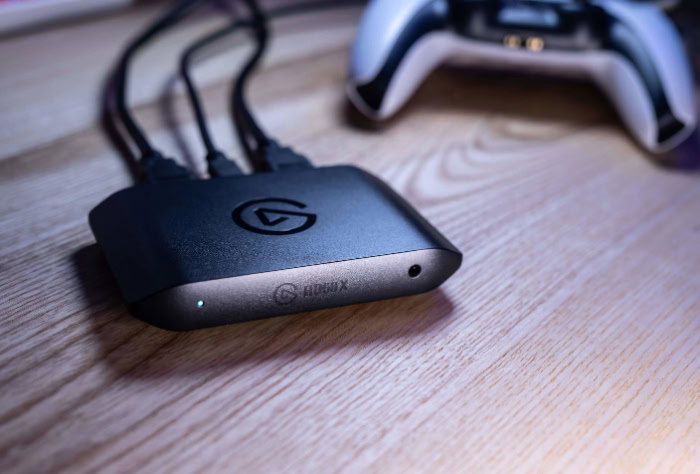
Anyone streaming console gameplay or producing high-quality video content quickly realizes that their computer alone cannot handle every technical demand. If you want your broadcasts to look professional without crippling system performance, a capture card is an essential piece of hardware to master.
These devices act as a bridge between your raw video source and your final broadcast output. Dedicated streamers rely on them to capture console sessions, while remote professionals use them to transform high-end cameras into premium webcams.
Despite their popularity, the mechanics of how these tools process incoming signals can seem complicated.
Key Takeaways
- Capture cards function as intermediary devices that receive uncompressed HDMI video signals and translate them into a digital format your computer can process.
- Utilizing dedicated capture hardware reduces the processing strain on your primary computer, allowing it to maintain high frame rates during intensive recording sessions.
- Zero-latency pass-through technology splits the video signal, letting you play on a monitor without delay while simultaneously sending a processed feed to broadcasting software.
- Internal PCIe cards provide the highest bandwidth for uncompressed 4K recording, while external USB devices offer plug-and-play portability for laptop users.
- You must manually disable High-bandwidth Digital Content Protection settings on consoles before attempting to route their video signals through an external capture device.
Definition and Core Purpose
A functioning broadcasting setup relies on several hardware components working together seamlessly to produce a polished final product. Among these components, capture cards serve a specific and essential role in managing heavy audio and visual data.
Understanding what this hardware does and how it differs from other computer components makes it much easier to build an efficient streaming or recording environment.
Definition of a Capture Card
A capture card is an intermediary hardware device designed to intercept and translate data. It sits between an external media source and a computer.
The device is responsible for receiving raw video and audio signals from external hardware, such as a gaming console or a digital camera, and transferring those signals to a computer for recording or live broadcasting.
Primary Function in Content Production
The primary function of this hardware is the conversion of raw HDMI or video signals into digital data formats that a computer can recognize and process. By handling this conversion externally or on a dedicated expansion card, the device effectively offloads heavy processing tasks from the primary computer system.
This offloading prevents a single processor from having to run a demanding application while simultaneously encoding incoming high-definition video.
Distinction Between Capture Cards and Graphics Cards
People frequently confuse capture cards with graphics processing units, though they serve opposite functions. A graphics card is designed to render and output video signals to a display.
It generates the images you see on your monitor. A capture card operates in reverse by receiving video input from an outside source and converting it for storage or streaming.
A standard graphics card lacks the hardware inputs and internal architecture required to receive and process incoming video streams, making a dedicated capture device necessary for external media production.
Technical Mechanism and Signal Flow
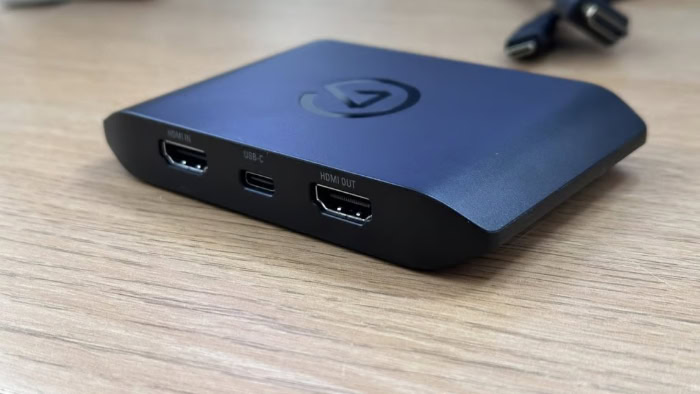
Once connected, a capture card facilitates a continuous, high-speed transfer of data between devices. This process happens in a fraction of a second, relying on specialized hardware to compress massive amounts of visual information into manageable streams.
Signal Conversion and Data Transmission
The data transmission process follows a straightforward, step-by-step path. First, the source device generates a raw video and audio signal and sends it outward via an HDMI cable.
The capture card receives this raw signal. Because uncompressed video contains an enormous amount of data, the encoding hardware inside the capture device compresses and translates the signal into a standardized digital format.
Finally, the capture card transmits this compressed, computer-readable data into the connected PC via a USB cable or a motherboard connection.
Pass-Through Technology and Latency Management
Processing and converting video inherently introduces a slight delay, which can ruin a gaming experience if a player relies entirely on the computer monitor to see their gameplay. To solve this, most modern devices feature zero-latency HDMI pass-through technology.
The hardware splits the incoming signal into two paths. One path is converted and sent to the computer for broadcasting.
The second path passes directly through the device unaltered and travels to a television or primary gaming monitor. This allows a player to experience uninterrupted gameplay in real time on one screen while the computer handles the delayed broadcast feed on another.
Integration with Broadcast Software
The hardware alone cannot broadcast content directly to the internet; it requires the assistance of production software. Applications like OBS Studio or Streamlabs are designed to recognize connected capture devices as native video sources, similar to how they recognize a standard webcam.
Once added to a software scene, users can configure the specific frame rate, resolution, and audio levels to match their production needs. The software then composites this feed with other elements like microphone audio and stream overlays before sending the final package out to a broadcasting platform.
Hardware Categories and Form Factors

The physical design of a capture card determines how it connects to a system and influences its overall performance capabilities. Manufacturers generally produce these devices in two distinct physical formats to accommodate different types of users and technical setups.
External USB Capture Devices
External capture devices are compact, standalone units that connect to a computer via a USB cable. These are typically designed as plug-and-play hardware, requiring minimal setup and often bypassing the need for complex driver installations.
Their primary advantage is portability. Because they reside outside the computer chassis, they can be easily disconnected and swapped between different laptops, desktop computers, and gaming environments.
Internal PCIe Capture Cards
Internal capture cards are expansion boards that must be installed directly onto a computer motherboard via a Peripheral Component Interconnect Express slot. Since they connect straight into the core architecture of the computer, they offer significant advantages regarding system stability and data transfer speeds.
The direct connection provides substantially higher bandwidth, which easily facilitates demanding tasks like uncompressed 4K video recording at high frame rates while maintaining exceptionally low latency.
Direct Comparison of Form Factors
Choosing between the two form factors requires balancing mobility against absolute performance. External USB devices offer superior ease of setup and are the only viable option for laptop users.
However, they are occasionally limited by the bandwidth constraints of standard USB ports. Internal PCIe cards offer premium performance and a cleaner workspace with fewer visible cables, but they carry a higher price point and demand a compatible desktop motherboard.
Ultimately, the choice depends on the specific hardware a user already owns and their requirement for mobility versus stationary power.
Key Use Cases and Applications

Dedicated capture hardware serves a variety of practical functions for modern content creators. By intercepting and translating video signals, these devices open up new possibilities for broadcasting that go far beyond standard desktop recording.
Console Broadcasts
Players wanting to stream gameplay from systems like the Nintendo Switch, PlayStation, or Xbox directly into professional broadcasting software must rely on physical capture hardware. While some consoles offer basic streaming applications, routing the video output through a capture device allows creators to add custom overlays, alerts, and professional audio mixing via their computer.
Dual-PC Configuration
High-end live broadcasts demand immense computing power, often pushing a single machine to its limits. A dual-PC configuration solves this by separating the gaming workload and the encoding workload across two distinct computers.
The primary computer runs the demanding video game and outputs its display signal directly into a capture card installed on the secondary computer. This secondary machine is strictly dedicated to compressing and uploading the video, ensuring superior performance and smooth gameplay without dropping frames.
DSLR and Mirrorless Camera Integration
Content creators and remote professionals often utilize high-end DSLR or mirrorless cameras to achieve superior visual fidelity. A standard computer cannot natively read a raw video feed directly from a camera through a basic USB connection.
By running an HDMI cable from the camera into a capture device, the computer recognizes the professional camera as a standard webcam. This setup provides massive improvements in image quality, depth of field, and low-light performance for video conferences and live video feeds.
Benefits, Technical Challenges, and Alternatives

Adding intermediary hardware to a production setup provides obvious quality boosts, but it also introduces specific technical requirements. Users must balance these performance upgrades against potential hardware conflicts and consider if purely software-based solutions might better suit their needs.
Performance and Quality Advantages
The most prominent advantage of dedicated capture hardware is the ability to maintain consistent video frame rates and high resolutions. Many modern devices fully support uncompressed 4K video at sixty frames per second.
Bypassing the primary computer’s hardware for video encoding significantly reduces system resource drain during recording sessions. This leaves the main processor and graphics card entirely free to render the game or application at maximum visual settings.
Technical Hurdles and Compatibility Factors
Connecting external video sources sometimes triggers High-bandwidth Digital Content Protection, commonly known as HDCP. This anti-piracy measure prevents the copying of digital media as it travels across connections.
Users often must manually disable HDCP settings on their consoles before a capture device will display the signal. Additionally, external USB hardware relies heavily on strict cable specification requirements.
Plugging a high-bandwidth device into an older, slower USB port will cause the video feed to freeze or fail entirely due to strict bandwidth limits.
Software-Based Alternatives
Users who do not wish to purchase extra equipment can utilize several single-PC software solutions. Programs like OBS allow for direct display capture, utilizing the computer’s own GPU encoding utilities to record the screen.
Meanwhile, modern consoles feature direct broadcast applications that let users stream straight to platforms like Twitch or YouTube. However, these direct-from-console features offer limited control over bitrate quality and lack the deep customization options provided by dedicated hardware running through computer software.
Conclusion
A capture card acts as a necessary bridge for transferring high-quality video and audio signals from external devices to a computer. By managing the heavy lifting of video conversion, this hardware prevents system resource drains and maintains high frame rates for live broadcasts.
Creators can choose between portable USB devices for flexibility or internal PCIe cards for maximum bandwidth and stability. Deciding if you need this hardware depends entirely on your specific goals.
If you stream directly from a single gaming PC or do not require highly customized stream overlays, software solutions usually suffice. However, if you plan to broadcast console gameplay, run a dual-PC setup, or use a professional camera as a webcam, acquiring dedicated capture hardware is a mandatory step for achieving professional results.
Frequently Asked Questions
Do I really need a capture card to stream PC games?
You do not need a capture card if you are playing and streaming on the exact same computer. Broadcasting software like OBS Studio can capture your gameplay directly from your graphics card. You only need external capture hardware if you want to stream console games or use a two-computer setup.
Can I use my digital camera as a webcam without a capture card?
Most standard computers cannot process raw video from a professional camera directly through a basic USB cable. You will need an HDMI capture device to translate the camera’s uncompressed video signal into a format your computer recognizes as a webcam. This guarantees the highest possible video quality for your calls.
Why does my capture card have two HDMI ports?
The two HDMI ports allow for zero-latency video pass-through to a second screen. You plug your console into the input port and connect the output port to your television or gaming monitor. This lets you play your game in real time without the slight delay caused by the encoding process.
Which is better between internal PCIe and external USB capture cards?
Internal PCIe cards offer superior stability and higher data transfer speeds because they connect directly to your motherboard. External USB devices are much easier to install and offer the flexibility to move between different computers. Choose an internal card for stationary performance and a USB device for laptop compatibility.
What is HDCP and why does it block my capture card?
High-bandwidth Digital Content Protection is an anti-piracy measure designed to stop unauthorized copying of digital media. When this setting is active on consoles like the PlayStation, it prevents capture devices from reading the video signal. You must manually turn off this setting in your console menus before recording your gameplay.
About the Author: Julio Caesar


