
5G Home Internet vs. Cable: Time to Switch?

Your home internet connection dictates how well you work, stream, and play online every single day. Choosing the right provider is no longer just an afterthought tied to a single local monopoly.
Consumers now face a major choice between established coaxial cable networks and emerging 5G fixed wireless alternatives. Traditional wired setups offer a long history of steady service, but modern cellular towers are bringing serious competition through straightforward pricing and simplified installation.
Figuring out which service belongs in your living room requires looking past the promotional hype. Comparing the hidden advantages and performance ceilings of both technologies will leave you fully prepared to select the connection that perfectly supports your daily bandwidth demands and monthly budget.
Key Takeaways
- 5G home internet relies on cellular towers to beam a wireless signal directly to a plug-and-play router, making installation fast and entirely tool-free.
- Traditional cable internet uses physical copper wires connected directly to your house, providing the highly stable latency that competitive gamers and remote workers require.
- Most 5G internet providers use flat-rate billing with unlimited data, completely avoiding the hidden rental fees and strict data caps often found in cable contracts.
- Cable connections typically offer much faster download speeds than upload speeds, while 5G delivers more moderate, symmetrical performance depending on your local cellular tower capacity.
- Network congestion affects both services differently; cable internet slows down when neighbors log on simultaneously, whereas 5G speeds drop if local mobile phone traffic spikes during commute hours.
Technological Foundations of 5G and Cable
Evaluating how the internet reaches your home requires looking at the physical networks built by telecom providers. Cable internet and 5G home internet rely on entirely different delivery methods to provide bandwidth.
One uses a vast web of physical wires buried underground or strung across utility poles. The other beams data through the air using cellular towers initially built for mobile phones.
Fixed Wireless Access Architecture
5G home internet utilizes a technology called Fixed Wireless Access, commonly abbreviated as FWA. Instead of pulling a physical cable into your house, FWA relies on data transmitting from a local cellular tower base station directly to a gateway router sitting on a desk or window sill.
This router grabs the wireless signal and broadcasts it as Wi-Fi throughout your home. The quality of this connection depends heavily on radio frequencies.
Providers use different parts of the wireless spectrum to balance speed and distance. Millimeter-wave frequencies offer massive bandwidth and lightning-fast speeds but struggle to travel far or pass through obstacles.
Mid-band spectrum offers a practical compromise, delivering highly capable home broadband speeds over longer distances while penetrating walls more effectively.
Coaxial Cable Network Infrastructure
Traditional cable providers use hybrid fiber-coaxial networks, often referred to as HFC networks. These systems run fiber-optic cables from central provider hubs deep into residential neighborhoods.
From a local node, physical copper coaxial lines bridge the final gap directly into your home. The capacity of this physical wiring relies heavily on the Data Over Cable Service Interface Specification, or DOCSIS standard.
Telecom companies periodically upgrade their DOCSIS equipment to push more data through the existing copper lines, allowing older cable infrastructure to remain competitive with newer technologies. Because the connection is physically wired from the neighborhood node right to the back of your modem, it maintains an uninterrupted physical path for data to travel.
Speed and Performance Metrics
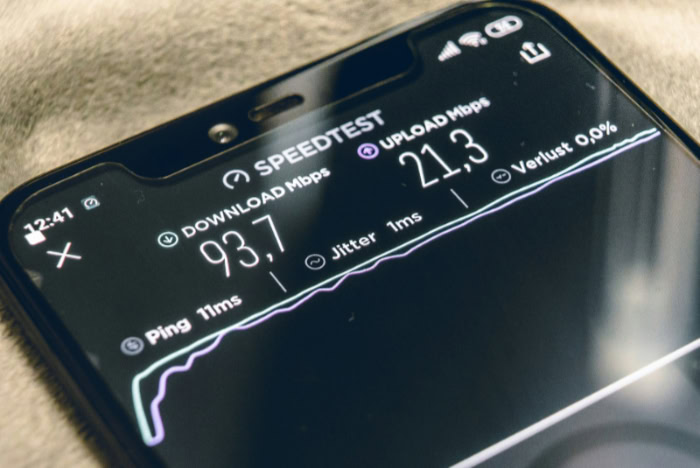
A fast connection dictates how quickly web pages load, how smoothly movies stream, and how well smart home devices function. While both 5G and cable are capable of handling modern household demands, their underlying technologies produce different performance profiles.
Download rates, upload limits, and response times determine the ultimate user experience.
Download and Upload Capacity
Cable internet historically offers higher maximum download speeds, often reaching gigabit tiers that easily support heavy downloading and 4K streaming. However, these connections are usually asymmetrical.
This means a cable plan might provide 1,000 megabytes per second for downloads but only 35 megabytes per second for uploads. 5G home internet speeds are highly dependent on location but typically offer moderate, symmetrical-leaning performance that comfortably handles daily tasks. Household device density plays a major role in how both connections perform.
If a family has multiple smartphones, laptops, and smart televisions pulling data simultaneously, bandwidth limits are tested. A wired gigabit connection handles dozens of demanding devices with ease.
A 5G connection might experience slower load times if too many users attempt high-bandwidth activities at the exact same moment.
Latency and Ping Response
Latency measures the time it takes for a signal to travel from your device to a server and back. This ping response is crucial for online multiplayer gaming, live streaming, and video conferences, where even a tiny delay disrupts the experience.
Wired cable internet excels in this category, providing stable and low ping times because the physical line offers a direct route for data. Wireless transmission naturally introduces variable latency. 5G signals travel through the air and must be processed by the tower, which can result in minor fluctuations in response time.
Packet loss and signal jitter are also more common with cellular reception than with physical line delivery, potentially causing occasional lag spikes during a competitive game or a slight stutter during a video call.
Reliability and Stability Factors

Even the fastest internet plan is useless if the connection frequently drops or slows to a crawl. Environmental hazards, physical damage, and heavy local traffic all threaten network stability.
Knowing what can disrupt your service helps dictate which technology offers the most consistent uptime for your specific location.
Environmental and Physical Obstructions
Because 5G home internet travels wirelessly, it faces unique physical hurdles. Dense foliage, hilly terrain, and certain building materials like brick or metal can block or degrade the cellular signal before it reaches your router.
Furthermore, severe weather conditions such as heavy rain or snow can temporarily interfere with radio frequencies. Cable networks avoid these airborne issues thanks to heavy insulation protecting the copper wires.
However, physical lines carry their own vulnerabilities. Cable internet is susceptible to physical cuts from construction work, utility pole damage from traffic accidents, and localized power outages that shut down neighborhood nodes.
If a tree falls on a utility line, the repair process often takes longer than waiting for a storm to pass.
Network Traffic and Congestion
Both technologies suffer from slowdowns when too many people use the network, but they handle congestion differently. 5G home internet relies on cell towers that must also serve mobile phone users. During peak hours, providers enforce cell tower priority rules.
Mobile phones typically get first priority on the network, meaning home internet speeds might temporarily drop if hundreds of commuters are using their phones in the area. Cable networks experience a different type of congestion known as the neighborhood node bottleneck.
Cable internet is essentially a shared pipeline within a subdivision. If multiple adjacent households jump online simultaneously to stream movies after dinner, the total available bandwidth at the local node is divided, leading to noticeable speed drops for everyone on that specific block.
Cost, Contracts, and Value Analysis

Analyzing internet options involves more than just speed tests and hardware checks. The financial commitment often dictates the final decision.
Providers structure their billing, promotional periods, and service agreements very differently, meaning the advertised price rarely tells the whole story.
Monthly Subscription and Hardware Fees
5G home internet providers generally promote price transparency by using a flat-rate billing model. The advertised price typically includes taxes and fees, and the gateway router is often provided at no extra cost.
Cable providers traditionally rely on tier-based pricing models where customers pay more for higher speed limits. These cable plans frequently feature attractive promotional rates that expire after the first year, leading to sudden bill increases.
Additionally, cable companies often charge hidden equipment rental fees for their modems and routers. Upfront investment costs also differ.
Cable providers might charge activation fees or require customers to purchase their own expensive hardware to avoid monthly rental charges, whereas 5G providers usually waive activation fees to entice new subscribers.
Data Caps and Contractual Commitments
Data limits are a major concern for households that stream video or download large video game files. Unlimited data plans are standard across almost all 5G home internet services, allowing users to consume as much bandwidth as they want without penalties.
Conversely, many cable plans still enforce data caps. Exceeding these limits often results in steep overage charges or throttled speeds until the next billing cycle.
Contract requirements also divide the two technologies. 5G providers heavily market their lack of annual contracts and early termination fees. Cable providers frequently require long-term commitments, locking customers into one-year or two-year agreements that carry heavy financial penalties if canceled prematurely.
Installation and Setup Procedures

Getting online should ideally be a quick and painless process. The steps required to activate service vary drastically depending on the chosen provider.
One method allows users to start browsing within minutes of opening a box, while the other might require waiting days or weeks for professional assistance.
Self-Installation and Router Placement
Setting up 5G home internet is essentially a plug-and-play process. Providers ship a gateway device directly to the customer, requiring no tools or technical background to install.
The most important step is optimal window placement. Users must test different locations around the home to find the spot with the strongest cellular reception.
Basic configuration steps are completed using intuitive mobile applications that guide the user through scanning a QR code, naming the Wi-Fi network, and setting a password. The entire process takes just a few minutes and offers the flexibility to move the router from room to room if needed.
Professional Deployment Requirements
Activating cable internet often requires professional technician appointments. The home must have active, physical coaxial cable outlets installed in the walls.
Older home configurations might have degraded wiring that needs replacing, or they might lack outlets entirely in the rooms where internet is needed most. This presents specific challenges for rental properties, as drilling new holes or running new wires typically requires landlord permissions.
Even if the house is pre-wired, users are limited to placing their modem exactly where the existing wall outlets are located, which might not be the most central location for broadcasting a strong Wi-Fi signal.
Conclusion
Choosing between 5G and cable ultimately comes down to balancing raw network stability against overall cost and convenience. 5G home internet shines through its flexibility and flat-rate pricing, offering a highly capable connection without the burden of drilling holes or signing rigid long-term contracts. Cable internet maintains a strong grip on the market by delivering unmatched stability and superior latency via a physical wire.
Budget-focused households, renters needing simple setups, and residents located right near modern cell towers will find 5G completely satisfying for daily browsing and streaming. On the other hand, competitive gaming households, heavy remote work environments, and homes situated far from reliable cellular reception will still benefit heavily from the steadfast reliability of a traditional cable connection.
Frequently Asked Questions
Is 5G home internet actually fast enough for streaming Netflix?
Yes, 5G home internet easily provides enough speed for high-definition and 4K streaming. Most providers deliver download speeds ranging from 100 to 300 megabytes per second. This capacity comfortably supports multiple family members watching videos, browsing the web, and listening to music simultaneously without constant buffering.
Does rain or bad weather mess up 5G internet?
Heavy rain or snow can temporarily reduce your 5G internet speeds or weaken the connection. Because the service relies on radio frequencies traveling through the air, dense water droplets sometimes scatter the signal before it reaches your home router. Physical cable lines completely avoid this specific weather interference.
Will I have to pay installation fees for cable internet?
You will usually have to pay an upfront activation or professional installation fee when setting up cable internet. Technicians often need to visit your property to activate the neighborhood node connection and verify the physical coaxial outlets inside your walls are functioning correctly.
Why is my cable internet so slow at night?
Your cable internet slows down at night because you share a local bandwidth node with your immediate neighbors. When multiple households on your street stream movies or play online games after dinner, the total available capacity drops. This shared pipeline creates a neighborhood bottleneck during peak evening hours.
Do I need a special router for 5G home internet?
You must use the specific gateway router provided by your 5G internet company to access their cellular network. Standard Wi-Fi routers cannot process incoming cellular signals from local towers. Fortunately, most providers include this necessary hardware at no extra monthly cost as part of their flat-rate subscription.
About the Author: Elizabeth Baker


