
Should You Upgrade Your Motherboard? Pros and Cons

The motherboard operates as the central nervous system of your custom PC, quietly dictating exactly which components you can install. If you want faster processing speeds or a better graphics card, you will eventually hit a compatibility wall enforced by this main circuit board.
Builders constantly face the frustrating dilemma of pushing their current system further or tearing everything down for a complete replacement. Spending hundreds of dollars on a new board just to support a different processor feels excessive if the resulting performance boost remains negligible.
By evaluating how these mainboards interact with modern hardware standards, you can accurately determine if a total system swap is strictly required, highly beneficial, or completely unnecessary for your specific computing needs.
Key Takeaways
- Motherboards do not directly generate processing speed or higher frame rates, acting instead as a communication hub that ensures stable data transfer between your primary hardware components.
- Upgrading your processor often requires a complete motherboard replacement due to shifting socket designs and strict chipset limitations enforced by manufacturers.
- Swapping your motherboard frequently triggers a wave of secondary purchases, including new generations of system memory and updated processor cooling brackets.
- Changing the main circuit board invalidates your Windows digital license and usually demands a complete operating system reinstall to avoid massive driver conflicts.
- Installing the maximum supported processor into your current motherboard socket offers a much higher return on investment than rebuilding the entire system from scratch.
The Function of the Motherboard and System Performance Impact
A computer’s motherboard provides the foundational wiring that allows all other hardware parts to function together. Recognizing how this board influences your system helps clarify why certain upgrades are necessary while others yield no noticeable benefits.
The board dictates the rules of engagement for your hardware, setting strict boundaries on speed, power, and compatibility.
Primary Role in PC Architecture
The motherboard acts as a vast communication network that bridges your central processing unit, system memory, graphics card, and storage drives. Rather than calculating data or rendering graphics, this central board routes electrical signals and data across different components.
It functions strictly as a communication hub rather than a primary processing unit. If you install a top-tier processor and a powerful graphics card, the motherboard ensures they can pass information back and forth without interruption.
The layout provides physical slots and ports designed to accommodate these parts, essentially serving as the framework upon which your entire computer is built.
Direct vs. Indirect System Performance
Many builders mistakenly assume that buying a more expensive motherboard will immediately increase their frame rates in video games or speed up video rendering times. Upgrading this component will not provide a direct boost to raw processing speed.
Instead, the board affects indirect performance factors. A high-quality board ensures system stability during heavy tasks, maintains optimal bus speeds, and maximizes data transfer rates between your drives and the processor.
While a premium board will not make your processor run inherently faster out of the box, it provides the stable foundation required for components to reach their maximum advertised speeds without crashing.
Thermal Bottlenecks and Power Delivery Limits
Modern processors require precise and stable power to reach their highest clock speeds. This power is managed by Voltage Regulator Modules, or VRMs, located around the CPU socket.
If you pair a high-end processor with a budget motherboard, the VRMs may struggle to handle the electrical load required during heavy computing workloads. Inadequate VRMs will quickly overheat, triggering a safety mechanism known as thermal throttling.
When this happens, the motherboard forces the processor to slow down to prevent hardware damage. Upgrading to a board with robust power delivery and substantial heatsinks ensures your processor receives clean, sustained power without causing thermal bottlenecks.
Mandatory Reasons for Hardware Replacement

Hardware limitations eventually force every PC builder to replace their main circuit board. You cannot bypass physical compatibility barriers, making a motherboard swap an unavoidable requirement rather than an optional upgrade.
CPU Socket and Chipset Compatibility
Processor manufacturers regularly update their physical socket designs to accommodate new architectures and power requirements. If you attempt to install a newly released CPU into a motherboard built for an older generation, the pins simply will not line up.
Even if the physical socket layout remains identical across a few generations, chipset limitations often restrict compatibility. The chipset is the silicon circuitry on the motherboard that controls data flow between the processor and external devices.
Manufacturers routinely limit newer processors to newer chipsets, forcing users to replace the entire board even if the old socket looks exactly the same.
Memory Generation Shifts
The transition between major memory standards requires a complete motherboard replacement. You cannot mix DDR4 memory modules with a DDR5 motherboard due to strict physical and architectural differences.
Each generation of random access memory features a unique notch cut into the bottom of the stick, ensuring it only fits into a matching motherboard slot. Beyond these physical notches, the underlying electrical architecture changes entirely between generations.
If you want to utilize the drastically faster speeds and higher bandwidth offered by newer memory standards, you must purchase a motherboard specifically engineered for that exact memory generation.
Hardware Failure and Physical Damage
Continuous heat cycles, electrical surges, and physical wear eventually cause motherboards to fail. Common indicators of a defective board include random system reboots, failure to post during startup, completely dead expansion slots, or visibly bulging capacitors.
Diagnosing a failed motherboard can be frustrating because the symptoms often mimic a dying power supply or faulty memory. To confirm a motherboard defect, builders must systematically test each individual component on a known working system.
Once you rule out the processor, RAM, graphics card, and power supply, a persistent boot failure points directly to irreversible motherboard damage.
Feature Expansion and Technical Benefits

Replacing a motherboard also unlocks access to newer technologies that improve daily usability and system aesthetics. Builders often upgrade specifically to utilize faster connection standards or to accommodate a radical shift in their computer’s physical footprint.
PCIe Bandwidth and M.2 Storage Expansion
The generation of PCIe lanes available on your motherboard dictates the maximum speed at which your graphics card and storage drives can operate. Upgrading from older standards to PCIe 4.0 or 5.0 doubles the available bandwidth, allowing modern NVMe solid-state drives to read and write files at staggering speeds.
Additionally, newer motherboards generally offer a greater quantity of M.2 slots. This expansion capability allows you to install multiple high-speed storage drives directly onto the board without relying on bulky cables.
For professionals moving massive video files or gamers wanting instantaneous load times, these storage upgrades justify a complete board replacement.
Modern Connectivity Standards
A new motherboard updates your system’s communication capabilities with the outside world. Recent models integrate advanced wireless protocols like Wi-Fi 6E or Wi-Fi 7, dramatically reducing latency and increasing download speeds over wireless networks.
Wired networking also sees massive improvements, with 2.5G and 10G Ethernet ports replacing older gigabit standards for high-speed local file transfers. On the physical connectivity side, modern boards update the rear and front panel I/O with high-speed USB-C ports, Thunderbolt compatibility, and superior onboard audio chipsets.
These additions eliminate the need for third-party expansion cards and external adapters.
Form Factor Adjustments and Aesthetics
Sometimes an upgrade is driven entirely by the physical dimensions of the computer case. Moving from a massive full tower to a compact desk build requires a form factor transition from standard ATX down to Micro-ATX or Mini-ITX.
The motherboard must match the spatial constraints of the new chassis. Furthermore, aesthetic considerations heavily influence motherboard selection.
Modern builds often rely on specific color themes, extensive cable management covers, and integrated RGB headers that sync lighting across all components. Upgrading a board solely to achieve a clean, cohesive visual design is a common practice among enthusiast PC builders.
Hidden Costs and Practical Challenges
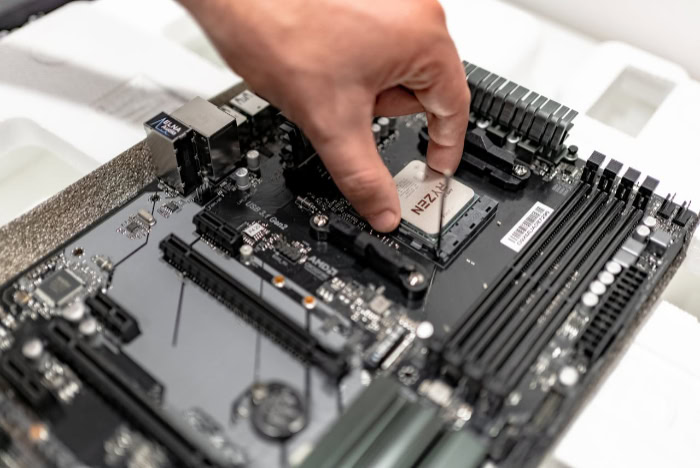
Replacing a motherboard requires more than just the purchase price of the board itself. Builders must account for a wave of secondary expenses, software hurdles, and the sheer physical effort required to rebuild an entire system from scratch.
Total Cost of Ownership and Cascading Expenses
Upgrading your motherboard frequently triggers a snowball effect of cascading expenses. Because a new board usually introduces a different processor socket or a newer memory standard, you are rarely just buying the motherboard.
You will likely need to purchase a compatible CPU and a new kit of RAM at the exact same time. Sometimes, your existing CPU cooler will not mount to the new socket, forcing you to buy additional brackets or an entirely new cooling solution.
When you add up these forced purchases, the total cost of ownership skyrockets. Compared to swapping out a single component like a graphics card, buying a new motherboard offers a notoriously low cost-to-performance ratio.
You spend hundreds of dollars mostly to enable future upgrades rather than gaining immediate performance.
Windows OS Activation and System Software Reconfiguration
Hardware is not the only thing disrupted during a major system overhaul. Microsoft ties your Windows operating system digital license directly to your motherboard’s unique hardware identifier.
When you swap the board, Windows assumes you have moved the hard drive into an entirely different computer and will immediately deactivate your license. If you are using a retail copy of Windows, you can usually transfer the license by logging into your Microsoft account and running the activation troubleshooter.
However, if your system uses an Original Equipment Manufacturer license, you might be forced to purchase a brand new operating system activation code. Beyond activation, moving your existing operating system installation to a new board often causes driver conflicts, frequently requiring a completely clean installation of Windows to ensure system stability.
Hardware Rebuild Labor and Assembly Complexity
Swapping a motherboard is the most labor-intensive upgrade you can perform on a desktop computer. Unlike installing a new stick of RAM or sliding in a graphics card, replacing the main circuit board requires a complete teardown of your system.
You must unplug every power cable, remove the graphics card, detach the processor cooler, and unscrew the old board from the chassis. After extracting the old hardware, you must carefully reverse the entire process with the new components.
This requires a significant time investment, often taking several hours even for experienced builders. The process also carries inherent risks.
Handling sensitive components increases the chance of dropping a processor, bending delicate socket pins, or accidentally damaging an expensive graphics card during the removal process.
Alternative Upgrade Paths and Decision Framework

Before committing to a complete system rebuild, it is wise to look into easier upgrade paths that might achieve your desired performance targets. Carefully evaluating your current hardware limitations against your actual computing needs can save you both time and money.
In-Socket Component Upgrades
You can often achieve massive performance gains without removing your current motherboard by maxing out the processor on your existing socket. Motherboard manufacturers regularly release basic software updates, known as BIOS updates, which allow older boards to support newer processors within the same socket family.
By identifying the absolute best CPU your current chipset can handle, you might find an upgrade path that requires minimal effort. If you are currently using an entry-level processor from a few years ago, dropping a high-end processor from the end of that same generation into your existing socket will dramatically improve speeds.
This in-socket upgrade keeps your current motherboard and memory in place while delivering a highly noticeable boost to processing power.
Alternative Hardware Investments for Higher ROI
If your goal is strictly better performance in games or faster loading times, spending your budget on other components yields a much higher return on investment. Upgrading a graphics card will immediately double or triple your frame rates in modern titles, something a motherboard swap will never achieve.
Similarly, expanding your system memory or switching from an older hard drive to a solid-state drive will make your computer feel noticeably faster and more responsive. Before spending money on any replacement parts, you should optimize your current hardware.
Simply cleaning the dust out of your processor cooler, applying fresh thermal paste, or enabling XMP memory profiles in your BIOS can restore lost performance and extend the life of your current setup.
Systematic Decision Matrix
Making the final call requires checking your situation against three simple criteria: necessity, utility, and alternatives. A motherboard upgrade is necessary if your desired processor physically will not fit your current socket or if your current board is completely broken.
An upgrade provides utility if you strictly require features your current board lacks, such as high-speed Thunderbolt ports or additional M.2 storage slots. If neither necessity nor utility applies, you should pursue alternatives like a graphics card or memory swap.
For builders on a strict budget, squeezing every last drop of performance out of the existing platform is always the smartest financial move. For users seeking absolute top-tier performance with massive budgets, a full motherboard replacement sets a clean foundation for the fastest components on the market.
Conclusion
Deciding to replace your motherboard comes down to evaluating physical compatibility, required features, and your available budget. If your desired processor requires a different socket or you need faster storage connectivity, a new board is unavoidable.
However, if your current board still supports high-end components from its generation, an in-socket processor swap or a graphics card upgrade will save you hours of labor and hundreds of dollars. Balancing the financial cost and the physical effort of a complete system rebuild against the expected performance gains ensures you only spend money where it truly matters.
By prioritizing direct component upgrades first, you can delay the massive undertaking of a motherboard replacement until your computing needs strictly require it.
Frequently Asked Questions
Do I have to reinstall Windows if I get a new motherboard?
Yes, replacing your motherboard usually requires a clean installation of Windows to prevent driver conflicts. While you can sometimes transfer your digital license using a Microsoft account, the new hardware profile often causes system instability if you keep the old installation. Wiping your drive and starting fresh ensures optimal performance.
Will buying a more expensive motherboard give me better FPS in games?
A new motherboard will not directly increase your gaming frame rates. Motherboards act as communication hubs rather than processing units, meaning they do not render graphics. Spending that same budget on a higher-tier graphics card or a faster processor will provide a massive, noticeable improvement in your gaming performance.
How do I know if my new CPU will fit my current motherboard?
You must check the processor’s socket type and compare it against your motherboard’s exact physical specifications. Even if the socket physically matches, you also need to verify that your specific motherboard chipset supports the new processor generation. Manufacturers list all supported processors on their official support pages, often requiring a quick BIOS update.
Can I put DDR5 RAM into an older DDR4 motherboard?
No, you cannot mix different generations of memory due to strict physical and electrical differences. DDR5 memory sticks have a different physical notch configuration compared to DDR4, making it impossible to insert them into older slots. If you want to use the faster speeds of DDR5, you must purchase a compatible motherboard.
Why does my computer slow down when the motherboard gets too hot?
Motherboards intentionally slow down your processor to prevent physical damage when the power delivery components overheat. The voltage regulator modules surrounding your processor manage massive electrical loads. If they lack proper cooling during heavy tasks, they overheat and trigger thermal throttling. This safety mechanism reduces processor speeds until temperatures stabilize.
About the Author: Elizabeth Baker


