
Are AirTags Worth It? Pros and Cons

Losing track of your essential belongings, like car keys or a travel backpack, causes immediate stress and disrupts your entire day. Since tracking devices are meant to prevent this frustration, deciding to buy an Apple AirTag comes down to cost and usefulness.
These small, disc-shaped accessories utilize Apple’s massive network of active devices to help locate misplaced items nearby or miles away. However, before investing in a single tracker or a multi-pack, it is important to consider the hidden costs of necessary accessories, safety alerts, and the limitations of tracking moving targets.
Key Takeaways
- Crowd-Sourced Mesh Network: AirTags locate missing items by securely broadcasting encrypted Bluetooth signals to hundreds of millions of nearby Apple devices, bypassing the need for direct cellular or internet access.
- Precision Guidance: When you are searching at close range, compatible iPhones use U1 or U2 wireless chips to provide exact distance readouts, direction arrows, and haptic vibrations.
- No Ongoing Fees: These trackers run on a standard CR2032 coin-cell battery that lasts over a year, requiring zero monthly subscriptions or platform network fees to operate.
- Apple Ecosystem Exclusivity: Setup and tracking functions are completely restricted to Apple device owners, meaning Android users cannot configure or locate these trackers.
- Theft Recovery Limitations: Apple’s anti-stalking alerts notify nearby smartphone users of unknown trackers, which means thieves will likely be warned of a hidden device and discard it.
Technical Capabilities and Operation
To determine if these small tracking pucks are a worthwhile addition to your daily routine, it is helpful to look at the technology that powers them. Apple’s tracking system relies on a blend of local hardware and a massive, passive communication network to locate missing items.
By analyzing how these devices communicate, you can see how they operate in different environments.
The Apple Find My Network
The power behind the AirTag is the Apple Find My network, a passive crowd-sourced mesh network. This system comprises hundreds of millions of iPhone, iPad, and Mac devices spread across the globe.
When an AirTag is separated from its owner, it broadcasts a secure, encrypted Bluetooth signal. Nearby Apple devices that detect this signal can upload its location to iCloud, allowing the owner to see where the tag is on a map.
This transmission happens entirely in the background, utilizing minimal data and battery power. Because the system is vast, you can often locate a lost item in crowded public spaces within minutes, even if the tag itself has no cellular or direct internet connection.
Precision Guidance and Ultra-Wideband Technology
When you are in close range of your misplaced item, the AirTag switches to Ultra-Wideband technology. Inside compatible iPhones, a dedicated wireless chip (the U1 in older models or the newer U2 chip) coordinates with the tracker to pinpoint its location.
This is known as Precision Finding. As you search for your item, your phone screen displays an on-screen arrow pointing you in the right direction, along with the exact distance in feet or meters.
To help guide you without looking at your screen, the phone provides haptic vibrations that become more intense as you get closer, along with audio chimes emitted from the tracker’s built-in speaker.
Difference Between Bluetooth and GPS Trackers
It is important to clarify that an AirTag is not a satellite GPS tracker. GPS units maintain a direct connection with orbiting satellites and broadcast their coordinates via cellular data networks, which allows for real-time tracking across vast empty spaces. However, GPS units are physically large, require a subscription fee, and drain their rechargeable batteries in days or weeks.
AirTags, by contrast, use local Bluetooth and Ultra-Wideband signals to leverage nearby Apple devices. This approach keeps battery consumption low enough to last over a year on a tiny coin-cell battery.
The trade-off is geographic range; an AirTag in the middle of a remote forest with no Apple devices nearby will not be able to report its location.
Practical Application Analysis

How these technical mechanics translate to daily life depends largely on the items you are tracking. Some scenarios showcase the tracker’s strengths, while others expose the natural boundaries of the technology.
Looking at common situations can help you see where these devices excel and where they struggle.
Luggage and Travel Management
For travelers, these trackers offer a major benefit when passing through busy transit hubs. Placed inside a checked suitcase, a tracker can confirm if your bag actually made it onto your flight before takeoff.
If your luggage is misplaced by an airline, you can bypass the guesswork at the baggage claim counter and show customer service exactly where your belongings are located. The security of knowing your bag is safely in the cargo hold or sitting in a specific terminal provides immense reassurance during long-haul flights.
Everyday Item Recovery
For household objects, the tracker acts as a quick remedy for daily clutter. Attaching one to a keyring, sliding it into a wallet slot, or placing it in a backpack pocket ensures that you can find misplaced items in seconds.
If your keys slide behind a couch cushion, you can trigger the tracker’s built-in speaker to play a sound. The speaker is loud enough to hear through cushions or drawers, saving you from tearing the living room apart before leaving for work.
Constraints with Animals and Mobile Targets
While these tracking pucks work well for stationary objects, they are less effective for pets or children. Because the system relies on intermittent Bluetooth pings forwarded by nearby Apple devices, there is a delay in location updates.
If a dog runs into a wooded area or down a busy street, the tracker will only show where the pet was when it last passed an Apple device, not where it is currently running. This latency makes it a poor substitute for an active GPS tracker for moving targets.
Financial Investment and Ownership Costs
Deciding if these trackers are worth the purchase involves assessing both upfront and long-term expenses. The sticker price of the device is only the first factor to consider.
Accessories and maintenance costs also shape the overall value of ownership.
Initial Cost of Single and Multi-Packs
Apple offers these tracking devices individually or in four-pack bundles. Buying a single unit is ideal if you only need to secure one vital item like your car keys.
For households with multiple sets of keys, bags, and wallets, the four-pack bundle offers a discount per unit, reducing the cost of each individual tracker. Assessing how many items you lose on a regular basis will help you decide which purchasing option makes the most sense.
Supplementary Accessory Expenses
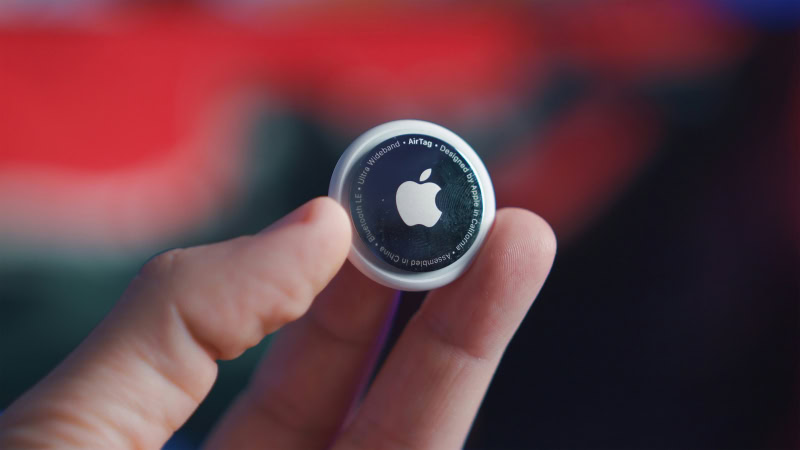
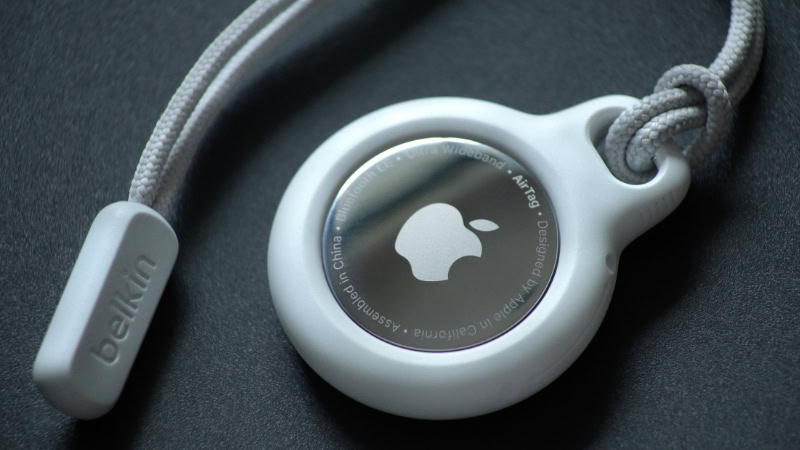
The physical design of the tracker is sleek but smooth, lacking any built-in loop, hole, or adhesive backing. This means you cannot attach it to a keyring without buying a separate case, loop, or keychain.
While Apple sells premium first-party leather loops and keychains, these accessories can sometimes cost more than the tracker itself. Fortunately, budget-friendly third-party cases and mounts are widely available online, offering affordable alternatives to secure the tracking pucks.
Battery Lifespan and Maintenance
Unlike many rechargeable smart devices, these trackers run on a standard CR2032 coin-cell battery. A single battery provides more than a year of continuous power, and when it finally runs low, you can easily replace it yourself by twisting open the metallic backplate.
Since these replacement batteries are cheap and easy to find, the ongoing maintenance cost is minimal. Additionally, there are no monthly subscription fees to access the tracking network, making the long-term cost of ownership highly predictable.
Security Features and Theft Recovery Performance
A major aspect of modern tracking devices is the balance between personal safety and asset recovery. While these devices are designed to help you find lost items, their high accuracy has forced manufacturers to implement strict privacy guardrails.
These safety protocols can directly influence how the devices perform when your belongings are stolen.
Personal Safety Alerts and Prevention of Unauthorized Location Checks
To prevent individuals from using trackers for unauthorized surveillance, Apple built safety alerts into the operating software. If an unknown tracker is detected moving with an iPhone or Android user over time, the system will send an alert to their phone.
The user can then force the tracker to play a sound to locate it and read instructions on how to disable it. While this feature is essential for protecting personal privacy, it changes how the device behaves in theft scenarios.
Effectiveness in Asset Recovery and Theft Prevention
If a thief steals a bag containing a tracker, they will likely receive an alert on their smartphone within a short period. Once notified of the unknown tracker, a thief can easily locate the device inside the bag and discard it, rendering the tracking system useless.
Because of this, the tracker is far more effective as an item finder for misplaced belongings rather than an anti-theft recovery tool. If you plan to use it for theft prevention, hiding the tracker deeply inside an item is necessary to delay its discovery.
Encryption and Location Privacy Standards
Apple prioritizes privacy by using end-to-end encryption for all location data sent through the Find My network. The location coordinates of your tracker are only visible to you, and not even Apple can see where your device is located.
The Bluetooth identifiers emitted by the tracker rotate frequently to prevent anyone from spoofing or tracking your device as you move. This strict standard ensures that your personal habits and locations remain completely private.
Device Compatibility and Market Alternatives

Before finalizing your purchase, you must evaluate how well these trackers fit into your current household technology. While they work brilliantly within a specific ecosystem, they may not be the right choice for everyone.
Comparing them to alternative hardware can help you determine the best option for your devices.
iOS Integration and Android Exclusivity
Setting up these trackers is incredibly simple for iPhone owners. You merely hold the tracker next to your phone, and a pop-up prompt guides you through naming the device and linking it to your Apple Account.
Once paired, you manage the tracker entirely through the native Find My app. However, this seamless experience is restricted to Apple hardware.
Android users cannot set up or actively track these devices, making them a poor choice for anyone outside the Apple ecosystem.
Comparison to Competitor Hardware
Other tracking brands like Tile, Chipolo, and Samsung SmartTags offer competitive alternatives with different advantages. Tile and Chipolo trackers are highly compatible with both iOS and Android platforms, and some models feature flat card shapes that slip more easily into slim wallets.
However, none of these competitors can match the sheer size of Apple’s Find My network. While a competitor tracker might struggle to find a signal in a quiet suburb, an Apple-linked device can often find a connection almost anywhere.
Decision Metrics for Android Users
If your household relies primarily on Android devices, alternative tracking networks are a necessity. Samsung SmartTags leverage Samsung’s own massive network of Galaxy devices, making them the premier choice for Galaxy smartphone owners.
For other Android users, trackers that utilize Google’s Find My Device network or Tile’s community network offer the most reliable coverage without requiring you to switch to Apple hardware.
Conclusion
Apple AirTags represent a practical investment for iPhone owners who frequently misplace everyday items or travel often with checked bags. If you are already within the Apple ecosystem, the convenience of the massive locating network and the low upkeep of a cheap, easily replaceable coin-cell battery provide solid daily value.
However, if you are an Android user or primarily need a real-time anti-theft tracking tool, these devices will not meet your expectations. For Apple device owners tracking stationary valuables, buying a multi-pack is a highly sensible purchase that offers peace of mind.
For those outside the iOS ecosystem, they are an unnecessary expense, and you should opt for a platform-compatible competitor.
Frequently Asked Questions
Can I use an AirTag if I have an Android phone?
No, you cannot set up or track an AirTag using an Android device. Apple restricts these trackers strictly to the iOS ecosystem, meaning you need an iPhone or iPad to pair and view them. Android users should look at platform-compatible alternatives like Tile, Chipolo, or Samsung SmartTags instead.
How long does the battery last and can I change it?
The battery lasts for more than a year and is fully user-replaceable. The device runs on a standard CR2032 coin-cell battery, which you can purchase cheaply at most stores. To swap the battery, simply press down and twist the polished metal back cover of your tracker to open it.
Do I have to pay a monthly fee to use an AirTag?
No, there are no monthly fees or subscription costs associated with using an AirTag. Once you purchase the tracker, you have free, unlimited access to Apple’s locating network. Your only ongoing cost will be replacing the inexpensive coin-cell battery roughly once a year.
Will an AirTag let me track my dog in real time?
No, an AirTag is not designed for real-time tracking of active pets. Because the device relies on intermittent Bluetooth pings picked up by passing iPhones, its location updates can be delayed. For fast-moving animals, an active GPS tracker with a dedicated cellular connection is a much safer choice.
Can someone use an AirTag to secretly track me?
No, Apple has built-in safety features to prevent unauthorized tracking. If an unrecognized AirTag moves with you over time, your smartphone will send you an automatic alert. You can then trigger the unknown tracker to play a sound, helping you find and disable it immediately.
About the Author: Julio Caesar


