
1TB vs. 2TB SSD: Capacity, Performance, and Value

Choosing the right storage capacity dictates how many massive applications, modern games, and media files you can install before facing frustrating system warnings. Making the correct initial choice between a 1TB and a 2TB Solid State Drive saves you from expensive hardware upgrades and tedious data migrations later on.
While both sizes heavily dominate current consumer hardware markets, they offer vastly different value propositions for PC and console users alike. Beneath the advertised gigabytes, notable technical variations exist in cache allocation, continuous performance, and actual usable space.
Key Takeaways
- A 1TB SSD provides approximately 930 GB of usable storage space, while a 2TB drive offers around 1.86 TB after calculating binary conversion loss and operating system overhead.
- 2TB solid state drives feature more physical memory chips, allowing them to process continuous write operations and massive file transfers significantly faster than 1TB counterparts.
- Upgrading to a 2TB model immediately doubles your Terabytes Written endurance rating, meaning the hardware will survive twice as many data cycles before failing.
- Modern PC games frequently exceed 100 GB per installation, making a 2TB drive the necessary baseline to store more than a handful of major titles simultaneously.
- Single-slot laptops and compact motherboards severely restrict future upgrades, so installing a 2TB drive outright prevents complicated hardware replacements and data migrations later.
Financial Investment and Value Metrics
Buying storage hardware involves balancing your immediate budget against your future needs. The price tags on 1TB and 2TB drives tell only a fraction of the story regarding actual financial efficiency.
Evaluating the true cost means analyzing per-gigabyte ratios, comparing different performance tiers, and calculating the hidden expenses of future hardware upgrades.
Price-per-Gigabyte Breakdown
The most accurate way to evaluate storage cost efficiency is to divide the total price of the drive by its capacity in gigabytes. Historically, the price-per-gigabyte dropped significantly as you moved from smaller drives to 1TB models, establishing the 1TB tier as the sweet spot for value.
However, current market trends show that 2TB drives frequently offer an identical or even superior price-per-gigabyte ratio. Buying in bulk applies to digital storage.
While you pay more upfront for a 2TB model, you are often paying slightly less for every individual gigabyte compared to the 1TB version of the exact same drive.
Upfront Cost vs. Long-Term Value
Allocating system build budgets requires a careful compromise between immediate performance and extended usability. You can often purchase a mid-range 2TB SSD for the same price as a premium, top-tier 1TB model.
For the vast majority of users, the sheer volume of the mid-range 2TB drive offers vastly superior long-term value than the minor speed advantages of the premium 1TB drive. Having double the capacity means you can use the drive for several additional years before feeling the pressure to upgrade, effectively spreading your initial financial investment over a much longer period.
Initial Single Purchase vs. Future Upgrade Expense
Opting for a 1TB drive now with plans to add a second 1TB drive later might seem economically sensible, but it usually ends up costing more. A single 2TB drive is generally cheaper than buying two separate 1TB drives over a two-year span.
Furthermore, future upgrade paths carry indirect costs. If your system lacks extra M.2 slots, upgrading means you have to completely replace the original 1TB drive rather than just adding a second one.
This process requires buying an external enclosure, performing time-consuming data transfers, and figuring out what to do with a redundant, leftover 1TB drive.
Technical Performance and Drive Endurance

Solid state storage scales in speed and durability right alongside physical size. While a 1TB and 2TB drive might share the exact same brand name and product line, their internal hardware behaves differently under heavy use.
The larger physical footprint of a 2TB drive allows for specific architectural advantages that directly translate to better continuous speed and a longer operational lifespan.
Controller Architecture and NAND Die Density
An SSD operates using a microscopic internal controller that reads and writes data across multiple flash memory chips, known as NAND dies. A 2TB drive physically contains more NAND dies than a 1TB model.
This increased density allows the controller to access more memory channels simultaneously. Because the controller can distribute the workload across a wider array of chips, bus utilization is highly optimized.
Consequently, the 2TB variant of a specific SSD model will frequently benchmark with faster sequential write speeds than its 1TB counterpart, simply because it has more physical pathways to route the data through.
SLC Cache Allocation and Sustained Write Speeds
Modern drives use a specific portion of their storage as an ultra-fast SLC cache to handle immediate data transfers. Depending on the manufacturer, this cache is either a fixed static size or a dynamic size based on total drive capacity.
Because a 2TB drive has double the overall storage, its dynamic SLC cache is usually twice as large as the cache on a 1TB drive. This massive advantage becomes obvious during continuous, heavy write workloads like transferring large video files or decompressing massive game archives.
A 1TB drive will exhaust its smaller cache much faster, resulting in a severe drop in transfer speeds, while the 2TB drive maintains its maximum speed for a significantly longer duration.
Drive Lifespan and Terabytes Written (TBW)
Storage manufacturers rate the physical lifespan of their drives using a metric called Terabytes Written, or TBW. This number represents the total amount of data you can write to the drive before the memory cells begin to degrade and the warranty expires.
Because a 2TB drive has twice the number of memory cells to absorb these write operations, its TBW rating is universally double that of a 1TB drive. If a 1TB model is rated for 600 TBW, the 2TB version will be rated for 1200 TBW.
This expanded endurance means the larger drive will comfortably survive years of heavy formatting, deleting, and rewriting without risking hardware failure.
Storage Demands Across Specific Workloads

Different computer uses consume storage at wildly different rates. The applications you run daily dictate exactly how fast your drive fills up and how soon you hit capacity limits.
Matching your specific computer habits to the appropriate drive size prevents frustrating bottlenecks and constant file deletion.
Modern PC Game File Sizes
Contemporary AAA video games require massive amounts of storage space. A single major release frequently demands between 100 GB and 150 GB of drive space, and ongoing live-service updates push those numbers even higher.
On a 1TB drive with an operating system installed, you can comfortably store perhaps five or six large titles before the drive turns red and performance suffers. Upgrading to a 2TB drive transforms your experience by allowing 15 or more major games to remain installed simultaneously.
This larger capacity eliminates the tedious cycle of deleting older games just to make room for new purchases.
High-Resolution Video Post-Production and Media Workflows
Professional media creation devours free space faster than any other common computing task. Raw 4K and 8K video footage takes up hundreds of gigabytes per hour of recording.
Video editors must also accommodate proxy files, rendered effects, and dedicated scratch disks to ensure playback remains smooth. A 1TB drive will choke under the weight of a single heavy video project, causing severe software slowdowns.
For dedicated media editing suites, a 2TB drive represents the bare minimum baseline to keep active projects, cache files, and high-bitrate exports organized without constantly offloading footage to external hard drives.
Console Storage Expansion for PlayStation 5 and Handheld Devices
Storage expansion is a massive priority for modern console and portable gamers. The PlayStation 5 features a dedicated internal M.2 slot for storage upgrades, while handhelds like the Steam Deck and ROG Ally rely on specific compact SSD formats to boost their base capacities.
Because console game libraries grow rapidly and physical discs copy massive amounts of data directly to the internal storage, a 1TB upgrade fills up in just a few months. A 2TB drive offers a much better buffer for these devices, giving users immediate access to a vast portion of their game library while away from high-speed internet connections.
General Workstation Tasks and Everyday Productivity
Not every computer needs a massive storage pool to function perfectly. Standard office applications, web browsing data, and standard document archives consume very little space.
A massive folder containing thousands of PDFs, Word documents, and Excel spreadsheets might barely register as 10 GB. For users strictly focused on non-gaming and non-media workloads, a 1TB drive provides more than enough room.
In an everyday productivity environment, this capacity will likely outlast the physical hardware of the computer itself without ever nearing the storage limit.
System Constraints and Decision Criteria
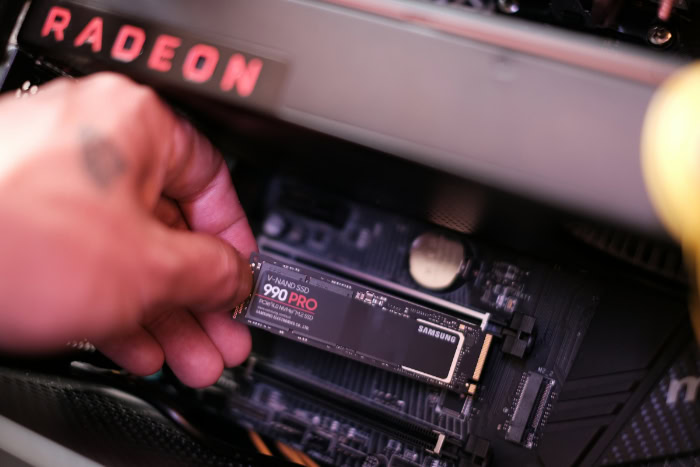
Physical hardware limitations strongly influence which drive you should purchase. The layout of your motherboard and your willingness to manage multiple storage devices dictate your available upgrade paths.
Evaluating these physical and logical constraints ensures your chosen capacity actually fits and functions perfectly within your machine.
Motherboard M.2 Expansion Slot Limitations
The physical size of your computer directly impacts your storage expansion options. Compact Mini-ITX motherboards and thin laptops frequently offer only one single M.2 slot for storage.
Micro-ATX boards might offer two slots, but secondary slots often share PCIe bandwidth with other components like graphics cards or Wi-Fi adapters. If you populate that secondary slot, your overall system performance might degrade as bandwidth is split.
Because of these severe physical constraints, maximizing the capacity of your primary slot with a 2TB drive is highly recommended for small form factor builds and laptops.
Single Drive vs. Dual Drive Configurations
Users with spacious desktop cases must decide between using one large 2TB drive or splitting their storage across two separate 1TB drives. A single 2TB configuration is vastly simpler to manage, as all your files live on one unified partition.
It also improves internal thermal management by keeping heat concentrated on a single storage controller while drawing less overall power from the system. Conversely, a dual drive setup allows you to isolate your operating system on one drive and store large files on the other.
This protects your data if the primary operating system drive crashes, but it heavily relies on having multiple uncompromised motherboard slots available.
Primary Decision Factors for Capacity Selection
Choosing the perfect drive requires a simple evaluation of your budget, primary workload, and physical hardware. You must first look at your motherboard to confirm how many M.2 slots are actually accessible.
If you only have one slot, you should stretch your budget to secure a 2TB drive. General office workers and casual web browsers will easily survive on a 1TB model.
However, active gamers, video editors, and laptop users should view a 2TB SSD as the optimal baseline to prevent constant file management and future hardware replacements.
Conclusion
The decision between a 1TB and a 2TB SSD involves balancing upfront costs against ongoing performance benefits and practical storage limits. While a 1TB drive requires a smaller initial investment and handles standard office tasks perfectly, it rapidly falls short under the immense file sizes of modern games and high-resolution video workflows.
Stepping up to a 2TB capacity provides more than just double the storage space. The larger drive delivers superior continuous transfer speeds, double the hardware endurance, and a far more forgiving dynamic cache.
By choosing the 2TB option from the start, users maximize their system bandwidth, extend the physical lifespan of their hardware, and completely bypass the frustrating process of replacing drives in single-slot laptops and compact motherboards.
Frequently Asked Questions
Why does my 1TB SSD only show 930GB of free space?
Your computer reads data in binary gibibytes, while manufacturers advertise using decimal gigabytes. This difference in mathematical measurement causes an immediate discrepancy once the drive is formatted. Furthermore, your operating system and essential partition files immediately claim a portion of that converted storage for basic functionality.
Is a 2TB SSD actually faster than a 1TB SSD?
Yes, a 2TB drive usually maintains faster continuous write speeds than a 1TB drive of the exact same model. The larger capacity contains more physical memory chips, allowing the internal controller to access multiple memory channels simultaneously. This extra density prevents severe slowdowns during massive file transfers.
Should I buy one 2TB drive or two 1TB drives?
Purchasing a single 2TB drive is generally cheaper and much easier to manage. A single drive keeps your files consolidated on one partition, draws less system power, and generates concentrated heat. Dual drives are only beneficial if you need a separate physical device for dedicated operating system backups.
How many big PC games can fit on a 1TB drive?
You can realistically fit five or six major modern game releases on a 1TB drive. Modern games frequently demand well over 100 GB of space each. Once you factor in your operating system footprint and background applications, the remaining space fills up incredibly fast with frequent live-service updates.
What does the TBW rating mean for my new SSD?
Terabytes Written represents the total amount of data you can save to the drive before the physical memory cells begin degrading. A higher rating guarantees a much longer hardware lifespan. Because 2TB models have double the memory cells, they universally feature twice the endurance of 1TB drives.
About the Author: Julio Caesar


