
Are Dedicated Microphones Worth It? Our Verdict
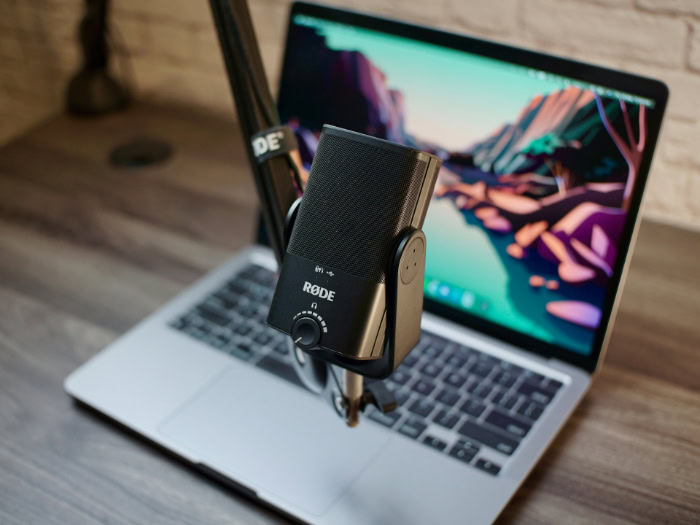
As virtual meetings, online education, and content creation occupy more of our daily routines, the quality of your voice online can define your professional and social interactions. If your listeners constantly struggle to hear you over background hums or thin, echoing audio, your message simply fails to connect.
Standard built-in laptop microphones and phone headsets offer basic convenience, but they often compromise on clarity and vocal depth. Deciding to upgrade to a separate microphone involves balancing the promise of better sound against financial costs, hardware complexity, and desk space.
Weighing these practical factors against your specific communication needs will help you decide if a dedicated audio setup is a valuable investment or an unnecessary expense.
Key Takeaways
- Built-in laptop and webcam microphones capture thin, echoing sound because their physical distance from your mouth forces them to record ambient room noise and computer fan vibrations.
- Dedicated microphones use larger condenser or dynamic capsules to capture more acoustic energy, which prevents digital distortion and delivers a natural vocal tone.
- A cardioid directional pattern isolates your voice by capturing sound directly in front of the microphone while blocking background noise from the sides and back.
- A dedicated setup requires managing physical space and budgeting for essential accessories, including shock mounts to absorb desk vibrations and pop filters to block harsh air blasts.
- USB microphones offer simple plug-and-play setup for remote workers, while modular XLR systems require an external audio interface but allow you to upgrade individual components over time.
Limitations of Integrated Audio
Most computers and webcams feature built-in audio components designed for basic communication. While these integrated tools offer immediate usability, they operate under severe physical limitations that compromise sound quality.
Performance of Laptop and Webcam Microphones
A primary limitation of built-in laptop and webcam microphones is the physical distance between the hardware and the speaker. Since these sensors are typically positioned at arm’s length, they must capture sound across an open space.
This distance causes the captured voice to sound thin and hollow, as the microphone records the room’s natural echoes and ambient noise alongside the speaker’s voice. Furthermore, because these microphones reside inside or adjacent to computer chassis, they frequently pick up internal hardware noises, such as whirring cooling fans or the click of a keyboard, which introduces distracting background hums.
Capabilities of Headset Microphones
Headset microphones solve the distance issue by placing the microphone capsule close to the mouth, but they introduce other technical trade-offs. To keep headsets lightweight and wearable, manufacturers must use tiny microphone capsules.
These miniature sensors have physical limits, offering a narrow frequency response that struggles to capture the full bass and treble ranges of a human voice. Additionally, many headset connections compress the audio signal heavily to transmit it wirelessly or over standard audio jacks, resulting in a processed, artificial sound that lacks warmth and detail.
The Impact of Poor Audio on Professional Communication
Poor audio quality has real consequences for professional interactions. When a speaker uses a low-quality microphone, listeners must expend extra mental effort to interpret muffled words, filter out background hums, and ignore harsh room echoes.
This extra cognitive strain leads to listener fatigue, causing colleagues or clients to tune out during longer calls. Additionally, bad sound quality can subtly undermine a speaker’s professional credibility.
Clear, rich audio conveys preparation and competence, whereas static-filled or distant audio can make a presentation feel rushed, unpolished, or unprofessional.
Advantages of Dedicated Microphones
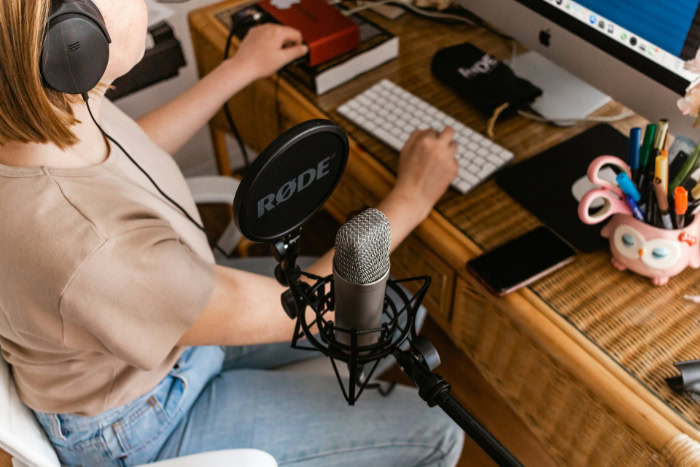
Dedicated microphones are engineered for a single purpose: capturing high-fidelity audio with clarity and accuracy. By separating the microphone from other computer components, manufacturers can prioritize physical audio capture mechanics.
These devices use advanced hardware components and design principles that overcome the limits of built-in audio.
Audio Fidelity and Voice Depth
The superior sound of a dedicated microphone relies on the size and design of its internal capsule. Dedicated devices use much larger condenser or dynamic capsules compared to the tiny sensors found in laptops or headsets.
These larger physical components collect more acoustic energy, allowing them to record a wide range of frequencies and capture the natural depth of the human voice. This design ensures that the high and low tones of a voice sound natural and balanced, reducing the digital distortion and harshness that often plague cheaper hardware.
Physical Controls and Hardware Features
Standalone microphones often feature integrated physical controls that improve the user experience. Many models include physical mute buttons, analog gain dials to adjust microphone sensitivity on the fly, and built-in headphone jacks for zero-latency monitoring.
This hardware monitoring allows speakers to hear their own voice in real time without distracting software delays. Furthermore, some dedicated models support multi-pattern selectability, letting users switch between directional pickup patterns to adapt to different recording environments, such as solo speeches or roundtable discussions.
Voice Isolation and Noise Rejection
Keeping unwanted background noise out of a stream or meeting is a major challenge for built-in microphones. Dedicated units address this through directional polar patterns, most commonly the cardioid pattern, which captures sound directly in front of the capsule while rejecting noise from the sides and rear.
This focus isolates the speaker’s voice from household sounds. Additionally, placing the microphone on a standalone stand or arm physically separates the audio sensor from computer chassis vibrations, eliminating mechanical hums from typing or internal fans.
Practical Challenges and Total Cost of Ownership

While standalone microphones offer excellent sound, they require a physical and financial commitment that built-in solutions do not. Adopting dedicated audio hardware changes the workspace environment and introduces additional costs.
A realistic look at space constraints, necessary accessories, and budgeting reveals what it actually takes to run a dedicated audio setup.
Desk Space and Hardware Footprint
One of the first adjustments users must make is managing the physical space a dedicated microphone occupies on a desk. Unlike built-in options that sit invisible inside a laptop frame, a standalone microphone requires its own footprint, which can clutter small workspaces.
This physical size also severely limits portability. Carrying a heavy microphone, its mounting hardware, and cables in a laptop bag is far less convenient than relying on a simple headset, making dedicated setups less practical for highly mobile professionals.
Essential Accessories
Buying a microphone is often just the first step, as several accessories are necessary to get the best performance. Shock mounts are required to absorb desk vibrations, pop filters block the harsh air blasts caused by speaking “p” and “b” sounds, and boom arms are needed to position the microphone close to the mouth without taking up desk space.
Furthermore, a high-quality microphone will pick up room echo more clearly, meaning users may need to invest in basic acoustic panels or soft furnishings to dampen sound reflections in their recording space.
Financial Investment Levels
The financial commitment of dedicated audio scales with complexity. Entry-level USB microphones offer a budget-friendly option, with many capable models available for a modest price.
On the other end, professional XLR setups demand a higher investment, requiring not just the microphone but also an external interface and quality cabling. For most users, there is a clear point of diminishing returns.
Beyond the mid-tier price bracket, the audio quality improvements become subtle, meaning ultra-expensive professional gear is rarely worth the cost for standard business calls or casual use.
The Choice Between USB and XLR Technologies

When choosing a dedicated microphone, the decision usually comes down to two distinct technologies: USB and XLR. Each path appeals to different priorities, from simple convenience to modular, high-end customization.
USB Microphones: Convenience and Plug-and-Play Simplicity
USB microphones are designed for quick and easy operation. They plug directly into a computer’s USB port, utilizing internal preamps and analog-to-digital converters to handle all audio processing inside the microphone housing.
This eliminates the need for additional hardware or driver installations, making them ideal for straightforward communication. For remote workers, educators, or budget-conscious users who want an immediate upgrade over integrated audio without any technical hassle, USB is the most practical choice.
XLR Microphones: Modular Upgrades and Audio Interfaces
XLR microphones are the standard in professional recording environments. Instead of connecting directly to a computer, they send an analog signal through a thick, three-pin XLR cable to an external audio interface, which houses preamps and converts the signal to digital.
This modular design offers excellent long-term value because individual components can be replaced or upgraded independently. If a preamp fails or a user wants a different microphone style, they can replace that single part without discarding the entire audio system.
Direct Comparison of Cost and Setup Complexity
Comparing these two paths highlights a clear trade-off between simplicity and control. USB setups are highly affordable, require zero technical skills to install, and function immediately out of the box.
In contrast, XLR setups are more expensive due to the need for multiple pieces of hardware, and they require a bit of technical learning to configure gain levels and routing software. While XLR offers superior audio control and customizability, the higher cost and physical complexity make it less suitable for users who simply want a quick plug-and-play solution.
Decision Framework for Different User Profiles

Not everyone requires the same level of audio fidelity, meaning the value of a dedicated microphone depends heavily on how it will be used. By evaluating specific user profiles, individuals can determine if upgrading their hardware is a worthwhile business expense or an unnecessary luxury.
Recommendations for Remote Workers and Business Professionals
For remote workers who spend their days on Zoom, Teams, or Webex, clear communication is vital. If your job involves client-facing presentations, remote sales, or managing teams, a dedicated microphone transitions from a luxury to a professional asset.
A mid-range USB microphone is usually the best recommendation here, as it dramatically improves vocal clarity without the workspace clutter or setup complexity of professional studio gear. For internal team catch-ups, however, a standard laptop or headset microphone remains perfectly acceptable.
Recommendations for Gamers and Casual Streamers
Gamers and casual streamers face a choice between high-tier gaming headsets and standalone USB microphones. While premium headsets offer convenience and built-in chat audio, dedicated microphones provide vastly superior voice quality for stream audiences.
However, standalone microphones must be paired with directional cardioid patterns and proper placement to avoid capturing loud mechanical keyboard clicks or controller noises during live gameplay. For casual gaming with friends, a quality headset is often sufficient, but those looking to grow an audience will benefit from a dedicated microphone.
Recommendations for Podcasters and Content Creators
For podcasters and content creators, dedicated audio hardware is a baseline requirement rather than an option. Audiences will quickly abandon a podcast or video if the audio is thin, echoing, or full of background static, making high sound quality essential for listener retention.
Content creators must balance this need for high fidelity with their production workflows, often starting with a high-end USB microphone before transitioning to an XLR setup as their production needs grow and require multi-microphone recording.
Conclusion
Transitioning to a dedicated microphone represents a clear trade-off between audio fidelity, financial investment, and physical setup complexity. While standalone hardware resolves the muffled sound, background noise, and echo associated with built-in options, it introduces a permanent physical footprint on your desk and requires a higher upfront cost.
Determining if this upgrade is worth the investment depends on your daily communication needs. If your professional success or content quality relies heavily on how clearly your voice is heard, investing in a dedicated microphone is a logical step.
However, for casual calls and standard meetings, the convenience of your existing built-in audio is likely sufficient.
Frequently Asked Questions
Why do my coworkers say I sound like I am in a cave?
Your voice sounds like it is in a cave because your built-in microphone is too far from your mouth and is recording the room’s echoes. Laptop and webcam microphones capture sound across an open space, which mixes your voice with ambient noise. Moving closer to the device or adding soft furnishings to your room can help reduce this echo.
Do I really need to buy a boom arm and a shock mount?
You do not strictly need them, but they are highly recommended to prevent desk vibrations and keyboard clicks from ruining your audio. A shock mount isolates the microphone from physical movement, while a boom arm lets you position the capsule close to your mouth. This combination keeps your desk clear and your audio clean.
Is a USB microphone good enough for starting a podcast?
Yes, a high-quality USB microphone is excellent for starting a podcast because it offers clear sound and simple plug-and-play setup. Many modern USB models deliver enough vocal depth and clarity to meet baseline broadcast standards. This allows you to produce professional audio without purchasing expensive external mixers or interfaces right away.
What is the difference between a condenser and a dynamic microphone?
The main difference is that condenser microphones are highly sensitive and capture detailed sound, while dynamic microphones are less sensitive and better at ignoring background noise. Condenser models work best in quiet, treated rooms. Dynamic models are ideal for untreated spaces because they naturally reject room echo and computer fan hums.
How do I stop my microphone from picking up my keyboard clicks?
You can reduce keyboard noise by using a microphone with a cardioid polar pattern and positioning it away from your keyboard. Placing the microphone on a boom arm closer to your mouth allows you to lower the sensitivity. This ensures the microphone captures your voice while ignoring the quieter clicking noises below.
About the Author: Julio Caesar


