
Intel Core i5 vs. i7: Which Is Worth It?
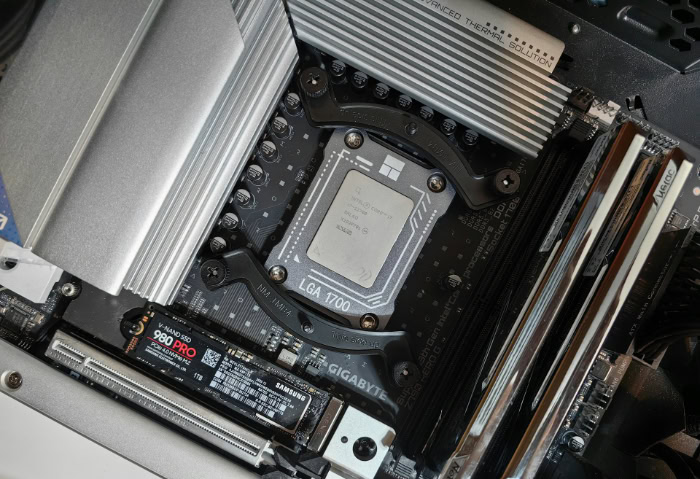
Buying a new computer often comes down to a single, expensive question: is that blue Core i7 sticker worth the extra two hundred dollars over the Core i5 next to it? Making the wrong choice means either wasting cash on processing power you will never utilize or watching your system stutter under your daily workloads. While marketing suggests that higher model numbers simply equal better performance, the actual silicon architecture, thermal behavior, and value dynamics of these two processor families tell a more complex story.
Key Takeaways
- Core i7 processors feature more Performance-cores and Efficient-cores than Core i5 models, which provides higher thread counts that improve rendering speeds and multitasking under professional workloads.
- A newer generation Core i5 will regularly outperform an older generation Core i7 in both single-core and multi-threaded tasks due to architectural and efficiency advancements.
- For gaming, the Core i5 is the most practical choice because most games are limited by the graphics card, making the performance differences between an i5 and an i7 negligible.
- High-performance Core i7 processors in thin laptops are prone to thermal throttling, meaning they may slow down to Core i5 speeds to prevent overheating during prolonged tasks.
- Saving money by choosing a Core i5 allows for strategic budget allocation, enabling upgrades to faster solid-state drives, higher system RAM, or a better graphics card.
Understanding the Core Technical Differences
Intel’s Core i5 and Core i7 lines might look identical from the outside, but underneath the metal heat spreader, they differ in core allocation, clock speed potential, and memory access speeds. These physical differences dictate how each processor handles modern computing demands and determines how well your system will perform under heavy workloads.
Core and Thread Count (Hybrid Architecture)
Modern Intel architectures utilize a hybrid design. Performance-cores (P-cores) are larger, high-power units designed to handle heavy, active tasks, while Efficient-cores (E-cores) are smaller, low-power units designed to manage background activities and highly parallel workloads.
Typically, a Core i7 processor features more P-cores, E-cores, or both, compared to its contemporary Core i5 counterpart. For instance, in a given generation, a Core i5 might have six P-cores and eight E-cores, while the corresponding Core i7 might feature eight P-cores and twelve E-cores.
Thread counts scale accordingly. Since P-cores utilize hyper-threading, which allows a single physical core to process two threads simultaneously, and E-cores handle one thread each, the higher core count of the Core i7 results in a significantly higher total thread count.
This larger thread capacity allows the system to distribute computing loads more efficiently, ensuring that background updates, browser tabs, and system security scans do not interrupt active tasks.
Clock Speeds and Turbo Boost
Clock speed, measured in gigahertz, represents the rate at which a processor executes instructions. Each processor operates at a base frequency for standard tasks and can scale up to a maximum boost frequency when demand spikes.
Core i7 processors generally ship with both higher base and higher maximum boost clock speeds than Core i5 processors. For single-core, instantaneous tasks, such as opening a complex spreadsheet, loading a webpage, or launching an application, these higher frequencies make the system feel snappier.
The Core i7 can complete these rapid bursts of activity slightly faster because its transistors cycle at higher rates during those brief moments of peak demand.
Intel Smart Cache Sizes
Cache memory is a small pool of ultra-fast memory built directly into the processor die, sitting closer to the execution units than the system RAM. It stores frequently used data so the processor does not have to wait to retrieve it from the slower system memory.
Intel Core i7 processors are equipped with larger Smart Cache pools than Core i5 processors. When a processor has access to a larger cache pool, it can store more instructions and data closer to the processor cores.
This reduces the latency of data retrieval, meaning the processor spends less time waiting for information to arrive and more time actively processing it. The difference is especially noticeable in complex tasks that require repetitive, rapid calculations.
Matching the Processor to Your Daily Workload

Raw specifications only matter when translated into real-world tasks. Choosing between a Core i5 and a Core i7 requires matching the silicon capabilities to your specific daily routines, whether that involves standard office work, intense gaming, or heavy media production.
General Productivity and Multitasking
For everyday office suites, heavy web browsing with dozens of open tabs, and running multi-monitor setups, both processor tiers offer highly capable performance. Modern operating systems manage resources effectively, and these standard tasks rarely saturate even a mid-range processor.
An average user will rarely experience a noticeable speed difference between a Core i5 and a Core i7 in these scenarios. Standard tasks are generally limited by drive speeds or network connections rather than raw processor calculations.
While the Core i7 might load a massive database slightly quicker, the difference is usually measured in fractions of a second, which does not justify the added cost for standard office work.
Gaming Performance and Framerates
The role of the processor in modern gaming is to process physics, artificial intelligence, and player inputs, while preparing frame instructions for the graphics card. In many modern games, the graphics card is the primary bottleneck, a situation known as being GPU-bound.
This is why the Core i5 is widely considered the sweet spot for gaming. When running games at high resolutions like 1440p or 4K, the graphics card works so hard that the processor spends time waiting for it to finish rendering.
As a result, upgrading to a Core i7 yields only marginal framerate gains in most titles. The extra cores of the Core i7 remain mostly idle during gaming, making the Core i5 a highly cost-effective choice for players who prefer to spend their budget on a better graphics card.
Content Creation and Professional Workloads
Professional workloads scale differently. Tasks like rendering 4K video, compiling complex codebases, running virtual machines, and exporting large 3D models are highly parallelized, meaning they can utilize every available processor thread.
In these scenarios, the Core i7 shines. The extra P-cores and E-cores allow the system to divide massive rendering tasks into smaller, simultaneous chunks, cutting down export times dramatically.
Professional software is designed to consume all available processing resources, meaning the larger cache and higher clock speeds of the Core i7 directly translate into saved time and smoother real-time previews during the editing process.
The Impact of Form Factor (Desktop vs. Laptop)

A processor does not operate in a vacuum. The physical chassis housing the chip heavily influences its performance, making the choice between a Core i5 and a Core i7 look entirely different on a thin laptop compared to a spacious desktop tower.
Laptop Constraints (Thermals and Battery Life)
Laptops operate under strict physical limitations. The cramped interior of a modern notebook leaves little room for copper heat pipes and cooling fans, which directly limits how much heat the system can dissipate.
High-performance Core i7 processors generate significant heat and consume substantial power. When installed in a thin laptop, a Core i7 can quickly reach its thermal limits under sustained workloads.
To prevent permanent damage from overheating, the laptop’s motherboard will trigger thermal throttling, deliberately slowing down the processor’s speed. Under heavy, prolonged workloads, a throttled Core i7 may drop to performance levels similar to, or even below, those of a Core i5.
Additionally, the higher power draw of the Core i7 can noticeably reduce battery life, forcing users to stay tethered to a wall outlet more frequently.
Desktop Capabilities (Power Delivery and Cooling)
Desktop environments do not suffer from these severe spatial constraints. A desktop tower offers robust power delivery directly from the power supply unit and ample room for massive cooling solutions.
In a desktop system, both Core i5 and Core i7 processors can run at peak capacity for extended periods. Users can install large dual-fan air coolers or liquid all-in-one coolers to manage the heat generated by a Core i7 running at maximum turbo boost speeds.
This ensures that the desktop Core i7 can sustain its higher frequencies without throttling, allowing users to fully realize the performance benefits they paid for.
Decoding Intel’s Generations and Model Suffixes

Looking only at the “i5” or “i7” badge can be highly misleading. Intel’s naming convention relies on generation numbers and specific letter suffixes that completely alter the performance profile and intended use case of each chip.
Why Generation Matters More Than Tier
Architectural generational leaps occur every year or two, bringing improvements in transistor density, power efficiency, and instructions per cycle. These updates mean that newer architectures process information much more efficiently than older ones.
Because of these advancements, a newer generation Core i5 will routinely outperform an older generation Core i7. For example, a 13th or 14th-generation Core i5 often surpasses a 10th or 11th-generation Core i7 in both single-core speed and multi-threaded tasks, despite the Core i7 having a higher tier name.
Buying an older Core i7 simply because of the badge is often a poor decision compared to purchasing a modern Core i5.
Processor Suffixes
Intel appends letters to the end of processor model numbers to indicate their target design and capabilities. On desktops, a “K” suffix indicates an unlocked processor that can be overclocked for higher performance, while an “F” suffix indicates that the processor lacks integrated graphics and requires a dedicated graphics card.
On laptops, the suffixes are even more critical. “H” or “HX” indicates high-performance processors designed for gaming laptops and mobile workstations, while “U” indicates ultra-low-power processors designed for thin-and-light laptops prioritizing battery life over raw power. Consequently, a Core i5-H processor designed for high performance can easily outperform a Core i7-U processor designed for low power consumption, making the suffix just as important as the tier.
Price-to-Performance and Strategic Budgeting

Maximizing a hardware budget is about balanced spending rather than simply buying the most expensive components. Evaluating where the Core i7 offers a genuine return on investment prevents overspending on underutilized hardware capacity.
Evaluating the Cost-to-Performance Ratio
Upgrading from a Core i5 to a Core i7 typically carries a significant price premium, often ranging from one hundred to several hundred dollars depending on the generation and whether it is a laptop or desktop component. For non-professional workloads, this price increase rarely correlates to an equivalent jump in real-world performance.
This is the point of diminishing returns. An average user paying thirty percent more for a Core i7 might only see a five to ten percent increase in daily application loading speeds or gaming frame rates.
Unless you are running software that actively utilizes every available core and thread for professional output, that price premium is largely wasted on hardware capacity that sits idle.
Smart Resource Allocation in System Builds
When building a custom computer or configuring a pre-built system, balancing the overall budget is essential. Choosing a Core i5 instead of a Core i7 frees up substantial funds that can be redirected toward other components that have a more immediate impact on system responsiveness.
For example, saving money on the processor allows you to double your system memory from 16 gigabytes to 32 gigabytes, purchase a faster solid-state drive with higher capacity, or buy a tier-higher graphics card. In almost every scenario, a system equipped with a Core i5, 32 gigabytes of RAM, and a powerful graphics card will deliver a much better gaming and computing experience than a system paired with a Core i7, 16 gigabytes of RAM, and a weaker graphics card.
Conclusion
The choice between an Intel Core i5 and a Core i7 ultimately comes down to your workload demands and budget flexibility. While the Core i7 offers more processing cores, higher boost clock speeds, and larger cache sizes, these hardware upgrades only benefit users running highly demanding, multi-threaded applications.
For daily office tasks, web browsing, and standard gaming, the Core i5 provides a nearly identical user experience at a much lower cost.
To simplify your decision, consider your specific user profile. Casual users who stick to web browsing, streaming, and basic document editing will find the Core i5 to be more than sufficient.
Gamers should also choose the Core i5, as most modern titles are limited by the graphics card, meaning the money saved can be better spent on a more powerful GPU. Conversely, creative professionals, software developers, and researchers who regularly run video rendering software, virtualization tools, or large code compilations will benefit from the extra cores and thermal headroom of a desktop Core i7.
Frequently Asked Questions
Is a Core i7 always better than a Core i5?
No, a newer generation Core i5 will routinely outperform an older generation Core i7. Intel makes significant architectural improvements with each generation. This means a 13th or 14th-generation Core i5 processes data faster and more efficiently than a 10th or 11th-generation Core i7, despite the lower tier number on the box.
Do I need an i7 for gaming?
No, a Core i5 is generally the ideal choice for most gaming setups. Modern games depend heavily on your graphics card rather than your processor. Upgrading to a Core i7 offers only minor increases in framerates, making it smarter to buy a Core i5 and spend the savings on a faster graphics card instead.
Why would a Core i7 run slower in a laptop?
A Core i7 may run slower in a laptop due to thermal throttling caused by limited cooling space. Because thin laptops cannot quickly dissipate the high heat generated by a Core i7, the system automatically slows the processor down to prevent damage. This often reduces the sustained speeds of an i7 to those of an i5.
What does the letter at the end of an Intel processor name mean?
The letters at the end of Intel processor names indicate the chip’s power limits and specific capabilities. For example, desktop “K” processors are unlocked for overclocking, while “F” chips lack integrated graphics. On laptops, “H” indicates high-performance processors designed for heavy workloads, while “U” indicates low-power chips built to preserve battery life.
Does a Core i7 use more battery power than a Core i5?
Yes, a Core i7 generally consumes more power and drains laptop batteries faster than a Core i5. The higher clock speeds and extra processing cores of the Core i7 require more energy to operate. If you prioritize long battery life for travel or off-grid work, a Core i5 laptop is typically the more efficient option.
About the Author: Julio Caesar


