
Is a TV Antenna Worth It? Costs, Channels & Reception Guide

Monthly television bills continue to climb as traditional cable providers and live TV streaming services regularly raise their subscription rates. Many households now pay over $100 every month just to watch local news, live sports, and network shows.
Modern digital TV antennas offer a practical over-the-air alternative by capturing free broadcast signals directly from nearby transmission towers. Connected to a television, an antenna delivers high-definition programming with zero monthly fees or contracts.
Deciding if an antenna setup makes sense requires evaluating geographic location, daily viewing habits, and household budget goals. Weighing local signal strength against personal channel preferences helps everyday viewers determine if purchasing an antenna is a smart financial move.
Key Takeaways
- Immediate Financial Payback: Purchasing a $15 to $150 digital antenna eliminates $80 to $150+ monthly cable or live TV streaming bills, allowing the hardware to pay for itself within two weeks of canceling a pay-TV subscription.
- Free Major Network Access: An over-the-air antenna captures uncompressed 1080i and 720p high-definition broadcasts from ABC, CBS, FOX, NBC, PBS, The CW, and dozens of digital subchannels like MeTV and Ion without monthly fees, blackouts, or internet buffering.
- No Cable-Exclusive Channels: Antennas only receive over-the-air broadcast signals and cannot access pay-TV cable networks such as ESPN, CNN, HGTV, Food Network, or Disney Channel.
- Location Determines Hardware Needs: Viewers within 15 to 30 miles (24 to 48 kilometers) of local broadcast towers can use an indoor flat or tabletop antenna, whereas suburban and rural homes 40 to 70 miles (64 to 113 kilometers) away require an attic or rooftop unit.
- Check Signal Maps Before Buying: Entering a home street address into free lookup tools like the FCC DTV Reception Maps, RabbitEars, or AntennaWeb reveals exact channel availability, tower distances, and compass directions before purchasing equipment.
Financial Value and Cost Comparisons
Switching from a paid television package to an over-the-air antenna represents one of the fastest ways to lower monthly household expenses. Comparing upfront equipment costs against recurring subscription bills shows how quickly the hardware investment pays off.
One-Time Hardware Costs Versus Monthly Subscriptions
Traditional cable packages and major live TV streaming services typically cost between $80 and $150+ per month, totaling $960 to $1,800+ every year. By contrast, a digital TV antenna requires only a single upfront hardware purchase.
Over-the-air broadcast television is federally mandated in the United States to remain free to the public, as broadcasters use public airwaves in exchange for serving their local communities. Viewers who connect an antenna face zero monthly subscription charges, no annual price hikes, and no long-term service contracts.
Price Tiers for Basic and High-End Models
Antenna pricing scales according to signal range and physical durability. Budget indoor models, including flat window antennas and classic tabletop rabbit-ear designs, cost between $15 and $40 and work well in urban neighborhoods close to broadcast towers.
Mid-range attic units and heavy-duty outdoor rooftop arrays cost between $50 and $150+, offering larger metal elements built to capture weaker signals in suburban and rural areas. Homeowners who prefer not to climb a ladder for a rooftop unit can hire a professional installer, which typically adds a one-time labor fee of $100 to $300.
Long-Term Return on Investment for Households
Because pay-TV subscriptions are so expensive, an over-the-air antenna usually pays for itself within the first two weeks of canceling a cable or live streaming plan. Even a premium $150 rooftop antenna paired with a $200 professional installation recovers its full cost in about three months.
Beyond the base subscription price, cutting cable also eliminates secondary monthly charges that inflate traditional bills, including $10 to $15 set-top box rental fees per television, $10 to $15 regional sports network fees, and $20 to $30 broadcast TV surcharges.
Channel Availability and Broadcast Content

Over-the-air television has expanded significantly since the transition from analog to digital broadcasting. While an antenna does not replicate a 200-channel cable bundle, it delivers many of the most-watched networks in the country.
Major Networks for Local News and Live Sports
A properly aimed antenna pulls in the core national broadcast networks, including ABC, CBS, FOX, NBC, PBS, and The CW, alongside major Spanish-language networks such as Univision and Telemundo. For sports fans, those networks carry the majority of high-profile live events, including Sunday and Monday night NFL games, major college football matchups, network playoff broadcasts, the Super Bowl, and the Olympics, all without streaming blackouts.
Local broadcast stations also provide dedicated daily news and continuous severe weather coverage, which stays operational during home internet outages as long as the television has power.
Bonus Digital Subchannels for Movies and Classic Shows
Digital broadcast technology allows a single television station to split its assigned bandwidth into multiple streams known as subchannels. Instead of tuning only to Channel 4, a digital tuner scans for decimal channels such as 4.1, 4.2, 4.3, and 4.4.
While the primary .1 channel carries the main network feed like NBC or CBS, the secondary subchannels broadcast 24-hour specialty networks at no cost. Popular multicast networks include MeTV (classic sitcoms and dramas), Grit (westerns and action movies), Ion (crime procedurals), Bounce (programming aimed at African American audiences), Laff (comedy), Mystery, and PBS Kids.
Most metro areas offer between 30 and 80 total channels once all subchannels are counted.
The Absence of Traditional Cable Networks
Setting realistic expectations requires distinguishing between free over-the-air broadcast stations and paid cable networks. An antenna can only receive signals transmitted from local broadcast towers; it cannot decode channels distributed exclusively through closed cable, satellite, or internet pipelines.
Viewers using only an antenna will not receive cable networks such as ESPN, Fox News, CNN, MSNBC, HGTV, Food Network, Bravo, TNT, USA, or Disney Channel. Households that rely heavily on 24-hour cable news or cable-exclusive sports will need to pair their antenna with a streaming app to keep watching those channels.
Picture Quality and Reception Variables

Many first-time antenna users are surprised to find that free broadcast television often looks better on a large screen than paid cable. However, achieving reliable reception depends heavily on physics and local geography.
Uncompressed High-Definition Video and Audio Performance
Over-the-air stations broadcast primary network feeds in 1080i or 720p high definition using a dedicated slice of radio spectrum. Cable companies and live TV streaming services must cram hundreds of channels through limited bandwidth, forcing them to heavily compress video signals, which can introduce blocky artifacts in dark scenes or fast-moving sports.
Because an antenna receives the raw broadcast feed directly from the local tower, the picture typically appears sharper with richer color depth and cleaner surround sound. Over-the-air signals also eliminate internet buffering, Wi-Fi pixelation, and the 30 to 60 second broadcast delay common on live streaming apps.
Geographic Distance, Terrain, and Weather Obstacles
Television signals travel on line-of-sight radio waves from the transmitting tower to the receiving antenna. Distance is the primary limiting factor, as the curvature of the Earth blocks signals beyond roughly 70 miles (113 kilometers).
Between the tower and the home, physical obstacles can reflect, weaken, or completely block reception. Mountains, deep valleys, dense tree canopies, and tall downtown buildings degrade signal strength, while building materials inside the home, such as stucco with wire mesh, brick, Low-E coated glass windows, and metal roofs, block signals from reaching indoor antennas.
Severe thunderstorms, heavy rain, and high winds sway trees and cause temporary signal dropouts or pixelation.
Online Signal Maps and Tower Location Tools
Before buying any hardware, viewers can verify exactly which channels reach their home by entering their street address into free browser-based lookup tools. The FCC DTV Reception Maps, RabbitEars.info, and AntennaWeb.org analyze local terrain data and transmitter power to generate a personalized reception report.
Those tools display available networks, the exact distance to each broadcast tower, the compass direction needed to aim the antenna, and the frequency band (VHF or UHF) used by each local station.
Hardware Categories and Setup Requirements

No single antenna works for every home. Selecting the right hardware depends on tower distance, the frequency bands used by local broadcasters, and where the antenna can be mounted.
Indoor Flat Models Versus Outdoor and Attic Units
Indoor antennas fall into two common designs: thin flat plastic sheets that stick to a wall or window, and tabletop units combining a loop with extendable rabbit-ear rods. Indoor models offer simple plug-and-play setup and suit apartments or homes located within 15 to 30 miles (24 to 48 kilometers) of broadcast towers.
Flat models excel at picking up UHF channels (channels 14 through 36) but often struggle with VHF channels (channels 2 through 13), whereas rabbit-ear rods capture VHF signals much more reliably. Suburban and rural homes located 40 to 70 miles (64 to 113 kilometers) from towers need a larger attic or rooftop antenna.
Mounting an antenna in the attic protects it from weather while elevating it above ground-level clutter, though roofing materials reduce signal strength by about 20% to 30% compared to an unobstructed rooftop mount.
Placement Aesthetics and Coaxial Cable Routes
Getting clean reception with an indoor antenna usually requires placing it high on an exterior window or wall facing the local broadcast towers, which can leave a visible black or white coaxial cable hanging down behind the television. Paintable adhesive cord covers or routing the wire along baseboards helps keep living spaces tidy.
Homeowners installing an attic or outdoor antenna can avoid drilling new interior holes by disconnecting the incoming street feed from a previous cable or satellite provider and connecting the antenna directly into the home’s existing coaxial splitter box, routing the over-the-air signal straight to living room and bedroom wall jacks.
Signal Boosters and Cellular Interference Filters
Signal amplifiers can rescue weak channels, but only when used in the right scenario. A mast-mounted preamplifier boosts weak signals at the antenna to overcome signal loss across long coaxial cable runs of 50 to 100 feet (15 to 30 meters) or when splitting a feed across three or four televisions.
However, attaching an amplifier to an indoor antenna within 15 miles (24 kilometers) of broadcast towers causes over-amplification, overloading the TV tuner and making strong channels disappear. In urban areas, nearby 4G LTE and 5G cellular towers operate on frequencies adjacent to television bands and can disrupt reception; screwing an inexpensive $10 to $20 LTE/5G filter onto the coaxial line blocks cellular interference.
Modern Home Integration and DVR Features
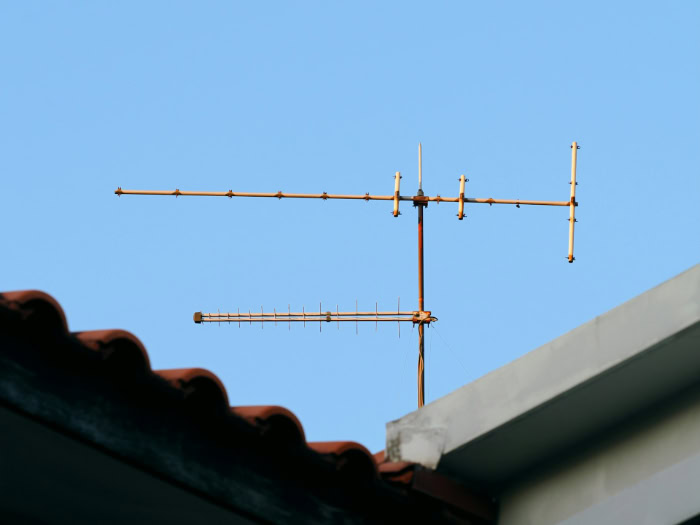
Plugging an antenna directly into the back of a television provides a traditional live viewing experience, but adding modern accessories unlocks whole-home streaming and recording capabilities.
Over-the-Air DVRs for Pause and Record Capabilities
A basic antenna connected straight to a television cannot pause live broadcasts, rewind a missed play, or record prime-time shows out of the box. Standalone over-the-air DVR boxes connect between the antenna coaxial cable and the television’s HDMI port to restore full time-shifting control.
Equipped with internal storage or an external USB hard drive, an OTA DVR provides an interactive multi-day channel guide, schedules full-series recordings, pauses live television, and offers automatic commercial skipping on recorded programs.
Network Tuners for Whole-Home Wi-Fi Distribution
Running coaxial cable to every bedroom is often impractical, especially when the best window for antenna reception is in an upstairs office far from the main living room TV. Network tuners such as Tablo and SiliconDust HDHomeRun solve the placement problem by connecting the antenna directly to a home Wi-Fi router rather than a television.
The network tuner converts incoming broadcast signals into local Wi-Fi streams, allowing household members to watch and record live local channels through a dedicated app on Smart TVs, Roku, Amazon Fire TV, Apple TV, tablets, and smartphones throughout the house.
Hybrid Television Setups with On-Demand Apps
Most cord-cutters achieve the best balance of content and savings by building a hybrid setup. Using an antenna for free live local news, network sitcoms, and weekend sports covers the bulk of live viewing, leaving room in the budget for one or two affordable on-demand streaming apps like Netflix, Peacock, or Paramount+ costing $8 to $20 per month.
Viewers who still want cable networks like ESPN, HGTV, or CNN can pair their antenna with a lower-cost live streaming bundle such as Sling TV, which keeps monthly rates down by omitting local broadcast channels in many markets.
NextGen TV Tuners and 4K Broadcast Standards
Over-the-air broadcasting across major US markets now includes ATSC 3.0, marketed to consumers as NextGen TV, alongside the standard ATSC 1.0 signal. NextGen TV supports up to 4K Ultra HD video, High Dynamic Range (HDR), wider color gamuts, and immersive Dolby AC-4 audio with clearer dialogue enhancement.
While any existing antenna can capture ATSC 3.0 radio waves, decoding the signal requires a NextGen TV tuner. Only select newer Smart TVs from brands like Sony, Samsung, Hisense, and TCL include built-in ATSC 3.0 tuners, while older televisions require an external NextGen TV converter box costing $60 to $130.
Buyers shopping for external NextGen tuners or network DVRs should verify Digital Rights Management (DRM) certification before purchasing, as many local stations encrypt their ATSC 3.0 feeds, preventing uncertified external boxes from displaying or recording those channels.
Conclusion
Deciding to buy a TV antenna comes down to balancing substantial monthly savings against channel availability and local geography. For the price of a single dinner out, an over-the-air setup permanently eliminates recurring bills for major broadcast networks while delivering uncompressed high-definition picture quality.
Viewers who benefit most live within 40 miles (64 kilometers) of local broadcast towers and primarily watch local news, major network shows on ABC, CBS, FOX, NBC, and PBS, or live weekend football. Conversely, households located in deep rural dead zones or steep mountain valleys where radio signals cannot penetrate should skip an antenna, as should viewers whose daily television habits revolve exclusively around 24-hour cable news and specialty cable networks.
Frequently Asked Questions
Do you need a special TV antenna to get HD or 4K NextGen TV channels?
No, any working television antenna can capture standard HD and NextGen TV (ATSC 3.0) broadcasts because the radio frequencies remain identical. Picture resolution depends on the tuner inside the television or external converter box rather than the antenna itself. Even a 30-year-old rooftop antenna will pull in modern digital broadcasts if the coaxial cable remains intact.
Will a digital TV antenna work without a home internet connection?
Yes, a digital TV antenna operates completely independently of home internet or Wi-Fi networks. Broadcast signals travel through the air from local transmission towers straight to the television’s coaxial tuner. Because broadcast television requires zero internet bandwidth, local news and weather alerts stay accessible during broadband outages whenever the home has power.
Can one TV antenna connect to multiple televisions in a house?
Yes, a single antenna can feed multiple televisions across a house using a coaxial splitter or a wireless network tuner. Connecting an attic or rooftop antenna to existing coaxial wiring with a powered distribution amplifier prevents signal loss. Alternatively, a network tuner like Tablo or HDHomeRun sends live channels to Smart TVs over Wi-Fi.
Why is one specific local channel missing on a digital antenna?
Missing a single major network usually happens because that station broadcasts on a VHF frequency while flat indoor antennas target UHF signals. Several network affiliates transmit on VHF channels 2 through 13, which use longer wavelengths. Switching to an antenna with telescoping rabbit-ear rods or dedicated VHF elements solves the issue.
Are TV antennas claiming a 150-mile or 200-mile range actually legitimate?
No, antennas advertising a 150-mile (241-kilometer) or 200-mile (322-kilometer) range are misleading because the Earth’s curvature blocks signals beyond roughly 70 miles (113 kilometers). Television towers transmit line-of-sight radio waves that travel into space past the horizon. Buyers should choose reputable antennas rated up to 70 miles (113 kilometers).
About the Author: Julio Caesar


