
Is Liquid Cooling Worth It? Our Honest Take
Modern high-performance processors generate intense heat that can severely throttle system performance and shorten component life. Choosing the right thermal solution directly impacts your computer’s speed, stability, and noise levels, making it a critical decision for any custom system builder.
While traditional metal heatsinks offer reliable, budget-friendly cooling, the rise of power-hungry modern hardware makes liquid-filled setups a highly compelling alternative for demanding tasks. However, liquid systems introduce distinct complications, including higher initial costs, physical clearance challenges, and potential maintenance requirements over time.
Evaluating these practical trade-offs ensures that your next hardware investment delivers the exact balance of thermal performance, acoustics, and system reliability your computer needs.
Key Takeaways
- Liquid cooling provides superior thermal capacity for high-TDP processors, making it highly effective at preventing thermal throttling on chips drawing over 250 watts.
- High-performance air coolers are much more cost-effective, offering sufficient cooling for mid-range processors at a fraction of the cost of premium liquid systems.
- Air coolers are highly reliable because they only rely on a replaceable fan, whereas liquid coolers use mechanical pumps that eventually fail and require full replacement.
- Liquid cooling water blocks are compact, which eliminates physical clearance issues with motherboard RAM slots, VRM heatsinks, and top PCIe expansion slots.
- Larger radiator surfaces allow liquid cooler fans to spin at lower speeds, creating a quieter and more stable acoustic profile under sudden, short-lived processor workloads.
Thermal Performance and Overclocking Capabilities
Managing temperature is the primary defense against hardware degradation and performance loss in modern computing. How you choose to transport thermal energy away from the silicon wafer determines not only your system’s stability but also its ultimate speed limits under stress.
The Physics of Heat Dissipation
Air cooling relies on direct thermal transfer through copper heat pipes to aluminum cooling fins, where air is pushed through to blow the heat away. This passive transfer is limited by the thermal conductivity of the metal and the surface area of the heatsink.
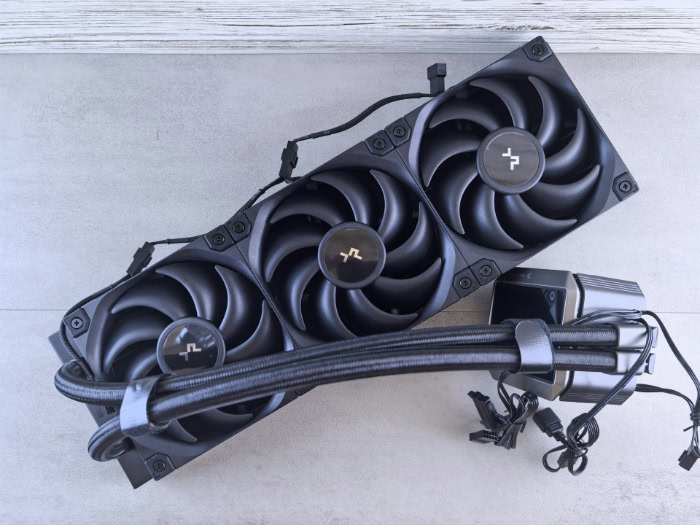
Liquid cooling, by contrast, utilizes water, which has a much higher specific heat capacity than air or solid copper. A pump circulates coolant to a copper cold plate resting on the processor.
The liquid absorbs the heat, moves it through flexible tubing to a large radiator, and fans blow through the radiator to expel the heat. Because liquid absorbs and transfers heat far more efficiently than air, it keeps the processor closer to ambient room temperature during operation.
Performance on High-TDP Hardware
High thermal design power (TDP) processors, such as modern Intel Core i9 or AMD Ryzen 9 chips, can draw well over 250 watts of power under sustained multi-threaded workloads like rendering or video editing. Air coolers can struggle to keep up with these sudden thermal loads, often resulting in temperature spikes that force the processor to drop its clock speeds.
Liquid cooling systems, particularly those with 280mm or 360mm radiators, have the volume and surface area required to soak up and dissipate these immense thermal loads reliably, ensuring consistent performance over long rendering sessions.
Thermal Headroom for Overclocking
Modern processors use aggressive boost algorithms that automatically raise clock speeds as long as temperature limits are not exceeded. Lower operational temperatures mean the processor spends more time at its maximum boost clocks.
For users interested in manual performance tuning or overclocking, liquid cooling provides the thermal margin necessary to increase voltage and frequency without immediately hitting thermal throttling limits, allowing enthusiasts to squeeze every drop of capability from their silicon.
Cost-to-Value Comparison (Liquid vs. Air)

Performance does not exist in a vacuum, and budget represents a significant constraint for most system builders. Balancing the upfront cost of your cooling system against the actual performance return is necessary to build a well-proportioned PC.
Initial Investment Levels
The financial entry barrier varies dramatically between options. High-performance air coolers are highly affordable, with top-tier dual-tower designs costing around forty to eighty dollars.
Closed-loop, all-in-one (AIO) liquid coolers start near sixty dollars for smaller 120mm units, but premium 240mm to 360mm AIOs quickly climb to between one hundred and two hundred and fifty dollars. For custom open-loop systems, which require individual pumps, reservoirs, blocks, fittings, and radiators, prices easily exceed several hundred or even a thousand dollars, making them a significant premium investment.
The Concept of Diminishing Returns
While liquid cooling offers superior performance, the law of diminishing returns applies heavily. A budget or mid-range processor with a modest TDP of sixty-five to one hundred watts will run perfectly fine on a simple twenty-five-dollar air tower.
Upgrading that system to a two-hundred-dollar AIO liquid cooler will lower temperatures, but it will yield virtually zero noticeable increase in frame rates or application speeds. The extra financial investment does not scale linearly with real-world computing benefits unless you are running top-tier, power-hungry hardware.
Total Cost of Ownership
Beyond the initial price tag, the long-term cost is an important consideration. A quality air cooler consists of a block of metal and one or two fans.
If a fan stops spinning after several years, it can be swapped out for ten dollars, meaning the metal tower itself has an almost infinite useful life. An AIO liquid cooler, however, has an internal pump that degrades over time and cannot be easily serviced.
Once the pump fails or the liquid permeation lowers the fluid level too much, the entire unit must be thrown away and replaced, resulting in a higher long-term cost of ownership.
Aesthetics, Case Space, and Physical Compatibility

Beyond raw thermals and budgets, the physical size and appearance of a cooler dictate how your build comes together. A system’s visual layout and chassis clearance often determine which cooling method is physically possible.
Component Clearance and Motherboard Access
Large, high-performance air coolers are massive structures that can dominate the upper half of a motherboard. Their sheer bulk often creates clearance issues, blocking access to RAM slots, obstructing high-power voltage regulator module (VRM) heatsinks, and even crowding the primary PCIe lane where the graphics card sits.
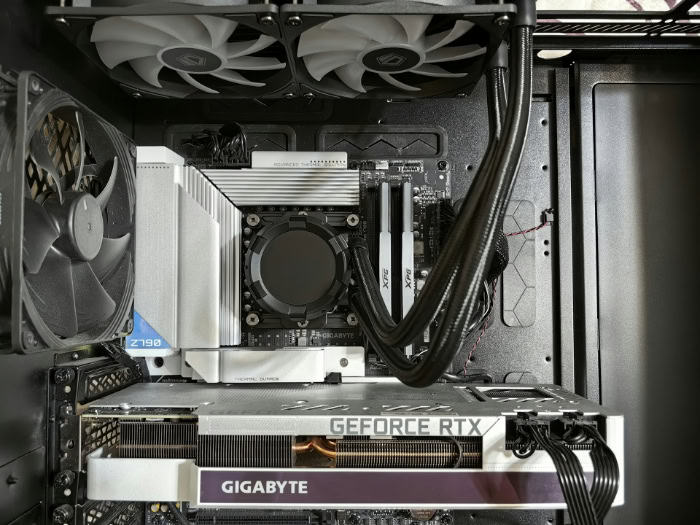
Liquid cooling solves this by placing a compact water block over the CPU, moving the bulky heat dissipation element (the radiator) to the chassis walls. This leaves the motherboard open and accessible, making component changes much easier.
Small-Form-Factor (SFF) System Integration
In compact, small-form-factor cases, physical space is at an absolute premium. Many of these tiny enclosures cannot accommodate a tall tower air cooler, which might require a wide case to close the side panel.
However, many SFF cases are specifically designed to support 240mm radiators. By using flexible tubing, builders can route heat away from the cramped motherboard area to a radiator mounted on the top or side, allowing high-performance builds to exist in incredibly small enclosures.
Visual Design and System Presentation
For many builders, the appearance of their PC is just as important as its performance. Large metal air towers can look cluttered and industrial.
Liquid cooling systems offer a clean, open aesthetic that highlights other hardware components. Furthermore, premium AIO and custom loop parts often feature customizable RGB lighting, integrated LCD screens on the water block that display real-time system diagnostics, and clean tubing runs that elevate the overall visual design of the PC.
Reliability, Lifespan, and Maintenance Realities
Every PC component comes with some level of operational risk, and the cooling system is no exception. Understanding the mechanical vulnerabilities and required upkeep of each option prevents unexpected downtime and hardware failure.
The Risk of Leaks and Component Damage
The presence of liquid inside a computer chassis is inherently risky. While modern AIO liquid coolers are factory-sealed and built with durable materials like braided rubber tubing and secure fittings to minimize leaks, the risk is never zero.
A leak can cause catastrophic short circuits, permanently damaging expensive graphics cards, motherboards, or power supplies. Air cooling, on the other hand, carries absolutely zero risk of liquid damage, offering complete peace of mind.
Failure Points and Lifespan Expectations
An air cooler has only one failure point: the fan. If the fan stops spinning, the large metal heatsink will still passively delay overheating, and a simple fan replacement restores the cooler to full operation.
An AIO liquid cooler introduces several dynamic failure points, including the electric pump, internal block clogging from particle buildup, and slow liquid evaporation through the rubber tubes. When the pump fails, the system will overheat rapidly under load, requiring a complete replacement of the unit.
Typically, an AIO has a realistic operational life of three to six years, whereas a quality air tower can last indefinitely.
Maintenance Requirements
Air coolers and sealed AIO liquid coolers are essentially maintenance-free, requiring only occasional dusting with compressed air. Custom open-loop systems, however, demand a high level of dedication.
These systems must be drained, flushed, and refilled with fresh coolant every twelve to eighteen months to prevent algae growth, corrosion, and biological buildup. Standard cleanings of the micro-channels inside the copper blocks are also required, making custom liquid cooling a hobby in itself rather than a set-it-and-forget-it solution.
Acoustics and Noise Profile Analysis

Noise can be a subtle but persistent annoyance during long computing sessions. The acoustic profile of your PC is largely shaped by the fans and mechanics of your cooling solution.
Fan Efficiency and Radiator Surface Area
Liquid cooling systems typically utilize larger radiators, such as 280mm or 360mm units, which accommodate multiple 120mm or 140mm fans. This massive surface area means the fans do not need to spin at maximum speed to dissipate heat.
They can run at lower, quieter revolutions per minute (RPM) while maintaining excellent thermal performance. In contrast, smaller air coolers may require their fans to spin at high speeds, creating a louder, higher-pitched noise under heavy workloads.
The Pump Noise Factor
While liquid cooling fans can run quieter, liquid systems introduce an entirely new acoustic element: the pump. Water pumps must run constantly to keep liquid moving through the loop.
This can produce a continuous, high-frequency humming or buzzing sound, along with occasional gurgling as air bubbles move through the tubes. This pump noise is present even when the system is idling, which can irritate users who prefer a completely silent PC when doing light tasks.
Acoustics Under Variable Loads
The acoustic behavior of these systems differs during sudden, short-lived CPU tasks. Because liquid has a high heat capacity, a liquid cooling system absorbs rapid temperature spikes slowly, allowing the fans to ramp up gradually and quietly.
Air coolers, with less mass to absorb sudden heat spikes, must react instantly. This can cause the fans to aggressively cycle up and down in speed during normal desktop use, creating a distracting, fluctuating noise profile.
Conclusion
Choosing between liquid and air cooling involves balancing your system performance needs against your budget and risk tolerance. While liquid solutions deliver excellent thermal performance and a clean aesthetic, traditional air cooling offers unmatched reliability and cost-efficiency.
| Cooling Type | Best Suited For (Target Profiles) | Primary Advantages | Primary Drawbacks |
| Liquid Cooling | Overclockers, high-end enthusiasts, and small-form-factor (SFF) builders. | Superior heat dissipation, clean motherboard clearance, and excellent peak workload thermal management. | Higher initial cost, potential for pump failure or liquid leaks, and a limited operational lifespan. |
| Air Cooling | Budget-conscious builders, everyday gamers, and users seeking a zero-maintenance setup. | Outstanding value, exceptional reliability, almost infinite lifespan, and zero risk of liquid damage. | Bulky size that can block RAM or PCIe slots, and less thermal headroom for extreme workloads. |
Frequently Asked Questions
Will a liquid cooler leak and ruin my computer?
While modern all-in-one liquid coolers are factory-sealed to prevent leaks, a tiny risk of leakage still exists. Over time, physical wear or manufacturing flaws can cause coolant to escape and damage components. However, these failures are rare, and most users run liquid systems for years without experiencing any leaks.
How long does an all-in-one liquid cooler actually last?
A high-quality all-in-one liquid cooler typically lasts between three and six years before it needs to be replaced. Unlike air coolers, liquid coolers rely on active mechanical pumps that gradually wear out and fail. Liquid also slowly evaporates through the tubing over time, which eventually lowers cooling performance.
Do I need to refill the liquid in my cooler?
You do not need to refill the liquid if you are using a standard all-in-one liquid cooler. These units are completely sealed at the factory and require absolutely zero fluid maintenance. Only custom open-loop cooling systems require periodic draining, flushing, and refilling with fresh coolant every year.
Is liquid cooling quieter than a standard air cooler?
Liquid coolers can run quieter under heavy workloads, but they are often louder when your computer is idle. The larger surface area of a radiator allows its fans to spin slower and quieter when the processor is hot. However, the water pump must run constantly, producing a permanent, low-level humming sound.
Can I use an air cooler for a high-end CPU?
Yes, top-tier dual-tower air coolers can handle high-end processors, though they might not maintain maximum boost speeds indefinitely. Heavy multi-threaded tasks will push these processors to their thermal limits, causing them to run hotter than they would under liquid cooling. Still, air cooling remains a highly reliable and safe choice.
About the Author: Julio Caesar


