
Is Premium Thermal Paste Worth It? The Verdict
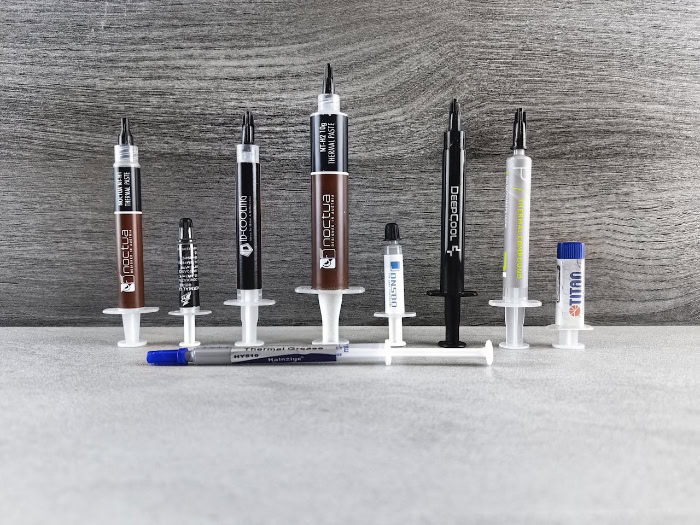
If a computer runs too hot, its performance drops, noise levels rise, and expensive hardware faces a shorter life. A tiny line of gray compound between the processor and the cooler is the only barrier protecting a system from these thermal bottlenecks.
Builders and upgraders often debate if spending extra cash on top-tier paste is necessary, or if standard pre-applied options work just as well. While marketing claims promise massive temperature drops, the actual difference between a cheap tube and a premium option is often highly debated.
Key Takeaways
- Standard ceramic and silicon-based pastes cost less but only offer thermal conductivity ratings of 1 to 4 W/mK, whereas premium carbon or metal-oxide mixtures exceed 8 to 12 W/mK.
- Upgrading from a basic factory compound to a premium aftermarket paste typically drops processor temperatures by a modest 2°C to 5°C under heavy loads, which rarely changes daily performance.
- Cooler-running chips sustain high-frequency boost clock speeds longer because premium paste helps prevent processors from reaching their thermal throttling limits during continuous rendering or gaming.
- Cheap silicon-based pastes degrade and dry out faster, requiring re-application every two years, while premium synthetic formulas can resist dry-out and last for five years or more.
- Non-conductive ceramic and carbon pastes are completely safe for beginners, but electrically conductive metal pastes or liquid metal solutions can short-circuit motherboards and corrode aluminum heatsinks if applied incorrectly.
Overview of Thermal Interface Materials
Maintaining low temperatures in modern processors requires efficient heat transfer between the silicon die and the cooling block. Standard cooling setups often rely on basic chemical compounds, but the market offers a wide variety of advanced materials designed to maximize thermal conductivity.
Selecting the right compound requires analyzing how these mixtures bridge physical gaps and how their ingredients alter thermal performance.
Core Purpose of Thermal Paste
Metal surfaces look flat to the naked eye, but microscopic inspection reveals a texture of peaks, valleys, and scratches. When a CPU heat spreader meets the flat base of a cooler, these microscopic imperfections trap tiny pockets of air.
Because air is a terrible thermal conductor, these gaps resist heat flow, causing heat to build up rapidly on the processor.
Thermal paste acts as a pliable interface that fills these microscopic voids. By displacing the trapped air with a material that conducts heat far more effectively, the paste establishes a continuous thermal path.
This ensures that heat generated by the processor flows directly into the metal heatsink without hitting insulating air barriers.
Differences in Material Composition
The materials suspended within the paste determine its overall thermal conductivity. Budget pastes typically use silicon-based fluids filled with ceramic compounds like zinc oxide or aluminum oxide.
These mixtures are cheap to manufacture, highly stable, and completely safe to use, though their ability to transfer heat remains relatively modest.
Premium options replace or augment these basic ingredients with carbon, advanced metal oxides, or hybrid synthetic suspensions. These materials feature higher thermal conductivity ratings, measured in Watts per meter-Kelvin (W/mK).
While budget ceramic pastes might hover around 1 to 4 W/mK, high-end carbon or metallic-oxide compounds regularly exceed 8 to 12 W/mK. These high-grade raw ingredients and complex manufacturing processes raise the price of premium pastes, but they allow heat to move through the compound at a much faster rate.
Thermal Performance and Temperature Analysis

Lowering system temperatures is the primary goal of upgrading cooling hardware. Users expect premium thermal compounds to deliver noticeable drops in heat, which can directly affect how modern hardware behaves under heavy workloads.
Analyzing the actual temperature drops helps clarify if the performance gains match the financial investment.
Typical Temperature Reductions
Replacing a cheap, generic thermal compound with a premium option usually yields a modest reduction in processor temperatures. In standard desktop setups, users typically see drops ranging from 2°C to 5°C under heavy loads.
While this margin can help lower fan speeds and reduce noise, it rarely transforms a hot-running computer into a cold one.
This illustrates the principle of diminishing returns in PC cooling. Once a compound establishes basic thermal contact, the cooler itself, fan speeds, and ambient room temperatures become the primary limiting factors.
Spending double or triple the price for a premium paste might only shave off an extra degree or two, making the upgrade less impactful for standard desktop builds.
Impact on Clock Speeds and Performance Drops
Modern processors use aggressive boosting algorithms to extract maximum performance within safe thermal limits. Technologies like Intel Thermal Velocity Boost and AMD Precision Boost monitor silicon temperatures in real time, pushing clock speeds higher if thermal headroom allows.
A cooler-running processor can sustain these higher boost clocks for longer periods, resulting in smoother performance.
When a chip reaches its thermal limit, it automatically lowers its clock speed to prevent permanent damage, a process known as thermal throttling. By keeping temperatures a few degrees below this critical threshold, premium paste can prevent these sudden performance drops.
This benefit is particularly noticeable during long rendering tasks, heavy gaming sessions, or compiled workloads where the processor runs at maximum capacity for extended periods.
Stock Paste vs. Aftermarket Compounds

Many CPU coolers and graphics cards arrive with pre-applied thermal paste right out of the box. Deciding to use this factory solution or replace it with an aftermarket option is a common dilemma for builders.
Efficiency of Factory-Applied Solutions
Factory-applied thermal interface materials are highly consistent and applied with industrial precision. Cooler manufacturers design these pre-applied pads or pastes to meet the thermal requirements of the paired processor.
For standard desktop builds, non-overclocked systems, or basic office computers, this pre-applied paste is completely adequate for managing the heat output.
These factory applications are also highly reliable because they are laid down in dust-free environments with uniform thickness. This eliminates the risk of air pockets caused by uneven manual application.
For the average user, the stock compound provides a worry-free setup that performs reliably for years without intervention.
Cost-Benefit Analysis of Paste Replacement
Purchasing an aftermarket tube requires spending extra money and taking the time to clean and manually apply the new paste. Given that the temperature improvement might only be a few degrees, casual users and budget builders gain very little from replacing factory-applied options.
The monetary cost and physical effort rarely justify the minor change in heat output for a standard build.
Conversely, system tuners, overclockers, and those building high-end workstations view these minor improvements differently. For these users, shaving off even 3°C can provide the thermal headroom needed to stabilize a manual overclock or prevent thermal limits during continuous heavy rendering.
The profile of the user and the performance goals of the system remain the deciding factors.
Longevity and Maintenance Intervals

A thermal compound must maintain its performance over several years of thermal cycling. Over time, heat causes the carrier fluids in the paste to dry out, reducing its ability to transfer heat effectively.
Anticipating how different formulas degrade over time helps plan maintenance schedules and avoid unnecessary rebuilds.
Lifespan and Degradation of Formulas
Budget compounds often rely on standard silicone oils that are prone to drying out under constant heat exposure. As these volatile carrier fluids evaporate, the paste turns into a brittle, crusty solid that can crack and pull away from the metal surfaces.
This degradation creates tiny air gaps, causing processor temperatures to steadily rise over time.
Premium formulas use advanced synthetic polymers and high-grade binding agents that resist drying. These mixtures maintain their pliable, wet state even after years of continuous heat cycling.
By keeping their physical structure intact, high-end pastes preserve consistent thermal contact, ensuring the processor remains cool long after cheaper alternatives have failed.
Re-application Frequency and Compound Displacement
Because budget pastes dry out faster, they typically require re-application every two years to maintain optimal cooling. In contrast, high-quality premium compounds can easily last five years or more before showing any signs of performance loss, reducing the need for frequent maintenance.
Another challenge is pump-out, a phenomenon where thermal expansion and contraction push the paste outward, away from the center of the silicon die. When the CPU heats up, the metal parts expand and squeeze the compound, and when they cool down, the paste does not always pull back.
Premium pastes with higher viscosity resist this physical migration far better than thin, runny budget formulas, preventing dry spots from forming over long periods of use.
Safety Risks and Compound Classifications

Selecting a thermal compound is not just about performance; safety and hardware compatibility are equally important. Using the wrong paste or applying it incorrectly can lead to permanent component damage.
Electrical Conductivity and Component Safety
Most consumer thermal pastes are non-conductive, meaning they do not carry an electrical current. Ceramic and carbon-based mixtures are electrically resistive, making them highly forgiving during application.
If an excess of non-conductive paste spills onto the motherboard or surrounding pins, it will not cause electrical issues and can be cleaned up easily.
Conversely, some premium pastes contain metal-based particles that are electrically conductive. If these conductive compounds spill onto exposed circuits or motherboard pins, they can cause immediate short-circuits when the system powers on.
Applying conductive pastes requires precision and care to prevent catastrophic hardware failure.
Comparison of Liquid Metal vs. Standard Paste
Liquid metal compounds offer exceptional thermal performance, boasting thermal conductivity ratings far exceeding standard pastes. These gallium-based alloys form an incredibly thin and highly efficient bridge between the chip and the cooler.
However, this high performance comes with significant risks and requires a very high level of skill to apply safely.
Liquid metal is highly conductive and flows like water, making spills extremely dangerous for surrounding electronics. Furthermore, gallium chemically reacts with aluminum, causing rapid corrosion that can physically destroy an aluminum heatsink.
Liquid metal should only be paired with nickel-plated copper coolers, and only by builders who are comfortable with the meticulous application process.
Hardware Compatibility for Desktop and Laptop Systems
Desktop processors are protected by a large metal integrated heat spreader, which distributes pressure evenly across a wide surface. Laptops, however, use direct-die cooling, where the heatsink mounts directly onto the bare silicon chip.
This direct contact under high thermal cycling makes laptops highly susceptible to the pump-out effect.
To prevent the compound from migrating off the bare silicon, laptop systems require thermal paste with exceptionally high viscosity. Thin, runny pastes that work fine on desktop heat spreaders will quickly migrate away from a laptop die, leading to rapid overheating.
Matching the physical properties of the paste to the specific physical demands of the hardware is necessary for maintaining safe operating temperatures.
Conclusion
Deciding on a thermal compound requires balancing performance expectations, maintenance preferences, and system requirements. While high-end formulations offer measurable advantages, they are not a universal requirement for every build.
The difference in heat management between cheap and premium thermal pastes is relatively minor, usually amounting to only a few degrees under load. While premium compounds offer higher thermal conductivity and resist drying out over years of use, they also come with a higher price tag and, in some cases, safety risks.
For most builders, these modest temperature drops do not significantly alter day-to-day computing.
The final choice depends entirely on the specific demands of the hardware and the goals of the user. High-end mixtures are an excellent fit for enthusiasts, laptop upgraders dealing with direct-die cooling, or those running heavy workstation tasks where every degree matters.
On the other hand, budget builders and those assembling standard office PCs will find that pre-applied factory paste or basic ceramic compounds provide all the cooling efficiency their systems require.
Frequently Asked Questions
How often do I actually need to change my thermal paste?
You should replace budget thermal paste every two years, while premium compounds can last five years or more before needing maintenance. Over time, heat dries out the carrier fluids in cheaper silicon pastes, reducing heat transfer. High-end formulas use advanced synthetic binders that resist drying, allowing them to perform reliably for much longer.
Will buying an expensive thermal paste actually lower my temperatures?
Yes, but the difference is usually modest, typically lowering processor temperatures by only 2°C to 5°C compared to cheap pastes. While premium compounds offer higher thermal conductivity, they quickly hit a point of diminishing returns. The overall performance of your cooling setup is ultimately limited by your heatsink size, fan speeds, and ambient room temperature.
Can I damage my computer if I apply thermal paste incorrectly?
Yes, you can damage your hardware if you use an electrically conductive paste and spill it onto your motherboard circuits. Most standard ceramic and carbon-based pastes are non-conductive and perfectly safe, even if you make a mess. However, metallic pastes or liquid metal solutions can cause immediate short-circuits and permanent damage if they leak onto exposed electrical pins.
Should I wipe off the pre-applied thermal paste on a new CPU cooler?
No, you do not need to remove the pre-applied paste unless you plan to overclock your processor or run heavy workstation tasks. Manufacturer-applied paste is highly reliable, applied with industrial precision, and completely adequate for standard computing needs. Replacing it with expensive aftermarket paste involves extra cost and manual effort for very minimal temperature drops.
Is liquid metal better to use than standard thermal paste?
Liquid metal provides vastly superior thermal conductivity, but it carries high risks of electrical short-circuits and chemical corrosion. These gallium-based alloys offer extreme cooling benefits but flow easily, making spills highly dangerous for surrounding components. Furthermore, liquid metal chemically degrades aluminum heatsinks, meaning it can only be paired safely with nickel-plated copper coolers by experienced builders.
About the Author: Julio Caesar


