
Laptop vs. 2-in-1 Tablet: Which is Worth It?
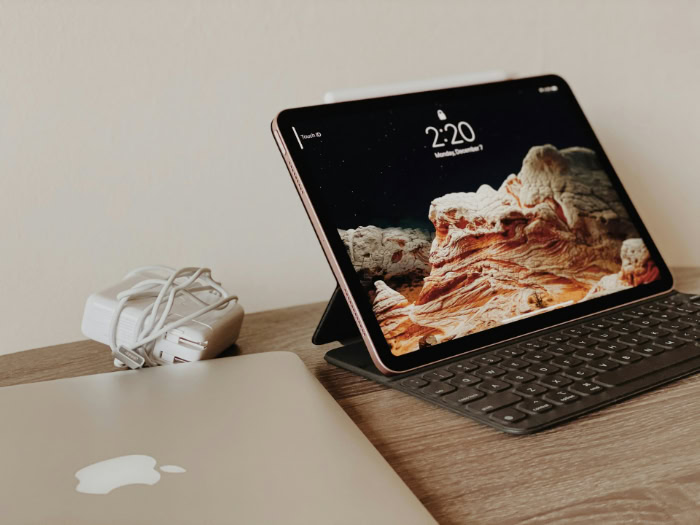
Investing a significant amount of money into a new computer forces a difficult choice between mobile flexibility and raw power, a decision that dictates your daily productivity and physical comfort. The boundary separating standard laptops from 2-in-1 tablets has blurred entirely, leaving buyers unsure which design actually fits their specific habits.
Standard laptops utilize a rigid clamshell form built for ergonomic stability and specialized processing strength. Conversely, 2-in-1 devices introduce versatile touchscreen interaction through fold-back hinges or detachable magnetic keyboards.
This central conflict pushes consumers to weigh the freedom of a multi-mode screen against the reliable performance of a traditional base. Recognizing the hidden hardware limitations and practical usability compromises behind each design is essential before finalizing a purchase.
Key Takeaways
- Standard laptops offer significantly better processing power and graphics capabilities for your money because their larger chassis can accommodate specialized chips and robust cooling fans.
- Detachable 2-in-1 devices struggle with stability on uneven surfaces like a lap or a soft bed because they rely entirely on thin kickstands to remain upright.
- Buying a 2-in-1 computer introduces hidden accessory costs since items like active styluses and magnetic keyboards are frequently sold separately from the main tablet.
- Traditional clamshell laptops generally provide a far superior typing experience with deeper key travel and wider, more accurate trackpads built into their rigid bases.
- Hybrid devices prioritize extreme mobility and direct touchscreen interaction, making them the optimal choice for digital artists and students who rely on handwritten notes.
Form Factor, Design, and Portability
Physical layout and structural engineering dictate how easily you carry and use your device every day. Evaluating the dimensions and mechanical build of standard laptops versus modern hybrids reveals distinct advantages based on your physical space and travel habits.
The Classic Clamshell
The traditional laptop features a rigid base attached to a screen via a simple hinge mechanism. This clamshell shape remains an industry standard because it provides a highly stable platform for typing.
The weighted bottom ensures the device stays firmly anchored on a desk or your lap without tipping backward under its own weight.
The Convertible 2-in-1 (360-Degree Hinge)
Fold-back designs take the traditional clamshell and add a specialized hinge that allows the screen to rotate completely around. This provides the flexibility to prop the screen up like a tent or fold it flat into a thick tablet.
The main physical trade-off is having an exposed keyboard on the back of the device while holding it. Feeling the buttons depress against your hands can feel awkward or distracting during use.
The Detachable 2-in-1 (Tablet-First Design)
These devices function primarily as tablets containing all internal components strictly behind the screen. To mimic a laptop experience, they rely on built-in kickstands and magnetic keyboards that snap onto the bottom edge.
While highly modular, relying on a kickstand drastically reduces physical stability on uneven surfaces.
Weight and Footprint
Traditional laptops generally carry a larger physical footprint and heavier chassis due to their reinforced bases and larger cooling systems. Detachable tablets easily win in pure weight metrics, slipping effortlessly into small bags.
Convertibles sit directly in the middle. They add extra weight through reinforced 360-degree hinges and heavier glass screens but remain relatively easy to slide into a standard backpack.
Performance, Thermal Control, and Battery Life

Internal components dictate the raw processing power and stamina of any computer. The physical dimensions of a chassis strictly limit what hardware can fit inside, directly impacting how fast a computer runs and how long it lasts away from a charger.
Processor (CPU) and Graphics (GPU) Limits
The spatial constraints of thin hybrid devices heavily restrict their internal hardware. High-power processors and dedicated graphics cards require substantial physical space.
Consequently, traditional laptops easily house top-tier chips needed for intense video editing or gaming. Two-in-one models generally utilize low-voltage processors and integrated graphics to fit inside their much thinner frames.
Thermal Management
Heavy workloads generate immense heat that must escape the chassis. Standard laptops use robust cooling systems with multiple fans and heat pipes to expel hot air continuously.
Many detachable tablets and ultra-thin convertibles rely entirely on passive, fanless cooling designs. Without fans, these thin machines suffer from thermal throttling.
The system must intentionally slow down the processor to prevent overheating during sustained heavy tasks.
System Memory and Storage
Standard laptops offer expansive configuration options, frequently allowing buyers to select massive hard drives and generous amounts of RAM. Compact hybrid models face strict motherboard space limits.
This restricts standard storage sizes and limits maximum RAM capacities, meaning buyers must often settle for lower specifications than they would find in a similarly priced clamshell computer.
Battery Performance
Battery life depends heavily on the physical size of the battery cells and the efficiency of the screen. Traditional laptops have room for massive batteries inside their thick lower decks.
Detachable devices must squeeze much smaller batteries behind the display panel. Furthermore, bright touchscreens consume massive amounts of power, causing hybrid devices to drain faster during daily use compared to standard non-touch displays.
Input Methods and Daily Usability

Interacting with your computer should feel natural and comfortable. The way you physically move through menus, type documents, and position the machine heavily influences your overall productivity and daily satisfaction.
Keyboard and Trackpad Experience
The rigid base of a standard laptop allows for deep travel distance for the switches and satisfying tactile feedback. These bases also provide ample room for large, precise trackpads.
Typing for extended periods feels much more comfortable on a sturdy deck. Detachable keyboards often feel hollow or flex under pressure, and their trackpads are usually smaller and less responsive.
“Lapability” and Stability
Using a computer on unstable surfaces like a couch, bed, or an airplane tray table tests a metric often called lapability. Traditional clamshells excel here because the heavy base anchors the entire unit.
Convertibles hold their own fairly well. Conversely, detachable devices with kickstands struggle to remain upright on soft or uneven surfaces, frequently tipping over or sliding off your knees.
Touch and Stylus Integration
Hybrid machines truly shine through direct screen interaction. The responsiveness and precision of active pens allow for drawing, sketching, and handwritten note-taking directly on the display.
This practical utility is entirely absent from traditional laptops unless you connect secondary hardware. Touching the screen to zoom in on documents or swipe through presentations adds a layer of intuitive control.
Operating System Adaptation
Modern operating systems attempt to bridge the gap between desktop control and touch interfaces. Windows, for example, dynamically transitions between a standard layout featuring small icons and a touch-friendly interface with larger touch targets when a keyboard is detached or folded away.
This software adaptation ensures menus remain accessible regardless of the physical mode you choose.
Choosing the Right Tool for Specific Workflows

Matching a device to your profession or daily habits prevents frustration and wasted money. Different user categories demand entirely different strengths from their primary computer.
General Productivity and Office Work
Heavy spreadsheet management, extensive writing, and multitasking across multiple windows require maximum screen space and a reliable keyboard. Traditional clamshell computers dominate these tasks.
Their superior typing comfort and ability to quickly snap multiple windows into place make them highly efficient for standard office duties.
Creative Professionals and Digital Artists
Graphic designers and illustrators gain immense value from drawing directly onto the screen of a hybrid device. This direct integration eliminates the need to carry external drawing tablets.
Standard laptops require artists to map their hand movements on a desk pad to the cursor on the monitor, making a convertible or detachable model significantly more appealing for visual creatives.
Students and Academics
University life requires a careful balance between typing essays and managing handwritten notes. A two-in-one device serves academic needs perfectly.
Students can type out research papers in laptop mode and then fold the device flat to annotate PDFs or write out mathematical equations during lectures. The extreme mobility of a detachable unit makes moving through crowded lecture halls effortless.
Casual Media Consumption and Travel
Reading digital books, streaming video, and browsing the web in confined spaces heavily favor tablet designs. Removing the keyboard entirely allows you to comfortably hold the screen while sitting in a tight airplane seat.
Traditional laptops feel cumbersome and overly bulky if you only want to watch a movie or scroll through social media before bed.
Financial Investment and Long-Term Durability

Purchasing a computer represents a major financial commitment that extends well beyond the initial checkout. Assessing the hidden costs, mechanical lifespan, and potential for future upgrades reveals the true cost of owning each type of machine.
Price-to-Performance Ratio
Standard laptops consistently offer superior hardware specifications per dollar spent. Buyers pay a massive premium for the complex engineering, touchscreens, and miniaturized components required to build slim hybrid computers.
For the exact same price, a traditional clamshell will almost always provide a faster processor, more storage, and better graphics capability.
Accessory Expenses
Hidden costs frequently inflate the final price of hybrid devices. While traditional laptops come fully functional out of the box, detachable tablets usually require separate purchases for essential items.
Buying the specialized stylus, the magnetic keyboard attachment, and protective cases can easily add hundreds of dollars to your initial budget.
Hinge Wear and Physical Durability
Mechanical stress inevitably takes a toll on moving parts. The intricate 360-degree hinges on convertibles and the magnetic connectors on detachable units face daily wear and tear.
Over a few years, these moving parts can loosen or fail entirely. The simple, single-axis hinge of a standard laptop endures heavy use with far less risk of structural failure.
Repairability and Upgrades
Traditional laptops often feature removable bottom panels, allowing users to easily swap out dead batteries, upgrade storage drives, or add more RAM. Highly sealed, compact hybrid units are notoriously difficult to repair.
Components are frequently glued together or soldered directly to the motherboard. If a single part fails, or if you simply need more storage space later, you generally have to replace the entire machine.
Conclusion
Choosing between a standard laptop and a hybrid device requires balancing physical flexibility against raw processing power. Traditional clamshell models consistently deliver superior typing comfort, robust cooling, and better hardware specifications for the price.
Hybrid devices sacrifice some internal performance and long-term repairability to offer the immense freedom of touchscreen interaction and extreme portability. Your final purchasing decision should strictly reflect your daily habits.
If your routine demands heavy typing, managing large spreadsheets, or using resource-heavy software, the stable base and powerful internals of a traditional laptop remain superior. If you prioritize handwritten notes, digital drawing, or consuming media in tight spaces like airplane seats, the versatile screen of a two-in-one tablet easily justifies the higher price tag.
Prioritize your dominant daily tasks to ensure your new machine actually supports the way you work.
Frequently Asked Questions
Can you play heavy video games on a 2-in-1 tablet?
Playing heavy video games on a 2-in-1 device is generally a poor experience due to weak internal graphics. These thin machines lack the physical space needed for powerful dedicated graphics cards and robust cooling fans. You will face severe lag and overheating unless you stick to lightweight, casual games.
Why are 2-in-1 laptops more expensive than regular laptops?
You pay a premium for the complex engineering required to build a 360-degree hinge and a high-quality touchscreen. Manufacturers also spend more money shrinking components to fit inside these extremely thin, lightweight frames. A traditional laptop bypasses these specialized parts, resulting in a significantly lower manufacturing cost.
Do the hinges on convertible laptops break easily?
The intricate hinges on convertible laptops are definitely more prone to wearing out over time than standard designs. Constantly flipping the screen completely backward puts significant mechanical stress on the moving parts and internal display cables. Treating the device gently will help, but structural failure remains a known risk.
Can I upgrade the memory or storage in my 2-in-1 later?
Upgrading the internal components of a 2-in-1 device is usually impossible. To save physical space, manufacturers glue the chassis shut and solder the memory and storage drives directly to the motherboard. You must buy the exact amount of storage and RAM you need during your initial purchase.
Is a detachable tablet good for typing on your lap?
Typing with a detachable tablet on your lap is typically awkward and highly unstable. These devices rely on a thin kickstand to hold the screen upright, which frequently slips or digs into your legs. If you regularly work on couches or in bed, a traditional clamshell base is vastly superior.
About the Author: Elizabeth Baker


