
Prebuilt vs. Custom PC: Pros, Cons, and What to Expect

Overpaying by hundreds of dollars on a new computer is a common mistake made simply because of a brand name logo on the chassis. When you invest your hard-earned money in a machine for gaming, editing, or daily work, you deserve to know if your budget is buying raw performance or simply assembly convenience.
Choosing between a preassembled system and a custom DIY build affects not only your upfront expenses but also your computer’s lifespan, future upgrades, and troubleshooting head space. Balancing the trade-offs of hardware control, warranty coverage, and the actual time required to piece together components ensures that your eventual decision aligns with your daily needs and technical comfort.
Key Takeaways
- Prebuilt PCs carry a convenience premium that covers assembly labor, operating system licensing, and retail margins, which typically makes them more expensive than custom builds with identical specifications.
- Custom builds maximize your price-to-performance ratio but require you to budget for overlooked expenses, including retail operating system licenses, thermal paste, and tools.
- Many major prebuilt manufacturers use proprietary motherboards, cases, and power supplies, which limits your ability to perform future hardware upgrades.
- Custom PCs offer separate warranties for each component, requiring you to diagnose which specific part failed before shipping it back to the manufacturer for repair.
- System integrators provide a practical middle ground by assembling standard, retail-grade parts of your choice for a fee, combining custom upgradeability with a single warranty.
Financial Evaluation
Purchasing a computer is a major financial commitment, and the method you select to acquire your hardware directly dictates how far your money goes. While some buyers prioritize convenience, others look to squeeze every drop of performance out of their budget.
Evaluating upfront pricing structures, assembly premiums, and hidden costs helps clarify the actual value of both options.
The Pricing Structure of Prebuilt PCs
Prebuilt computers arrive ready to run, but that immediate usability carries a specific pricing structure. Manufacturers do not assemble machines for free; they build a convenience premium directly into the retail price.
This premium covers the labor cost of physical assembly, the cost of operating system licenses, and retail markups that ensure profit margins for both the builder and the store. However, prebuilt systems can sometimes offer surprising value.
During periods of severe individual component shortages, bulk manufacturers often maintain a steady supply of graphics cards and processors at standard rates. Additionally, major seasonal retail events can lead to deep discounts, occasionally making a prebuilt computer cheaper than buying the equivalent individual parts at retail price.
The Price-to-Performance Ratio of Custom Builds
Building your own system generally offers a far better price-to-performance ratio. By purchasing parts individually, you avoid assembly markups and can allocate your budget directly toward higher-performing components, such as a faster graphics card or a more robust processor.
This approach allows you to hunt for sales on individual parts over time, maximizing your hardware value. Despite these savings, first-time builders must account for hidden expenses.
Buying an individual retail license for an operating system adds to the bill. You may also need to purchase thermal paste, basic hand tools, zip ties for cable management, and shipping fees from multiple retailers, all of which can chip away at the initial savings of a DIY project.
Long-Term Financial Considerations
The initial purchase price is only part of the financial equation. Over several years, a custom computer often proves more cost-efficient because of how easily you can perform targeted upgrades.
If your games or programs begin to lag, you can replace a single bottleneck, like the graphics card or system memory, without discarding the rest of the computer. With many mass-market prebuilt systems, upgrading a single part can be difficult or impossible, forcing you to purchase an entirely new computer much sooner than you otherwise would have.
Time Investment, Difficulty, and Risk
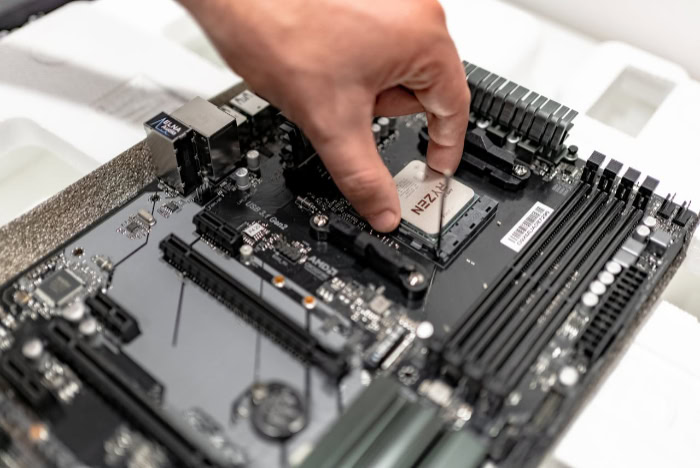
Beyond the financial cost, choosing between a prebuilt and a custom PC requires a realistic assessment of your personal time and technical comfort. One path offers immediate gratification, while the other demands a patient commitment to learning and assembly.
Assembly and Setup Time
Prebuilt systems are designed for immediate use. Unboxing the computer, plugging in the power cable, and completing the initial Windows setup wizard usually takes less than thirty minutes.
Conversely, a custom build requires a significant time commitment before assembly even begins. You must spend hours researching component compatibility and reading reviews.
The physical assembly, neat cable management, and initial software installation, including the operating system and hardware drivers, can easily consume an entire afternoon or weekend for a beginner.
Required Technical Skill and Knowledge
Building a computer requires a willingness to learn. You must understand how different parts plug together, how to navigate a motherboard BIOS to set memory speeds, and how to install a clean operating system.
For some, this learning curve is part of the appeal, transforming the assembly into an engaging hobby that provides a sense of personal achievement. For others, diagnosing hardware compatibility and configuring software feels like unpaid labor, making the simplicity of a prebuilt system far more attractive.
Risk Management during Assembly
Handling delicate, expensive electronics carries inherent risk. A single mistake, such as bending fragile pins on a motherboard CPU socket or failing to guard against electrostatic discharge, can permanently damage expensive components.
Furthermore, finishing a build only to encounter a black screen, known as a failed power on self-test, or no-POST, can be incredibly stressful. Troubleshooting a brand-new system requires patience and systematic testing, which can be highly frustrating when you lack spare parts to isolate the failure.
Component Selection, Build Quality, and Control

The physical parts inside your computer case determine not only how fast it runs, but also how reliably it operates under heavy workloads. Taking control of the selection process lets you dictate the exact quality of every capacitor, fan, and cable.
Prebuilt systems, by contrast, require you to trust the manufacturer’s choices, which are often influenced by corporate cost-cutting.
Proprietary vs. Standardized Components
Many large-scale computer manufacturers rely on proprietary components to streamline their assembly lines and reduce production costs. These systems often feature custom-shaped motherboards, non-standard power supplies, and cases with unique screw layouts that prevent you from using standard retail parts.
Custom builds, however, rely entirely on standardized industry form factors, such as ATX or Micro-ATX. This universal compatibility ensures that any retail component you purchase will fit and function within your system, giving you complete freedom to mix and match brands.
Hardware Quality and “Cut Corners” in Prebuilts
To hit specific retail price points while maintaining profit margins, prebuilt manufacturers frequently cut corners on components that do not appear in bold text on the store listing. While the processor and graphics card might be high-end, the system may use a generic power supply, slow single-channel memory, or a noisy, minimal CPU cooler.
Building your own computer eliminates these compromises. You have the power to select highly-rated, reliable brands for every single component, ensuring that your power supply is efficient, your storage is fast, and your cooling system keeps the machine quiet and cool.
Customization and Aesthetics
Customization allows you to tailor a computer to your exact environmental and physical preferences. If you require a silent workspace, you can select insulated cases and quiet fans.
If you have limited desk space, you can design a compact, small-form-factor build that still packs high-end performance. Additionally, the visual appearance of a custom build is entirely in your hands, allowing you to choose specific color schemes, custom cables, and custom lighting profiles.
Prebuilt systems offer very little aesthetic variety, leaving you to accept whatever pre-packaged chassis design the manufacturer provides.
Customer Support, Warranties, and Troubleshooting

When a computer stops working, the path to resolving the issue can vary wildly depending on how the machine was acquired. Managing hardware failures and software issues requires either dealing with a single corporate entity or taking matters into your own hands.
Understanding these support systems before a failure occurs is vital for peace of mind.
Unified Warranties for Prebuilt Systems
The primary advantage of a prebuilt PC is its unified warranty. If the computer fails to turn on or experiences constant blue-screen errors, you only have to contact one customer support department.
This single point of contact handles all troubleshooting, repairs, and replacements. However, this convenience has a downside.
If a minor component like a system fan or a secondary drive fails, manufacturers often require you to package and ship the entire, heavy desktop computer back to their repair facility, leaving you without a computer for weeks.
Individual Component Warranties for Custom Builds
When you build a custom computer, you do not have a single warranty for the entire system. Instead, every individual component has its own warranty from its respective manufacturer.
These warranties are often quite generous, sometimes spanning five to ten years for power supplies and memory. The challenge lies in diagnosing the failure yourself.
If your system refuses to boot, you must determine whether the motherboard, power supply, or processor is at fault before you can open a return ticket with the correct manufacturer, a task that requires a logical, step-by-step troubleshooting approach.
Software and Bloatware Management
Operating system environments differ significantly between custom and prebuilt systems. Prebuilt systems frequently arrive with pre-installed trial software, unnecessary security suites, and manufacturer utility programs.
This bloatware runs in the background, consuming system resources and occasionally causing software conflicts. A custom build starts with a completely blank slate.
You install a clean operating system, ensuring that only the drivers and applications you explicitly choose are running on your hardware, resulting in a cleaner, faster software experience right from the first boot.
Upgradeability, Future-Proofing, and Alternative Solutions

Technology moves quickly, and a computer that feels incredibly fast today will eventually struggle with future software and games. How your system handles these changing demands determines its overall lifespan.
The Upgrade Path of a Prebuilt PC
Prebuilt computers often face strict physical and electrical limitations that hamper future upgrades. Cases designed for prebuilts may lack the clearance needed for larger, modern graphics cards, or they may have restricted airflow that cannot handle hotter, high-performance components.
Furthermore, proprietary motherboards and power supplies often lack standard connectors, meaning you cannot upgrade your power supply to support a faster graphics card without also replacing the motherboard and case, effectively halting your upgrade path.
The Modular Flexibility of Custom PCs
Custom computers are inherently modular, allowing you to swap out or upgrade individual parts as your performance requirements change. If you need more storage for heavy media files, you can easily install another drive into an open slot.
If modern games require more system memory, adding another module of RAM takes only a few minutes. Because every part in a custom system is standardized, you can gradually modernize your hardware over many years, preventing the system from becoming obsolete.
The Middle Ground: System Integrators (SIs)
For those who want the high-quality, standardized components of a custom build but want to avoid the physical labor and risk of assembly, system integrators offer a compelling middle ground. These companies allow you to select standard retail components through an online builder.
A professional then assembles the system, manages the cables, tests the hardware, and provides a single, unified warranty for the entire build. While you still pay an assembly fee, you avoid proprietary parts and retain a clear path for future upgrades.
Conclusion
Choosing between a prebuilt and a custom computer ultimately comes down to how you value your time versus your desire for control. Prebuilt systems offer immediate, plug-and-play convenience backed by a single point of support, but they often require financial and hardware compromises.
Building your own PC demands a significant investment of time, research, and physical labor, yet it rewards you with superior value, component quality, and complete upgrade freedom.
To determine the right path, match your resources and goals to these two distinct user profiles. A prebuilt computer is ideal for time-constrained professionals, beginners who prefer to avoid technical troubleshooting, and anyone who values the security of a single, system-wide warranty.
Conversely, a custom build is the perfect fit for performance enthusiasts, hands-on hobbyists, and budget-conscious buyers who want to maximize their hardware value and preserve an easy, modular upgrade path for years to come.
Frequently Asked Questions
Is it actually cheaper to build a PC than to buy a prebuilt one?
Yes, building a PC is generally cheaper because you avoid the assembly fees and retail markups charged by manufacturers. This allows you to allocate more of your budget toward higher-performing parts. However, you must factor in the cost of an operating system license and basic tools to calculate your true savings.
What happens if a part breaks inside a custom-built computer?
You must identify the broken component yourself and return it directly to its specific manufacturer for replacement. Unlike prebuilt computers, which are covered by a single system warranty, custom PCs rely on individual warranties for each part. This means you do not have to ship your entire computer away for a simple repair.
Do I need special tools or soldering skills to build a PC?
No, you do not need any soldering skills or specialized tools to build a modern computer. A standard magnetic Phillips-head screwdriver is usually the only tool required for the entire assembly process. Most consumer hardware components are designed to plug directly into standardized slots, making the physical setup highly modular.
Can I upgrade a prebuilt computer if it starts running slow?
Upgrading a prebuilt computer can be difficult because many major brands use proprietary motherboards, power supplies, and cases. These non-standard parts often lack the physical space or standard power connectors required to support modern upgrades. You may be forced to replace the entire system rather than just swapping out a single component.
How long does it actually take to build a computer from scratch?
A beginner should expect to spend about three to six hours physically assembling a computer and installing the software. This estimate does not include the time you will spend researching parts compatibility before purchasing them. Experienced builders can often complete the entire physical assembly and cable management process in under two hours.
About the Author: Elizabeth Baker


