
Should You Buy or Build a Gaming PC? Compare Your Costs

You are currently staring at two browser tabs: one features a sleek, ready-to-ship desktop, and the other holds a shopping cart filled with fifteen separate boxes of hardware. This decision determines if you spend your Saturday night playing a new release or sweating over a motherboard with a screwdriver in hand.
It is the difference between paying a premium for peace of mind and risking a hardware failure for the sake of peak performance. While the allure of a custom-built machine is undeniable, the safety net of a professional warranty offers its own kind of value.
Choosing the right path requires an honest look at your patience, your wallet, and how much you trust your own hands.
Key Takeaways
- Building your own PC eliminates the assembly labor markup, allowing you to spend more of your budget on higher-tier graphics cards and processors.
- Custom-built systems avoid proprietary parts used by large manufacturers, which makes future upgrades and maintenance much easier over several years.
- Prebuilt computers offer a single warranty for the entire system, whereas DIY builders must manage separate warranties for every individual component.
- DIY builds provide a cleaner software experience because they lack the pre-installed bloatware often found on mass-market retail machines.
- Ready-made PCs save hours of research and assembly time, making them ideal for users who want a plug-and-play experience without the risk of hardware failure during setup.
Cost Comparison: Convenience vs. Customization
The financial side of gaming is rarely simple, as every dollar spent should ideally translate into higher frame rates or better visual fidelity. When you look at the total price of a machine, you are not just paying for the silicon and plastic inside the case.
You are also paying for the logistics of getting that machine to your desk. The market splits into two distinct pricing models: one that prioritizes the value of your time and another that prioritizes the value of the hardware itself.
The Prebuilt Premium
Buying a computer from a retail store or a system integrator involves a markup often called the prebuilt premium. This extra cost covers the labor required to assemble the parts, the overhead of the company’s facility, and the profit margins necessary to keep the business running.
While the specs might look identical to a DIY build on paper, you are paying a significant fee for the fact that someone else did the manual labor. This premium can range from a hundred dollars to several hundred, depending on the complexity of the build and the brand name on the box.
Maximizing Performance-per-Dollar
Building your own PC allows you to allocate every cent toward the hardware that affects your gaming experience. Instead of paying for a builder’s labor, you can move up a tier in graphics cards or double your storage capacity.
Furthermore, the DIY route allows you to hunt for individual sales across multiple retailers. You might find a power supply on sale at one store and a CPU discounted at another, effectively lowering the total cost of the machine below what any single manufacturer could offer for a finished product.
Hidden Expenses
Both paths involve costs that are not always visible on the initial price tag. For the builder, you must account for the price of a Windows license, a set of precision screwdrivers, and perhaps extra thermal paste.
These small costs add up. Conversely, prebuilt buyers often face hidden costs in the form of shipping insurance or extended warranty packages.
While a prebuilt might seem like a fixed price, these add-ons often appear at the final checkout screen, narrowing the price gap between the two options.
The Effort Factor: Time, Skills, and Setup
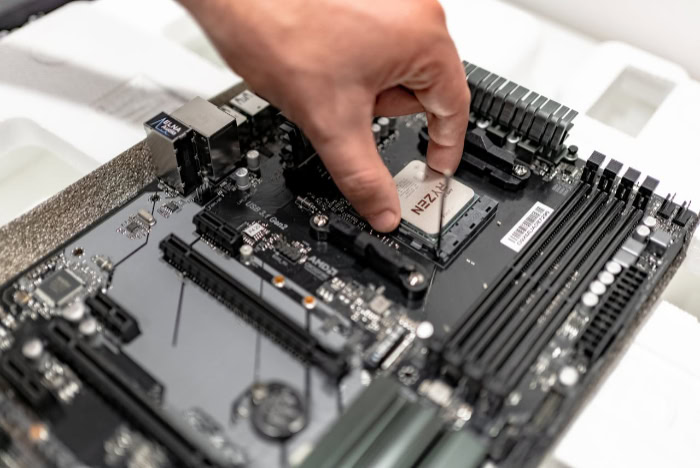
Time is a currency just as much as money. Choosing between building and buying often comes down to how much free time you have and how you prefer to spend it.
Some view the assembly process as a rewarding hobby, while others see it as a stressful barrier between them and their favorite games. The setup process extends far beyond the physical assembly and includes the initial software configuration that defines your daily user experience.
The Learning Curve
Building a PC requires a specific set of skills that take time to acquire. You must research part compatibility to ensure the processor fits the motherboard and the power supply can handle the total draw of the system.
Watching tutorials and reading manuals is a necessity for a first-time builder, and the actual assembly can take several hours. If a part arrives dead on arrival, the time spent troubleshooting can stretch into days.
You are essentially trading your leisure time for the knowledge of how your machine functions.
Out-of-the-Box Readiness
The primary appeal of a prebuilt PC is the plug-and-play experience. Once the box arrives, you simply remove the protective packaging, plug in the power cord, and hit the start button.
The manufacturer has already handled the BIOS updates, driver installations, and cable management. For a professional with limited free time or a beginner who feels overwhelmed by technical manuals, this immediate access to the system is often worth the extra cost.
It eliminates the anxiety of potentially breaking a delicate component during the installation process.
Software and Bloatware
One of the major differences in the setup phase is the state of the operating system. When you build your own PC, you perform a clean installation of Windows, meaning your system is free of unnecessary background programs.
Prebuilt PCs from large manufacturers often come with bloatware, which includes trial versions of antivirus software and proprietary tools that can slow down the computer. While you can uninstall these, a DIY build offers a pristine environment from the very first boot, ensuring that no unwanted software is eating up your system resources.
Component Control: Quality and Aesthetics

The quality of a PC is often hidden in the parts that people do not talk about in advertisements. While a prebuilt might boast a powerful graphics card, the motherboard or power supply might be an unbranded, low-cost component.
Building your own system grants you total control over every single piece of hardware, ensuring that no part of the machine is a weak link that might fail prematurely.
Name-Brand vs. OEM Parts
In the DIY world, you choose parts from reputable manufacturers with long histories of reliability. You can select a power supply with a gold-rated efficiency or a motherboard with high-quality capacitors for better stability.
Many mass-produced prebuilts use original equipment manufacturer (OEM) parts. These are often stripped-down versions of retail components, lacking the heat sinks, extra ports, or power phases found on name-brand hardware.
By building your own, you avoid these proprietary shortcuts and ensure that every component meets your personal standards for quality.
Aesthetic Personalization
If you care about how your setup looks, building is the only way to achieve a truly custom result. You can choose a case that fits your specific desk space, select fans with specific lighting patterns, and even use colored cable extensions to match a theme.
Prebuilt systems are usually limited to a few standard designs. While some boutique builders offer customization, they charge a high premium for it.
Doing it yourself allows you to create a visual centerpiece for your room without the custom-shop price tag.
Thermal Performance and Noise
A common issue with standard retail PCs is poor airflow. Many prebuilts use cases with solid front panels that look sleek but choke the intake fans, leading to high temperatures and loud fan noise.
When you build your own, you can prioritize a high-airflow case and quiet, aftermarket cooling solutions. This results in a machine that runs cooler and stays silent even during intense gaming sessions.
Better cooling also helps the hardware maintain its maximum speed for longer periods without throttling.
Risk and Reliability: Warranties and Support

No matter how well a computer is built, hardware can fail. The difference between buying and building becomes most apparent when something goes wrong.
The risk profile of a DIY project is fundamentally different from a retail product, especially when it comes to who is responsible for identifying and fixing a hardware malfunction.
The Single-Point Warranty
A prebuilt PC comes with a single warranty that covers the entire system. If the computer stops turning on, you call one company, and they are obligated to fix it.
This often includes shipping the entire tower back to them or, in some cases, having a technician come to your home. This safety net is a massive benefit for users who do not want to spend their time diagnosing complex electrical issues.
You have one point of contact and one person to hold accountable for the functioning of the machine.
Managing Individual Component Warranties
When you build your own PC, you are the warranty manager. Every part has its own separate warranty from a different manufacturer.
If your system crashes, you must figure out if the culprit is the RAM, the GPU, or the power supply yourself. Once you identify the failing part, you have to contact that specific company to start a return.
This process can be tedious, as you may have to deal with several different customer support teams over the years, and you will be without a functioning PC while that single part is being replaced.
Troubleshooting Responsibility
In the DIY world, you are the technician. If the computer fails to boot after a software update or a hardware change, the responsibility to fix it falls entirely on your shoulders.
You will need to use online forums and community guides to solve your problems. For those who enjoy problem-solving, this is an opportunity to learn.
For those who just want their computer to work, the lack of a professional support line can be a major source of stress. Prebuilt owners can simply pass that burden to the manufacturer.
System Lifespan: Upgradability and Future Use

The value of a computer is measured over years, not just days. A machine that is easy to fix and easy to upgrade will serve you much longer than one that is designed to be replaced.
How a PC is constructed dictates how much life you can squeeze out of it as games become more demanding and hardware ages.
Standardized vs. Proprietary Designs
The biggest obstacle to a long-lasting PC is proprietary hardware. Some major prebuilt brands use custom-shaped motherboards or non-standard power connectors that only fit their specific cases.
This means that if you want to upgrade your graphics card in three years, you might find that the power supply cannot be replaced with a stronger one, or the new card physically does not fit. DIY builds use standardized parts that are designed to be interchangeable.
This ensures that you can replace any single part at any time without having to buy a whole new computer.
Ease of Maintenance
Building a PC gives you an intimate understanding of how it is put together. This familiarity makes routine maintenance, such as dusting the internal components or reapplying thermal paste, much less intimidating.
Prebuilt PCs can sometimes be difficult to open or have cramped interiors that make cleaning a chore. Because you designed the layout of a DIY build, you know exactly where the dust filters are and how to safely navigate the interior, which helps keep the system running efficiently for a much longer period.
The Second Life of Parts
When a DIY PC finally reaches the end of its useful life as a primary gaming machine, its parts still hold value. You can take the old storage drives and put them in a new build, or turn the old CPU and motherboard into a home media server.
Because the parts are standard, they are easy to resell on the used market. Many prebuilt systems, especially those with proprietary parts, have very little resale value because the components cannot be easily used in other machines.
Building your own preserves the long-term value of your hardware investment.
Conclusion
The decision rests on how you balance your budget against your technical confidence and available time. Building a PC is the superior choice for those who want to maximize their hardware per dollar and enjoy the granular control over every specific component.
This path rewards the patient enthusiast who views assembly as part of the hobby. Conversely, buying a prebuilt system is the best move for professionals or beginners who prioritize a guaranteed working machine with a single point of support.
By removing the risk of assembly errors, you can spend your time playing games instead of troubleshooting hardware.
Frequently Asked Questions
Is it actually cheaper to build a PC right now?
Yes, building your own PC is generally more cost effective because you avoid the manufacturer’s labor fees and profit margins. You can also save money by picking specific parts on sale across different stores. This allows you to get better performance for the same total price compared to a prebuilt.
What happens if I break a part while building it?
If you accidentally damage a component during assembly, you are usually responsible for the cost of replacement. Unlike prebuilts that have a full-system warranty, individual part warranties do not cover user error like bent CPU pins or static discharge. This is the primary financial risk of the DIY route.
Can I upgrade a prebuilt PC later on?
Your ability to upgrade a prebuilt depends on whether the manufacturer used standardized or proprietary parts. Some big brands use custom power supplies and motherboards that cannot be replaced with standard retail versions. This often makes it impossible to install a newer graphics card or a more powerful processor in the future.
Do I need special tools to build a computer?
You typically only need a standard Phillips-head screwdriver to assemble a modern gaming PC. While items like anti-static wrist straps or magnetic parts trays are helpful, they are not strictly necessary for a successful build. Most components, such as the motherboard and case, come with all the specialized screws you need.
Is bloatware really that big of a deal?
Bloatware can significantly impact your system performance by consuming CPU cycles and RAM in the background. Many retail PCs come with trial software and manufacturer utilities that start automatically. Building your own system allows for a clean Windows installation, ensuring that every bit of power goes toward your games.
About the Author: Julio Caesar


