
What Is Thermal Paste? How It Works

Every time a computer processes data, runs applications, or streams video, internal chips generate significant heat. Without effective cooling, this heat builds up quickly and risks damaging delicate electronics.
Thermal paste serves as a specialized substance placed directly between a processor and its metal cooling unit. Acting as a bridge, it fills invisible gaps between both parts to transfer heat away from sensitive circuitry efficiently.
For everyday users, keeping hardware cool can seem complicated, but managing heat transfer starts with this simple gray compound.
Key Takeaways
- Thermal paste fills microscopic surface valleys between the processor and heatsink base, displacing trapped air that would otherwise act as a heat insulator.
- Entry-level ceramic pastes are electrically non-conductive and safe for standard desktop use, whereas liquid metal conducts electricity and will corrode aluminum heatsinks.
- Maintaining effective heat transfer prevents processors from thermal throttling above 90°C, ensuring consistent clock speeds and lower fan noise.
- A single center dot measuring 4 mm to 5 mm provides the ideal volume for standard desktop chips without spilling excess compound onto motherboard sockets.
- Thermal compound lasts two to five years under normal use, but it must be cleaned with 90% or 99% isopropyl alcohol and reapplied whenever a cooler is unseated.
Core Function and Thermal Mechanics
A computer processor concentrates an immense amount of electrical activity into a compact area, generating intense thermal energy during standard operation. Efficient operation depends on channeling this heat away from the processor chip toward a dedicated cooling unit.
Thermal paste makes that transfer possible by bridging the physical gap between hardware surfaces.
Definition as a Thermal Interface Material
Thermal paste, commonly called thermal compound or thermal grease, is a dense and malleable substance engineered specifically to conduct heat. In consistency, it resembles thick toothpaste or cosmetic cream, retaining a viscous form that does not easily run or drip under normal temperatures.
Manufacturers suspend thermally conductive micro-particles within a silicone or synthetic base oil to achieve this balance of flexibility and heat transmission.
The material occupies a critical boundary zone within the computer chassis. It sits directly between the top surface of the processor, known as the integrated heat spreader (IHS), and the flat metal contact plate of the heatsink or liquid cooler.
Without this compound pressed firmly between the two components, direct heat exchange between the silicon unit and the cooling hardware drops dramatically.
Microscopic Imperfections on Processor Surfaces
To the naked eye and touch, the integrated heat spreader on a processor and the copper or aluminum base of a cooler look completely flat and mirror-smooth. In reality, modern metal manufacturing techniques leave tiny imperfections across these surfaces.
Under a microscope, both contact plates resemble rugged terrain covered in ridges, peaks, pits, and fine scratches.
When two rigid metal plates are clamped together, their high points touch, but their low points fail to meet. This uneven contact creates thousands of microscopic voids across the mating area.
Instead of continuous, solid contact across the entire metal surface, only a small percentage of the physical area actually touches metal to metal.
Heat Transfer Efficiency and Air Displacement
The voids left behind by uneven metal surfaces naturally fill with air, which presents a serious obstacle to cooling. Air is a poor thermal conductor and acts as a thermal insulator, resisting the movement of heat away from the processor.
When microscopic air pockets remain trapped between the chip and the heatsink base, heat gets trapped at the surface of the processor rather than flowing into the cooling fins.
Applying thermal paste resolves this physical bottleneck. When the cooler is tightened onto the processor, the mounting pressure squashes the compound, forcing it into every tiny microscopic valley and scratch.
By physically displacing the trapped air, thermal paste creates an unbroken, conductive pathway that lets heat glide smoothly from the processor cover straight into the cooler.
Compound Types and Material Classifications
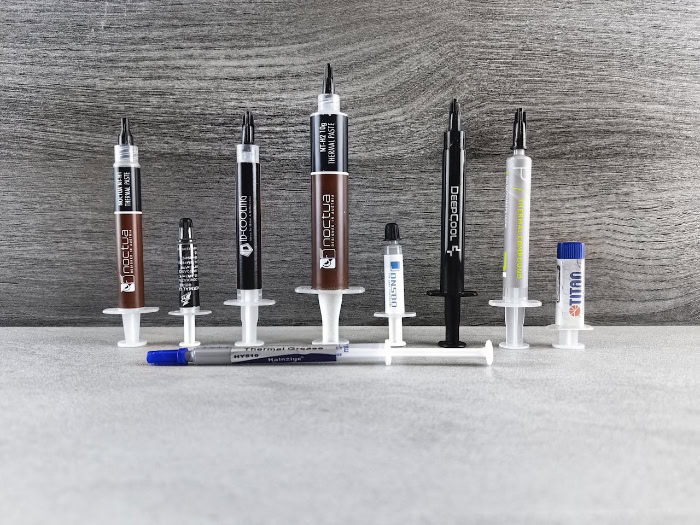
Thermal pastes rely on different base materials and conductive elements to suit varied performance needs, budgets, and experience levels. Choosing an appropriate paste requires balancing thermal performance against ease of handling and electrical safety.
Ceramic and Silicone Formulas
Ceramic compounds represent the traditional entry-level choice for standard computing needs. These pastes consist of a silicone fluid base blended with fine ceramic powders, such as zinc oxide, aluminum oxide, or boron nitride.
White or light gray in appearance, they provide dependable heat conductivity suitable for everyday office computers, budget builds, and general consumer electronics.
The primary advantage of ceramic formulas is their complete lack of electrical conductivity. Because they do not conduct electricity, an accidental spill onto motherboard traces or surrounding surface-mount capacitors will not cause short circuits or component damage.
They are affordable, widely available, and simple to clean, making them an excellent choice for basic computer maintenance.
Carbon and Metal-Particle Compounds
Performance-oriented systems generally rely on compounds formulated with microscopic carbon structures or metal particles. Manufacturers blend high concentrations of micronized silver, aluminum, or carbon nanoparticles into a synthetic suspension base.
These tiny particles fill microscopic surface gaps and provide higher thermal conductivity ratings than ceramic blends.
Carbon and metal-particle pastes offer an ideal balance of thermal control and safety for modern gaming desktops and heavy-workload workstations. While many metal-particle pastes are formulated to be electrically non-capacitive and non-conductive under normal operating voltages, some variants can conduct electricity under specific electrical conditions.
Users must handle them carefully to avoid getting compound on delicate motherboard circuitry.
Liquid Metal Formulations and Electrical Conductivity Risks
Liquid metal compounds sit at the highest end of thermal performance, utilizing room-temperature liquid metal alloys primarily composed of gallium, indium, and tin. These formulations deliver exceptional heat conductivity, often outperforming conventional pastes by substantial margins under heavy processor loads.
However, liquid metal presents significant hazards that make it unsuitable for non-specialists. Gallium is highly conductive to electricity, meaning a single stray droplet can instantly destroy a processor or motherboard.
Furthermore, gallium aggressively corrodes aluminum through a process known as liquid metal embrittlement, structurally compromising aluminum heatsinks within hours. It should only be paired with nickel-plated copper surfaces by experienced builders who can apply protective barriers around the processor socket.
System Performance and Hardware Protection

Thermal management directly determines how reliably a computer runs during daily operation. A quality thermal interface ensures that internal cooling hardware can regulate temperature fluctuations before heat threatens operational stability.
Preservation of Peak Processor Speeds
Modern processors feature internal monitoring sensors that continuously track core temperatures. When heat generation outpaces cooling capability and temperatures approach maximum safe limits, usually between 90°C and 100°C, the processor initiates an automatic protection mechanism known as thermal throttling.
The chip cuts its operating voltage and lowers its clock speed to prevent catastrophic overheating.
Effective thermal paste prevents these sudden performance drops by steadily channeling heat away from the processor. By keeping core temperatures well below the throttling threshold, the compound ensures the chip sustains its designated boost speeds during processor-heavy tasks such as gaming, video rendering, or data compilation.
Prevention of High-Heat Component Stress
Prolonged exposure to excessive temperatures poses long-term physical risks to computer hardware. Silicon dies, internal solder joints, and motherboard socket assemblies expand and contract as temperatures spike and cool.
Over time, extreme thermal cycles can degrade microscopic connections, leading to memory errors, erratic system crashes, or premature hardware failure.
When thermal paste channels heat smoothly toward the heatsink, it softens these temperature extremes and reduces mechanical strain on delicate silicon packages. It also helps prevent automatic thermal shutdowns, which occur when a computer abruptly turns off to rescue an overheating processor, protecting the operating system from data corruption and storage write errors.
Acoustic Control and Fan Noise Reduction
Cooling fans respond directly to the thermal readings reported by processor temperature sensors. Motherboard firmware adjusts fan curves automatically; as core temperatures climb, fans spin faster to push more air through the heatsink fins.
Poor thermal paste causes temperatures to surge even during light workloads, forcing cooling fans to run at maximum speed and create distracting, high-pitched whines.
Maintaining an efficient thermal transfer interface allows the heatsink to absorb and disperse heat smoothly. Because core temperatures remain moderate and predictable, cooling fans can operate at low, steady rotation speeds.
This steady dissipation creates a quiet computing environment for both focused work and media entertainment.
Application Techniques and Usage Protocols

Applying thermal paste correctly ensures full coverage across the processor without creating excess residue or air pockets. Applying the right amount of compound using an appropriate pattern guarantees optimal thermal contact.
Common Pattern Variations (Dot, Cross, and Spread)
The single center dot technique remains the most common method for consumer desktop processors. A user dispenses a round droplet of compound, roughly 4 mm to 5 mm across, directly onto the center of the integrated heat spreader.
When the heatsink is mounted and screwed down, the downward clamping force evenly spreads the paste outward in a circular pattern across the contact area.
For larger square or rectangular processor surfaces, such as high-end workstation processors, a cross pattern works better. Laying thin lines of paste from corner to corner ensures the compound reaches the outer edges of the larger heat spreader once compressed.
Alternatively, some users prefer the manual spread method, using a small plastic spatula to distribute a thin, uniform layer across the entire metal surface before mounting the cooler. This manual approach is mandatory for liquid metal compounds to ensure comprehensive surface wetting.
Volume Errors and Overflow Hazards
Precision in compound volume is essential for safe operation. Applying too little paste leaves dry patches between the metal plates where the spread fails to reach the edges, creating localized thermal hotspots that degrade cooling efficiency.
Conversely, applying too much paste creates messy and potentially dangerous overflows. As the cooler clamps down, excess compound squeezes past the edges of the heat spreader.
Thick spills can drip onto the processor socket, foul tiny capacitor arrays, or seep into pin connectors. If the compound carries any electrical capacitance or conductivity, overflow can cause short circuits that permanently disable the computer.
Manual Tubes Versus Factory Pre-Applied Solutions
Many retail cooling units, including stock air heatsinks and all-in-one liquid coolers, arrive out of the box with thermal material already pre-applied. This factory compound typically appears as a neat square or circle of gray paste stamped onto the cooler base, protected by a plastic peel-off cover.
For first-time builders assembling standard components, this pre-applied paste performs adequately and eliminates the need for manual measurement.
Purchasing a standalone syringe of thermal paste becomes necessary in several common scenarios. Users must apply fresh paste whenever they replace an older cooler, remount a heatsink after cleaning, or upgrade the processor.
Enthusiasts also frequently wipe away stock factory paste and substitute high-grade aftermarket compounds to gain lower operating temperatures.
Inspection and Maintenance Lifecycle

Thermal compound is not a permanent fixture inside a personal computer. Over time, exposure to continuous heat causes the material to age, requiring periodic checks and scheduled renewal to preserve cooling efficiency.
Observable Symptoms of Compound Dry-Out
As thermal paste endures thousands of heating and cooling cycles, its carrier oils evaporate, leading to a process known as dry-out. The most reliable early warning sign is an unexplained, gradual increase in baseline operating temperatures.
A computer that previously idled at 35°C might begin idling at 50°C, with cooling fans spinning aggressively during basic web browsing.
Upon removing the heatsink, dry paste reveals unmistakable physical changes. Instead of showing a tacky, spreadable texture, expired compound appears crusty, chalky, or brittle.
In advanced stages of degradation, the material cracks, flakes off the metal surface, and leaves wide dry voids that completely block heat dissipation.
Residue Solvents and Surface Preparation
Before fresh paste can be applied, old residue must be thoroughly cleared from both the processor heat spreader and the heatsink contact plate. The standard cleaning agent for this process is high-percentage isopropyl alcohol, ideally rated at 90% or 99% purity.
High-purity alcohol rapidly dissolves stubborn, baked-on compound while evaporating quickly without leaving moisture or conductive residue behind.
Users should apply the alcohol using lint-free materials, such as microfiber cloths, specialist cleaning wipes, or plain paper coffee filters. Standard paper towels and cotton swabs should be avoided because they shed tiny cellulose fibers that can get caught between metal surfaces.
The goal is to clean both metal faces until they are completely free of smudges, fingerprints, and compound remnants.
Standard Schedules for Paste Renewal
Under ordinary conditions, modern thermal compounds offer a dependable lifespan spanning several years. For standard office desktops subjected to moderate daily tasks, refreshing the thermal paste every three to five years is typically sufficient.
High-performance gaming rigs, heavy-workload workstations, and compact laptops experience higher sustained thermal stress, making a renewal interval of two to three years advisable.
There is one strict rule regarding hardware maintenance: thermal paste must always be replaced immediately whenever a cooler is unseated or shifted. Breaking the seal between the heatsink and the processor introduces air pockets into the compound.
Re-clamping a cooler onto existing, compressed paste traps those air bubbles permanently, severely crippling heat transfer until the surfaces are cleaned and fresh compound is applied.
Conclusion
Thermal paste is an inexpensive yet vital component that protects computer hardware from heat damage and keeps performance steady. By filling microscopic air gaps between the processor and the cooling unit, this small dab of compound prevents aggressive thermal throttling, loud fan noise, and sudden shutdowns.
Everyday computer owners do not need to check their thermal paste constantly, but keeping an eye on normal temperatures and reapplying fresh compound during regular maintenance or cooler upgrades keeps machines running smoothly for years.
Frequently Asked Questions
How often should I replace my thermal paste?
You should replace your thermal paste every two to five years depending on how hard you push your computer. Standard office desktops can safely run for up to five years without maintenance. High-performance gaming rigs and laptops run hotter, so they benefit from fresh compound every two to three years, or whenever you remove the heatsink.
Can a computer run without thermal paste?
No, a computer cannot safely run without thermal paste. Without paste to fill microscopic surface gaps, trapped air acts as an insulator and stops heat from reaching the cooler. The processor will quickly overheat within seconds, causing thermal throttling, severe lag, or an emergency shutdown to prevent hardware damage.
How much thermal paste should I use?
You only need a small drop about the size of a pea. A dot measuring roughly 4 mm to 5 mm in the center of the processor provides plenty of coverage once clamped. Using too little creates uncooled hotspots, while using too much can spill over the edges and foul sensitive motherboard parts.
What is the best way to clean off old thermal paste?
The best method is using high-percentage isopropyl alcohol with a lint-free cloth. Alcohol rated at 90% or 99% dissolves dried paste quickly and evaporates without leaving damp residue behind. Coffee filters or microfiber towels work best for wiping surfaces clean because ordinary paper towels leave behind tiny fibers that hinder heat transfer.
Can I reuse thermal paste if I take the cooler off?
No, you must clean and reapply thermal paste every time you remove the cooler. Lifting the heatsink breaks the existing seal and creates air pockets in the compound. Clamping the cooler back down without fresh paste traps those air bubbles permanently, creating hotspots that cause high temperatures and loud fan noise.
About the Author: Julio Caesar


