
Thermal Paste vs. Liquid Metal: Which One Do You Need?
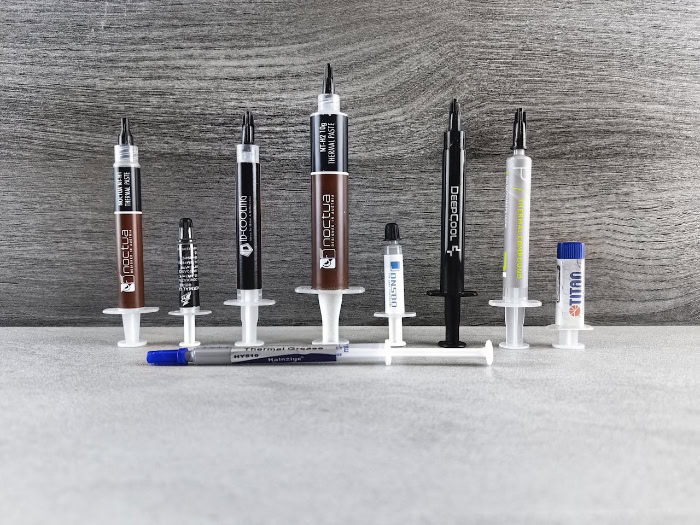
Your powerful gaming rig fights a constant war against heat. Even with a massive cooler attached, microscopic imperfections between your CPU and heatsink act as insulators that trap thermal energy.
You must fill those air gaps to keep temperatures down. Standard thermal paste serves as the reliable choice used in nearly all builds, while liquid metal stands as the high-performance alternative for those chasing every last degree.
Although the cooling benefits of liquid metal are distinct, they come with the real threat of destroying your hardware if applied incorrectly.
Composition and Conductivity
To appreciate the difference between these two compounds, we must look at their fundamental makeup. One relies on a suspension of particles to bridge the gap between surfaces, while the other utilizes raw metal alloys to maximize efficiency.
Thermal Paste Composition
Standard thermal paste, often called thermal grease, usually consists of a silicone or polymer base. Manufacturers suspend thermally conductive particles within this base to facilitate heat transfer.
These particles typically include zinc oxide, ceramic powder, or in premium options, diamond powder. The primary function is to fill microscopic air pockets on the CPU lid and cooler base without creating an electrical connection.
Because of the silicone carrier, thermal paste acts as a partial insulator compared to raw metal. Most high-quality pastes offer a thermal conductivity rating between 4 W/mK and 14 W/mK.
Liquid Metal Composition
Liquid metal is an entirely different class of material. It is an alloy generally composed of Gallium, Indium, and Tin.
This specific mixture, often referred to as Galinstan, possesses a unique property: it remains in a liquid state at room temperature. Unlike paste, which uses a carrier fluid, liquid metal creates a pure metal-to-metal interface between the die and the heatsink. This allows for significantly higher thermal transfer rates.
Typical liquid metal products boast thermal conductivity ratings of 73 W/mK or higher, dwarfing the specifications of even the best traditional pastes.
The Theoretical Gap
Looking strictly at the numbers, liquid metal appears vastly superior. The statistical disparity in thermal conductivity is massive.
Liquid metal conducts heat roughly 7 to 10 times more efficiently than standard paste. However, this raw data represents the potential of the material itself rather than the guaranteed result for every computer system.
Real-World Performance Differences

Theoretical numbers look impressive on a spec sheet, but they do not always translate linearly to your CPU temperature readout. The actual benefit depends heavily on the specific hardware, the cooling solution, and the workload intensity.
Temperature Reduction Expectations
In standard scenarios involving low-wattage CPUs or locked processors running at stock speeds, the difference between paste and liquid metal is often negligible. If a system is not generating enough heat to saturate the transfer capacity of standard paste, switching to liquid metal might only yield a 1°C or 2°C improvement.
The story changes for high-load scenarios. Overclocked systems, high-end GPUs, and gaming laptops with limited airflow see dramatic results.
In these hot environments, liquid metal can lower load temperatures by 5°C to 15°C compared to traditional paste.
Preventing Thermal Throttling
Modern processors are designed to boost their clock speeds until they hit a thermal limit. When a CPU gets too hot, it throttles down to protect itself, reducing performance.
Because liquid metal transfers heat away from the die so rapidly, it prevents the processor from hitting that thermal wall as quickly. This allows the CPU or GPU to sustain its maximum boost clocks for longer periods during intense gaming sessions or rendering tasks.
Fan Noise and Acoustics
A secondary but valuable benefit of improved thermal transfer is acoustic performance. When the CPU runs cooler, the motherboard or laptop firmware detects that aggressive cooling is not required.
Consequently, the system runs the cooling fans at lower RPMs. For users sensitive to noise, applying liquid metal can result in a noticeably quieter system under load.
Critical Risks and Material Compatibility
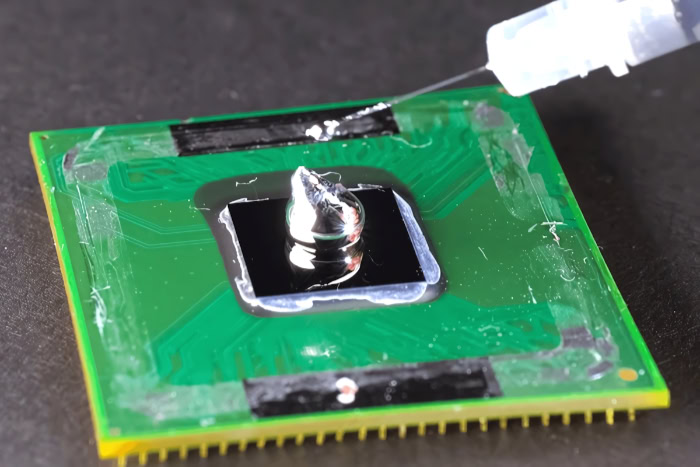
The pursuit of lower temperatures introduces hazards that standard thermal paste completely avoids. Liquid metal is an aggressive substance that requires strict adherence to safety protocols to prevent permanent hardware failure.
The Gallium Problem
The most severe restriction when using liquid metal involves its reaction with aluminum. Gallium, the primary ingredient in liquid metal, chemically attacks aluminum in a process called embrittlement.
If liquid metal touches an aluminum heatsink, it will migrate into the grain structure of the metal, causing it to become brittle and eventually crumble into dust. You must only use liquid metal with cold plates made of Copper or Nickel-plated Copper.
Using it on an aluminum cooler guarantees the destruction of the heatsink.
Electrical Conductivity Dangers
Standard thermal paste is dielectric, meaning it does not conduct electricity. If you accidentally smear a little paste on the green part of the CPU or the motherboard, it is messy but harmless.
Liquid metal is the opposite. It is highly electrically conductive.
If a single drop spills onto the motherboard capacitors, SMDs, or contacts around the GPU die, it will cause an instant short circuit when you power on the system. This often results in the immediate death of the component.
Corrosion and Staining
Even when used on compatible copper surfaces, liquid metal creates long-term cosmetic changes. Over time, the gallium in the alloy will slowly absorb into the copper, leaving a silver-colored stain that cannot be removed with alcohol or solvents.
This alloying effect does not typically ruin the performance, but it permanently alters the appearance of the cold plate. In contrast, traditional thermal paste can be wiped away years later, leaving the surface looking brand new.
Application and Maintenance Challenges

The decision to use liquid metal transforms a routine maintenance task into a precision operation. While traditional thermal paste is designed to be forgiving and user-friendly, liquid metal demands patience, preparation, and a significantly higher level of technical skill to apply correctly.
Application Complexity
Applying standard thermal paste is straightforward. Most builders use the “pea” or “X” method, where you place a small amount of paste on the center of the CPU integrated heat spreader.
The mounting pressure of the cooler naturally spreads the material out to create a thin, even layer. It is a foolproof process that rarely fails.
Liquid metal requires a completely different approach known as the “painting” method. Because of its high surface tension, it does not spread on its own.
You must manually coat both the CPU die and the cooler's cold plate with a micro-thin layer using fine-tipped cotton swabs. Using too much creates a risk of the liquid running off the side, while using too little results in poor contact.
Safety Preparation
Before opening a tube of liquid metal, you must insulate the surrounding area. Since the fluid acts as a conductive wire, any spill is catastrophic.
Experienced users apply a conformal coating, such as clear nail polish, or specific high-temperature Kapton tape to the small electronic components (SMDs) surrounding the GPU or CPU die. This barrier ensures that if a rogue droplet slides off the chip, it lands on plastic or tape rather than shorting out a capacitor.
Standard thermal paste requires none of this preparation; you simply wipe the surface clean and apply.
Longevity and Degradation
Both materials have specific weaknesses regarding how long they last. Traditional pastes often suffer from the “pump-out effect,” particularly in laptops.
The constant thermal expansion and contraction of the heatsink push the paste out from the center of the die, leading to higher temperatures over time. Liquid metal does not pump out, but it does interact with copper.
During the first few months of use, the gallium tends to absorb into the copper structure of the cooler. This can make the interface appear “dry,” necessitating a one-time maintenance check to add a tiny amount more material.
Once the copper is saturated, liquid metal tends to remain stable for years.
Best Usage Scenarios
Selecting the right thermal interface depends entirely on your hardware goals and your tolerance for liability. For most users, the risks associated with conductive alloys outweigh the benefits, but specific niches exist where liquid metal is the only logical option.
The Standard PC Builder
If you are assembling a desktop PC with a mid-range to high-end processor and a standard air cooler or All-in-One (AIO) liquid cooler, high-quality thermal paste is the correct choice. Modern pastes are highly efficient and capable of handling the heat output of stock processors without issue.
The few degrees gained by switching to liquid metal do not justify the risk of shorting a motherboard or voiding a warranty. For the vast majority of builds, paste is safe, sufficient, and maintenance-free.
The Delidding Enthusiast
“Delidding” is the process of physically removing the Integrated Heat Spreader (IHS) from a CPU to cool the silicon die directly. This is a dangerous modification usually reserved for extreme overclockers.
If you are going to the trouble of delidding a CPU, using standard thermal paste creates a new bottleneck that negates your efforts. In this scenario, liquid metal is essential.
The direct die-to-IHS transfer requires the absolute highest conductivity possible to make the risk of voiding the CPU warranty worthwhile.
The Gaming Laptop User
Gaming laptops present a unique challenge because they pack high-wattage components into constrained chassis with limited airflow. These systems often hit thermal limits quickly.
Liquid metal can transform a loud, overheating laptop into a cooler, quieter machine. However, the application on a laptop is difficult and risky due to the lack of an IHS on mobile chips.
For users who want better performance than paste but fear liquid metal, Phase-Change Material (PCM) pads offer a compelling middle ground. PCM pads are solid at room temperature but liquefy under heat, resisting pump-out better than paste while remaining safer than liquid metal.
Conclusion
Liquid metal offers the highest raw cooling performance available, yet it demands a level of precision that most PC builders do not need. The risk of short-circuiting expensive components or destroying aluminum heatsinks makes it a specialized tool rather than a general solution.
For the vast majority of users, high-quality thermal paste remains the correct choice because it offers safety and reliability without the stress of strict application protocols. You should leave the conductive alloys to the overclockers and enthusiasts who are willing to accept the liability of hardware damage in exchange for maximum thermal efficiency.
Frequently Asked Questions
How often do I need to replace liquid metal?
Liquid metal does not dry out like traditional paste, but it can absorb into copper surfaces over time. You should check the application after the first year to ensure the layer is still even. If your temperatures remain stable, the material can last for several years without needing a full replacement.
Can I use liquid metal on an aluminum heatsink?
No, you must never use liquid metal on aluminum surfaces. The gallium in the alloy chemically reacts with aluminum, causing it to become brittle and crumble into dust. This process destroys the cooler and can permanently damage your hardware. Only use liquid metal on copper or nickel-plated copper cold plates.
Is it difficult to remove liquid metal from a CPU?
Cleaning liquid metal is much harder than wiping away thermal paste. You need to carefully suck up the pools of fluid using a syringe or specialized swab to prevent it from spilling onto the motherboard. Any remaining residue on the copper surface often requires polishing or light sanding to remove completely.
Is liquid metal safe to use on gaming laptops?
Liquid metal is risky for laptops because they are moved frequently, which increases the chance of leakage. While it offers excellent cooling for hot mobile processors, you must seal the area around the chip with foam dams or conformal coating. A single drop displaced by movement can short out the mainboard.
How much will liquid metal lower my temperatures?
The temperature drop depends heavily on your specific hardware and workload. On standard CPUs running at stock speeds, you might only see a 1°C to 3°C difference. However, on overclocked systems or high-wattage gaming laptops, liquid metal can lower load temperatures by 10°C or more compared to standard thermal paste.
About the Author: Julio Caesar


