
What Is a Smart Plug and How Does It Work? Explained
Modernizing a household often feels expensive and complicated, but a simple device can instantly lower your energy bills and automate daily chores. Smart plugs offer a highly cost-effective method to transform older, ordinary appliances into connected devices that you can control directly from your smartphone.
By acting as an adapter between a standard wall outlet and your electronics, these compact tools grant wireless control over lights, fans, and coffee makers. Learning how these devices operate, their power capacities, and the way they integrate with home networks prepares you to select the right models.
This knowledge ensures you can safely build a more convenient, automated, and energy-efficient living space without overspending on brand-new smart appliances.
Key Takeaways
- Smart plugs act as physical intermediaries between wall outlets and ordinary appliances, allowing users to control electrical current via a mechanical relay that opens or closes the circuit.
- Traditional appliances with physical toggle switches are highly compatible with smart plugs, whereas modern appliances with digital power buttons require a physical press and generally cannot be automated.
- Standard smart plugs are rated for 10A or 15A loads and should never be used with high-draw appliances like space heaters, portable air conditioners, or refrigerators due to fire hazards.
- Most Wi-Fi smart plugs require a 2.4 GHz frequency band rather than a 5 GHz band because the lower frequency provides a longer range and penetrates walls more effectively.
- When internet connection fails, most smart plugs continue to run pre-programmed schedules stored locally, but remote app control and voice commands will cease to function until connection is restored.
Definition and Core Mechanics
Smart plugs serve as simple, intermediate hardware components that modify how power reaches household appliances. By controlling the electrical current before it enters a device, they convert traditional products into controllable nodes within a home network.
Physical Design and Placement
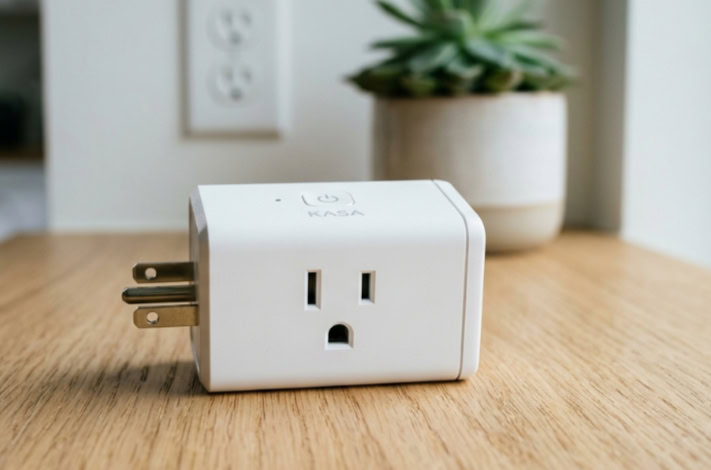
A smart plug is a compact, pass-through adapter designed to insert directly into a standard wall outlet. The power cord of an ordinary appliance, such as a lamp or fan, then plugs into the front of the smart plug.
This configuration positions the smart plug as a middleman in the electrical pathway. Physically, most models feature a simple plastic casing equipped with a small manual power button, allowing users to override wireless controls directly at the wall.
Additionally, integrated indicator lights, often small light-emitting diodes (LEDs), display if the outlet is active and confirm network connectivity status.
Basic Power Control Method
On a mechanical level, a smart plug functions as an electronic switch that regulates the flow of electrical current to the connected device. It does not alter the voltage or wattage of the household supply; rather, it simply interrupts or permits the electricity to pass through.
Inside the plug, an internal relay system receives wireless commands from a smartphone or smart home hub. When the user sends an “on” signal, the relay closes the internal electrical circuit, allowing current to flow to the appliance.
Sending an “off” command opens the circuit, breaking the connection and instantly cutting power to the device.
Practical Applications and Daily Benefits

Integrating smart plugs into daily household routines offers direct improvements to convenience, safety, and energy management. These devices allow users to automate repetitive tasks and gain better oversight of household electricity use.
Appliance Automation and Schedules
The primary use of a smart plug is automating everyday items that normally require manual operation. Users can establish schedules to turn lamps, coffee makers, and fans on or off at specific times of the day, ensuring a warm pot of coffee is ready in the morning or that living room lights activate automatically at sunset.
Beyond simple schedules, built-in timers allow users to control device runtimes. For instance, a timer can automatically cut power to a cell phone charger after three hours to prevent unnecessary continuous charging, or manage the daily operating hours of holiday decorations without manual intervention.
Home Security and Safety Enhancements
These adapters also contribute to home safety and security. When residents travel, they can set smart plugs to follow randomized lighting schedules, turning lamps on and off at variable intervals to simulate occupancy and deter potential intruders.
From a safety perspective, smart plugs offer a reliable way to prevent fire hazards. If a user leaves the home and worries they left a high-risk appliance active, such as a hair straightener or a clothes iron, they can check the status remotely and cut the power instantly through their smartphone, neutralizing the risk of overheating.
Energy Conservation and Utility Cost Reduction
Many household electronics continue to draw small amounts of electricity even when turned off, a phenomenon known as standby power draw or vampire power. Television sets, game consoles, and charger blocks constantly consume energy while idle.
Placing these electronics on smart plugs allows users to cut power entirely when the devices are not in use, eliminating this hidden drain. Additionally, certain premium models feature built-in electricity measurement capabilities, providing real-time data on energy consumption that helps users identify which household appliances are using the most power.
Integration and Technical Requirements

For a smart plug to perform automated tasks, it must connect to a local communication network. Setting up these devices requires familiarity with wireless protocols and the software ecosystems that tie different devices together.
Network Connectivity Types
Smart plugs utilize several different wireless protocols to communicate. Standard Wi-Fi models connect directly to a home router, making them easy to set up without additional hardware.
Other models use protocols such as Bluetooth, Zigbee, or Z-Wave, which consume less power and create mesh networks but often require a central hub to communicate with the internet. Because smart plugs send small amounts of data, they have very low bandwidth requirements.
However, almost all Wi-Fi smart plugs require a 2.4 GHz frequency band rather than a 5 GHz band, as 2.4 GHz signals travel farther and penetrate walls more effectively, ensuring a stable connection throughout the house.
Smart Home Hub and Voice Assistant Compatibility
To control devices hands-free, users can integrate smart plugs with major voice-control ecosystems, including Amazon Alexa, Google Home, and Apple HomeKit. Compatibility is a critical consideration before buying, as not all plugs work with every system.
Many entry-level smart plugs offer hub-free configurations, communicating directly with a smartphone app via local Wi-Fi. In contrast, complex smart home setups utilizing Zigbee or Z-Wave plugs require a dedicated hardware hub to bridge the gap between the plugs and the local router, allowing unified control of multiple devices.
Mobile Application Setup and Control
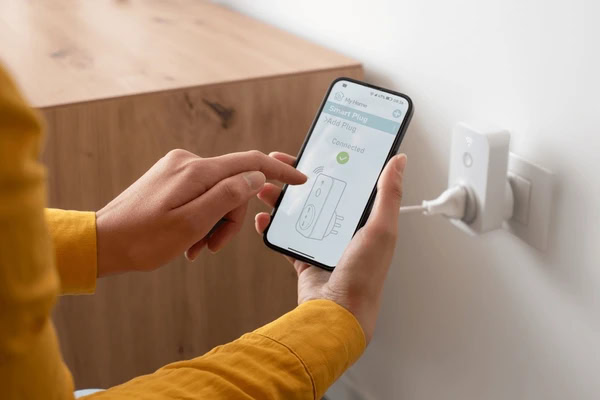
The initial setup begins by plugging the device into an outlet and putting it into pairing mode, typically indicated by a blinking light. Using a companion mobile application on a smartphone, the user connects to the plug, inputs the local wireless network credentials, and completes the pairing process.
Once connected, the application serves as the primary control panel. Users can rename individual plugs, organize them into groups, such as “Living Room Lights,” and create automated routines or scenes where multiple plugs activate simultaneously with a single command.
Hardware Limitations and Safety Measures

While smart plugs are highly versatile, physical and electrical constraints dictate how and where they can be safely used. Ignoring these limitations can result in non-functioning systems or serious electrical hazards.
Appliance Compatibility and Power Switches
A smart plug only controls the flow of electricity; it cannot physically press buttons on an appliance. For this reason, compatibility depends on the type of power switch the target appliance uses.
Devices with mechanical toggle switches, which can remain physically in the “on” position even when unplugged, are highly compatible with smart plugs. When the smart plug restores power, the appliance immediately starts running.
Conversely, appliances with digital buttons or touchscreens default to a standby state when unplugged and plugged back in, requiring a manual press to start. These digital devices generally cannot be automated using a smart plug.
Wattage Limits and Electrical Load Hazards
Every smart plug has strict electrical limits, usually expressed in maximum amperage ratings, commonly 10A or 15A, alongside voltage limits. Exceeding these thresholds can overheat the plug, damage the internal components, or trigger a fire.
Standard smart plugs are ideal for low-draw devices like lamps, fans, and routers. High-draw appliances, such as space heaters, portable air conditioners, and refrigerators, pull immense amounts of current and should never be used with standard smart plugs unless the plug is explicitly rated for heavy-duty appliances and high-amperage loads.
Network Disconnection and Power Outage Behavior
If a home loses its internet connection, the behavior of a smart plug varies depending on its design. Most models will still execute pre-programmed schedules that are stored locally on the device itself, but users will lose the ability to control them remotely or via voice assistants.
In the event of a power outage, the plug will turn off completely. Once power is restored, some models default to an “off” state, while others can be configured via their companion apps to remember their previous state or default to “on,” ensuring critical appliances resume operation as expected.
Essential Purchase Considerations
Selecting the right smart plug involves evaluating physical constraints, household needs, and budget. Analyzing these options beforehand prevents common installation issues and ensures long-term compatibility.
Form Factor and Outlet Obstruction
The physical size and shape of a smart plug are crucial details. Bulky models can easily block the adjacent socket in a standard duplex wall outlet, rendering the second outlet useless.
Opting for a slim, rectangular, or low-profile circular design ensures that two smart plugs can fit into a single wall receptacle simultaneously. Additionally, standard plugs are designed solely for dry, climate-controlled indoor spaces.
If the goal is to control holiday lights or water fountain pumps, users must purchase weather-resistant outdoor models rated to withstand moisture, dust, and temperature extremes.
Feature Variations and Multi-Outlet Strips
While single-outlet plugs are the most common, smart power strips offer a practical alternative for entertainment centers or home offices. These strips feature multiple outlets, often individually controllable through the app, alongside built-in USB ports for charging mobile devices.
When choosing a product, buyers should also assess premium features against their actual needs. Some users will benefit greatly from energy-monitoring software, while others may only need basic on-and-off scheduling, making simpler and less expensive models a more sensible choice.
Budget and Cost Analysis
Smart plugs are generally affordable, but costs can accumulate when outfitting an entire home. Single units are highly accessible, but manufacturers often sell multi-pack bundles at a significantly lower cost per unit.
When comparing options, buyers should weigh the price against brand reputation, the reliability of the companion application, and the manufacturer warranty. Cheaper, off-brand options may save money upfront but can suffer from poor app support, frequent disconnects, or limited smart home integration, making slightly more expensive, well-supported models a better value over time.
Conclusion
Smart plugs provide an affordable and straightforward path toward a more automated household. By serving as simple wireless adapters, they bring modern convenience, safety, and energy efficiency to older appliances without requiring a major financial investment.
Deciding if you should adopt this technology depends largely on the devices you already own. If your home relies heavily on appliances with physical, mechanical switches, these plugs will offer immediate utility.
Conversely, if your space is filled with digital, touchscreen appliances that require manual activation, you may find fewer opportunities for automation. Ultimately, assessing your current household inventory and identifying areas where scheduled power control would reduce waste or improve security will determine if these adapters are a practical addition to your home.
Frequently Asked Questions
Do smart plugs use electricity when turned off?
Yes, smart plugs consume a tiny amount of standby power even when they are turned off. This electricity, typically under one watt, is necessary to keep the internal Wi-Fi or Bluetooth receiver active so the plug can detect your next wireless command. However, this minor consumption is still significantly lower than the standby power drawn by idle appliances.
Can I plug a space heater into a smart plug?
No, you should not plug a space heater into a standard smart plug due to severe safety risks. Space heaters draw a high amount of electrical current that can easily exceed the wattage limits of a typical plug, causing it to overheat. This overheating creates a serious fire hazard that can damage your wall outlets and household wiring.
Will a smart plug work if my Wi-Fi goes down?
No, you will lose the ability to control a smart plug remotely if your Wi-Fi stops working. While some models can still run pre-programmed schedules stored locally, you will not be able to turn them on or off through your phone app or voice assistants. Fortunately, the physical power override button on the plug casing will still work.
Can I use a smart plug outside?
No, you cannot use a standard indoor smart plug outside because it lacks protection against weather elements. Rain, humidity, dust, and temperature extremes will quickly damage indoor hardware and create electrical short circuits. Instead, you must purchase a dedicated outdoor smart plug that features a weather-resistant casing and protective rubber outlet covers.
Why won’t my coffee maker work with a smart plug?
Your coffee maker likely uses a digital power button rather than a physical toggle switch. Smart plugs can only control the flow of electricity to an outlet, meaning they cannot physically press a digital button for you. If an appliance defaults to a standby mode when plugged in, it is incompatible with a smart plug.
About the Author: Julio Caesar


