
What Is Virtual Reality? How It Works

Virtual reality has transitioned from a speculative science fiction concept into an accessible consumer technology found in living rooms, classrooms, and workplaces. Early iterations required bulky, expensive equipment confined to specialized laboratories, whereas modern hardware delivers high-definition simulations through compact headsets.
Defining virtual reality requires looking beyond the physical visor to see how software generates interactive three-dimensional spaces that convince the human brain to accept a synthetic environment. Optical lenses, motion sensors, and spatial audio operate together to track movement and build believable surroundings.
Available equipment ranges from portable standalone units to high-powered computer setups and commercial simulation rigs. Reviewing practical uses across healthcare, workforce instruction, architecture, and entertainment alongside physical and financial limitations illustrates how virtual reality functions today.
Key Takeaways
- Virtual reality completely replaces your surrounding view with an interactive 3D environment, distinguishing it from augmented reality, which overlays digital graphics onto physical surroundings, and static 360-degree video, which restricts movement to a fixed viewpoint.
- Headsets create depth and spatial awareness by combining stereoscopic displays with specialized lenses, directional 3D audio, haptic controllers, and 6 Degrees of Freedom (6DoF) tracking that monitors both head rotation and physical movement across a room.
- Hardware configurations fall into three main categories: wire-free standalone headsets with built-in mobile processors, tethered headsets connected to personal computers or consoles for superior graphics, and enterprise simulation rigs that incorporate treadmills or cockpit replicas.
- Beyond interactive gaming and virtual concerts, industries use virtual environments for risk-free surgical rehearsal, heavy machinery and flight training, exposure therapy, and full-scale architectural walkthroughs prior to physical construction.
- Widespread adoption faces ongoing hurdles including cybersickness caused by sensory conflicts between the eyes and inner ear, eye strain, high hardware costs, and the requirement for at least 6.5 by 6.5 feet (2 by 2 meters) of unobstructed floor space.
The Core Concept of Virtual Reality
Virtual reality replaces a person’s physical surroundings with a responsive, computer-generated environment. By blocking out external sights and sounds, the medium shifts the user from an outside observer looking at a flat monitor to an active participant standing inside a three-dimensional space.
Definition and the Illusion of Presence
Virtual reality is a simulated 3D environment rendered in real time that responds directly to human movement and input. When a user puts on a headset, the system tracks their head and hand positions, updating the surrounding visuals and audio instantaneously to match their perspective.
Success in a virtual environment depends on two distinct concepts: immersion and presence. Immersion describes the objective technical capability of the hardware to surround the senses, determined by display resolution, field of view, and audio fidelity.
Presence is the resulting psychological response, where the human brain accepts the simulation as a physical place. When presence takes hold, a user standing on the edge of a virtual skyscraper experiences an elevated heart rate and a reluctance to step forward, even while knowing they are standing on a carpeted living room floor.
Contrast Between Virtual Reality and Augmented Reality
Virtual reality and augmented reality differ in how they treat the user’s physical room. Virtual reality uses an opaque headset to achieve total sensory replacement, shutting out the surrounding room entirely so the user sees only the simulated space.
Augmented reality, by contrast, preserves the view of the physical environment and places a layer of digital graphics on top of it through transparent smart glasses or a smartphone screen.
Mixed reality acts as a functional bridge between these two approaches. Using high-resolution passthrough cameras and depth sensors, mixed reality headsets map the physical geometry of a room and allow digital objects to interact with physical surfaces.
In a mixed reality setup, a virtual character can sit on an actual sofa, or a digital ping-pong ball can bounce off a physical dining table.
Separation of Static 360-Degree Video from True Virtual Environments
A common misconception equates spherical 360-degree video with true virtual reality. While you can watch 360-degree videos inside a headset, the experience remains passive and bound to the exact spot where the camera tripod stood during filming.
You can rotate your head to look left, right, up, or down, but leaning forward does not bring you closer to objects in the scene, and the environment cannot react to your actions.
True virtual environments are built using real-time 3D graphics engines rather than flat video recordings. Because the computer calculates geometry and lighting on the fly, users can walk around an object, crouch down to inspect the underside of a desk, and reach out with controllers to pick up, throw, or manipulate items within the space.
The Technology and Sensory Components

Convincing the human sensory system to accept a synthetic space requires precise coordination between optics, motion tracking, and audio engineering. If any component lags by more than 20 milliseconds, the illusion breaks down.
Stereoscopic Displays and Optical Lenses
Human depth perception relies on binocular disparity, the slight angle difference between what the left eye and right eye see. Head-mounted displays replicate binocular vision by presenting two separate images on high-pixel-density panels refreshing at 90Hz to 120Hz.
Each eye receives a slightly offset perspective of the same 3D scene, prompting the brain to fuse the two flat images into a single view with natural depth and scale.
Because human eyes cannot focus on a screen positioned less than 2 inches from the face, manufacturers place specialized Fresnel or pancake lenses between the eyes and the display panels. These lenses bend incoming light so the focal distance appears 5 to 6.5 feet (1.5 to 2 meters) away, while magnification stretches the image across a horizontal field of view between 95 and 115 degrees to fill peripheral vision.
Motion Detection and Spatial Coordinates
Tracking systems fall into two tiers of movement capability: 3 Degrees of Freedom (3DoF) and 6 Degrees of Freedom (6DoF). A 3DoF system uses internal gyroscopes, accelerometers, and magnetometers to measure rotational movement only, registering pitch (tilting the head up and down), yaw (turning left and right), and roll (tilting ear to shoulder).
If a user in a 3DoF headset takes a step forward, the virtual environment moves with them rather than letting them walk closer to an object.
Modern headsets rely on 6DoF tracking, which combines rotational data with positional movement across three spatial axes: moving forward and backward, crouching up and down, and stepping side to side. Most consumer headsets achieve 6DoF through inside-out tracking, using four to six wide-angle optical cameras mounted on the exterior of the visor to monitor stationary edges and corners in the room.
Some specialized systems use outside-in tracking, which relies on external laser emitters or infrared cameras mounted on room walls to pinpoint sensors on the headset and controllers.
Spatial Audio and Haptic Controllers
Visual immersion falters quickly without matching acoustic cues. Spatial audio engines simulate how sound waves bounce off surfaces and interact with the shape of the human head and outer ears. As a user turns their head, the software adjusts the volume, frequency, and millisecond arrival delay between the left and right speakers, allowing the listener to pinpoint whether footsteps are approaching from behind, above, or 15 feet (4.6 meters) to the left.
Physical interaction inside the simulation happens primarily through ergonomic handheld controllers tracked in 3D space. These controllers combine analog thumbsticks and pressure-sensitive triggers with capacitive sensors that detect when fingers rest on or lift off buttons, translating hand gestures into the virtual space.
Internal haptic motors and linear resonant actuators generate targeted vibrations, simulating the recoil of a tool, the tension of a drawn bowstring, or the texture of a virtual surface.
Hardware Platforms and Configurations

Virtual reality hardware is divided into three primary configurations, each balancing convenience and mobility against raw graphical computing power.
Standalone All-In-One Headsets
Standalone headsets are self-contained, battery-powered devices that integrate the display, lenses, mobile processor, cooling system, storage, and tracking cameras into a single wearable visor. Because all computing happens onboard, users do not need to connect the headset to a personal computer or console, and there are no trailing cables to trip over during active movement.
Portability and quick setup make standalone units the most popular choice for home users. You can slip a standalone headset into a backpack and use it in any room within seconds.
The trade-off involves weight, battery life, and graphical fidelity; most standalone headsets weigh around 1.1 lbs (0.5 kg), run for 2 to 3 hours per charge, and rely on mobile chipsets that require simplified lighting and textures compared to desktop systems.
Tethered Computer and Console Systems
Tethered headsets connect to an external personal computer or a dedicated gaming console such as a PlayStation 5. The connection typically runs through a lightweight fiber-optic USB-C or DisplayPort cable measuring 15 to 16 feet (4.6 to 4.9 meters), though some PC setups use a dedicated Wi-Fi 6E wireless link to stream compressed video across the room.
By offloading rendering tasks to a high-wattage desktop graphics card or console processor, tethered systems deliver intricate lighting, dense geometric detail, and high native resolutions. However, users must invest in expensive external hardware, remain within range of the host machine, and manage cable routing so the cord does not tangle around their legs during rotation.
Commercial and Specialized Simulation Rigs
Enterprise training centers, defense contractors, and research laboratories often pair high-resolution headsets with specialized physical peripherals that replicate specific occupational environments. Rather than relying solely on handheld controllers, these setups integrate physical props and motion systems that align with what the user sees inside the visor.
Common commercial configurations include omnidirectional treadmills and low-friction parabolic dishes that allow a strapped-in user to walk or run infinitely in any direction without leaving a 4-foot (1.2-meter) footprint. Other facilities use full-body motion capture suits lined with inertial sensors to track exact limb posture, or hydraulic vehicle cockpits equipped with physical steering wheels, flight yokes, and instrument panels that tilt and vibrate in sync with the visual simulation.
Practical Applications Across Industries
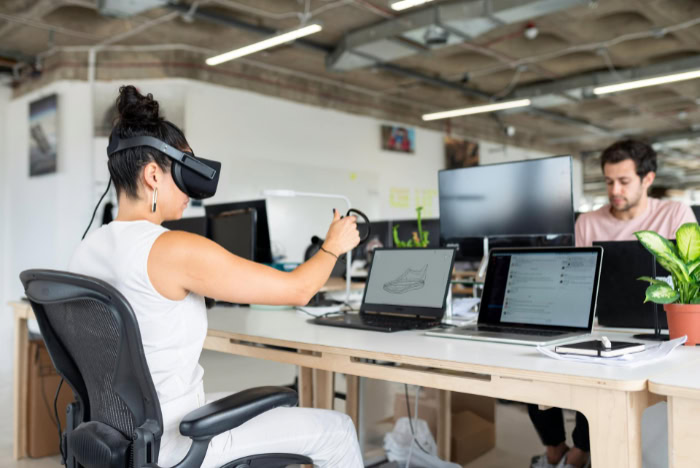
While interactive entertainment introduced millions of consumers to virtual reality, industries across medicine, manufacturing, and education rely on spatial simulation to solve practical training and design challenges.
Healthcare and Medical Simulation
Hospitals and medical schools use virtual simulations to allow surgeons to practice complex procedures before entering the operating room. Software converts patient CT and MRI scans into interactive 3D anatomical models, letting surgical teams rehearse incisions and plan around specific vascular structures with zero risk to the patient.
In physical rehabilitation, therapists use motion-tracked virtual tasks to help stroke and neuromuscular patients rebuild motor skills and range of motion, turning repetitive therapy routines into engaging exercises with real-time movement feedback. Mental health clinicians also apply controlled virtual environments for exposure therapy, helping patients confront heights, public speaking, or traumatic triggers inside a safe clinical office where the therapist controls the intensity of the scenario.
Workforce Instruction and Hazard Safety
High-risk industries use virtual environments to train personnel for emergencies that are too dangerous or expensive to stage in person. Aviation crews, heavy crane operators, and offshore oil rig workers practice responding to equipment failures, severe weather, and fires inside realistic simulations where mistakes carry no physical or financial penalty.
Using virtual replicas for employee onboarding also reduces operational downtime. Instead of shutting down an active factory assembly line or pulling a commercial aircraft out of service for training, companies let trainees practice procedural steps on digital twins, preserving physical equipment and preventing costly mechanical wear.
Architectural Walkthroughs and Industrial Design
Evaluating a building design on a flat 2D blueprint or a computer monitor makes it difficult to judge ceiling heights, corridor widths, and natural lighting. Architects convert computer-aided design files into 1:1 scale virtual walkthroughs, enabling clients and contractors to stand inside an unbuilt structure, check sightlines from different windows, and spot structural conflicts before construction begins.
In automotive and industrial manufacturing, distributed engineering teams wear headsets to meet inside a shared virtual room and inspect full-scale 3D prototypes. Engineers can examine how wiring harnesses fit inside an engine bay or test whether a driver can comfortably reach dashboard controls, iterating on designs in software before spending hundreds of thousands of dollars on physical molds and prototypes.
Interactive Media and Digital Entertainment
Video games remain the primary consumer driver for virtual reality hardware. Instead of pressing a button on a gamepad to reload a weapon or swing a tennis racket, players perform the physical motions with their own arms and hands, physically ducking behind cover or leaning around corners to inspect their surroundings.
Media companies also use virtual venues to broadcast live concerts, theatrical performances, and sporting events. Viewers wearing headsets can sit in a virtual courtside seat at a basketball game or stand near the stage at a live music performance, conversing with friends represented as digital avatars even when the participants live thousands of miles apart.
Current Limitations and User Challenges

Despite advances in display clarity and processor speed, virtual reality still faces physiological, spatial, and ergonomic obstacles that prevent it from replacing traditional screens for prolonged daily tasks.
Simulator Discomfort and Visual Fatigue
Cybersickness remains one of the most persistent hurdles for new users. The condition occurs when the visual system tells the brain that the body is moving through space, such as gliding down a virtual hallway or banking in an aircraft, while the vestibular system inside the inner ear detects that the physical body is standing completely still.
This sensory mismatch triggers symptoms similar to seasickness, including sweating, dizziness, and nausea.
Prolonged use also causes eye strain and headaches due to the vergence-accommodation conflict. In the physical environment, human eyes naturally rotate inward (vergence) and flex their lenses to focus (accommodation) at the exact same distance.
Inside a headset, a user’s eyes rotate inward to look at a virtual object held 1 foot (0.3 meters) away, but their eyes must remain optically focused on the fixed 5-foot to 6.5-foot (1.5-meter to 2-meter) focal plane of the headset lenses, tiring the ocular muscles over time.
Spatial Demands and Physical Safety Hazards
Using a headset with full positional movement requires an unobstructed physical area. Most software platforms recommend a clear floor space of at least 6.5 by 6.5 feet (2 by 2 meters) for room-scale experiences.
In smaller apartments or furnished bedrooms, clearing enough room to walk and swing both arms can be impractical.
Because an opaque visor blocks out the physical room, users lose awareness of nearby furniture, walls, ceiling fans, and pets. While headsets include software boundary systems that project a virtual warning grid when a player approaches the edge of their designated play area, fast arm movements during active games still lead to accidental collisions with television screens, lamps, and walls.
Expense and Ergonomic Barriers
Hardware costs limit access to high-end virtual experiences. While entry-level standalone headsets sell for $300 to $500, premium tethered headsets often cost $1,000 or more and require a desktop computer equipped with a dedicated graphics card that can add $1,200 to $2,000 to the total price.
Ergonomics also restrict session lengths. Wearing an enclosed device weighing 1 to 1.5 lbs (0.45 to 0.68 kg) strapped to the front of the head places leverage on the neck and pressure on the cheekbones and forehead.
Combined with heat buildup from internal processors and displays sitting inches from the skin, many users experience physical fatigue after 45 to 60 minutes of continuous wear.
Conclusion
Virtual reality functions by synchronizing stereoscopic optics, 6DoF motion tracking, spatial audio, and haptic input to replace a person’s physical surroundings with an interactive 3D space. By shifting computing from a flat external screen to an encompassing environment that triggers a psychological sense of presence, the technology serves practical roles across surgical planning, industrial hazard instruction, architectural design, and interactive entertainment.
At the same time, hardware categories ranging from portable standalone visors to tethered desktop systems and enterprise simulation rigs require users to weigh graphical power against convenience and cost. Balancing these capabilities against ongoing challenges like cybersickness, eye fatigue, floor space requirements, and headset weight defines how consumers and professionals use virtual reality today.
Frequently Asked Questions
Do I need an expensive gaming computer to use virtual reality?
No, you do not need a computer if you buy a standalone virtual reality headset. Standalone models house the processor, battery, and display inside the visor, allowing you to play games and watch media right out of the box for $300 to $500. You only need a powerful computer for tethered headsets that prioritize maximum graphical detail.
Why does virtual reality make some people feel dizzy or nauseous?
Virtual reality causes dizziness when what your eyes see conflicts with what your inner ear feels. If your digital perspective moves rapidly forward while your physical body remains still on the floor, your brain misinterprets the sensory mismatch as motion sickness. Choosing apps with teleportation movement, using a cooling fan, and taking frequent breaks help prevent discomfort.
Can I wear my prescription glasses inside a virtual reality headset?
Yes, most modern virtual reality headsets accommodate standard prescription glasses using built-in facial space or included plastic spacer inserts. However, bulky frames can still press uncomfortably against your nose or scratch the headset optics during active movement. For the best comfort and visual clarity, you can snap custom prescription lens inserts directly over the headset eyepieces.
How much empty room space do I need to use virtual reality safely?
You need at least 6.5 by 6.5 feet (2 by 2 meters) of clear floor space for full room-scale movement. If you have a smaller bedroom or living room, every headset offers a stationary boundary mode that lets you play while sitting in a swivel chair or standing in one spot with enough clearance to extend both arms.
What is the difference between virtual reality and augmented reality?
Virtual reality blocks out your physical room completely to place you inside a simulated environment, while augmented reality overlays digital images onto the room around you. A virtual reality headset uses an opaque visor to transport you to a new location. In contrast, augmented reality uses transparent glasses or smartphone cameras so digital graphics appear alongside your physical furniture.
About the Author: Julio Caesar


