
What Is DisplayPort? The PC Display Standard

Choosing the right connection interface can mean the difference between a sluggish, stuttering screen and a fluid, high-refresh-rate visual experience. If you own a high-end gaming PC or a professional workstation, DisplayPort is likely the technology driving those crisp frames and high resolutions.
Developed by the Video Electronics Standards Association (VESA), this digital standard has surpassed older analog connections to set new benchmarks in data transmission. Unlike older cables, it uses a packet-based architecture to deliver high-definition video and multi-channel audio through a single, secure connection.
Key Takeaways
- DisplayPort transmits video and audio in data packets, similar to Ethernet, allowing a single cable to handle high-bandwidth, multi-channel streams efficiently.
- The standard natively supports VESA Adaptive-Sync, providing the foundational technology that enables AMD FreeSync and NVIDIA G-Sync to prevent screen tearing.
- Through Multi-Stream Transport (MST) and DisplayPort Alternate Mode, you can chain multiple monitors together or connect high-performance displays using a single USB-C cable.
- Low-quality, non-certified cables can cause boot failures and hardware damage by carrying power on Pin 20, making VESA-certified cables necessary for system safety.
- Passive adapters only work when the source device can natively convert its signal, whereas active adapters use a built-in microchip to translate signals between incompatible formats like HDMI and DisplayPort.
Definition and Core Purpose of DisplayPort
DisplayPort represents a major milestone in how visual data is transmitted from computers to screens. Originally designed to address the limitations of older analog connections, this interface provides the massive throughput required for modern resolutions and refresh rates.
Origin and Creator
The Video Electronics Standards Association (VESA) developed DisplayPort to establish a standardized, high-performance digital interface. Before its arrival, computers relied on analog connections like VGA or early digital solutions like DVI.
These older legacy formats were bulky, limited in bandwidth, and incapable of supporting the rapid advancements in panel technology. VESA, a consortium of major hardware manufacturers, designed DisplayPort as a royalty-free standard to replace these aging systems and push the boundaries of high-resolution video and audio output.
Physical Design and Connector Types
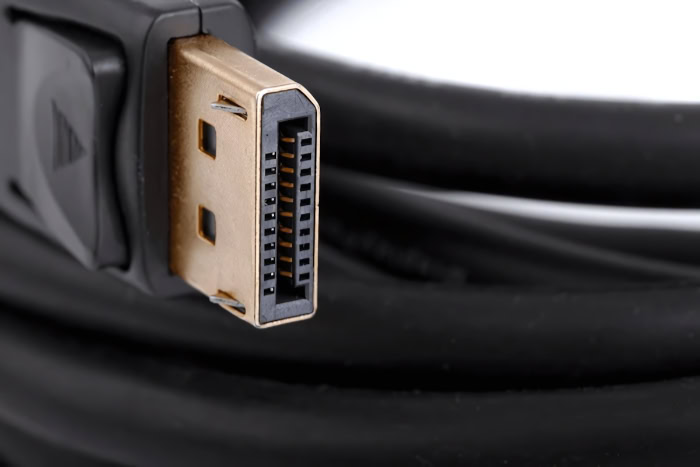
The physical standard DisplayPort connector features a distinctive asymmetrical shape, with one flat corner and one angled corner, containing 20 pins. This design prevents users from inserting the cable upside down.
For smaller form factors, VESA approved the Mini DisplayPort. Apple originally developed this compact version, which offers the exact same bandwidth and capability in a much smaller footprint, making it ideal for thin laptops and compact graphics cards.
Primary Function and Audio-Video Transmission
Unlike older standards that broadcast continuous streams of data, DisplayPort transmits information in packets, much like Ethernet or PCIe connections. This packet-based architecture allows the cable to bundle multiple types of data efficiently.
Consequently, a single DisplayPort cable simultaneously delivers ultra-high-definition video and multi-channel, lossless audio, reducing cable clutter and simplifying complex media configurations.
Comparison of DisplayPort and HDMI

While DisplayPort and HDMI seem to perform the exact same task, they were engineered for entirely different environments. Recognizing these differences clarifies why one dominates the desktop PC market while the other is found on almost every television.
Target Audience and Common Devices
DisplayPort is primarily found in the personal computer industry. It is standard on modern graphics cards, business laptops, and high-performance monitors.
HDMI, conversely, was designed by a coalition of consumer electronics companies for home entertainment. As a result, HDMI is the standard port on televisions, gaming consoles, Blu-ray players, and streaming devices, where wide-scale compatibility with living room hardware is essential.
Bandwidth and Audio-Video Capabilities
Bandwidth limits dictate what resolutions and refresh rates a cable can support. Historically, DisplayPort versions have pushed bandwidth boundaries earlier than competing HDMI standards.
This allows DisplayPort to support extreme refresh rates, like 144Hz, 240Hz, or even higher at 4K resolution, which is vital for competitive gaming. HDMI has caught up in raw bandwidth with its latest versions, but DisplayPort remains preferred for multi-monitor setups running from a single source.
Feature Comparison
A major benefit of DisplayPort is its native, built-in support for VESA Adaptive-Sync. This technology serves as the foundation for AMD FreeSync and NVIDIA G-Sync, matching the monitor’s refresh rate to the graphics card’s frame rate to eliminate screen tearing.
Additionally, standard DisplayPort connectors feature a physical latching mechanism. This mechanical lock keeps the cable firmly anchored in the port, preventing accidental disconnections, a feature absent on standard HDMI cables.
Evolution of DisplayPort Versions
The continuous demand for higher resolutions and faster frame rates has driven the development of the DisplayPort standard. Over the years, VESA has introduced several iterations, each dramatically increasing data capacity and adding sophisticated features.
Early Standards (DisplayPort 1.0 to 1.2)
DisplayPort 1.0, introduced in 2006, established the foundation of the technology with a maximum bandwidth of 10.8 Gbps. By the time version 1.2 arrived, bandwidth doubled to 21.6 Gbps.
This update brought crucial advancements, including support for 4K resolutions at 60Hz, basic High Dynamic Range (HDR) metadata, and multi-channel audio, alongside the ability to drive multiple monitors from a single port.
High-Definition Era (DisplayPort 1.3 to 1.4a)
Versions 1.3 and 1.4 boosted bandwidth further to 32.4 Gbps. DisplayPort 1.4 introduced Display Stream Compression (DSC), an advanced compression method that allowed users to run 8K displays at 60Hz or 4K displays at high refresh rates like 144Hz.
This era also standardized advanced HDR support, ensuring vibrant colors and high contrast ratios on compatible panels.
Ultra-High Bandwidth Standards (DisplayPort 2.0 and 2.1)
The latest specifications, DisplayPort 2.0 and its refined successor 2.1, represent a massive leap forward. These standards offer up to 80 Gbps of bandwidth.
This enormous capacity easily supports multi-monitor 4K setups at high refresh rates, single 8K displays at 120Hz, and even resolutions up to 16K with compression. Furthermore, these versions align closely with USB4 specifications, ensuring seamless compatibility over modern connectors.
Advanced Features and Capabilities

DisplayPort is not just a simple pipeline for video signals; it is a highly versatile data standard. Its unique packet-based design enables several advanced features that simplify workstation setups and maximize hardware efficiency.
These technologies allow a single cable to perform tasks that previously required multiple distinct connections.
Multi-Stream Transport (MST) for Multi-Monitor Daisy Chains
Multi-Stream Transport (MST) allows users to connect multiple independent displays to a single DisplayPort output on a computer. Instead of running a separate cable from the PC to each monitor, users can connect the computer to the first monitor, then run a cable from the first monitor to the second.
This daisy-chain setup requires a compatible graphics card and monitors that support MST output ports. The total resolution and refresh rate across all connected screens must remain within the source port’s maximum bandwidth.
DisplayPort Alternate Mode over USB-C
DisplayPort Alternate Mode, or Alt Mode, allows USB-C ports to transmit native DisplayPort signals directly. Because USB-C cables can carry data, power, and video simultaneously, this feature is highly useful for modern laptop docks.
A single USB-C cable can charge the laptop, connect external USB peripherals, and drive one or more high-resolution DisplayPort monitors, greatly simplifying the desktop workspace.
Display Stream Compression (DSC)
Display Stream Compression (DSC) is a visually lossless compression standard developed by VESA. It compresses video data before transmission and decompresses it at the display.
DSC allows high-bandwidth video, such as 4K or 8K at extreme refresh rates, to pass through cables that would otherwise lack the necessary physical bandwidth. Because the compression is mathematically optimized, it introduces zero noticeable visual degradation or input lag, maintaining a pristine picture.
Common Challenges and Technical Solutions

Despite its advanced design, users occasionally encounter technical hurdles when using DisplayPort hardware. Many of these issues stem from improper cable manufacturing, long cable lengths, or signal conversion difficulties.
Active versus Passive Adapters
When converting a DisplayPort signal to another format like HDMI or DVI, the choice between passive and active adapters is critical. Passive adapters are simple, inexpensive cables that rely on the source device’s ability to output a compatible signal.
Active adapters contain a small internal microprocessor that actively translates the video signal. Active adapters are required when connecting multiple monitors, when the source lacks native signal conversion capabilities, or when converting an HDMI source to a DisplayPort monitor.
The Pin 20 Power Conflict
A notorious issue in some DisplayPort setups is the Pin 20 power conflict. Pin 20 is designed to carry power to external, unpowered dongles.
However, cheap or poorly manufactured cables sometimes connect Pin 20 on both ends, linking the power supplies of the computer and the monitor together. This can cause severe system instability, boot failures, fans spinning while the PC is turned off, and potentially permanent damage to the graphics card.
Buying VESA-certified cables ensures that Pin 20 is left unwired inside the cable, avoiding this risk entirely.
Cable Length and Signal Loss Solutions
As DisplayPort bandwidth requirements rise, signal degradation over long distances becomes a major obstacle. Standard copper DisplayPort cables usually experience signal loss beyond three meters, leading to screen flickering, lower resolution limits, or complete blackouts.
To run high-bandwidth signals over longer distances, active fiber optic DisplayPort cables are required. These cables convert the electrical signal into light, transmitting it over long distances without any loss of performance.
Conclusion
DisplayPort stands as a highly robust digital interface designed specifically to meet the rigorous demands of modern computing. By utilizing a packet-based data architecture, it provides the massive bandwidth required for high-resolution screens, rapid refresh rates, and lossless multi-channel audio over a single connection.
Its native integration of adaptive-sync technologies and multi-monitor daisy-chaining further cements its position as a superior option for workstations and gaming systems. Ultimately, for anyone seeking to maximize the performance of high-end monitors and graphics cards, DisplayPort remains an essential connection standard that ensures hardware operates at its absolute limit.
Frequently Asked Questions
Can I use a DisplayPort cable to connect to an HDMI monitor?
Yes, you can connect a DisplayPort source to an HDMI monitor using a compatible adapter or adapter cable. However, you must choose between a passive or active adapter depending on your system’s capabilities. If your computer does not natively output an HDMI signal through its DisplayPort, an active adapter is required to translate the video signal.
Why is my computer screen flickering when using a DisplayPort cable?
Screen flickering is often caused by using a low-quality cable or one that exceeds the maximum recommended length of three meters. High-bandwidth signals degrade quickly over long distances, which disrupts the video stream. Replacing your current copper cable with a VESA-certified cable or an active fiber optic cable typically resolves this issue.
What happens if I use a cheap DisplayPort cable?
Cheap DisplayPort cables can cause system instability, failure to boot, or damage to your graphics card due to a power conflict on Pin 20. This pin is designed to power external adapters, but poorly made cables mistakenly connect it on both ends. Purchasing a VESA-certified cable guarantees that Pin 20 is safely unwired.
How do I chain multiple monitors together using DisplayPort?
You can chain multiple monitors together by using a DisplayPort feature called Multi-Stream Transport (MST). To do this, connect your computer to the first monitor, and then connect that monitor’s MST output port to the second monitor’s input. Ensure your graphics card and both monitors support MST, and keep the total resolution within bandwidth limits.
Is DisplayPort better than HDMI for gaming?
DisplayPort is generally better for PC gaming because it natively supports extreme refresh rates and VESA Adaptive-Sync technologies. While HDMI is excellent for home consoles and televisions, DisplayPort offers the dedicated bandwidth and reliable connector locks preferred for desktop setups. It is the standard choice for maximizing high-performance graphics cards and gaming monitors.
About the Author: Elizabeth Baker


