
Apple TV 4K vs. Roku Ultra: Which Flagship Wins?
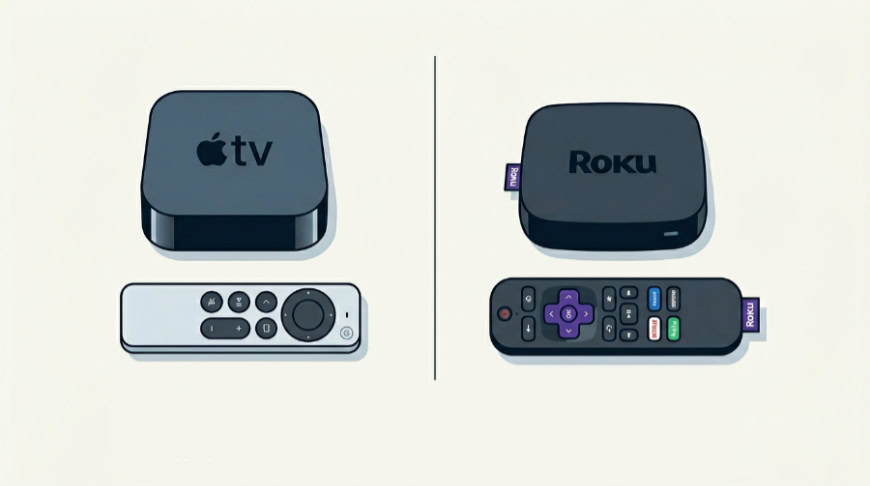
Settling for a sluggish, ad-ridden streaming stick can ruin an otherwise premium home theater setup. If you want fluid menus, pristine HDR picture quality, and theater-grade sound, you need to invest in a dedicated, high-performance console.
The Apple TV 4K and the Roku Ultra represent the absolute peak of this premium category, yet they approach home entertainment from entirely different design philosophies. One prioritizes raw processing power and deep ecosystem integration, while the other focuses on simplicity and platform independence.
Key Takeaways
- Raw Performance: The Apple TV 4K utilizes the powerful A15 Bionic chip and 4GB of RAM, providing significantly faster app loading times and a smoother visual interface compared to the Roku Ultra’s 2GB of RAM.
- Local Media Support: Only the Roku Ultra includes a physical USB Type-A port, enabling offline playback of personal video and photo libraries directly from an external hard drive or flash drive.
- Smart Home Capabilities: The 128GB Apple TV 4K model serves as a full Thread border router and Matter controller to coordinate smart home devices, whereas the Roku Ultra only operates as a basic smart home endpoint.
- Advertising Policies: Apple enforces a strict ad-free homepage policy for its tvOS interface, whereas Roku OS relies on persistent, third-party sponsored banners and interactive advertisements on the right side of its main menu.
- Retail Value: The Roku Ultra represents a lower upfront cost and a complete retail package that includes a high-speed HDMI cable and a USB-C charging cable, while the Apple TV 4K requires you to purchase these cables separately.
Hardware Performance and Audiovisual Capabilities
Choosing a premium streaming box often comes down to how much processing muscle you want under the hood and how well that hardware translates to a theater-like experience in your living room. Both Apple and Roku equip their flagship models with enough processing power to output high-resolution content, but they handle rendering, app caching, and visual processing differently.
Processing Power and Interface Snappiness
The Apple TV 4K uses the A15 Bionic chip, the same silicon found in modern smartphones. With 4GB of RAM, this processor provides a level of speed and headroom that is unmatched by typical streaming devices.
Moving through the tvOS interface feels completely fluid, with zero stutter, instantaneous app launches, and the ability to hold multiple resource-heavy applications in memory. This extra computing power also makes the Apple TV 4K a highly capable casual gaming machine, running complex graphics from the Apple Arcade library without dropped frames.
By contrast, the Roku Ultra features a proprietary quad-core processor paired with 2GB of RAM. In its latest iteration, Roku uses machine learning algorithms to anticipate which app you are likely to open next, preloading it in the background to ensure faster startup times.
While the Roku Ultra is highly responsive, representing the fastest performance in Roku’s history, it does not match the raw computational horsepower of the A15 Bionic. Heavy menus and graphics-heavy apps can occasionally show a split-second pause as they load, though everyday scrolling and switching between standard streaming channels remain highly efficient.
Format Support (Audio & Video)
Both flagship boxes support high-dynamic-range video, including Dolby Vision, HDR10+, HDR10, and HLG, alongside premium surround-sound decoding for Dolby Atmos. However, the true difference lies in how each platform handles frame-rate and dynamic-range matching.
The Apple TV 4K features highly reliable system-level frame-rate matching, forcing the display’s refresh rate to sync with the native frame rate of your content, from a 24-frame-per-second cinematic film to a 60-frame-per-second live broadcast.
The Roku Ultra also delivers a robust visual output, supporting all major HDR formats. Furthermore, the Ultra supports Quick Media Switching, or QMS, over HDMI 2.1.
This feature prevents the brief black screen, often called an HDMI handshake, when switching between content with different frame rates on compatible televisions. Both devices handle Dolby Atmos pass-through or decoding with ease, but Apple’s processor handles audio rendering with slightly lower latency, which can be beneficial when syncing with multiple wireless home speakers.
Physical Connectivity and Port Configurations
On the back of these boxes, the differences in physical connectivity become more pronounced. The Apple TV 4K is sold in two configurations: a Wi-Fi-only model with 64GB of storage, and a Wi-Fi plus Ethernet model with 128GB of storage.
The Ethernet version features a Gigabit Ethernet port, capable of transferring data up to 1000 Megabits per second. Both models offer Wi-Fi 6 for stable wireless streaming, but neither model has any external USB ports for local media playback, relying entirely on network-attached storage or cloud services.
The Roku Ultra features a single hardware configuration that includes a 10/100 Ethernet port, meaning wired speeds are capped at 100 Megabits per second. While this is plenty of bandwidth for 4K streaming, it is significantly slower than Apple’s Gigabit port.
On the wireless side, the Roku Ultra supports Wi-Fi 6. Where the Roku Ultra pulls ahead is its inclusion of a USB Type-A port, allowing you to plug in a flash drive or external hard drive to play personal video, music, or photo libraries offline using the built-in media player app.
Both boxes connect to your TV via an HDMI port, though the Apple TV supports HDMI 2.1, whereas the Roku Ultra supports HDMI 2.1b but runs at HDMI 2.0 bandwidth speeds.
Ecosystem Integration and Smart Home Compatibility
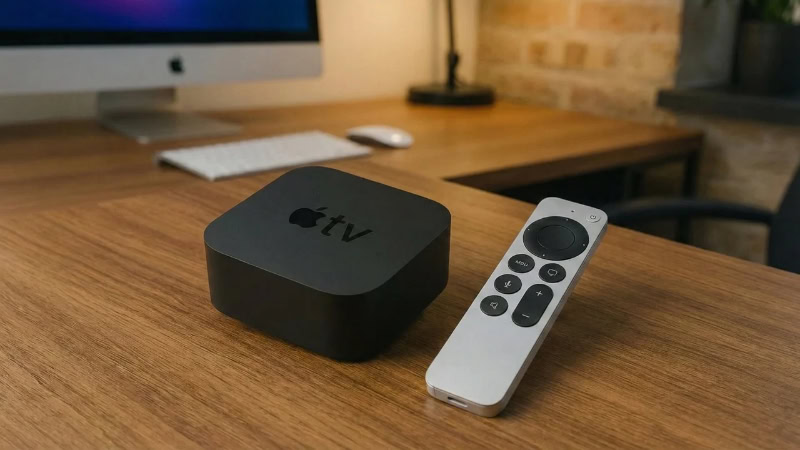
A streaming box does not exist in isolation; it must fit into your broader home setup. The choice between these two devices often depends on what other hardware you already own, as one box acts as a natural extension of a single company’s ecosystem, while the other strives to be a neutral partner to all major platforms.
The Apple Ecosystem Advantage
For users who already own an iPhone, iPad, Mac, or Apple Watch, the Apple TV 4K offers a highly integrated experience. AirPlay allows you to stream video or mirror your screen from any Apple device with a single tap.
If you own AirPods, you can connect them instantly for private listening, and the box even supports connecting two pairs of AirPods simultaneously so two people can watch together without disturbing the house. Additionally, you can use your iPhone to calibrate your TV’s color balance, type text into search fields, or act as a secondary remote control.
The Apple TV 4K also syncs with Apple Fitness+ to display your real-time heart rate from your Apple Watch directly on the screen, and it showcases your iCloud Photos as high-resolution screensavers.
Roku’s Platform-Agnostic Philosophy
The Roku Ultra operates on a platform-neutral model, meaning it does not prioritize one smart assistant or hardware brand over another. It integrates with Amazon Alexa, Google Home, and Apple HomeKit, allowing you to control playback, power your TV on, or search for content using whichever assistant you prefer.
While it supports Apple AirPlay for casting content from iOS devices, it also supports standard screen mirroring from Android and Windows devices, a feature the Apple TV 4K lacks. For private listening, Roku allows you to pair Bluetooth headphones directly to the box or use the Roku mobile app on any smartphone to route the audio through your phone’s headphones, offering a universally accessible solution regardless of what phone brand you carry.
Smart Home Hub Capabilities
The role of these streaming players extends beyond entertainment into smart home management. The 128GB model of the Apple TV 4K functions as a powerful home hub, acting as a Thread border router and a Matter controller.
This means it can coordinate and connect smart home accessories, such as smart lights, locks, and sensors, directly through your home network without requiring separate brand-specific hubs. This processing capability allows you to view live feeds from HomeKit-enabled security cameras in a picture-in-picture window while watching a movie.
The Roku Ultra, on the other hand, operates purely as a smart home endpoint rather than a central controller. It can receive commands from your smart home network, such as letting you control the TV with an Alexa speaker, but it cannot route signals for other smart devices or act as a Thread border router.
It is designed to fit into your existing smart home setup rather than serving as the foundation of it.
User Interface, Software, and Content Discovery

How you interact with your television on a daily basis is shaped entirely by the software on your streaming box. A well-designed interface can make finding a movie effortless, while a cluttered layout can lead to frustration and wasted time.
Apple’s tvOS Experience
The tvOS platform on the Apple TV 4K features a clean, app-centric grid layout that prioritizes high-resolution artwork and smooth animations. The visual interface is highly polished, with parallax icons that tilt as you hover over them, making the system feel incredibly responsive.
Apple maintains a strict policy against third-party advertisements on the home screen, meaning your main interface remains free of sponsored banners, pop-ups, or promoted products. Multi-user profile handling is also highly sophisticated, allowing up to six family members to switch profiles easily, which instantly customizes their personal recommendations, up-next queues, and App Store preferences.
Roku OS Simplicity
Roku OS focuses on a straightforward, grid-of-tiles layout that has remained visually consistent for years. This simplicity makes the Roku Ultra highly accessible for non-technical users, as there are no complex nested menus or flashy animations to learn.
Your installed channels are arranged in a customizable list, and the system boot-up is practically instantaneous. However, this simplicity comes with a trade-off: Roku relies heavily on advertising to monetize its platform.
The right side of the home screen features a persistent third-party advertisement banner, and Roku often uses sponsored backgrounds and interactive ad campaigns on the main menu. While multi-user profile options are available within individual streaming apps, the main Roku OS interface does not support separate system-level user profiles.
Search and Content Recommendation Engines
Finding what to watch next is handled differently by both platforms. The Apple TV app aggregates content from various subscription services into a unified queue, though it excludes Netflix from this system, requiring you to open the Netflix app separately.
Its voice search, powered by Siri, is highly contextual, allowing you to ask for comedy movies from a specific decade and then filter those results further.
The Roku Ultra uses a neutral search engine that does not favor any specific streaming service. When you search for a title, Roku displays where it is available to stream, rent, or buy, sorted clearly by price, highlighting free options first.
Roku also features a dedicated recommendation section and a live TV zone that aggregates hundreds of free, ad-supported linear streaming channels into an easy-to-read electronic program guide.
Remote Control Usability and Features
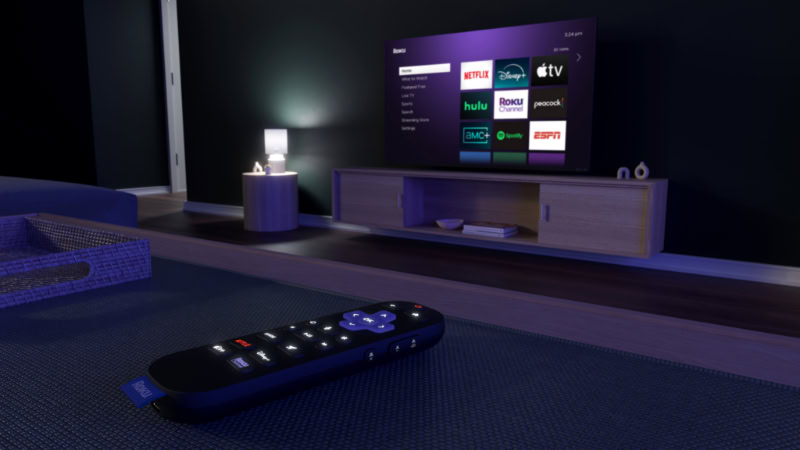
The remote control is your physical connection to your television, and its design can make or break the daily viewing experience. A great remote should feel comfortable in the hand, offer intuitive controls, and provide practical solutions for common household annoyances.
The Siri Remote (Design & Navigation)
The Apple TV 4K includes the Siri Remote, which features a premium, single-piece aluminum body with a USB-C charging port. Its standout feature is the touch-enabled clickpad, which allows you to click, swipe, or run your thumb around the outer ring to jog fast-forward or rewind through a video, mimicking a traditional jog wheel.
The remote feels solid and dense, though its small, symmetrical shape can make it easy to hold upside down in the dark. If the remote gets lost, you can use your iPhone’s control center to locate it via an on-screen signal tracker.
For those times when the physical remote is out of reach, you can fully control the Apple TV using any iOS device connected to your network.
The Roku Voice Remote Pro (Utility & Practicality)
The Roku Ultra comes with the Roku Voice Remote Pro, which prioritizes tactile utility and hands-free convenience. This rechargeable remote features backlit buttons that light up automatically when picked up in a dark room.
It includes a built-in lost remote finder, allowing you to trigger a chime on the remote by pressing a physical button on the Roku Ultra box or by simply saying “Hey Roku, where is my remote?” out loud. The remote also features two customizable shortcut buttons, a dedicated live TV guide button, and a physical mute switch.
Private listening is handled wirelessly via Bluetooth, and you can plug headphones into your phone while using the Roku mobile app to route the TV audio directly to your ears.
System Accessibility Controls
Both devices offer excellent accessibility menus designed to assist users with visual or auditory impairments. The Apple TV 4K features a screen reader called VoiceOver, which reads aloud everything on the screen with highly natural-sounding speech.
It also offers advanced zoom controls, color filters, and closed-captioning customization that can be applied system-wide.
The Roku Ultra provides a similar suite of tools, including an Audio Guide screen reader, high-contrast text options, and customizable closed captions. Roku’s platform also features a simple shortcut to toggle captions on and off directly from the quick-settings menu, making it easy for users to read along during quiet dialogue scenes without having to open deep settings menus.
Pricing, Value, and Device Longevity

While hardware performance and software features are critical, the decision ultimately comes down to financial value and how long a device will remain useful in your home. Comparing the upfront costs against the expected lifespan of each box reveals distinct approaches to consumer value.
Upfront Cost vs. Long-Term Value
The Apple TV 4K sits at the higher end of the streaming market, retailing at a premium price point. Despite this higher barrier to entry, it offers strong value for users who want a device that will perform reliably for years to come.
The raw power of the A15 Bionic chip ensures that the Apple TV 4K is over-engineered for simple video streaming, meaning it is unlikely to slow down as apps become more demanding.
The Roku Ultra is priced lower, frequently positioning itself as a more budget-friendly flagship option. It offers almost all of the same audiovisual capabilities as its Apple competitor, making it an excellent value for buyers who want high-fidelity streaming without paying a premium for smartphone-grade processing power.
Software Support and Lifespan
Apple has a track record of supporting its hardware with software updates. Even older Apple TV models receive regular tvOS updates, security patches, and new features years after their release.
The massive storage capacity of the Apple TV 4K also ensures that it will not run out of space for app downloads and system cache files over time.
Roku also maintains a consistent record of updating its devices with new versions of Roku OS, but the hardware can eventually show its age. Because Roku devices operate with more modest processors and limited RAM, older models can sometimes struggle to run modern, complex apps smoothly after several system updates.
The Roku Ultra’s updated processor helps delay this, but its performance ceiling is lower than that of the Apple TV 4K.
Out-of-the-Box Completeness
When you purchase a Roku Ultra, the retail box is completely self-contained. It includes the streaming box, the rechargeable Voice Remote Pro, a USB-C charging cable, a power adapter, and a high-speed HDMI cable.
This means you can plug the device in and start streaming immediately without any additional purchases.
The Apple TV 4K retail package is less complete. It includes the streaming box, the Siri Remote, and a power cable.
It does not include an HDMI cable, which you must purchase separately if you do not already own a compatible high-speed cable. Furthermore, Apple does not include a USB-C charging cable for the Siri Remote, requiring you to supply your own charger and cable to keep the remote powered.
Conclusion
The primary distinction between these two streaming boxes lies in their design philosophy and ecosystem integration. The Apple TV 4K behaves like a high-performance computer for your television, offering a premium, ad-free experience, massive processing power, and tight integration with other Apple devices.
The Roku Ultra, by contrast, functions as a platform-agnostic, utility-first media player that focuses on a simple, budget-friendly setup and includes helpful hardware additions like a headphone jack and a lost remote finder.
The Apple TV 4K is best for users who are already heavily invested in the Apple ecosystem, owning devices like iPhones, Apple Watches, or AirPods. It is also the ideal choice for home theater enthusiasts who demand flawless frame-rate matching, smart home integration with Thread and Matter, and a completely ad-free user interface.
The Roku Ultra is best for budget-conscious buyers who want a premium, high-fidelity experience without paying a steep price. It is also perfect for non-technical users who prefer a straightforward grid layout, individuals who want to play local media files via USB, and anyone who wants a fully complete retail package with all necessary cables included.
Frequently Asked Questions
Does the Apple TV 4K come with an HDMI cable?
No, the Apple TV 4K does not include an HDMI cable in the box. You must purchase a compatible high-speed HDMI cable separately to connect the device to your television. Apple also excludes the USB-C charging cable for the remote control, meaning you will need to provide your own.
Can I use Bluetooth headphones with the Roku Ultra?
Yes, you can pair Bluetooth headphones directly to the Roku Ultra for private listening. You can also use the free Roku mobile app on your smartphone to route the television audio wirelessly through your phone’s headphones. This second option works with any standard wired or wireless headphones connected to your mobile device.
Which device is better if I do not use other Apple products?
The Roku Ultra is generally better for households without other Apple devices due to its platform-neutral design. It integrates smoothly with Google Home and Amazon Alexa while offering full screen-mirroring support for Android and Windows devices. The Apple TV 4K works without other Apple hardware, but you lose access to many of its best integration features.
Do these streaming boxes show advertisements on the home screen?
The Roku Ultra displays large third-party advertisements on its home screen, while the Apple TV 4K maintains a strict ad-free main menu. Roku uses these sponsored banners and custom backgrounds to help monetize its platform and keep hardware prices lower. Apple completely bans third-party ads, displaying only content recommendations from installed streaming services.
Can I play videos from a USB thumb drive on either of these devices?
Only the Roku Ultra supports local media playback directly from a USB drive. The device features a physical USB Type-A port on the back, allowing you to plug in external drives and play personal files through the Roku Media Player app. The Apple TV 4K has no USB ports and relies entirely on network-attached storage.
About the Author: Elizabeth Baker


