
DDR3 vs. DDR4: Which RAM Does Your PC Need?

Random access memory (RAM) serves as a computer’s temporary workspace, holding active applications and files so the processor can reach them instantly. Fast, plentiful memory keeps everyday multitasking responsive and prevents bottlenecks during heavy workloads.
When computer hardware transitioned from DDR3 to DDR4, memory modules gained higher transfer speeds, lower operating voltages, and larger storage capacities. Millions of budget, office, and secondary machines still run on either DDR3 or DDR4 platforms today.
Comparing physical pin layouts, bandwidth ceilings, thermal efficiency, processor compatibility, and module pricing highlights the practical gap between the two standards. Weighing those technical specifications against current hardware costs helps users decide between upgrading an aging system’s memory or building a modern replacement.
Key Takeaways
- Desktop DDR3 modules use a 240-pin layout while DDR4 modules use 288 pins with a relocated notch, making the two generations physically and electrically incompatible on standard motherboards.
- Standard DDR4 memory transfers data between 2133 MT/s and 3200 MT/s (yielding up to 25.6 GB/s of peak bandwidth per channel), doubling the typical 800 MT/s to 2133 MT/s speed range of DDR3.
- Operating voltage drops from 1.5V on standard DDR3 to 1.2V on DDR4, reducing memory power draw by roughly 20% and extending battery life in portable computers.
- Individual consumer DDR4 modules support up to 32GB per stick compared to the common 8GB ceiling on DDR3 sticks, allowing four-slot desktops to reach 128GB of total system memory.
- Adding inexpensive used DDR3 RAM to reach 16GB can extend the usable life of an older office PC, whereas modern gaming or video editing workloads justify a complete motherboard, processor, and DDR4 platform upgrade.
Physical Design and Form Factors
At a glance, DDR3 and DDR4 memory modules share a similar rectangular circuit board design and identical overall width for desktop systems. Closer inspection reveals distinct structural changes in pin density, edge contouring, and connector formatting that physically separate the two generations.
Pin Count Differences (240-Pin vs. 288-Pin)
Standard desktop memory modules, known as Dual In-line Memory Modules (DIMMs), connect to the motherboard through rows of gold contact pins along the bottom edge. Desktop DDR3 sticks feature 240 pins spaced at a 1.0mm pitch.
To support higher data bandwidth and improved signal routing without widening the memory slot, DDR4 packs 288 pins into the exact same module length by narrowing the spacing between contacts to 0.85mm.
Alongside the denser pin array, DDR4 introduces a subtle change to the bottom edge profile. While a DDR3 module has a completely flat contact edge, a DDR4 module features a slightly curved, stepped bottom edge where the central pins extend marginally lower than the outer pins.
Because fewer pins engage the socket at the exact same moment when pressing the stick down, the curved profile reduces the physical insertion force required to seat DDR4 memory into the motherboard.
Key Notch Alignment and Socket Fit
Every memory module includes a small mechanical cutout, or notch, along the bottom contact row that aligns with a raised plastic ridge inside the motherboard’s DIMM socket. On a DDR3 stick, the alignment notch sits noticeably off-center toward one side of the module.
On a DDR4 stick, engineers shifted the notch closer to the middle of the contact edge.
Relocating the mechanical notch serves two practical purposes. It stops users from installing the module backward, and it physically blocks a DDR3 stick from seating inside a DDR4 motherboard slot (or vice versa).
That simple barrier prevents accidental installation that would otherwise cause electrical short circuits when powering on the system.
Laptop Module Variations (SO-DIMM Formats)
Portable computers, compact mini-PCs, and all-in-one desktops use a smaller memory format called a Small Outline DIMM (SO-DIMM), which measures roughly half the length of a desktop module. Just like their desktop counterparts, laptop modules increased their contact density across generations.
A DDR3 SO-DIMM uses 204 pins, whereas a DDR4 SO-DIMM expands to 260 pins and shifts the alignment notch position. Because laptop motherboards have strict internal space constraints and generation-specific sockets, DDR3 and DDR4 SO-DIMMs cannot be swapped between notebooks.
Speed, Bandwidth, and Latency

Memory performance depends on how many data transfers occur each second, how much data moves across the bus at once, and how quickly the module responds to new processor requests. DDR4 raises transfer frequencies substantially while keeping actual response times low.
Data Transfer Rates and Megatransfers
Memory speeds are measured in megatransfers per second (MT/s), which indicates millions of data operations completed per second. Standard DDR3 memory operates between 800 MT/s and 2133 MT/s, with the vast majority of consumer systems running at 1333 MT/s or 1600 MT/s.
Standard DDR4 begins where DDR3 reaches its ceiling, starting at a base speed of 2133 MT/s and scaling from 2400 MT/s to 3200 MT/s on mainstream systems, with enthusiast kits pushing past 3600 MT/s. Higher transfer rates allow the memory subsystem to feed instructions and active assets to the processor without making the CPU cores wait for data.
Memory Bus Bandwidth and Data Flow
Each standard desktop or laptop memory channel transfers 64 bits (8 bytes) of data per transfer cycle, meaning peak theoretical bandwidth scales directly with the transfer rate. A single channel of mainstream DDR3-1600 delivers a peak bandwidth of 12.8 GB/s, or 25.6 GB/s when running two sticks in a dual-channel configuration.
By contrast, mainstream DDR4-3200 delivers 25.6 GB/s on a single channel and 51.2 GB/s in a dual-channel setup. Doubling the available data flow speeds up memory-intensive tasks such as exporting high-resolution video files, compiling software code, and decompressing large file archives.
CAS Latency and True Response Time
Column Address Strobe (CAS) latency, abbreviated as CL, measures the number of clock cycles that pass between the memory controller requesting a specific column of data and the module making that data available. Typical DDR3 modules feature ratings between CL9 and CL11, while DDR4 modules commonly operate between CL16 and CL18.
Higher cycle counts on DDR4 do not result in slower responsiveness because DDR4 clock cycles are much shorter. True memory latency, measured in nanoseconds, balances the cycle count against the clock speed.
A DDR3-1600 stick rated at CL11 takes 13.75 nanoseconds to respond to a command. A DDR4-3200 stick rated at CL16 completes each clock cycle twice as fast, resulting in a true response time of 10 nanoseconds.
Power Consumption and Thermal Efficiency

Beyond faster data speeds, the transition from DDR3 to DDR4 focused heavily on electrical efficiency. Lowering the operating voltage reduces energy draw across the entire memory subsystem and cuts down on wasted heat.
Standard Voltage Levels (1.5V vs. 1.2V)
Standard DDR3 memory operates at 1.5V, with high-speed overclocked kits often requiring 1.65V to maintain stability. DDR4 drops the standard operating voltage down to 1.2V, while high-speed performance DDR4 kits typically run at 1.35V.
Lowering the base voltage from 1.5V to 1.2V cuts electrical power draw by roughly 20% per module at comparable activity levels. In a standard desktop workstation with two or four memory sticks, that drop reduces continuous system power consumption and eases the load on the motherboard’s voltage regulators.
Low-Voltage Editions (DDR3L and DDR4L)
To help mobile and compact systems save additional power, memory manufacturers introduced specialized low-voltage variants. DDR3L operates at 1.35V instead of 1.5V, and most DDR3L modules are dual-voltage rated so they can also function in standard 1.5V sockets.
A less common ultra-low-voltage DDR4L specification drops operating voltage further to 1.05V. These low-power modules are Primarily used in thin-and-light notebooks, small-form-factor office terminals, and fanless embedded hardware where every watt of electricity matters.
Heat Dissipation and Battery Life Impact
Because electrical power converts directly into thermal energy inside computer components, lower voltage memory runs noticeably cooler. Standard DDR4 sticks operating at 1.2V generate minimal heat during everyday workloads, making bare circuit-board modules completely safe and reliable without heavy aluminum heat spreaders.
In laptop computers, the combination of lower electrical draw across SO-DIMM slots and reduced cooling fan activity translates to measurable gains in battery runtime away from a wall outlet.
Hardware Compatibility and Platform Requirements
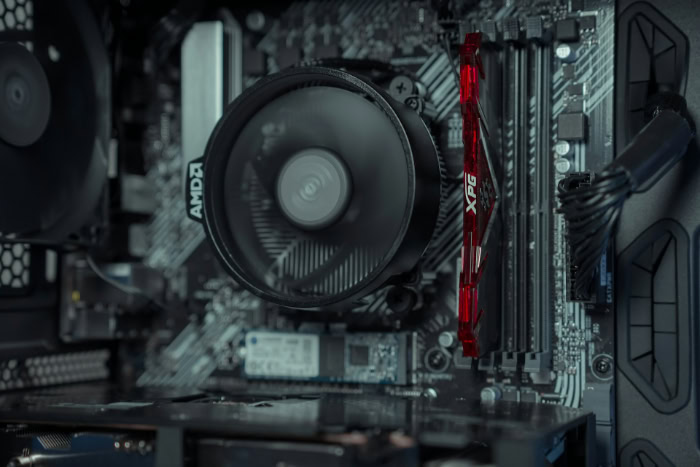
Upgrading or replacing system memory requires strict alignment between the RAM modules, the motherboard sockets, and the processor. Mixing components across the DDR3 and DDR4 divide is impossible on standard hardware.
Motherboard Slot Restrictions and Incompatibility Rules
Motherboard DIMM slots are wired and keyed exclusively for one memory generation. Because DDR3 and DDR4 differ in pin count, notch placement, and voltage signaling, a DDR4 stick cannot fit into a DDR3 slot, and a DDR3 stick cannot fit into a DDR4 slot.
Attempting to force a mismatched module into an incompatible motherboard socket will bend the gold contact pins, crack the module edge, or break the plastic retention clips on the motherboard.
Processor Generations and Memory Controller Support
Modern processors contain an integrated memory controller (IMC) built directly onto the CPU silicon, which determines what type of RAM the system can communicate with. Older processors, including Intel Core 2000 through 4000 series chips and AMD FX processors, contain DDR3 memory controllers.
Mainstream DDR4 support began with Intel 6th-generation Core processors (the 6000 series, codenamed Skylake) and AMD Ryzen 1000 series processors, continuing through Intel 14th-generation Core and AMD Ryzen 5000 series platforms.
Hybrid Motherboards and Transitional Chipsets
When Intel released its 6th-generation Core processors on 100-series chipsets (such as H110, B150, and Z170), the processor’s integrated memory controller supported both 1.35V DDR3L and 1.2V DDR4. A handful of motherboard manufacturers produced transitional hybrid boards equipped with two DDR3 slots and two DDR4 slots to help buyers carry over older memory sticks.
However, those hybrid motherboards cannot run both standards at the same time; users must populate either the DDR3L slots or the DDR4 slots exclusively, and running standard 1.5V DDR3 over long periods risked damaging the processor’s memory controller.
Memory Capacity and Upgrade Economics

Choosing between keeping an existing DDR3 machine alive or moving to a newer platform comes down to module capacity limits, software demands, and the total cost of replacing surrounding hardware.
Module Density and Total Capacity Limits
Higher-density memory chips allow DDR4 modules to hold far more data per stick than DDR3. Consumer unbuffered DDR3 modules commonly top out at 8GB per stick, which limits a standard two-slot motherboard to 16GB and a four-slot motherboard to 32GB of total RAM.
Consumer DDR4 modules are widely available in 16GB and 32GB capacities per stick, allowing a two-slot system to reach 64GB and a four-slot desktop motherboard to hold up to 128GB of total system memory.
Performance Differences in Common Software and Video Games
For basic office tasks, email, and streaming video, having enough total memory capacity (such as 16GB) matters more than generation speed, though DDR4 still keeps systems snappier when switching between dozens of open browser tabs. The performance gap widens dramatically in modern video games and creative software.
Moving from DDR3 to DDR4 paired with a modern processor raises average frame rates, improves 1% low frame rates (which reduces jarring stutters during gameplay), and accelerates texture loading into the graphics card.
Decision Strategy: System Maintenance vs. Platform Replacement
For users running an older desktop or laptop with only 4GB or 8GB of DDR3 RAM, buying two used 8GB DDR3 sticks for $15 to $25 is a cost-effective way to reach 16GB and extend the machine’s lifespan for basic web browsing or office productivity. Beyond minor maintenance, investing additional money into a DDR3 machine offers poor value.
Because upgrading to DDR4 requires replacing the motherboard and processor alongside the memory sticks, users whose computers struggle with modern games or heavy software should save their budget for a complete platform replacement.
Conclusion
The generational leap from DDR3 to DDR4 reshaped computer memory by packing 288 pins into the standard desktop module footprint, doubling transfer speeds and bus bandwidth, and raising single-module capacities up to 32GB. At the same time, lowering the standard operating voltage from 1.5V to 1.2V reduced power consumption and heat output across both desktops and laptops.
Today, DDR3 stands as a retired legacy format suited only for low-cost maintenance on older office or secondary machines, while DDR4 remains a mature, widely supported, and cost-effective standard for capable everyday computers and budget gaming builds.
Frequently Asked Questions
Can I put DDR4 RAM in a DDR3 motherboard?
No, you cannot install DDR4 memory into a DDR3 motherboard slot because the two standards are physically and electrically incompatible. Desktop DDR3 modules have 240 pins and run at 1.5V, while DDR4 modules have 288 pins, run at 1.2V, and feature a different notch position to prevent accidental installation.
Is 16GB of DDR3 still good enough for gaming and everyday use?
Yes, 16GB of DDR3 is still sufficient for web browsing, office work, and older or lightweight video games. However, modern demanding games will experience lower frame rates and occasional stuttering on DDR3 systems due to slower memory bandwidth and the aging processors tied to DDR3 motherboards.
Why does DDR4 have higher CAS latency numbers than DDR3?
Higher CAS latency numbers on DDR4 do not mean the memory responds more slowly than DDR3. CAS latency only counts clock cycles, and because DDR4 completes many more cycles per second, a DDR4-3200 module at CL16 actually responds in 10 nanoseconds compared to 13.75 nanoseconds for DDR3-1600 at CL11.
How can I tell if my computer uses DDR3 or DDR4 without opening the case?
You can check your memory generation directly inside your operating system or system BIOS without removing any hardware panels. On Windows, open Task Manager, click the Performance tab, and select Memory to see the speed and type, or run a free hardware utility like CPU-Z for exact module specifications.
Can I use DDR3 and DDR4 at the same time on a hybrid motherboard?
No, even rare transitional motherboards that include both DDR3 and DDR4 slots cannot run both memory types at the same time. The processor’s integrated memory controller can only operate at one voltage and signaling standard during startup, so you must install either all DDR3L sticks or all DDR4 sticks.
About the Author: Julio Caesar


