
Samsung Galaxy vs. Google Pixel: Which Should You Buy?

Samsung and Google stand as the two premier choices for Android smartphone buyers, yet the two tech giants build their devices around starkly contrasting philosophies. Samsung takes a hardware-first, feature-packed approach, packing its Galaxy lineup with high-powered processors, versatile multi-lens camera systems, and extensive customization tools.
Google follows a software-first, minimalist philosophy, designing Pixel phones around clean interfaces, effortless point-and-shoot photography, and helpful automated intelligence. Because both manufacturers deliver top-tier build quality and seven years of software support, choosing between them rarely comes down to raw quality alone.
Comparing how One UI and Pixel UI handle daily tasks, camera processing, battery endurance, and connected accessories helps everyday buyers match their personal habits, visual preferences, and budget to the right smartphone brand.
Key Takeaways
- Choose Samsung for raw hardware power and gaming: Flagship models like the Galaxy S26 Ultra use the Snapdragon 8 Elite Gen 5 processor and larger vapor chambers, delivering higher frame rates and cooler temperatures during heavy 3D gaming than Google’s Tensor G6 chip.
- Pick Google for effortless point-and-shoot photography: Pixel 11 phones excel at capturing fast-moving children and pets without motion blur while rendering accurate skin tones through Real Tone technology, whereas Samsung favors brighter, more saturated colors and superior long-range zoom on Ultra models.
- Match the interface to your personal workflow: Google’s Pixel UI offers a clean, single-app layout with automated call screening via Gemini Intelligence, while Samsung’s One UI 9 packs in split-screen multitasking, deep Good Lock customization, and Samsung DeX desktop computing.
- Count on seven years of software updates from both brands: Both the Galaxy S26 series and Pixel 11 series guarantee seven years of major Android operating system upgrades and security patches, alongside midrange options like the $499 Pixel 10a.
- Factor in charging speeds and ecosystem lock-in: Samsung’s Galaxy S26 Ultra leads in charging speed at 60W wired compared to 45W on the Pixel 11 Pro XL, and accessories like the Galaxy Ring or Samsung DeX require a Galaxy phone for full functionality.
Software Experience and Artificial Intelligence
Although Samsung Galaxy and Google Pixel phones both run on the Android operating system, picking up each device feels like using two entirely different platforms. The daily user experience comes down to a choice between Google’s streamlined, assistant-driven simplicity and Samsung’s dense, customizable toolkit.
Interface Design: Samsung One UI vs. Google Pixel UI
Google designs Pixel UI on Android 17 to feel calm, cohesive, and immediately intuitive. Menus use generous spacing, large rounded toggles, and adaptive color palettes that automatically match the wallpaper.
Everyday navigation stays simple, with a permanent search bar at the bottom of the home screen and a swipe-right feed for personalized news. Users rarely have to dig through deep sub-menus to find basic settings.
Samsung’s One UI 9 takes a maximalist approach geared toward efficiency and multitasking. It includes a slide-out Edge Panel for launching favorite apps in split-screen view or floating pop-up windows, making it easy to run a calculator over an email or watch a video while texting.
Samsung also designs its system menus so interactive buttons sit in the lower half of the screen, which helps with one-handed reachability on massive 6.9-inch displays.
Everyday Smart Features: Galaxy AI vs. Google Gemini
Both brands weave artificial intelligence into daily tasks, though their strengths lie in different areas. Google shines in automated communication management.
Features like Call Screen answer unknown numbers on the user’s behalf and display a live transcript of who is calling and why, filtering out robocalls before the phone ever rings. Hold for Me waits on the line with customer service and alerts the user when a human representative picks up, while Gemini Intelligence on the Pixel 11 series can summarize recorded conversations, extract action items from emails, and execute multi-step voice commands across apps.
Samsung counters with Galaxy AI, which integrates Google’s Gemini models alongside Samsung’s own on-device tools. Its standout productivity features focus on document and cross-language workflows.
Live Translate provides two-way voice and text translation during traditional phone calls, while Note Assist automatically formats messy meeting notes into bulleted summaries. Both brands also include Circle to Search, allowing users to circle any object, text, or math problem on screen to pull up instant answers.
Pre-Installed Apps, Customization, and Update Lifespan
One of the most noticeable differences out of the box is app clutter. Because Google makes both the Pixel hardware and the Android operating system, a Pixel phone includes only one app for each core function: Chrome for browsing, Google Photos for images, and Google Messages for texting.
Samsung pre-installs its own suite of apps alongside Google’s defaults. As a result, Galaxy buyers encounter two web browsers, two app stores, two photo galleries, and two voice assistants, which can confuse casual users until the extra apps are hidden or disabled.
On the flip side, Samsung gives enthusiasts unmatched control over how the phone looks and behaves. Through Samsung’s Good Lock app, users can redesign the lock screen clock, alter multitasking animations, customize the volume slider, and build automated routines triggered by time or location.
Regardless of which software style a buyer prefers, both brands back their flagship lineups with seven years of major Android operating system updates and security patches, ensuring phones bought today stay secure and current well into the next decade.
Camera Capabilities and Image Quality

Smartphone cameras rely just as much on image processing algorithms as they do on physical glass and sensors. Samsung and Google tune their cameras with distinct visual signatures that cater to different photography habits.
Everyday Photography: Action Shots and Skin Tones
For effortless point-and-shoot reliability, Google Pixel remains the gold standard. Pixel cameras prioritize faster shutter speeds and intelligent frame merging, making them far better at freezing motion when photographing energetic toddlers, pets running indoors, or candid street scenes.
Google also leads in color accuracy through its Real Tone tuning, which renders diverse human skin tones naturally without washing out dark shadows or over-brightening highlights.
Samsung tunes its Galaxy cameras to produce punchy, vibrant images that pop on social media feeds right away. Blue skies look deeper, green foliage looks lush, and food photography appears bright and appetizing.
While the Galaxy S26 series has improved its shutter response, shooting fast-moving subjects in dim indoor lighting can still produce occasional motion blur unless the user switches to Pro mode to raise the shutter speed manually.
Zoom Hardware and Lens Versatility
Hardware versatility is where Samsung pulls ahead, particularly on its top-tier Ultra model. While the standard Galaxy S26 and S26+ feature a 50MP main camera, a 12MP ultrawide, and a 3x optical telephoto lens, the Galaxy S26 Ultra packs four rear cameras.
It pairs a 200MP main sensor with a 50MP ultrawide and two separate zoom lenses: a 10MP 3x optical telephoto for portraits and a 50MP 5x periscope telephoto that reaches up to 100x Space Zoom. Having two dedicated zoom lenses allows the S26 Ultra to capture crisp details at intermediate distances, such as 3x to 10x at a school play or sports stadium.
Google has closed the hardware gap significantly. Even the standard Pixel 11 now includes a triple-camera system with a dedicated 5x optical telephoto lens, giving base-model buyers stronger long-range reach than the 3x lens on the base Galaxy S26.
Stepping up to the Pixel 11 Pro or Pro XL brings a 50MP main sensor, a 48MP ultrawide with sharp macro focus for extreme close-ups, and a 48MP 5x telephoto lens capable of 120x Pro Zoom aided by generative detail enhancement.
Video Capture and Photo Edit Tools
Samsung holds an edge in native on-device video recording. The Galaxy S26 series captures smooth, well-stabilized 4K video at up to 120 frames per second on the Ultra model and 8K video at 30 frames per second, with Horizon Lock keeping footage level even if the phone rotates completely.
Google’s Pixel 11 Pro models also produce impressive night and HDR video, though their best results rely on Video Boost, a feature that uploads clips to Google’s cloud servers for heavy processing before sending the finished video back to the phone.
Both brands offer powerful post-capture editing suites right inside their photo galleries. Google’s Magic Editor lets users tap or circle photobombers, power lines, or distractions to erase them, while Best Take swaps blinking faces in group shots with smiling expressions from consecutive frames.
Both platforms also include AI audio erasers that isolate voices in recorded videos and scrub out background wind, traffic, or crowd noise with a single slider.
Hardware, Performance, and Battery Life
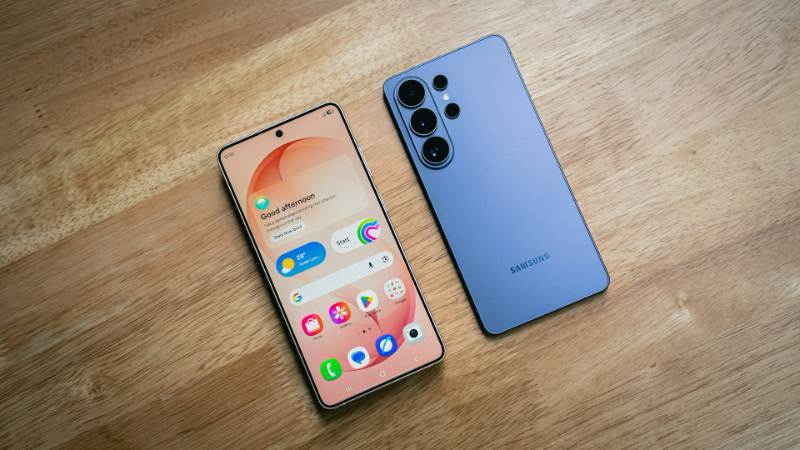
Underneath the glass, Samsung and Google make fundamentally different engineering trade-offs. Samsung chases peak silicon speed and cutting-edge display coatings, while Google designs its internal hardware specifically to support daily efficiency and machine learning.
Processor Power: Snapdragon vs. Tensor Chips
Samsung equips the Galaxy S26 Ultra globally, as well as the S26 and S26+ in North America, with the Qualcomm Snapdragon 8 Elite Gen 5 for Galaxy processor, while utilizing its 2nm Exynos 2600 chip in select international markets. The Snapdragon chip is a powerhouse built for heavy workloads.
Mobile gamers playing demanding 3D titles at 120Hz or creators exporting 4K video clips will notice faster load times, higher sustained frame rates, and better thermal control thanks to Samsung’s enlarged internal vapor chamber cooling system.
Google powers the Pixel 11 lineup with its custom Tensor G6 processor. Rather than competing for benchmark records, the Tensor G6 is engineered around Google’s Tensor Processing Unit to run voice recognition, image processing, and Gemini tasks efficiently.
In everyday use, scrolling through social media, switching between apps, and navigating maps feel just as fluid on a Pixel as on a Samsung. However, during extended 3D gaming sessions or prolonged GPS navigation on a hot day, the Tensor chip throttles its graphics speed sooner than Samsung’s Snapdragon hardware.
Display Quality, Brightness, and Build Materials
Both manufacturers produce some of the brightest, sharpest OLED screens on the market, all featuring smooth 120Hz adaptive refresh rates. Google’s Super Actua displays on the Pixel 11 Pro series reach a blinding 3,600 nits of peak brightness, making text easy to read under midday sun.
Samsung’s Galaxy S26 Ultra peaks at 2,600 nits, but it holds a major practical advantage: Corning Gorilla Armor 2 with an anti-reflective coating. That specialized glass cuts surface glare by up to 75%, making the screen appear darker, richer, and more readable outdoors than competing displays with higher raw brightness numbers, while also introducing a built-in Privacy Display mode.
In terms of physical construction, both lineups carry IP68 ratings for dust and water resistance, surviving submersion in up to 5 feet (1.5 meters) of freshwater for 30 minutes. Google uses spacecraft-grade aluminum frames paired with Gorilla Glass Victus 2 on the Pixel 11 series, featuring its signature horizontal camera bar on the back that prevents the phone from wobbling on a flat desk.
Samsung also moved the Galaxy S26 Ultra back to an Armor Aluminum 2 frame to reduce weight to 7.55 oz (214 g), reserving titanium frames for its ultra-premium Galaxy Z Fold 8 Ultra foldable.
Battery Endurance and Recharge Speeds
Battery life across both families comfortably lasts a full day of mixed web browsing, streaming, and photography. Capacity scales with screen size, ranging from 4,300mAh on the compact 6.3-inch Galaxy S26 to 5,000mAh on the S26 Ultra, while Google packs a generous 4,985mAh cell into the 6.3-inch Pixel 11 and 5,115mAh into the 6.8-inch Pixel 11 Pro XL.
Charging speeds vary depending on the specific tier. Samsung upgraded the Galaxy S26 Ultra to 60W wired Super Fast Charging 3.0, which refills the battery to 75% in roughly 30 minutes, though the base Galaxy S26 remains capped at a slower 25W wired speed.
Google’s Pixel 11 Pro XL supports 45W wired charging, while the standard Pixel 11 and 11 Pro charge at 30W. Both brands support up to 25W Qi2 wireless charging on their top models, and neither company includes a wall power adapter in the box, requiring buyers to supply a compatible USB-C Power Delivery PPS charger.
The Connected Device Ecosystem

A smartphone rarely operates in isolation. How well a phone communicates with watches, earbuds, laptops, and household appliances can easily tip the scales toward one brand.
Wearable Tech: Smartwatches, Fitness Trackers, and Earbuds
Samsung offers a broader range of personal wearables, including the Galaxy Watch 9, the rugged Galaxy Watch Ultra 2, the screen-free Galaxy Ring for sleep and recovery tracking, and the Galaxy Buds 4 Pro. However, Samsung enforces strict ecosystem lock-in for its best features.
While a Galaxy Watch pairs with non-Samsung Android phones, features like electrocardiogram readings, blood pressure alerts, sleep apnea detection, and AI Energy Scores require a Galaxy smartphone. Similarly, the Galaxy Buds 4 Pro only unlock 24-bit high-resolution audio, seamless multi-device switching, and live ear-to-ear translation when paired with a Samsung device.
Google builds its wearable ecosystem around the domed Pixel Watch 5, Fitbit trackers, and Pixel Buds Pro 2. Google’s approach is noticeably more open: the Pixel Watch 5 delivers its full suite of Fitbit health tracking, heart rate accuracy, and Gemini voice assistance on almost any modern Android phone, including Samsung devices.
Pairing Pixel Buds Pro 2 with a Pixel phone provides instant Fast Pair setup, spatial audio with head tracking, and hands-free Gemini conversation mode.
Larger Screens: Tablets, Laptops, and Desktop Modes
For users who want their phone to double as a productivity workstation, Samsung holds a decisive lead. Every Galaxy S-series flagship includes Samsung DeX, which projects a full PC-style desktop interface with resizable windows, a taskbar, and keyboard shortcuts onto an external monitor or television via USB-C or wireless casting.
Furthermore, the Galaxy S26 Ultra houses a built-in S-Pen stylus inside its chassis, enabling precise handwritten notes, PDF signatures, and photo retouching. Samsung also offers deep integration with its Galaxy Tab S11 tablets and Galaxy Book laptops, plus deeper Link to Windows features for Microsoft PC owners.
Google has narrowed the gap by introducing an official Android Desktop Mode in Android 16 and refining it in Android 17. Plugging a Pixel 11 into a USB-C monitor with a Bluetooth mouse and keyboard now launches a windowed desktop interface with a bottom taskbar, though it remains slightly less mature than Samsung DeX.
For file transfers, both brands use Quick Share to beam photos and videos across Android devices, Chromebooks, and Windows PCs in seconds.
Smart Home Control and Appliance Compatibility
Smart home management depends heavily on what equipment already lives in the buyer’s home. Samsung phones center around the SmartThings platform.
If a household owns a Samsung television, Bespoke refrigerator, or smart washer and dryer, a Galaxy phone acts as an automatic remote control, displaying laundry completion alerts on the screen and letting users locate lost keys with Ultra-Wideband Galaxy SmartTag 2 trackers.
Google Pixel phones integrate natively with the Google Home app. For homes equipped with Nest thermostats, Nest Doorbells, Chromecast streamers, or Matter-compatible smart bulbs, Pixel provides one-tap lock screen controls and instant live camera feeds when someone rings the doorbell.
Google also offers its own Pixel Tag tracker that leverages the global Find My Device network to locate luggage and everyday essentials.
Retail Cost, Overall Value, and Buyer Profiles

Both manufacturers span a wide price spectrum, from sub-$500 midrange phones to ultra-premium foldables approaching $2,000. Evaluating how each brand prices and discounts its hardware ensures buyers get maximum value for their budget.
Lineup Variety: Budget Models, Flagships, and Foldables
In the budget and midrange tier, Samsung offers a sprawling Galaxy A-series lineup ranging from entry-level phones under $300 to the $550 Galaxy A57, which features a slim 0.27-inch (6.9 mm) body, a 6.7-inch 120Hz AMOLED screen, and six years of updates. Google offers a single, focused midrange contender: the $499 Pixel 10a.
While the Pixel 10a is slightly thicker with a 6.3-inch screen, it delivers flagship-level camera processing and a full seven years of updates.
In the mainstream flagship tier, the 6.3-inch Galaxy S26, 6.7-inch S26+, and 6.9-inch S26 Ultra compete directly against the 6.3-inch Pixel 11, 6.3-inch Pixel 11 Pro, and 6.8-inch Pixel 11 Pro XL. Notably, Google lets buyers get its complete Pro camera system in a compact 6.3-inch size with the Pixel 11 Pro, whereas Samsung forces buyers to choose the massive 6.9-inch S26 Ultra to get its best zoom cameras.
In the foldable category, Samsung offers three models: the pocket-friendly clamshell Galaxy Z Flip 8, the wider book-style Galaxy Z Fold 8, and the powerhouse 8.0-inch Galaxy Z Fold 8 Ultra. Google focuses solely on the book-style format with its ultra-thin Pixel 11 Pro Fold.
Upfront Cost, Trade-In Deals, and Resale Value
On paper, flagship retail prices sit close together, with standard models starting around $799 to $899 and top-tier Pro XL and Ultra models starting at $1,299. However, very few buyers need to pay full sticker price.
Samsung is famous for aggressive trade-in promotions on its website and through mobile carriers, frequently offering up to $800 off for trading in a one-year-old or two-year-old phone alongside free storage upgrades during launch windows.
Google has become equally competitive with seasonal promotions, often bundling Google Store credit during August launch events and discounting its phones by $150 to $250 during holiday sales. When selling a phone privately on the secondhand market after two or three years, Samsung’s Ultra models tend to retain a higher percentage of their original value than Pixel phones, which depreciate faster due to frequent retail sales.
Ideal User Personas for Each Brand
Matching a phone to daily habits makes the final choice clear:
- The Samsung Galaxy Buyer: Best suited for power users, mobile gamers, hardware enthusiasts, and people who want maximum customization, stylus input, and versatile zoom range. Buyers who treat their phone like a pocket computer and enjoy tweaking every setting will feel right at home on One UI.
- The Google Pixel Buyer: Best suited for minimalists, parents or pet owners who need effortless point-and-shoot cameras, and users who want a clutter-free phone with helpful automated features. Buyers who want their phone to screen spam calls quietly, take great photos on the first try, and stay out of the way will love the Pixel experience.
Conclusion
Samsung Galaxy and Google Pixel represent two distinct peaks of modern smartphone engineering. Samsung wins on raw hardware muscle, gaming endurance, anti-glare display technology, charging speed, and ecosystem breadth, packing every conceivable tool into One UI and its Ultra and Z-series hardware.
Google wins on software simplicity, automated call management, natural skin tone reproduction, and reliable motion photography, proving that thoughtful software tuning can matter more than spec-sheet numbers.
Because both brands deliver durable IP68 hardware and seven years of operating system support, there is no wrong choice between them. Deciding between a Galaxy and a Pixel simply comes down to personal priority: choose Samsung for maximum hardware versatility and control, or choose Google for streamlined simplicity and effortless everyday intelligence.
Frequently Asked Questions
Which phone takes better pictures, Samsung Galaxy or Google Pixel?
Google Pixel takes more reliable everyday photos, while Samsung Galaxy is better for extreme zoom and manual camera control. Pixel phones use faster shutter speeds to capture moving kids or pets without blur and render natural skin tones automatically. Samsung’s Galaxy S26 Ultra produces brighter colors and captures sharper distant shots at concerts using dual telephoto lenses.
Do Samsung Galaxy phones last longer than Google Pixel phones?
Both Samsung Galaxy and Google Pixel phones offer comparable physical durability and identical seven-year software support lifespans on flagship models. Each brand equips its premium phones with IP68 water resistance, aluminum or titanium frames, and scratch-resistant Gorilla Glass. However, Samsung’s Snapdragon processors maintain faster gaming speeds over several years of heavy use than Google’s Tensor chips.
Can I use a Galaxy Watch with a Google Pixel phone?
Yes, you can pair a Galaxy Watch with a Google Pixel phone, though Samsung restricts several advanced health features to Galaxy smartphones. Basic notifications, fitness tracking, heart rate monitoring, and Google apps work normally on a Pixel. However, electrocardiogram readings, blood pressure tracking, and Energy Score metrics require a Samsung Galaxy phone with the Samsung Health Monitor app.
Is it hard to switch from a Samsung Galaxy to a Google Pixel?
Switching from a Samsung Galaxy to a Google Pixel is straightforward because both phones run on Android and share full Google account integration. During setup, connecting the two phones with a USB-C cable transfers contacts, messages, photos, and apps in minutes. Only proprietary apps like Samsung Notes require syncing to a cross-platform service like Google Keep beforehand.
Which brand gives you better value for your money in the midrange category?
The Google Pixel 10a offers better camera quality and software support for $499, while the $550 Samsung Galaxy A57 delivers a larger display and faster charging. Buyers who prioritize flagship-grade photography and seven years of updates should choose the Pixel 10a. Users who want a slim 6.7-inch screen for streaming and 45W wired charging will prefer the Galaxy A57.
About the Author: Julio Caesar


