
Download vs. Upload Speeds: The Essentials of Bandwidth
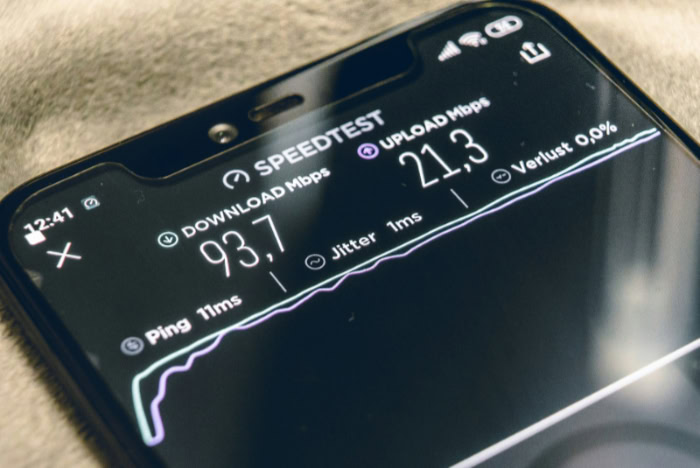
Most internet service providers advertise a massive number on their homepage to grab your attention, yet that figure rarely reflects how your connection handles a high-stakes video call. You pay for a specific tier of service every month, but your actual productivity often hinges on the half of the connection that providers tend to hide in the fine print.
While the early web was built for scrolling and reading, modern life demands a constant two-way flow of data. If your outgoing video is choppy while your Netflix stream remains perfect, you are likely feeling the effects of an unbalanced network.
Moving past the marketing jargon allows you to diagnose why your connection feels sluggish even when the speed test says otherwise.
Key Takeaways
- Download speed measures how fast data arrives on your device for activities like streaming 4K video, while upload speed measures how fast you send data for video calls and cloud backups.
- Internet speeds are measured in Megabits per second (Mbps), meaning a 100 Mbps connection takes approximately eight seconds to download a 100 Megabyte file due to the bit to byte ratio.
- Standard cable and DSL connections are usually asymmetrical, offering much slower upload speeds than download speeds, whereas fiber optic connections typically provide symmetrical speeds for better performance.
- A single 4K video stream requires roughly 25 Mbps of bandwidth, so households with multiple high definition screens and active users should aim for plans starting at 200 Mbps.
- High speed does not guarantee a smooth experience if latency is high, as the delay in data travel (ping) is what causes lag during gaming and live conversations.
Internet Speed Basics
Every interaction on the internet relies on a continuous exchange of information between a personal device and a distant server. This movement of data is not a singular event but a two-way street where requests are sent and content is received.
To manage expectations for a home network, one must distinguish between the speed of incoming information and the capacity to send data back out.
The Mechanics of Download Speed
Download speed refers to the rate at which data travels from the internet to a local device. This is the metric most people associate with a fast connection because it dictates how quickly a webpage loads, how long a movie takes to buffer, or how fast a new application installs.
When you click a link or open a streaming app, you are essentially requesting a file. The download speed determines how quickly that file can be pulled from a remote server and rendered on your screen.
The Mechanics of Upload Speed
Upload speed measures how fast data travels from a local device to the internet. While often overlooked, this process is necessary for any activity where you provide information to the web.
Sending an email, posting a photo to social media, or saving a document to a cloud drive all rely on upload capacity. If this speed is too low, the server on the other end waits for your data, leading to failed uploads or significant delays in communication.
Measuring Velocity in Mbps
Internet speed is measured in Megabits per second, abbreviated as Mbps. It is important to distinguish bits from bytes, as most file sizes are listed in Gigabytes or Megabytes, while speeds are listed in Megabits.
There are eight bits in a single byte. Therefore, a 100 Mbps connection does not download a 100 Megabyte file in one second; it actually takes about eight seconds under perfect conditions.
This industry standard allows for a universal way to compare different service providers and hardware capabilities.
Speed Needs by Activity

Different online behaviors place unique strains on a connection. Some activities require a massive firehose of incoming data, while others rely on a steady stream of outgoing signals to maintain a connection.
Recognizing where a specific habit falls on this spectrum helps identify why certain applications lag while others function perfectly.
Download-Dominant Tasks
The majority of casual internet use is heavily weighted toward downloading. Watching high-definition video on platforms like YouTube or Netflix is a primary example, as these services push large amounts of visual and audio data to your device.
Large file downloads, such as video game updates or software patches, also lean entirely on download bandwidth. For these tasks, upload speed is almost irrelevant, as the only outgoing data consists of small packets confirming that the information was received.
Upload-Critical Tasks
As remote work and content creation become more common, upload speeds have grown in importance. Video conferencing through platforms like Zoom or Microsoft Teams requires a strong upload connection to send your high-definition video feed to other participants.
Similarly, photographers and videographers who back up their work to cloud storage depend on upload bandwidth to move large assets off their local drives. Without sufficient upload capacity, these tasks become frustratingly slow or prone to disconnection.
Two-Way Traffic in Online Gaming
Online gaming is a unique category that requires a constant, balanced exchange of data. While the game world and other players’ actions are downloaded to your console or computer, your own movements and actions must be uploaded to the game server instantly.
This bidirectional flow must happen in real time. Even if a player has a high download speed, a poor upload speed can result in lag, where their character’s actions appear delayed to others in the game.
Types of Internet Connections

The physical infrastructure buried underground or strung across utility poles determines the inherent capabilities of a home connection. Historically, these systems were built to favor the way most people used the internet for decades, which involved mostly reading and watching.
Newer technologies are changing these rules to accommodate modern usage patterns.
Asymmetrical Lines and Cable
Most traditional internet connections, such as ADSL and standard Cable, are asymmetrical. This means the download speed is significantly higher than the upload speed.
This design choice was intentional, as providers assumed the average user would consume much more data than they would create. For instance, a plan might offer 300 Mbps for downloads but only 10 Mbps for uploads.
This imbalance is a byproduct of limited physical capacity in copper wiring, where engineers chose to prioritize the traffic flow that satisfied the most common consumer needs.
The Growth of Symmetrical Fiber Optics
Fiber optic technology uses light signals to transmit data through glass strands, offering much higher capacity than copper. This allows for symmetrical speeds, where the upload and download rates are identical.
A 500 Mbps fiber plan provides 500 Mbps in both directions. This is particularly beneficial for households with multiple people working from home, as it ensures that a large file upload in one room does not interfere with a video call in another.
Shared versus Dedicated Bandwidth
The way a connection is delivered to a neighborhood also impacts performance. Cable internet often uses shared bandwidth, meaning the total capacity is split among several houses on the same block.
During peak hours, everyone may see a dip in speed. In contrast, certain fiber configurations and dedicated lines provide a more consistent experience by ensuring your allotted bandwidth is not impacted by the heavy usage of a neighbor.
Choosing the Right Speed

Choosing the right internet package requires a clear assessment of how many people and devices are active at once. A plan that suffices for a single person may buckle under the pressure of a full household attempting to work and play simultaneously.
Identifying specific needs allows for a more efficient allocation of monthly expenses.
Individual versus Multi-User Households
In a single-person home, a modest 25 to 50 Mbps connection can handle most tasks easily. However, bandwidth is a finite resource that is shared across every connected device.
If four people are all trying to stream or work at once, that 50 Mbps is split four ways, potentially leaving each person with a sluggish experience. Multi-user households generally require 200 Mbps or more to ensure that one person’s activity does not throttle the connection for everyone else.
Streaming Quality Thresholds
Visual quality is directly tied to Mbps requirements. A standard 1080p high-definition stream typically requires about 5 Mbps.
However, upgrading to 4K Ultra HD content increases that demand to roughly 25 Mbps per stream. When calculating a household’s needs, it is helpful to multiply these numbers by the number of televisions or devices likely to be in use at the same time.
Professional and Content Creator Needs
Professionals who handle large media files or broadcast live video need to look past standard download numbers. A content creator streaming on Twitch or YouTube needs a consistent upload speed of at least 10 to 15 Mbps just for the video feed, leaving little room for other background tasks.
For those who frequently move gigabytes of data to remote servers, seeking out a plan with at least 50 Mbps upload, or a symmetrical fiber plan, is often a requirement for basic job performance.
Factors Affecting Performance

Advertised speeds represent a theoretical maximum under perfect conditions, but everyday performance often falls short of these benchmarks. Numerous external and internal variables can degrade a connection before it ever reaches a screen.
The Role of Latency and Ping
Speed is not the only factor in a responsive connection. Latency, often measured as ping, is the time it takes for a data packet to travel to a server and back. A connection could have a very high download speed but high latency, which results in a feeling of “lag.” This is especially noticeable in voice calls or gaming, where a delay of even a fraction of a second can make the experience feel disjointed.
Hardware and Internal Network Bottlenecks
Sometimes the bottleneck is inside the home rather than with the service provider. An outdated router might not be able to process the high speeds provided by a modern fiber connection. Wi-Fi interference from thick walls, large appliances, or neighboring networks can also significantly reduce the available speed.
Using a physical Ethernet cable is often the only way to reach the full speeds promised in a service contract.
Software and Background Congestion
Background activity can quietly consume bandwidth without the user noticing. Operating system updates, cloud photo backups, and file syncing services often run in the background.
If multiple devices are performing these updates simultaneously, the available speed for active tasks like browsing or streaming will drop. Managing these background processes or scheduling them for late at night can help maintain a more consistent connection during the day.
Conclusion
Distinguishing between download and upload speeds is more than just a technical exercise; it is a practical necessity for anyone who relies on a stable connection. Download speeds dictate how you consume content, while upload speeds govern how you share data with others.
By evaluating how many people live in a household and what specific tasks they perform, it becomes easier to select a plan that prevents frustration. A high headline download speed might seem impressive, but a lack of upload capacity or high latency can still render a connection unusable for work or gaming.
Prioritizing a balanced connection ensures that the hardware and service you pay for actually meet the demands of your daily life.
Frequently Asked Questions
Why is my upload speed always so much slower than my download speed?
Most traditional internet providers use asymmetrical technology that prioritizes download bandwidth because most people spend more time consuming content than creating it. This design allocates limited physical capacity to the traffic flow that benefits activities like streaming or scrolling. If you need equal speeds for heavy file sharing, look for a fiber optic provider.
How much speed do I actually need to stream in 4K?
You generally need a steady download speed of at least 25 Mbps to stream video in 4K resolution without buffering. However, you should account for other devices on the same network that might be using bandwidth simultaneously. A household with several people often needs a plan with at least 100 Mbps to avoid interruptions.
Will a faster internet plan fix the lag I experience while gaming?
A faster plan might help if your bandwidth is being maxed out, but gaming lag is usually caused by high latency or ping. Latency is the physical time it takes for data to travel to a server and back. Improving your hardware or using a wired Ethernet connection is often more effective than simply buying a higher speed tier.
What is the difference between a bit and a byte when looking at speeds?
A bit is a smaller unit of data used to measure network speed, while a byte is a larger unit used to measure file size. There are eight bits in every one byte. This means if you have an 80 Mbps connection, you can theoretically download 10 Megabytes of data every second.
Does my router affect the speeds I get from my provider?
Your router acts as the gateway for your home network and can definitely become a bottleneck if it is outdated. Older hardware might not be capable of handling the high speed signals provided by your internet plan. Physical obstacles like walls and interference from other electronics can also significantly degrade the Wi-Fi performance you experience.
About the Author: Elizabeth Baker


