
Ergonomic Mouse vs. Regular Mouse: Which Is Better?

For decades, the traditional computer mouse has served as the primary bridge between human intent and on-screen action. Its flat, symmetrical chassis comes bundled with nearly every desktop system, making it a familiar tool in homes and offices worldwide.
However, as workdays stretch to eight hours or more in front of screens, prolonged use of standard peripherals often leads to wrist soreness, joint fatigue, and chronic strain. In response, hardware designers have developed ergonomic mice that prioritize human anatomy through vertical angles and contoured support.
Comparing standard and ergonomic models across physical design, health effects, cursor performance, and everyday suitability helps computer users select the right tool for both daily productivity and long-term physical comfort.
Key Takeaways
- Ergonomic mice tilt the hand at a 45-degree to 90-degree angle to maintain a neutral handshake posture, eliminating the forearm twisting caused by flat standard mice.
- Elevating the wrist off the desk surface reduces direct mechanical pressure on the carpal tunnel and median nerve, preventing numbness and repetitive strain during eight-hour workdays.
- Standard mice offer superior micro-precision and rapid cursor flicks due to lightweight shells and fingertip control, making them better suited for competitive gaming and detailed graphic design.
- Switching to a vertical or contoured mouse requires an adjustment period of one to two weeks as muscle memory shifts from small wrist bends to broader arm movements.
- Buyers should measure their hand length in inches from the wrist crease to the middle fingertip before purchasing an ergonomic model, as oversized or undersized contours can worsen hand fatigue.
Structural and Anatomical Differences
The physical shape of a computer mouse dictates how the bones, muscles, and tendons of the upper limb align during desk work. Comparing the geometry of traditional and ergonomic shells reveals how simple changes in surface angles alter forearm mechanics.
Standard Mouse Design and Forearm Pronation
Traditional mice feature a low, horizontal profile that forces the user to place their palm parallel to the desk surface. Achieving a flat hand position requires forearm pronation, an inward rotation where the radius bone crosses over the ulna.
Holding the forearm in a twisted state for hours keeps the surrounding muscles under constant static tension. Furthermore, a standard chassis concentrates contact pressure on three small areas: the base of the palm, the fingertips, and the underside of the wrist rubbing directly against the desk or mouse pad.
Ergonomic Mouse Geometry and the Handshake Posture
Ergonomic mice replace the flat shell with an angled body, typically tilted between 45 degrees and 90 degrees. This sloped geometry places the hand in a natural handshake position, allowing the radius and ulna bones in the forearm to remain parallel and untwisted.
Alongside the vertical tilt, these devices feature deep thumb scoops and extended lower ledges along the pinky side. These structural additions cradle the entire side of the hand, lifting the wrist off the desk surface and preventing friction during movement.
Grip Styles and Support Structures
Users typically hold a standard mouse using one of three grip styles: resting the whole hand in a palm grip, arching the fingers in a claw grip, or steering solely with the fingertips. Because regular mice are relatively small, users tend to anchor their wrist on the desk and swing the device left and right like a windshield wiper.
Conversely, contoured ergonomic mice enforce a full-palm grip that locks the hand into a single supported posture. Rather than bending the wrist from side to side, the user guides an ergonomic mouse using larger, smoother movements generated from the elbow and shoulder.
Health Outcomes and Physical Well-Being
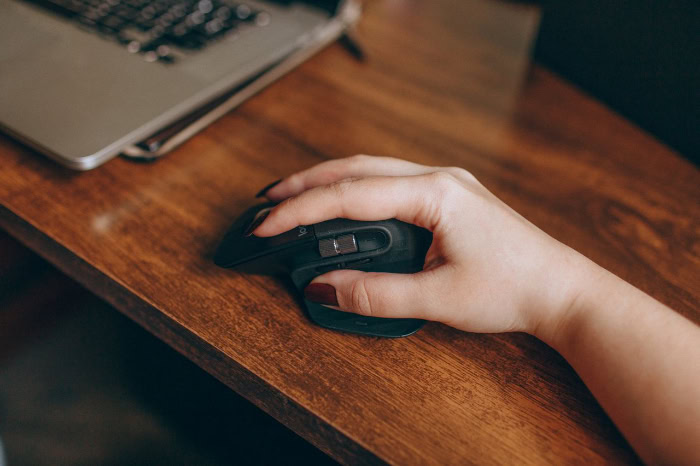
Prolonged computer operation places repetitive mechanical stress on the delicate structures of the hand and upper body. Adjusting the angle and support of a pointing device directly impacts joint health, nerve decompression, and muscular endurance across a full workday.
Mitigation of Repetitive Strain Injuries
Repetitive strain injuries develop when small tendons and muscles perform thousands of tiny clicks and micro-movements without adequate rest or structural support. On a standard mouse, constant finger tension combined with a twisted forearm restricts blood flow and irritates tendon sheaths.
Ergonomic angles redistribute this physical workload away from delicate wrist tendons and transfer it toward larger, stronger muscle groups in the upper arm. For professionals who spend six to eight hours daily at a desk, maintaining a neutral joint angle prevents minor muscular soreness from progressing into chronic inflammation.
Pressure Relief for the Carpal Tunnel and Median Nerve
The carpal tunnel is a narrow passageway on the palm side of the wrist that houses the median nerve and finger tendons. When using a low-profile regular mouse, users commonly rest the soft underside of their wrist directly against a hard desk while bending their hand upward in dorsiflexion.
Both actions pinch the carpal tunnel and compress the median nerve, causing tingling, numbness, and aching fingers. Ergonomic mice eliminate this compression by tilting the hand onto its outer edge, where thicker muscle padding and the pisiform bone safely absorb surface weight away from sensitive nerve pathways.
Fatigue Reduction in the Arm, Shoulder, and Neck
Because the human arm operates as an interconnected kinetic chain, poor posture at the wrist triggers compensatory tension all the way up to the neck. Rotating the forearm inward to hold a flat mouse naturally pulls the elbow outward and causes the shoulder to roll forward.
Over several hours, this hunched alignment creates persistent tightness in the upper trapezius and neck muscles. By returning the wrist and forearm to an untwisted orientation, an ergonomic mouse allows the elbow to rest comfortably near the ribs and keeps the shoulder blade relaxed.
Performance and Usability Trade-Offs

While ergonomic shapes prioritize physical comfort, altering how the hand interacts with a pointing device introduces practical trade-offs in cursor control, learning speed, and portability. Evaluating these operational differences helps users anticipate how a hardware switch affects daily tasks.
Cursor Precision for Detailed Tasks
Conventional mice excel at pinpoint accuracy because the fingertips rest directly on top of the shell, right above the optical sensor. Users can execute tiny, sub-millimeter adjustments simply by flexing their fingers.
On a vertical mouse, clicking requires pressing sideways with the index and middle fingers, which can slightly push the entire device toward the thumb if not counterbalanced. Additionally, guiding the cursor with whole-arm movements rather than fine finger movements can initially reduce micro-precision, though adjusting sensor sensitivity between 800 DPI and 1600 DPI helps compensate for the change in leverage.
The Adaptation Period and Muscle Memory Adjustment
Standard mice benefit from decades of universal familiarity, allowing anyone to sit down at a public workstation and operate the cursor immediately. Switching to an angled or vertical chassis overrides ingrained muscle memory and requires a dedicated adaptation period of one to two weeks.
During the first few days, users often experience clumsy cursor tracking, accidental clicks, and a temporary drop in work speed as the brain recalibrates to sideways button actuation and arm-driven steering.
Device Size, Portability, and Desk Space Requirements
A regular mouse features a flat, compact profile that slips easily into a laptop sleeve or shallow backpack pocket, making it ideal for mobile workers. In contrast, specialized ergonomic models have a tall, bulky footprint, often standing over 3 inches high with wide sculpted bases that resist packing into tight bags.
Their wider chassis and reliance on broad arm sweeps also demand more clear desk space and a larger mouse pad compared to wrist-driven standard devices.
Task Compatibility and Practical Applications

Different software applications place vastly different demands on a computer mouse. Matching the physical traits of standard and ergonomic devices to specific workloads ensures that comfort never comes at the expense of necessary functionality.
General Office Administration and Data Entry
For everyday clerical work involving web browsers, text documents, and spreadsheets, an ergonomic mouse is an exceptional fit. These tasks require moderate cursor accuracy rather than rapid reflexes, meaning the physical relief of a vertical posture easily outweighs any minor loss in micro-precision during an eight-hour shift.
Many office-focused ergonomic models also include programmable thumb buttons and dual-mode scroll wheels, allowing users to copy, paste, or scroll through thousands of spreadsheet rows with minimal finger movement.
Graphic Design and Digital Illustration
Visual creatives working in photo editors, vector software, or computer-aided design programs rely heavily on pixel-perfect selections and smooth path tracing. Many illustrators prefer standard or semi-contoured mice because fingertip control makes tiny anchor-point adjustments feel effortless.
However, long studio sessions can quickly exhaust the wrist. To balance accuracy with physical endurance, many designers adopt a hybrid setup, using an ergonomic mouse for general interface menus and pairing it with a stylus drawing tablet or glass trackpad for detailed brushwork.
Fast-Paced and Casual Video Games
Competitive video games, particularly first-person shooters and real-time strategy titles, demand rapid flicks, high acceleration, and ultra-lightweight shells weighing under 2.5 ounces (71 grams). Purely vertical ergonomic mice are poorly suited for competitive play due to their heavier builds, higher centers of gravity, and sideways click mechanics that can jitter the aim during frantic firefights.
Furthermore, most vertical mice use standard office sensors with a 125Hz polling rate rather than the 1000Hz to 8000Hz sensors found in gaming gear. Casual gamers playing turn-based strategy, role-playing, or simulation games, however, can comfortably use ergonomic models without any gameplay penalty.
Selection Criteria for Prospective Buyers

Choosing the right mouse requires looking beyond marketing claims to evaluate personal anatomy, budget constraints, and workspace layout. Taking accurate hand measurements and comparing available form factors prevents costly purchasing mistakes.
Hand Measurement and Handedness Compatibility
Because contoured mice are sculpted to fit specific anatomical curves, buying the wrong size can cause more cramping than a flat mouse. Prospective buyers should measure their hand length from the bottom crease of the wrist to the tip of the middle finger, and hand width across the widest part of the palm including the thumb.
Hands measuring under 6.7 inches typically require a small or medium shell, while hands over 7.5 inches need a large chassis. Additionally, while nearly all basic standard mice feature symmetrical shapes usable by anyone, the vast majority of sculpted ergonomic mice are built exclusively for right-handed users, leaving left-handed buyers with far fewer specialized options.
Price Differences and Long-Term Value
Basic standard mice are inexpensive commodities, with reliable wired or wireless office models available for $10 to $25. Specialized ergonomic peripherals command a noticeable price premium, typically ranging from $40 to $120 due to complex injection-molded shells, dual wireless receivers, and custom thumb rests.
While the upfront expense is higher, investing in a supportive device offers substantial long-term value by preventing wrist discomfort, reducing work interruptions, and avoiding potential physical therapy expenses.
Form Factor Options: Vertical, Trackball, and Contoured Designs
Buyers seeking ergonomic relief can choose from three primary form factors depending on their specific discomfort. Vertical mice tilt the hand between 57 degrees and 90 degrees, making them the best choice for relieving forearm twisting and wrist pronation pain.
Trackball mice remain completely stationary on the desk while the thumb or fingers roll a built-in ball to move the cursor, serving users with shoulder pain or cramped workspaces like airplane trays. Finally, semi-contoured mice feature a gentle 20-degree to 30-degree tilt with a built-in thumb rest, offering a comfortable middle ground that provides palm support while preserving the familiar feel of a traditional mouse.
Conclusion
Choosing between a regular mouse and an ergonomic mouse comes down to balancing cursor precision, portability, and physical comfort. Traditional flat mice remain practical for travelers, left-handed users needing ambidextrous hardware, and competitive gamers or illustrators who rely on rapid fingertip micro-adjustments.
Conversely, ergonomic models prioritize anatomical alignment by rotating the hand into a neutral handshake posture and lifting the wrist away from hard desk surfaces. For office professionals, writers, and remote workers spending hours each day working with documents and spreadsheets, transitioning to a properly sized vertical, trackball, or contoured mouse is one of the most effective upgrades for sustaining daily productivity without sacrificing joint health.
Frequently Asked Questions
How long does it take to get used to a vertical ergonomic mouse?
Most users need between one and two weeks of daily use to feel completely comfortable with a vertical mouse. During the first few days, steering with your whole arm rather than flexing your wrist feels unfamiliar, and sideways clicking may slightly nudge the cursor. Consistently using the new device without switching back accelerates muscle memory adaptation.
Can an ergonomic mouse cure carpal tunnel syndrome?
An ergonomic mouse cannot cure existing carpal tunnel syndrome, but it significantly reduces the daily mechanical pressure that triggers painful flare-ups. By tilting your hand onto its outer edge, the device lifts the sensitive underside of your wrist off the desk. Anyone experiencing persistent numbness or nerve pain should still consult a medical professional for proper treatment.
Are vertical mice good for playing video games?
Vertical mice work well for casual, slower-paced games, but they are poorly suited for competitive fast-paced shooters. Their heavy shells, tall profiles, and sideways button placement make rapid flicks and precise tracking difficult during intense action. Competitive players who want better comfort should look for lightweight gaming mice with a gentle, semi-contoured right-handed slope instead.
How do I know what size ergonomic mouse to buy?
You can find your ideal mouse size by measuring your hand from the bottom wrist crease to the tip of your middle finger. Hands under 6.7 inches generally fit small or medium models, while hands over 7.5 inches require a large frame. Choosing the right size ensures your fingers reach the scroll wheel without straining.
Should I choose a vertical mouse or a trackball mouse for wrist pain?
A vertical mouse is usually better for relieving wrist and forearm pain because it eliminates inward arm twisting while allowing natural arm movement. A trackball mouse keeps your hand completely stationary and relies on thumb or finger rolling, which works best for users who have shoulder pain or very limited desk space.
About the Author: Elizabeth Baker


