
What Is an Ergonomic Mouse? Types and Benefits
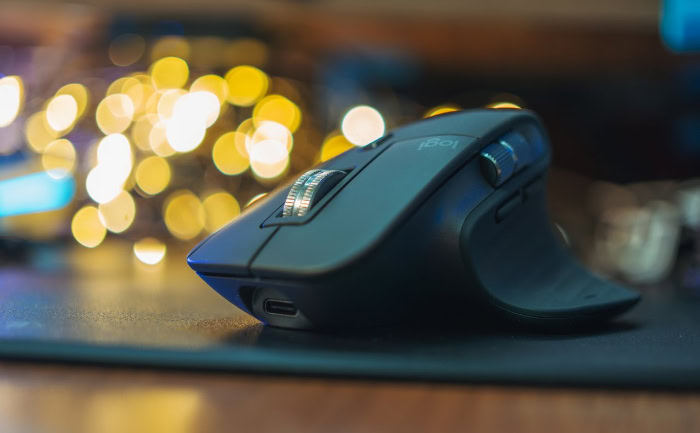
The traditional computer mouse sits on millions of desks worldwide, serving as the primary bridge between human intention and onscreen action. For decades, standard mice have relied on a flat shell built for simple manufacturing rather than human biology.
Gripping a conventional device for hours often causes sore wrists, tired fingers, and aching forearms. To address those physical complaints, hardware designers apply ergonomic principles to desktop peripherals, reshaping everyday equipment to fit the natural contours of the hand.
An ergonomic mouse is an anatomically conscious tool engineered to support natural body alignment, reduce physical strain, and enhance long-term computer comfort. By prioritizing posture over convention, ergonomic mice turn daily computer use into a healthier, more comfortable experience.
Key Takeaways
- Neutral Wrist Alignment: Ergonomic mice tilt the hand into a natural handshake posture between 57 and 90 degrees, eliminating the forearm twisting caused by flat mice.
- Targeted Strain Relief: By shifting cursor movement from small wrist joints to larger arm and shoulder muscles, ergonomic designs help prevent carpal tunnel syndrome and tendon inflammation.
- Diverse Form Factors: Users can choose vertical mice for general office comfort, stationary trackballs for tight desk spaces, or contoured horizontal models for a familiar grip.
- Adaptation Period: Switching to an angled or trackball mouse requires one to two weeks of daily practice to rebuild muscle memory and restore full cursor precision.
- Proper Sizing Matters: Selecting the right mouse requires measuring hand length and palm width, then matching those dimensions to a chassis that supports a palm, claw, or fingertip grip.
Definition and Anatomical Principles
Ergonomic hardware design starts with human anatomy rather than mechanical convenience. By analyzing how bones, tendons, and nerves interact during desktop work, engineers build input devices that protect the hand and arm from unnecessary mechanical stress.
Core Concept of an Ergonomic Mouse
Standard computer mice force the human hand to flatten and conform to a low, symmetrical plastic shell. Ergonomic design reverses that relationship by shaping the device around the natural resting posture of the hand.
Instead of a uniform, low-profile enclosure, an ergonomic mouse features high arches, angled button surfaces, deep thumb cradles, and sloped sides that support the palm and fingers without requiring active muscular tension.
The Problem with Forearm Pronation
Placing a hand flat on a standard mouse requires forearm pronation, a biomechanical motion where the two bones of the forearm, the radius and the ulna, twist and cross over one another. Holding a pronated posture for hours pulls the surrounding muscles taut and flattens the wrist against the desk surface.
That downward pressure compresses the carpal tunnel, a narrow passageway at the base of the palm, pinching the median nerve and restricting blood flow to the fingers.
The Neutral Handshake Posture
When a person stands with their arms relaxed at their sides, the palms naturally face inward toward the body. Raising the forearm while keeping that orientation creates a neutral “handshake” posture.
Vertical and semi-vertical mice capture that exact biomechanical angle, allowing the radius and ulna to remain parallel. Because the forearm bones stay untwisted, muscle tension drops significantly while moving the cursor and while resting the hand between clicks.
Health Advantages and Physical Strain Relief
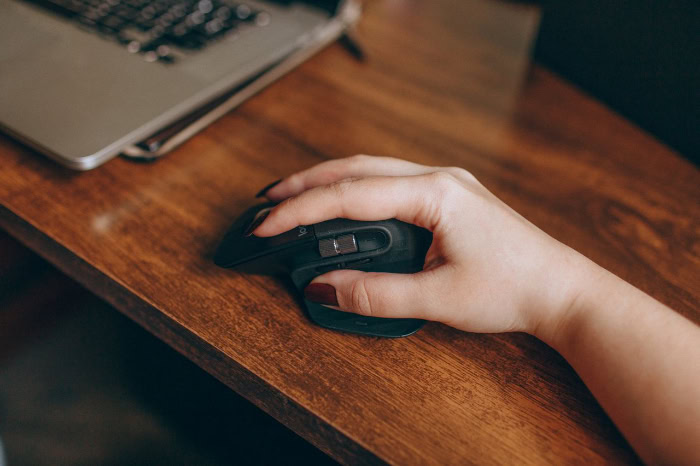
Transitioning to an anatomically supportive mouse delivers measurable physical relief across the entire upper body. Correcting hand and wrist alignment stops localized pain at the desk while preventing broader musculoskeletal fatigue.
Prevention of Repetitive Strain Injury and Carpal Tunnel Syndrome
Repetitive strain injuries develop when small tendons perform thousands of identical clicks and movements under constant tension. An ergonomic mouse tilts the hand onto its outer edge, lifting the sensitive underside of the wrist off the hard desk surface and eliminating direct pressure on the carpal tunnel.
Furthermore, angled click plates allow the index and middle fingers to press buttons from a relaxed, slightly curved position, reducing tendon friction and cumulative micro-trauma inside the hand.
Reduction of Tension in the Shoulder and Neck
The human arm functions as a connected kinetic chain where the position of the wrist directly influences the elbow and shoulder. Twisting the palm flat often forces the elbow outward, which in turn causes the shoulder to hunch forward or hike upward toward the ear.
By rotating the hand into a neutral vertical plane, the elbow rests closer to the torso. That subtle shift redistributes physical effort across stronger back and shoulder muscles, easing chronic neck stiffness.
Promotion of Full-Arm Motion Over Wrist Pivots
With a conventional flat mouse, users commonly anchor the heel of their palm on the desk and flick the cursor from side to side by bending the wrist joint. Repeated lateral wrist bending grinds tendons against bone and accelerates joint fatigue.
Ergonomic mice feature taller bodies and integrated thumb rests that brace the entire hand as a single unit, discouraging isolated wrist bending and encouraging smooth gliding motions driven by the forearm and shoulder.
Primary Categories and Form Factors

Ergonomic mice are not limited to a single shape or mechanical layout. Manufacturers produce several distinct form factors so users can match a device to their specific physical complaints, workspace dimensions, and daily tasks.
Vertical Mice
Vertical mice feature an upright chassis tilted at an angle between 57 and 90 degrees. The thumb rests in a sculpted groove on the left side while the main click buttons and scroll wheel sit vertically on the right facade.
Vertical models excel at general office tasks, web browsing, and document editing, making them the preferred choice for workers seeking immediate relief from forearm twisting and wrist soreness.
Trackball Controllers
A trackball controller remains completely stationary on the desk, replacing physical mouse gliding with a smooth, rotatable sphere housed inside the base. Users manipulate the ball using either their thumb or their index and middle fingers to guide the onscreen cursor.
Because the base never moves, trackball devices eliminate arm and shoulder motion entirely and operate effortlessly on cluttered desks, small tray tables, or uneven surfaces.
Contoured Horizontal Mice
Contoured horizontal mice bridge the gap between traditional flat peripherals and aggressive vertical designs. While maintaining a mostly horizontal orientation, contoured mice introduce a mild outward tilt, an elevated palm arch that fills the hollow of the hand, and an extended flange that keeps the thumb from dragging on the mousepad.
Contoured models also incorporate shallow finger channels that guide the digits into an effortless resting position.
Pen and Joystick Formats
Pen mice and joystick controllers offer specialized alternatives for users who cannot comfortably grip a standard or vertical chassis. A pen mouse resembles a thick stylus tilted on a small sliding base, utilizing a familiar handwriting grip that keeps the fingers relaxed.
Joystick mice feature a vertical post moved by the whole hand or gentle finger nudges, serving individuals with severe mobility limitations, arthritis, or targeted rehabilitation needs.
Operational Challenges and Practical Drawbacks

Despite their health benefits, ergonomic mice introduce practical trade-offs in daily operation. Adapting to unconventional shapes and altered button placements requires patience and an evaluation of how the device handles specialized workloads.
The Muscle Memory Transition Period
Switching from a flat mouse to an upright or trackball model disrupts years of ingrained muscle memory. During the first few days, clicking vertically or rolling a thumb ball often feels clumsy, and cursor movement speed drops noticeably.
Most users require one to two weeks of consistent daily use to retrain their hand coordination. Alternating between an old mouse and the new ergonomic model for 30-minute intervals during the first week helps ease the transition without causing frustration.
Sensitivity and Precision Limits in Fast-Paced Tasks
Vertical mice and trackballs can struggle with tasks requiring extreme pixel precision or rapid twitch reflexes, such as competitive action gaming or detailed vector illustration. On a vertical mouse, pressing a side-mounted button applies lateral horizontal force, which can slightly nudge the sensor right as a click registers.
While contoured horizontal mice balance comfort with high-speed accuracy, upright designs prioritize joint relaxation over split-second cursor control.
Limited Product Options for Left-Handed Users
Because ergonomic mice rely on asymmetrical, hand-specific molds, a right-handed ergonomic mouse is completely unusable in the left hand. Hardware manufacturers build the vast majority of sculpted mice exclusively for right-handed consumers, leaving left-handed users with a tiny fraction of the market.
Ambidextrous users who switch hands throughout the day to spread out physical strain must either purchase two separate sculpted mice or settle for a central-ball trackpad or symmetrical trackball.
Key Factors for Device Selection

Choosing an ergonomic mouse requires more than picking the highest-rated model online. Because ergonomic hardware relies on close physical contact, a poorly fitted device can create new pressure points rather than relieving existing strain.
Hand Measurements and Device Dimensions
Finding the proper chassis scale starts with two basic measurements. Measure hand length from the tip of the middle finger down to the first crease at the base of the wrist, and measure palm width across the widest part of the knuckles, excluding the thumb.
Hands under 6.7 inches in length generally pair best with compact or small shells, while hands exceeding 7.5 inches require large frames. A mouse that is too small forces the fingers to cramp inward, whereas an oversized body forces the fingers to overextend to reach the scroll wheel.
Grip Style Compatibility
Every computer user naturally gravitates toward one of three grip styles: palm, claw, or fingertip. A palm grip rests the entire inner hand flat against the shell, pairing best with long, high-arched vertical or contoured mice.
A claw grip arches the fingers steeply with only the heel of the palm touching the back of the device, requiring a shorter, wider body with responsive buttons. A fingertip grip steers the mouse using only the digit tips with no palm contact, making lightweight pen mice or compact trackballs ideal matches.
Programmable Shortcuts and Connectivity Options
Extra hardware controls further reduce repetitive movement by cutting down on trips between the mouse and the keyboard. Programmable thumb buttons and secondary horizontal scroll wheels allow users to execute copy, paste, back, and forward commands with a single twitch.
Regarding connectivity, wireless models operating over Bluetooth or a 2.4 GHz USB receiver eliminate cable drag that can pull against the wrist, while wired connections suit stationary workstations where battery charging is inconvenient.
Conclusion
An ergonomic mouse serves as a practical, preventative investment in long-term occupational health and daily desktop comfort. Rather than forcing the human body to endure unnatural forearm twisting and wrist compression, anatomically sculpted peripherals align the hand, wrist, and shoulder into a relaxed, neutral posture.
Selecting the right form factor, matching the chassis dimensions to exact hand measurements, and allowing a brief adaptation period for muscle memory to adjust all work together to transform desktop posture. By utilizing an upright vertical grip, a stationary trackball, or a supportive contoured shell, upgrading to an ergonomic mouse protects vital joints and tendons across years of daily computer work.
Frequently Asked Questions
Do ergonomic mice actually help with carpal tunnel pain?
Yes, ergonomic mice relieve carpal tunnel pain by rotating the hand into a neutral handshake position that takes direct pressure off the wrist. Traditional flat mice force the forearm bones to twist and press the base of the palm against the desk, whereas vertical and trackball designs keep the carpal tunnel open and relaxed.
How long does it take to get used to a vertical mouse?
Most people adjust to a vertical mouse within one to two weeks of regular daily computer use. During the first few days, cursor movement and clicking may feel awkward because the hand uses different muscle groups, but accuracy and speed quickly return as new muscle memory forms.
Are vertical mice or trackballs better for wrist pain?
Trackballs are better for severe wrist pain because the device stays completely still, requiring zero wrist or arm motion to move the cursor. However, if thumb soreness or finger arthritis is a concern, a vertical mouse is the better option because it shifts movement to the larger muscles of the forearm and shoulder.
Can you play video games with an ergonomic mouse?
Casual and strategy video games play very well on an ergonomic mouse, though fast-paced competitive shooters are harder to control on a vertical shell. Players who want both joint comfort and rapid gaming precision should choose a contoured horizontal mouse, which offers palm and thumb support without sacrificing quick twitch reflexes.
How do I know what size ergonomic mouse to buy
To find the right mouse size, measure your hand from the tip of your middle finger to the base crease of your wrist. Hands shorter than 6.7 inches fit best on small or compact mice, hands between 6.7 and 7.5 inches fit medium models, and hands over 7.5 inches require a large chassis.
About the Author: Elizabeth Baker


