
iPad vs. Samsung Galaxy: Which Is Truly Better?

Investing in a premium tablet directly dictates how seamlessly you handle daily work, creative projects, and personal entertainment for years to come. With flagship models easily demanding laptop-level prices, committing to a platform that clashes with your specific workflow guarantees daily software friction and wasted money.
Apple and Samsung represent two fundamentally distinct visions for portable technology, differing across user interface design, file management, external display capabilities, and stylus precision. Each brand offers unique strengths, but neither platform delivers an identical experience across every use case.
Key Takeaways
- Included stylus value: Samsung includes a battery-free S Pen in the box with most Galaxy Tabs, whereas Apple sells the Apple Pencil separately across its entire lineup.
- Desktop multitasking: Samsung DeX provides a traditional desktop environment with flexible window resizing and external monitor support, while Apple Stage Manager uses grouped floating windows.
- Display screen ratios: Apple’s 4:3 screen ratio favors document reading and digital illustration, while Samsung’s 16:10 layout excels at widescreen media consumption and side-by-side apps.
- File management control: Samsung One UI grants full directory access and external storage formatting, while iPadOS relies on a structured Files app built around cloud integration.
- Long-term investment: Samsung promises seven years of operating system updates for flagship models, while Apple tablets consistently retain higher trade-in and resale value on secondary markets.
System Architecture and Ecosystem Integration
Operating system design defines how comfortable a tablet feels during routine tasks, dictating everything from screen layouts to cloud syncing. Apple and Samsung take contrasting paths here, balancing unified user experiences against flexible software controls.
Comparing these software environments reveals how easily each tablet fits into existing setups.
iPadOS vs. Samsung One UI Platform Differences
iPadOS focuses on fluid motion, uniform iconography, and strict design standards. Touch gestures feel responsive and predictable, creating a consistent environment across system menus and third-party tools.
Samsung One UI offers a more adaptable approach, providing customizable home screens, adjustable app grids, and flexible split panel layouts. Navigation on One UI relies on customizable gesture controls or traditional navigation buttons, allowing users to tailor how they move between active tools.
While iPadOS delivers smoother visual transitions and refined system polish, One UI grants users more direct control over interface appearance and functional shortcuts.
Integration with Apple and Samsung Ecosystems
Apple excels at silent background synchronization across its hardware lineup. Universal Clipboard allows quick copy-pasting between an iPad and a Mac, while Sidecar transforms the tablet into a secondary computer display.
AirDrop simplifies local file transfers, and AirPods switch audio sources automatically between devices logged into the same Apple Account. Samsung matches this connectivity within its Galaxy lineup through features like Quick Share and Multi Control, which lets users manage a Galaxy phone and tablet using a single mouse and keyboard.
SmartThings integration coordinates home automation, while auto-syncing with Microsoft OneDrive bridges file access between Android hardware and Windows PCs.
File Management and System Customization
iPadOS uses the Files app, which presents a simplified directory structure focused on cloud services and app-specific folders. While it supports external drives via USB-C, direct file manipulation remains structured to prevent system alterations.
Samsung One UI provides a traditional file manager through My Files, granting access to internal storage roots, local download folders, and external storage media. Users can format external drives, move complex folder hierarchies, and set default applications for specific file extensions.
One UI also supports extensive system customization through themes, icon packs, and widget arrangements, giving users total authority over their device layout.
Hardware Performance and Display Quality
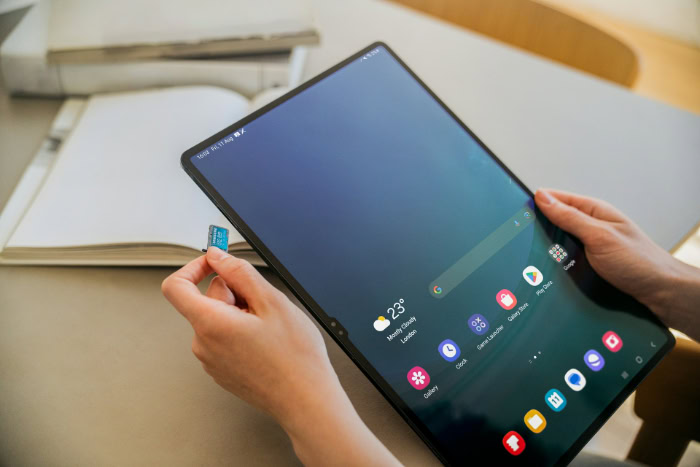
Underneath the software layer, hardware specs dictate raw processing power, visual fidelity, and battery endurance. Processor choices and display panel choices directly influence how tablets handle demanding creative software or high-framerate media playback.
Processor Architecture and Benchmark Speed
Apple equips its top tablets with custom M-series silicon, leveraging unified memory architecture and dedicated neural engines. These processors handle 4K video rendering, 3D graphics rendering, and heavy multitasking without noticeable thermal throttling.
Samsung equips its flagship tablets with high-end Qualcomm Snapdragon or top-tier Dimensity chipsets. While these processors easily run demanding Android applications and heavy games, Apple silicon maintains a clear lead in single-core benchmark scores and peak graphical throughput during sustained heavy workloads.
Display Panels, Resolution, and Aspect Ratios
Display technology showcases a major split in design priorities. Apple employs Ultra Retina XDR Tandem OLED panels on flagship Pro models and Liquid Retina LCD screens on standard tiers, utilizing a 4:3 aspect ratio.
This squarer layout suits document reading, digital drawing, and web browsing. Samsung equips its premium Galaxy Tab lineup with Dynamic AMOLED screens featuring high contrast ratios, deep black levels, and vibrant colors.
Using a 16:10 aspect ratio, Samsung screens provide a cinematic layout tailored for widescreen video streaming and side-by-side app multitasking. Refresh rates remain tier-dependent on both sides; Apple reserves its smooth 120Hz ProMotion technology strictly for iPad Pro models (while the standard iPad, iPad mini, and iPad Air remain capped at 60Hz), whereas Samsung offers 120Hz displays across its flagship Galaxy Tab S lineup, scaling down to 90Hz or 60Hz on mid-tier FE and Tab A devices.
Audio Output, Camera Systems, and Battery Endurance
Audio performance on both flagship lines relies on quad-speaker configurations tuned for wide spatial sound and high volume output without distortion. Camera placement reflects different primary orientations; Apple places front cameras along the landscape edge on modern models to center users during video calls, paired with document-scanning rear sensors.
Samsung similarly centers its front camera along the long bezel, ideal for landscape video conferencing and desktop dock usage. Battery performance remains competitive on both platforms, delivering around ten hours of web browsing or video streaming on a single charge, with efficient background power consumption during standby.
Productivity Capabilities and Application Optimization

Converting a tablet into a viable laptop replacement requires sophisticated multitasking features and professional-grade software. Desktop interface modes and window management tools attempt to bridge the gap between mobile simplicity and desktop utility.
Desktop Modes: Samsung DeX vs. Apple Stage Manager
Samsung DeX transforms the tablet interface into a full desktop environment, complete with a taskbar, customizable desktop icons, overlapping window controls, and right-click context menus. DeX operates directly on the tablet screen or projects a true dual-display workstation to an external monitor.
Apple Stage Manager offers an alternative windowing system that groups active applications into overlapping floating windows on the tablet or connected screen. While Stage Manager provides fluid visual transitions, it retains mobile window behaviors and offers less flexible window resizing compared to the traditional desktop layout provided by DeX.
Multi-Window Workflows and Workstation Setup
Multi-window efficiency differs in how each operating system handles active tasks. Samsung One UI allows users to run up to three apps simultaneously in split-screen, with additional floating pop-up views and saved multi-app pairings for instant launch.
Android handles true background processing for active tools, allowing long file transfers or downloads to continue uninterrupted. iPadOS supports Split View and Slide Over alongside Stage Manager, allowing smooth drag-and-drop actions for text and images between apps. However, iPadOS enforces stricter background application pauses to preserve battery and memory resources.
App Ecosystem Maturity and Professional Software Availability
The iPad maintains a strong position in professional application support, featuring tablet-optimized tools such as Procreate, Logic Pro, Final Cut Pro, and Affinity Suite. Developers frequently prioritize iPadOS for desktop-class creative software due to standardized hardware target specs and unified tablet API support.
Samsung’s Android platform has narrowed this gap significantly with optimized releases of Clip Studio Paint, LumaFusion, and Goodnotes. While standard office tools and document creation apps perform identically across both platforms, specialized creative software and high-end digital illustration tools offer deeper feature sets on iPadOS.
Stylus Input and Accessory Integration

Precision input tools and hardware attachments transform modern tablets from simple content viewers into capable workstations. Pen technology, active stylus sensors, and official keyboard cases determine how effectively these devices handle note-taking, illustration, and heavy typing.
Apple Pencil vs. Samsung S Pen Mechanics and Precision
Apple and Samsung use fundamentally different hardware mechanics for pen input. The Apple Pencil relies on an active Bluetooth digitizer, requiring an internal battery and magnetic charging against the tablet edge.
It delivers low latency, precise pressure tracking, and tilt detection, with higher-end models offering haptic feedback and barrel-roll gestures for digital painters. Samsung utilizes Electro-Magnetic Resonance technology developed with Wacom for the S Pen.
This technology allows the S Pen tip to track pressure and tilt without needing an internal battery charge for drawing or handwriting. The softer tip of the S Pen creates subtle friction against glass, producing a paper-like feel out of the box, whereas the firm plastic tip of the Apple Pencil glides smoothly across the glass surface.
Both systems provide excellent palm rejection, keeping unintentional hand rests from interrupting active strokes.
Stylus Value: Included Accessories vs. Separate Purchases
Financial expectations differ substantially between the two hardware families. Samsung includes an S Pen inside the box with almost every flagship and mid-tier Galaxy Tab, providing immediate pen functionality without extra expense.
This inclusion makes the Galaxy Tab line an appealing choice for students and artists managing tight budgets. Apple treats the Apple Pencil as a separate accessory across its entire iPad lineup.
Buyers must budget an additional sum on top of the tablet purchase price to acquire an Apple Pencil, which adds to the overall investment required for a complete setup.
Keyboard Attachments and External Device Connectivity
Official keyboard accessories alter how effectively each tablet handles desktop-style productivity. Apple offers the Magic Keyboard, featuring a rigid cantilever hinge, built-in trackpad, backlighting, and an auxiliary USB-C pass-through charging port.
The Magic Keyboard offers excellent typing stability on lap surfaces, though it adds noticeable weight and carries a high price tag. Samsung offers the Book Cover Keyboard, which combines a detachable magnetic keyboard deck with a kickstand back cover.
This design allows users to detach the keyboard while preserving screen protection and kickstand positioning. In terms of port versatility, both brands utilize USB-C connectors capable of data transfers, charging, and video output to external monitors, though iPad Pro models feature Thunderbolt support for higher transfer bandwidths.
Price Structure, Longevity, and Buyer Selection Criteria
Understanding product tiers, software maintenance schedules, and long-term resale rates helps buyers match their operational needs with realistic budget boundaries. Both manufacturers maintain multi-tiered lineups spanning budget options, mid-range compromises, and premium flagships.
Model Tier Breakdown Across Price Points
The entry-level tier pairs the base iPad against the Samsung Galaxy Tab A series, offering affordable access to media consumption, basic web browsing, and simple document editing. Moving into the mid-tier bracket, the iPad Air competes directly against the Galaxy Tab FE series.
These mid-range models offer upgraded processors, sharper displays, and enhanced stylus compatibility for users seeking solid performance without flagship pricing. At the top tier, the iPad Pro faces off against the Galaxy Tab Ultra series.
These flagship devices pack high-performance processors, tandem OLED or Dynamic AMOLED screens, ultra-thin enclosures, and expanded memory configurations designed for demanding professional workloads.
Software Support Lifespan and Device Resale Value
Operating system update commitments have expanded significantly across both platforms. Samsung promises seven years of major Android updates and security patches for its flagship Galaxy Tab lineup, ensuring extended hardware utility and security protection.
Apple consistently supports iPad models with five to seven years of iPadOS updates, followed by periodic security patches for older hardware versions. While both brands commit to multi-year software updates, Apple tablets generally hold higher trade-in and resale value on secondary markets over time, allowing owners to recoup a larger portion of their initial investment when upgrading.
Tablet Selection Matrix by User Profile
Selecting the ideal platform depends on primary daily tasks and personal workflow habits. Students and casual media consumers benefit from entry-level Galaxy Tabs due to the included S Pen and lower initial setup cost, or standard iPads for their long-term software stability.
Digital illustrators and graphic designers often lean toward the iPad Pro line due to broad professional app optimization in software like Procreate alongside precise pressure tracking. Mobile professionals requiring true multi-window multitasking, desktop file structures, and native dual-monitor setups will find the Galaxy Tab Ultra and Samsung DeX well suited for replacing a traditional laptop.
Conclusion
Apple and Samsung deliver distinct tablet experiences based on opposing design philosophies. The iPad leads in raw processor speed through M-series silicon, specialized creative application support, and high hardware trade-in value.
Conversely, Samsung Galaxy Tab models excel at desktop-style multitasking with Samsung DeX, flexible file management, and superior out-of-the-box value due to the included S Pen.
Choosing the right platform depends on your existing hardware ecosystem and everyday software demands. Users deeply invested in Apple hardware or professional creative suites like Procreate will find the iPad line unmatched.
Buyers who prioritize flexible file controls, wide media streaming, traditional window management, and included accessories should choose a Samsung Galaxy Tab.
Frequently Asked Questions
Does the Samsung Galaxy Tab come with a pen in the box?
Yes, Samsung includes an S Pen inside the box with almost every flagship and mid-tier Galaxy Tab. This provides immediate stylus functionality for note-taking and drawing without requiring an additional purchase. In contrast, Apple sells the Apple Pencil separately for all iPad models, adding to your total initial setup cost.
Can a Samsung tablet replace my laptop for work?
A Samsung Galaxy Tab can replace a laptop for many users thanks to Samsung DeX. Samsung DeX transforms the mobile interface into a desktop environment with a taskbar, resizable overlapping windows, and full external monitor support. Paired with a keyboard case, it handles multi-window workflows and document editing much like a traditional PC.
Which tablet is better for digital drawing and art?
The iPad is generally better for digital artists due to specialized software like Procreate and powerful M-series chips. Apple’s ecosystem offers deeper professional art software optimization and precise pressure responsiveness. However, Samsung Galaxy Tabs remain highly capable art devices, featuring an included battery-free S Pen that offers a softer, paper-like writing feel on glass.
How long do Apple and Samsung tablets get software updates?
Samsung promises seven years of major Android updates for flagship tablets, while Apple typically provides five to seven years of iPadOS support. Both manufacturers deliver excellent software longevity that protects your investment over time. While Samsung leads in guaranteed software update duration for its newest flagships, iPads tend to hold higher monetary trade-in and resale value on secondary markets.
Which display shape is better for watching movies and videos?
Samsung Galaxy Tab displays are better for watching movies because of their widescreen 16:10 aspect ratio. This wider screen ratio minimizes black letterbox bars during video playback, creating an immersive cinematic viewing experience. Conversely, the iPad uses a squarer 4:3 aspect ratio, which works better for reading documents, browsing websites, and drawing, but leaves thicker black bars on widescreen videos.
About the Author: Elizabeth Baker


