
Is a Mini PC Worth It? Pros, Cons, and Real Costs

For decades, personal computers dominated workspaces as heavy, metal towers that occupied substantial space beneath desks. Today, hardware manufacturers package capable computing power inside chassis no larger than a paperback book.
These diminutive systems offer obvious desk-clearing advantages and lower power bills, yet buyers frequently face tough choices regarding raw performance.
Key Takeaways
- Mini PCs draw only 15W to 65W of electricity under sustained loads compared to 300W to 750W for traditional towers, significantly lowering monthly power bills for continuous operation.
- Their compact 5 by 5-inch dimensions and standard VESA mounting options allow them to mount directly behind monitors to eliminate desk clutter.
- Internal solid-state storage and memory can usually be upgraded by removing the bottom panel, but processors and integrated graphics chips are permanently soldered.
- Modern integrated graphics handle dual 4K monitors, video streaming, and casual esports titles at 1080p, but cannot sustain playable frame rates in demanding modern games.
- At $200 to $450 for reliable productivity models, mini PCs cost $100 to $200 less than comparable laptops if you already own an external monitor and keyboard.
Design and Physical Characteristics of Mini PCs
Miniature desktop computers condense personal computing hardware into enclosures barely larger than a portable hard drive. While conventional computers rely on spacious metal cases to accommodate bulky components and expansion slots, these compact systems borrow engineering principles from mobile electronics.
Dimensions and Desk Space Integration
Mini PCs come in several compact profiles, ranging from ultra-small units that fit in the palm of a hand to slightly larger designs comparable to a small lunchbox. A typical unit measures roughly 5 by 5 inches with a height of around 1.5 inches, weighing between 1 lb (0.45 kg) and 2.5 lbs (1.13 kg).
This diminutive footprint allows users to reclaim substantial desk space, eliminating the clutter and dust collection associated with floor-standing towers. Many models include a flat mounting bracket compatible with standard 3-inch or 4-inch VESA patterns, enabling the device to bolt directly onto the back of a computer monitor.
When paired with wireless peripherals, the entire computer essentially disappears from view. For hybrid professionals who divide their workweek between an office and a home workstation, the low weight and small dimensions make it practical to slip the computer into a commuter bag alongside its power adapter.
Internal Hardware Architecture and Mobile Processors
To operate within such compact cases, these machines utilize mobile-grade processors developed by Intel and AMD. These processors are identical or very similar to the energy-efficient silicon engineered for modern laptops.
Rather than relying on large add-in cards for display processing, most Mini PCs depend on integrated graphics chips built directly onto the main processor die. The internal layout is tightly packed, featuring small laptop-style SO-DIMM memory slots and M.2 solid-state drive connectors arranged on a custom motherboard.
Cooling assemblies mirror laptop designs as well, combining compact copper heat pipes with small blower fans that push warm air through side or rear exhaust vents.
Power Consumption and Energy Efficiency
A notable advantage of mobile-grade architecture is low energy consumption. While a traditional full-sized desktop tower draws between 300W and 750W or more during active use, a standard Mini PC typically idles around 5W to 10W and consumes only 15W to 65W under sustained processing loads.
Running one of these efficient units daily results in measurable savings on monthly utility statements, particularly in regions with high electricity rates. This low draw also makes the hardware an exceptional choice for tasks that demand continuous operation, such as managing local file storage, downloading scheduled backups, or routing home automation devices overnight without causing significant spikes in power bills.
Performance Scope Across Common Workloads

Modern processor engineering has significantly elevated the computing power of mobile chips, allowing compact desktops to handle far more than basic administrative tasks. Everyday productivity, media consumption, and creative workflows run smoothly as long as user expectations align with the physical capabilities of integrated hardware.
Standard Productivity and Web Operations
For routine office duties and browsing, modern Mini PCs deliver immediate, fluid responsiveness. A mid-range processor paired with 16GB of system memory easily handles dozens of open browser tabs, extensive spreadsheet calculations, and cloud-based office suites simultaneously.
Background tasks like file synchronization and system updates rarely cause the operating system to stutter. Furthermore, current chipsets include display controllers capable of driving two or three external monitors at 4K resolution at 60Hz.
This multi-display capability gives office workers ample visual space for video conferences, research documents, and communications platforms running side by side without slowing down the system.
Multimedia Playback and Light Creative Work
Equipped with dedicated hardware media decoders, these computers excel at video playback. Streaming 4K resolution content encoded in modern formats like AV1 or HEVC consumes minimal processor overhead, resulting in smooth playback across video streaming services without dropped frames.
For creative applications, a Mini PC effortlessly handles photo editing within applications like Adobe Photoshop or Lightroom, as well as vector illustrations and multi-track audio editing. Bottlenecks begin to appear during intensive video production.
While short 1080p clips render quickly, editing multi-layer 4K video timelines leads to dropped playback frames, and file export operations take significantly longer compared to full-sized editing workstations equipped with discrete graphics cards.
Graphics Output and Modern Video Game Execution
Graphics processing remains the primary dividing line between compact units and traditional towers. Modern integrated graphical processors, such as AMD Radeon 780M or Intel Arc graphics, easily manage popular competitive multiplayer titles.
Games like League of Legends, Rocket League, and Counter-Strike 2 achieve playable frame rates between 45 FPS and 60 FPS at 1080p resolution with moderate graphical settings. Retro gaming emulation up to the PlayStation 2 and Nintendo GameCube eras also runs smoothly.
However, demanding modern releases require major graphical compromises. High-fidelity titles often fail to sustain 30 FPS unless the rendering resolution drops to 720p with upscaling technology enabled, and advanced visual features like ray tracing remain entirely out of reach.
Hardware Limitations and Practical Trade-Offs
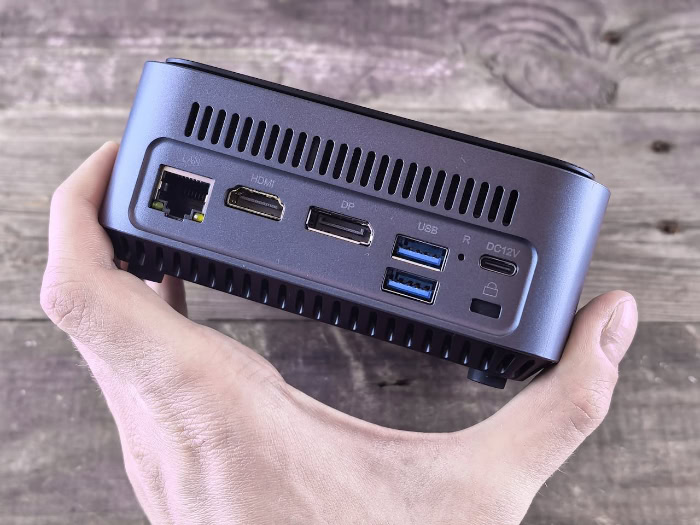
Packing capable desktop components into an enclosure the size of a book requires real engineering compromises. Prospective buyers must balance the convenience of a compact footprint against clear physical boundaries regarding cooling efficiency, long-term serviceability, and peripheral expansion.
Thermal Management and Fan Noise Levels
Physics dictates that small enclosures struggle with heat dissipation. Because air volume inside the chassis is extremely limited, the internal components heat up rapidly when placed under heavy computing loads.
To prevent hardware damage, the system processor will engage in thermal throttling, temporarily lowering its clock speeds to reduce heat generation once temperatures reach maximum thresholds. Furthermore, small blower fans must spin at high speeds to force hot air out through narrow ventilation grilles.
While the computer may run near-silently while browsing the web, prolonged tasks like video transcoding or 3D rendering can generate a noticeable, high-pitched fan whine that can distract users in quiet environments.
Component Upgradability and Repair Restrictions
Unlike modular desktop computers, Mini PCs offer limited avenues for hardware maintenance and component updates. Most models allow users to remove the bottom panel to replace or expand the system memory modules and M.2 storage drives.
Beyond those two components, the hardware is essentially fixed. The central processor and integrated graphics chip are permanently soldered to the motherboard, and the motherboard itself uses a custom shape that fits only that specific case.
If the motherboard or processor fails after the manufacturer warranty period expires, finding exact replacement parts is difficult, often making total system replacement the only practical option.
Peripheral Dependencies and Connectivity Constraints
A Mini PC arrives as a standalone computational box, meaning buyers must supply every accessory required for a complete workstation. You need to provide an external display, mouse, keyboard, audio speakers, and a separate webcam for video calls.
While compact chassis pack an impressive array of connection options into limited surface space, including USB-A, USB-C, HDMI, DisplayPort, and wired Ethernet ports, connector counts remain finite. Users with extensive external gear, such as audio interfaces, multiple external hard drives, drawing tablets, and memory card readers, will likely exhaust the built-in ports quickly, requiring the purchase of an external USB hub or a powered docking station.
Comparative Analysis with Alternative Systems

Selecting the best computer requires comparing different form factors against your specific workspace layout and daily workload. Evaluating how a Mini PC performs against standard desktops, portable laptops, and macOS alternatives helps place its value in clear perspective.
Comparison with Traditional Desktop Towers
Traditional desktop towers offer spacious interiors capable of housing large cooling radiators, full-sized power supplies, and bulky discrete graphics cards. As a result, towers deliver significantly higher raw graphical horsepower and processing headroom for the money.
They also provide complete modularity, allowing owners to upgrade components one piece at a time over several years. In contrast, Mini PCs trade raw compute power and upgrade flexibility for a footprint that takes up less than 10% of the desk area required by an average mid-tower case.
For consumers who value an orderly desk and do not engage in heavy 3D gaming, the space savings often outweigh the lost graphics potential.
Comparison with Standard Laptops
Laptops share the same energy-efficient mobile processors found in Mini PCs, but they include an integrated display, keyboard, trackpad, and battery. This design makes laptops the clear choice for mobile use away from a desk.
However, Mini PCs hold a distinct price advantage for users who plan to keep their computer stationary at a desk with existing monitors and input peripherals. Because Mini PC manufacturers do not need to factor in the expense of displays, trackpads, and lithium-ion batteries, these units typically cost $100 to $200 less than a similarly configured laptop.
Moreover, operating exclusively on wall power eliminates concerns about battery degradation, swelling, or reduced battery capacity after three or four years of constant charging.
Comparison with Apple Mac Mini Platforms
Apple offers a competitive entry in this market with the Mac Mini, powered by custom Apple silicon processors. The Mac Mini delivers outstanding energy efficiency, premium metal construction, and high performance per watt, especially for creative multimedia production within macOS.
On the other hand, Windows and Linux Mini PCs present greater software flexibility and significantly lower initial purchase costs. An entry-level Windows unit often costs between $200 and $400, while the base Mac Mini now starts at $899.
Upgrading system memory and storage is also substantially more affordable on PC platforms, where owners can install standard aftermarket SSDs and RAM for a fraction of the premium fees charged for factory-sealed Apple configurations.
User Suitability and Purchase Decision Framework

Determining whether a miniature computer represents a sensible purchase depends on matching hardware capabilities with realistic computing habits. Certain home and office setups benefit immensely from a downsized design, whereas other scenarios clearly favor traditional computing platforms.
Ideal Use Cases: Home Office and General Household Needs
Remote workers, students, and families looking for a clean, shared computer setup represent the ideal demographic for a Mini PC. Tasks like drafting documents, managing family finances, writing research papers, and attending remote classes require modest processing power that these systems handle effortlessly.
Their low noise levels, tiny physical profile, and minimal power draw make them unobtrusive fixtures in a home office or living area. A reliable configuration suitable for general household productivity typically ranges from $250 to $450, offering an economical entry point into desktop computing.
Ideal Use Cases: Home Media Centers and Dedicated Low-Power Servers
Mini PCs serve as outstanding living room entertainment hubs and dedicated home servers. Because they feature silent or near-silent idle profiles, small dimensions, and native 4K video playback via HDMI outputs, they tuck neatly into television consoles as dedicated Home Theater PCs (HTPCs).
Enthusiasts frequently deploy them as always-on utility hubs running 24 hours a day. They effortlessly manage lightweight network storage (NAS), stream home media libraries through platforms like Plex, run network-wide ad-blocking software like Pi-hole, and control smart home automation bridges without heating up living spaces or driving up utility costs.
Scenarios Where Alternative Systems Are the Better Investment
Compact computers are not universally suitable. Users who spend extensive time running demanding modern video games, complex 3D computer graphics software, or heavy engineering simulations require the cooling volume and high wattage of a full-sized desktop tower equipped with a discrete graphics card.
Similarly, frequent business travelers and mobile students who need computing access in transit, in lecture halls, or in coffee shops should invest in a standard laptop with an integrated screen and battery.
Follow these five steps to determine if a Mini PC meets your specific computing requirements:
- List the primary software applications you run daily to identify whether your tasks require integrated graphics or a powerful discrete graphics card.
- Check whether you already own a computer monitor, keyboard, mouse, and audio speakers, or calculate the added cost of buying those peripherals.
- Evaluate your physical workspace to determine if desk space limitations make a hidden or monitor-mounted computer advantageous.
- Determine whether you need to use your computer while moving between locations untethered from a wall outlet.
- Decide whether you plan to upgrade core components like the processor and graphics card individually over the next five years.
Conclusion
Mini PCs deliver a practical computing balance by packing capable processing power into an enclosure small enough to hide behind a monitor. Their primary strengths center on desk-clearing space conservation, aggressive power efficiency that cuts utility bills, and initial purchase costs substantially lower than comparable laptops or full-sized towers.
However, physical constraints impose clear ceilings on what these machines can accomplish. Tightly packed enclosures inevitably restrict cooling capacity, leading to thermal throttling during extended heavy processing, while soldered internal components prevent long-term graphics or processor upgrades.
A Mini PC represents an exceptional value for home office workers, students, living room media centers, and continuous low-power server operations. For these routine workloads, paying for a bulky tower or an expensive laptop battery is unnecessary.
Conversely, traditional desktop towers remain the superior choice for users who demand high-end gaming performance, complex 3D rendering, and modular part-by-part upgrade paths. Matching your daily software requirements with these physical boundaries ensures you invest in the exact amount of computer you need without wasting desk space or money.
Frequently Asked Questions
Can a mini PC replace my everyday desktop computer?
Yes, a mini PC can easily replace a full-sized desktop for typical daily tasks like web browsing, document editing, and video streaming. Modern mobile processors handle multi-tab web sessions and dual-monitor office workflows smoothly. However, you will sacrifice the modularity and raw graphics performance required for competitive modern gaming or complex video rendering.
Can you actually play games on a mini PC?
You can play casual games, esports titles, and older games, but mini PCs struggle with demanding modern blockbuster releases. Integrated graphics chips comfortably run titles like League of Legends and Rocket League at 1080p resolution. Demanding games with advanced visual effects require lowering settings to minimum levels, often resulting in choppy frame rates below 30 FPS.
Can I upgrade the parts inside a mini PC later?
You can usually upgrade the internal storage drive and memory, but you cannot upgrade the processor or graphics card. Most models provide accessible slots for standard M.2 solid-state drives and SO-DIMM RAM sticks. However, the processor and graphics hardware are permanently soldered onto a custom motherboard, preventing any core hardware upgrades.
Do mini PCs get too hot or loud under heavy use?
Mini PCs do run warm under heavy computing workloads, and their small fans can produce an audible high-pitched hum. Because compact cases have minimal airflow, prolonged video rendering pushes components toward their thermal limits, triggering automatic speed reductions to cool down. During routine web browsing or streaming, however, they operate almost completely silently.
Do mini PCs come with a monitor, keyboard, and mouse?
No, mini PCs are sold strictly as standalone computer boxes and do not include monitors, keyboards, or mice. You must provide your own display screen, input devices, and audio equipment, or purchase them separately. You should calculate the extra expense of these external accessories before deciding between a mini PC and a laptop.
About the Author: Julio Caesar


