
Is a UPS (Uninterruptible Power Supply) Worth It? Explained

A sudden flicker of the lights might seem harmless, but that minor voltage drop can cause permanent hardware damage or immediate data loss for sensitive electronics. As aging grid infrastructure makes unexpected power interruptions more frequent, relying solely on a basic power strip leaves your computer setup entirely exposed.
An Uninterruptible Power Supply (UPS) promises a reliable safety net by instantly providing backup battery power the second the wall outlet fails. Yet, these heavy units demand a notable financial commitment and require ongoing maintenance like scheduled battery replacements.
This raises a practical question for everyday consumers and professionals regarding the true value of battery backups.
Key Takeaways
- Standard surge protectors only block sudden voltage spikes, whereas a UPS contains an internal battery to keep your devices running during complete blackouts and brownouts.
- Frequent voltage drops force your computer’s power supply to draw extra current, generating excess heat that degrades delicate internal components over time.
- The internal lead-acid or lithium cells in a backup unit degrade through normal use and require a full replacement every three to five years.
- You must calculate the combined peak wattage of your connected gear to ensure you buy a unit with a large enough capacity to support the electrical load.
- High-end gaming rigs and modern workstations require pure sine wave models to prevent sudden system crashes triggered by active power factor correction.
How a UPS Differs from a Surge Protector
Many people confuse surge protectors with battery backups, assuming any specialized power strip offers complete protection. While both plug into a wall outlet and provide multiple receptacles for your gear, their internal mechanics serve completely different purposes.
A surge protector acts as a defensive wall against sudden spikes in voltage. A UPS functions as an active power reservoir designed to step in the moment the main supply drops.
The Limits of Standard Surge Protectors
Traditional power strips and surge protectors are built with a single defensive goal. They shield connected devices from massive voltage spikes caused by lightning strikes or sudden grid surges.
They absorb this excess energy and prevent it from frying your motherboard or power supply. However, these strips offer absolutely zero protection during a complete blackout or a voltage drop, commonly known as a brownout.
If the power cuts out entirely, your equipment shuts off instantly.
Battery Backup and Power Delivery
A UPS resolves the limitations of standard power strips by acting as an intermediary power source. It contains a heavy internal battery that sits between your wall outlet and your computer.
Under normal conditions, electricity flows through the unit while simultaneously keeping the internal battery fully charged. The instant the main grid fails, the system detects the drop and switches to battery power in a fraction of a second.
This seamless transition keeps your devices running long enough for you to save your work and execute a safe shutdown procedure.
The Three UPS Topologies
Not all battery backups operate the same way. They are categorized into three distinct designs based on how they manage power transition.
Standby, or offline, units represent the most basic tier. They pass grid power directly to your devices and only switch to the battery when they detect an outage.
This design works well for minor devices like routers or basic office PCs. Line-interactive models offer a substantial upgrade through Automatic Voltage Regulation (AVR).
This feature smoothes out minor power sags and swells without engaging the battery, saving wear and tear on the internal cells. Online, or double-conversion, units provide continuous, zero-transfer-time power filtering.
They constantly convert AC power to DC and back to AC, delivering absolutely flawless electricity suited for highly sensitive enterprise equipment.
The Hazards: What Happens to Electronics Without a UPS?

Trusting the standard power grid without a backup leaves expensive hardware vulnerable to several invisible threats. Power anomalies rarely announce themselves before striking, and the damage they cause extends far beyond the immediate annoyance of a restarting computer.
Electrical instability degrades components over time and poses an immediate threat to your data.
Data Corruption and System File Integrity
Abrupt power cuts are incredibly destructive to storage drives. Solid-State Drives (SSDs) and traditional Hard Disk Drives (HDDs) perform complex write-cycles in the background while your computer is running. If electricity vanishes in the middle of one of these cycles, the drive drops the operation instantly.
This sudden halt causes severe data corruption, corrupted system files, or even catastrophic failure of the entire storage volume. Rebuilding a crashed operating system or paying for professional data recovery costs significantly more than most preventative hardware.
The Silent Damage of Brownouts (Under-Voltage)
Complete blackouts are obvious, but low voltage events are often completely ignored. During a brownout, the electricity from the wall dips below standard operational levels.
This under-voltage scenario is exceptionally dangerous because your computer’s power supply still attempts to meet the wattage demands of the internal components. To compensate for the lack of voltage, the system pulls more current.
This increased current generates excess heat, quietly stressing capacitors and degrading the overall health of your machine over months or years.
Cumulative Wear from “Dirty Power”
The electricity flowing into your home is rarely a perfect, steady stream. It fluctuates continuously, creating minor electrical noise, harmonics, and subtle frequency shifts collectively known as dirty power.
While heavy home appliances ignore these fluctuations, sensitive microprocessors and delicate circuit boards are highly reactive to them. Continuous exposure to dirty power strains internal regulators on motherboards and graphics cards.
A quality battery backup intercepts and filters these imperfections to deliver a clean sine wave to your most valuable electronics.
The True Cost of Ownership: Initial and Ongoing Expenses
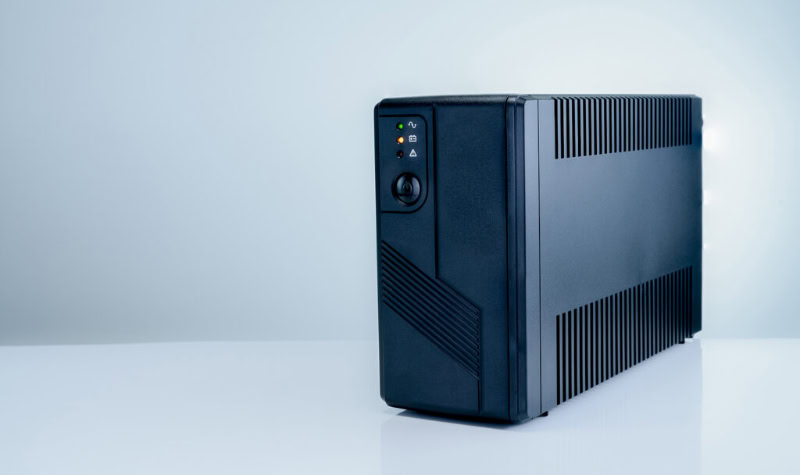
Purchasing a battery backup requires a realistic look at both your immediate budget and future maintenance expectations. These units are complex physical appliances containing heavy chemical batteries and advanced circuitry.
Calculating the true financial commitment means looking beyond the sticker price on the box.
Upfront Pricing and Power Sizing
The initial cost of a unit is directly tied to its maximum power output, measured in Volt-Amperes (VA) and Watts. If you run a high-end workstation with multiple monitors, you require a unit with a massive internal capacity to handle the electrical load.
Buying an undersized unit will trigger overload alarms and fail to keep the system running during an outage. Higher capacity units demand larger, heavier internal components, which significantly inflates the purchase price and shipping costs.
Battery Degradation and Replacement Cycles
A UPS is not a one-time purchase. The internal lead-acid or lithium cells degrade over time, losing their ability to hold a reliable charge.
For most consumer models, the battery block requires a complete replacement every three to five years. Failing to replace an expired battery turns the unit into nothing more than an expensive surge protector.
You must factor the cost of these replacement cartridges into your long-term hardware budget.
Operational Footprint (Noise, Heat, and Vampire Draw)
Integrating a massive battery block into a home setup introduces a few physical realities. These units are exceptionally heavy and difficult to hide under a standard desk.
During active operation or charging, internal fans often generate noticeable background noise. Furthermore, the constant monitoring circuitry and trickle charging create a permanent vampire draw.
The device continuously consumes a small amount of electricity even when your connected computers are entirely powered down.
Who Benefits Most from a UPS?

Not every computer user genuinely needs robust power protection. The necessity of a battery backup depends heavily on exactly how you use your machines and the specific types of hardware plugged into the wall.
Certain workflows and hardware configurations make an uninterruptible power supply absolutely essential.
Remote Professionals and Home Offices
If your income relies on a computer, workflow continuity is paramount. A brief neighborhood power flicker can instantly wipe out hours of unsaved progress on a massive spreadsheet or video render.
Beyond preventing lost work, connecting a modem and router to a backup unit guarantees your internet connection remains active during minor blackouts. This ensures you never abruptly drop out of an important client call or a crucial virtual meeting.
PC Gamers and Enthusiasts
High-end gaming rigs house expensive graphics cards and processors that are highly sensitive to sudden thermal shock and power loss. Additionally, enthusiast systems often utilize power supplies equipped with Active Power Factor Correction (Active PFC).
These specific power supplies occasionally conflict with cheaper backup units that output simulated sine waves instead of pure sine waves. Enthusiasts must specifically invest in pure sine wave models to avoid sudden system resets during a grid failure.
Network Storage (NAS) and Server Users
Home media servers and Network Attached Storage (NAS) units manage arrays of mechanical hard drives running in complex RAID configurations. A sudden power loss during a read or write operation easily fractures the synchronization across these multiple disks.
A dedicated backup unit communicates directly with the NAS via a USB protocol. If the wall power fails, the battery signals the server to securely save its state and perform an elegant, automated shutdown before the reserve energy runs out.
Is a UPS Worth It for Your Setup?

Determining the final value of a battery backup involves a practical evaluation of your specific living situation and hardware ecosystem. You can remove the guesswork from the purchasing process by analyzing your localized risks against the total cost of the equipment.
Evaluating Your Local Grid Reliability
The absolute necessity of power protection varies drastically based on your geographic location. Evaluate your regional weather patterns and neighborhood infrastructure.
If you experience intense seasonal thunderstorms, high winds, or rolling blackouts during the summer, the grid is inherently unreliable. Conversely, if you live in a modern building with stable underground wiring and cannot remember the last time the lights flickered, your immediate threat level is substantially lower.
The Cost-to-Risk Ratio Assessment
Deciding to buy protective hardware requires a simple financial calculation. Tally the total replacement value of your computer, monitors, and attached peripherals.
Next, assign a personal monetary value to the data currently sitting on your hard drives. Compare that total figure against the upfront cost of a properly sized battery backup plus one scheduled battery replacement over a five-year period.
If the cost of the backup unit is a tiny fraction of the potential hardware and data loss, the purchase is a logical necessity.
Alternative Risk-Mitigation Strategies
For casual users with inexpensive laptops or basic web-browsing desktops, a heavy battery backup might be overkill. Laptops already feature built-in batteries that inherently protect against sudden outages.
If your primary concern is data loss on a desktop, pairing a high-quality, reputable surge protector with automated, real-time cloud backups is often a perfectly viable strategy. This alternative approach shields against destructive voltage spikes while ensuring your files remain secure offsite for a fraction of the cost.
Conclusion
A battery backup rarely functions as an optional luxury upgrade for your workspace. Instead, it serves as a strict hardware insurance policy whose actual value directly corresponds to the severity of your local grid anomalies and the critical nature of your daily workload.
If you rely on an expensive graphics workstation or a network storage server holding irreplaceable files, leaving those devices exposed to sudden power drops is a massive gamble. Ultimately, securing the most cost-effective protection requires correctly matching the specific topology and wattage capacity of the unit to your exact hardware demands.
Buying the correct model ensures your delicate electronics survive severe electrical storms without wasting your budget on unnecessary enterprise-level features.
Frequently Asked Questions
How long will a UPS keep my computer running during an outage?
A standard unit typically provides five to fifteen minutes of backup power for a desktop computer. This short window is intentionally designed to give you just enough time to save your open files and safely shut down the operating system. Larger batteries offer extended runtimes for additional costs.
Do I need a battery backup if I only use a laptop?
You do not strictly need a backup unit for a laptop since it already contains an internal battery. If the wall power fails, your laptop automatically switches to its own power supply without interrupting your work. A basic surge protector is usually sufficient for charging laptop computers safely.
Can I plug my standard power strip into a UPS?
You should never plug a secondary power strip or surge protector directly into a battery backup unit. Doing so creates a dangerous daisy chain that overloads the internal circuitry and voids your warranty. Always plug your essential devices directly into the designated battery receptacles on the main unit.
Why does my backup unit make a constant beeping sound?
A continuous or repeating beep indicates that the unit has switched to battery power or detected a critical fault. If the power is currently out, the alarm warns you that your available runtime is rapidly draining. If the grid is active, you likely need a battery replacement.
How do I know what size backup to buy for my PC?
You must calculate the total maximum wattage of your computer and your monitors combined. Once you have that number, purchase a unit with a maximum wattage rating that is at least twenty percent higher than your hardware demands. This buffer prevents unexpected overloads during heavy processing tasks.
About the Author: Julio Caesar


