
Is an NVMe SSD Worth It? Let’s Find Out

When your computer lags during boot-up or file transfers, your entire productivity suffers. Upgrading storage is the easiest way to fix this slowdown, but the rise of ultra-fast NVMe drives leaves many buyers questioning if the performance gains justify the cost over standard SATA options.
While older SATA drives remain common in budget setups, newer drives boast theoretical speeds that look impressive on paper. Yet, raw benchmarks do not always translate to a noticeable difference when opening web browsers or launching casual games.
Evaluating how these modern drives perform under workloads, gaming setups, and professional tasks clarifies if this upgrade will actually make your daily system feel faster or simply drain your wallet.
Key Takeaways
- NVMe drives communicate directly with the processor using the PCIe interface, bypassing the legacy AHCI bottleneck that caps older SATA drives at roughly 600 MB/s.
- An M.2 drive shape does not guarantee fast NVMe performance, as M.2 slots on motherboards can host either SATA or NVMe drives depending on compatibility.
- Everyday computer tasks like booting up, loading web browsers, and opening office software do not benefit significantly from NVMe speeds over standard SATA SSDs.
- Modern gaming benefits from NVMe storage through faster load times and advanced asset streaming technologies like Microsoft DirectStorage, which reduce graphical stuttering.
- Creative professionals working with raw 4K or 8K video files require the high sequential read and write speeds of NVMe drives to prevent dropped frames during editing.
Understanding the Technology
To make sense of modern storage options, it helps to look at how data travels between your solid-state drive and your processor. For years, solid-state drives relied on older communication pathways built for mechanical hard drives.
Today, newer protocols bypass these legacy limitations to unleash the full potential of flash memory.
The Protocol Difference
The older mechanism, Advanced Host Controller Interface (AHCI), was designed when spinning platters and mechanical read-write heads defined data storage. AHCI manages data queueing in a highly linear fashion, which works well for physical disks but creates a bottleneck for solid-state technology.
Non-Volatile Memory Express (NVMe) was built specifically for flash memory. It allows for massive parallel processing, letting your system handle tens of thousands of data queues simultaneously rather than waiting on a single line.
This structural change allows modern storage to communicate directly with the processor, removing the artificial speed limits of older systems.
Form Factors
A common source of confusion is the distinction between a drive’s physical shape, known as its form factor, and the technology it uses to transfer data. A 2.5-inch drive looks like a small metal brick and connects via cables, almost always using the slower SATA interface.
An M.2 drive is a small, flat card that plugs directly into the motherboard, resembling a stick of chewing gum. Crucially, an M.2 slot can support either SATA or NVMe data transfers, depending on the motherboard and the drive itself.
Buying an M.2 drive does not guarantee NVMe speeds unless the drive specifically utilizes the NVMe protocol.
Theoretical vs. Real-world Bandwidth
The physical limits of these technologies show a stark contrast when looking at bandwidth numbers. The SATA III standard caps out at a maximum speed of roughly 550 to 600 megabytes per second (MB/s).
Because the physical connection cannot pass data any faster, even the best SATA drives hit this wall. NVMe drives connect via the PCI Express (PCIe) lanes, allowing speeds to scale from 3,500 MB/s on older generations to well over 7,000 MB/s on newer hardware.
While these numbers look incredible in promotional materials, the practical speed you experience in daily use depends heavily on the tasks you perform.
Performance in Daily Use and General Productivity

Most people use their computers for web browsing, writing documents, and managing files. While high-speed storage sounds beneficial for these tasks, the actual impact on daily productivity is often more subtle than the raw specifications suggest.
Operating System Boot Times
Moving from a traditional mechanical hard drive to a SATA solid-state drive cuts startup times from minutes to seconds, representing a massive shift in usability. However, upgrading from a SATA solid-state drive to an NVMe drive yields much smaller improvements.
While an NVMe drive can load system files faster, the boot process is also limited by motherboard initialization and hardware checks. As a result, you might only see a difference of one or two seconds when booting into Windows or macOS, a change that is barely noticeable in everyday life.
Everyday Applications and Multitasking
For applications like office software, web browsers, and media players, the files being loaded are relatively small. These programs load almost instantly on any solid-state drive.
Because the processor can process the small amount of data from a SATA drive in a fraction of a second, the speed of an NVMe drive offers no visible benefit here. Even when multitasking heavily with multiple productivity tools open, your system memory and processor capabilities matter far more than having ultra-high-speed storage.
Understanding the Diminishing Returns
This pattern illustrates the concept of diminishing returns in computer hardware. Synthetic benchmarks are software tools designed to push storage drives to their absolute limits, generating massive numbers that make NVMe drives look ten times faster than SATA alternatives.
In reality, everyday software rarely requests data in the massive, continuous blocks that show off these speeds. For small, scattered files, both drive types perform similarly, meaning the average user will not feel a speed boost that matches the higher price tag.
Performance in Gaming and Demanding Workloads

While casual tasks do not push modern storage to its limits, certain applications demand massive amounts of data as quickly as possible. For gamers and professionals handling complex tasks, the advanced speed of NVMe drives becomes far more valuable.
Gaming Load Times and Texture Streaming
Modern video games feature massive worlds filled with highly detailed textures and audio files. Traditional storage can cause stuttering or long loading screens as the system struggles to pull these assets into memory.
NVMe drives significantly reduce load times, getting players into the action faster. Furthermore, technologies like Microsoft DirectStorage allow the graphics card to pull data directly from an NVMe drive without taxing the processor.
This enables seamless asset streaming, reducing pop-in and allowing developers to create larger, more detailed game environments.
Content Creation and Media Editing
Creative professionals working with high-resolution media see some of the greatest benefits from NVMe storage. Editing 4K or 8K video involves scrubbing through massive files that require immense sequential read and write speeds.
A standard SATA drive will quickly choke under this load, causing dropped frames and laggy previews. An NVMe drive provides the necessary bandwidth to handle multiple streams of raw video simultaneously, making rendering and exporting tasks significantly faster.
High-Data Workloads
Software development, database administration, and running virtual machines all place a unique strain on storage systems. These tasks require a high volume of input/output operations per second, commonly referred to as IOPS.
Because NVMe drives can handle thousands of data requests at the same time, they manage databases and compile code much faster than older drives. Virtual machines also run more smoothly, as the storage can keep up with the demands of multiple operating systems running on a single physical machine.
Hardware Compatibility, PCIe Generations, and Installation
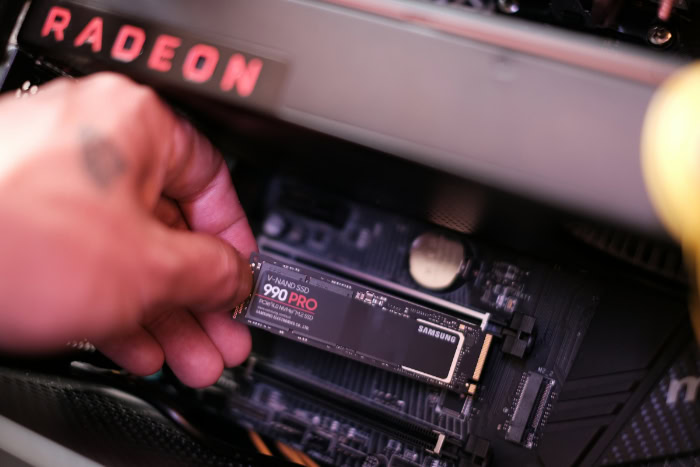
Choosing a fast drive is only half the battle; ensuring it works with your existing hardware is equally important. Compatibility, motherboard configurations, and thermal requirements all play a role in physical installation.
Motherboard and Slot Compatibility
Before purchasing an NVMe drive, you must confirm that your motherboard has an available M.2 slot that supports the NVMe protocol, often designated as an M-key slot. Some older motherboards feature M.2 slots that only support SATA drives, while others share bandwidth with other components.
For instance, plugging an NVMe drive into certain slots might disable some SATA ports or reduce the bandwidth available to your graphics card. Checking your motherboard manual is essential to avoid these lane distribution conflicts.
PCIe Generations (Gen 3, Gen 4, and Gen 5)
NVMe drives rely on the PCI Express bus, which has evolved through several generations. PCIe Gen 3 drives offer plenty of speed for most users, while Gen 4 and the newer Gen 5 drives push speeds to extreme levels.
These generations are backward and forward compatible, meaning you can plug a Gen 4 drive into a Gen 3 slot, though the drive will be limited to Gen 3 speeds. To get the maximum performance advertised on a drive’s box, both your motherboard and processor must support the corresponding PCIe generation.
Thermal Management and Cooling
Operating at extreme speeds causes NVMe drives to generate significantly more heat than their SATA counterparts. Under heavy, sustained workloads, high temperatures can cause the drive to throttle its speed to protect itself from damage.
Many mid-range and high-end motherboards include built-in metal heatsinks to help dissipate this heat. If your motherboard lacks these, or if you plan on using a high-speed Gen 4 or Gen 5 drive for intensive tasks, purchasing a drive with a pre-installed heatsink is a smart choice to maintain peak performance.
Price-to-Performance and Value Assessment

With multiple storage options available, finding the right balance between cost and actual performance is crucial for any budget. Looking closely at market trends helps clarify where to spend your money.
The Shifting Market: Closing the Price Gap
In the past, NVMe drives carried a massive price premium, making them a luxury reserved for high-end systems. Today, the price gap between standard SATA SSDs and entry-level NVMe drives has shrunk significantly.
In many cases, a basic NVMe drive costs only slightly more than a SATA drive of the same capacity. This shifting market makes NVMe the default choice for anyone building a new system, as the minor price difference makes opting for older technology hard to justify.
Budget NVMe vs. Premium NVMe
When shopping for NVMe drives, you will encounter cheap options and expensive, premium models. The primary difference often lies in the presence of an onboard DRAM cache.
Premium drives use DRAM to keep track of where data is stored, which keeps transfer speeds high during long file transfers. Budget, DRAM-less drives use a technology called Host Memory Buffer to borrow a tiny amount of your system’s RAM instead.
For everyday tasks and gaming, a cheaper DRAM-less drive performs wonderfully, while professionals handling massive files daily should invest in a premium drive with dedicated DRAM.
Determining Your Upgrade Path
If you are building a completely new computer, buying an NVMe drive is almost always the right decision due to the small price difference. However, if you already have a working computer with a SATA solid-state drive, upgrading to an NVMe drive might not offer the dramatic speed boost you expect.
Unless you are running out of storage space or frequently editing high-resolution video, keeping your existing SATA drive as your primary system drive is a sensible choice that saves money for other hardware upgrades.
Conclusion
Selecting the right storage option depends entirely on how you use your computer. While NVMe technology offers massive theoretical bandwidth up to 7,000 MB/s, standard SATA solid-state drives remain limited to around 600 MB/s.
However, these massive speed gaps only matter if your daily workload actually demands them. For casual users who primarily browse the web, write documents, and stream media, the differences in daily operation are virtually imperceptible.
If you are building a new computer or upgrading a system for modern gaming, an entry-level NVMe drive is the most logical choice because the price difference compared to SATA has narrowed significantly. For video editors, software developers, and database managers, investing in a high-end NVMe drive with an onboard DRAM cache is highly beneficial.
It prevents thermal throttling during long, intense transfers and provides the high performance required to keep up with demanding software.
Frequently Asked Questions
Will an NVMe drive make my computer boot up faster?
Yes, an NVMe drive will speed up your boot times, but the difference compared to a standard solid-state drive is usually only a few seconds. Motherboard startup checks limit boot speeds far more than your storage drive. You will only notice a major difference if you are upgrading from a slow mechanical hard drive.
Can I put an NVMe SSD into any motherboard?
No, your motherboard must have an M.2 slot that specifically supports the NVMe protocol to use these drives. Older motherboards might have M.2 slots that only support SATA speeds, which will not work with an NVMe drive. Always verify your motherboard specifications and check for slot compatibility before purchasing.
Do I need a heatsink for my NVMe SSD?
You do not always need a heatsink, but they are highly recommended for faster PCI Express generation four and five drives under heavy workloads. Sustained operations like video rendering make these drives run hot, which causes them to slow down to protect themselves. Many modern motherboards come with built-in metal cooling covers that solve this problem.
Is a DRAM-less NVMe SSD okay for gaming?
Yes, a DRAM-less NVMe drive is fine for gaming and will load your games just as fast as premium models. These budget drives utilize your computer’s main system memory for basic tasks, which works beautifully for gaming since games mostly read data. You only need dedicated onboard DRAM if you regularly copy or write massive files.
Should I upgrade my working SATA SSD to an NVMe drive?
No, you should not upgrade a working SATA solid-state drive unless you require more storage space or regularly edit ultra-high-definition video. For daily computer use, the speed difference is practically imperceptible. Save your budget for components that will offer a more noticeable upgrade, such as a faster processor or graphics card.
About the Author: Elizabeth Baker


