
Kindle vs. Kobo: Picking the Right E-Reader

Trading heavy stacks of paperbacks for an e-ink screen is a satisfying upgrade, but choosing the right device dictates how you access and enjoy your entire library. Committing to an e-reader means committing to its ecosystem, making your initial hardware choice a crucial decision. Amazon Kindle and Rakuten Kobo dominate this space, each offering distinct approaches to reading.
While physical books remain cherished, modern e-ink displays provide a lightweight, glare-free experience replicating the look of real paper. However, these two brands differ drastically in file compatibility, subscription models, and public library integration.
Key Takeaways
- Amazon Kindle requires you to pay an extra fee to remove lock screen advertisements, whereas all Rakuten Kobo devices offer a completely ad-free experience by default.
- Readers outside the United States should choose Kobo for public library access, as its built-in OverDrive integration works internationally while Kindle Libby support is heavily geographically restricted.
- Kobo e-readers natively process a wide variety of independent file formats like EPUB and PDF, making them ideal for users who prefer dragging and dropping personal files directly via USB.
- The Amazon Kindle ecosystem strictly locks your purchased books to their proprietary devices and applications, preventing you from legally migrating your library to competing hardware.
- Kobo provides advanced typographical controls through its TypeGenius software, allowing you to fine-tune font weight and margins much more precisely than the standard Kindle interface permits.
Ecosystem and Content Access
Selecting an e-reader means choosing a digital storefront that dictates how you buy and manage your reading material. Amazon and Rakuten operate distinct retail environments with their own subscription models and rules regarding digital ownership.
Store Catalog and Book Selection
The Amazon Kindle Store is massive. It offers millions of titles and holds a monopoly on books enrolled in Kindle Direct Publishing Select.
This program requires indie authors to sell exclusively through Amazon, meaning many self-published titles simply do not exist on other platforms. Rakuten Kobo operates a highly competitive eBookstore with a strong international presence.
While it might miss out on those Amazon-exclusive indie books, Kobo excels at securing localized content and offers a vast catalog that caters to readers across different regions globally.
Subscription Services: Kindle Unlimited vs. Kobo Plus
Both brands offer monthly subscription services for heavy readers. Kindle Unlimited provides access to millions of digital books and thousands of audiobooks for a flat monthly fee. This service is heavily populated by indie authors and genre fiction.
Kobo Plus counters with a highly flexible structure. It allows users to choose between specific tiers: Kobo Plus Read for ebooks only, Kobo Plus Listen for audiobooks only, or a combined tier for both formats.
The Kobo Plus catalog is growing rapidly and features a wide variety of traditionally published international titles.
Digital Rights Management and Platform Lock-In
Digital Rights Management determines what you can do with a book after you buy it. Amazon uses strict DRM practices that tie your purchases exclusively to Kindle devices and applications.
Moving an Amazon book to a non-Kindle device is incredibly difficult and violates their terms of service. Kobo takes a more open approach.
It supports open digital standards, allowing you to easily purchase books from independent stores and read them on a Kobo device. Similarly, Kobo purchases can often be migrated to other reading applications without severe restrictions.
Library Access and File Format Compatibility
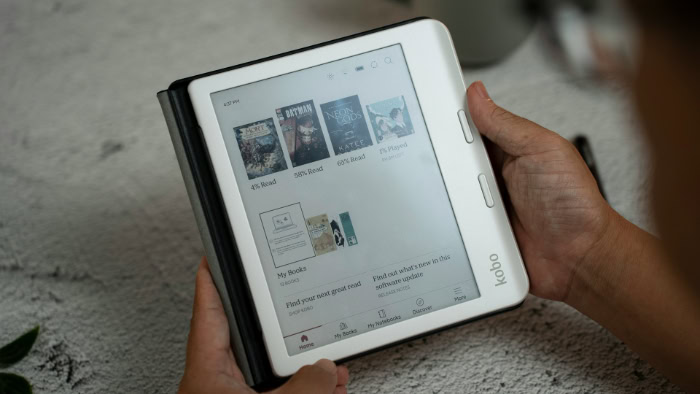
Beyond purchasing books directly from corporate storefronts, many readers rely on local libraries and personal archives. The methods for borrowing public library books and transferring independent files vary significantly between these two ecosystems.
Public Library Integration via Libby and OverDrive
Rakuten Kobo features built-in OverDrive support, which is the system powering the Libby application. Readers can browse their local public library catalog, search for specific titles, and borrow books directly on the device.
This seamless integration works in multiple countries worldwide. Amazon Kindle offers library access through a slightly more restrictive process.
Users must browse the Libby application on a phone or computer and use a “Send to Kindle” function to push the borrowed book to their e-reader. Furthermore, this library feature on Kindle is primarily restricted to users residing in the United States.
Native File Format Support
File compatibility dictates what documents will open without requiring external software conversion. Kindle devices natively support Amazon proprietary formats like AZW and KFX, along with older MOBI files.
Amazon now supports EPUB files, but they must pass through an automatic server-side conversion process before they appear on the device. Kobo e-readers natively support a much wider range of formats.
Users can directly open EPUB, KEPUB, PDF, CBZ, CBR, and TXT files without waiting for any cloud-based conversion. This makes Kobo highly favorable for readers with large collections of graphic novels or independently sourced ebooks.
Sideloading and Document Transfer Methods
Transferring non-store files to your device is often called sideloading. Amazon handles this primarily through its Send-to-Kindle ecosystem.
Users can email files directly to their device or drop them into a web-based uploader. Direct USB transfers are possible but can sometimes result in missing cover art or awkward formatting.
Kobo encourages direct USB drag-and-drop management. The devices connect to computers like standard flash drives, making it simple to organize large libraries using management software like Calibre.
Premium Kobo models also integrate directly with Dropbox and Google Drive, allowing users to pull files straight from the cloud.
Hardware Comparison and Physical Features

An e-reader is a physical tool designed to be held for hours at a time. Evaluating the screen technology, physical buttons, and overall build quality helps ensure the hardware matches your specific reading habits.
Entry-Level and Mid-Tier Device Tiers
The budget tier features the base Kindle and the Kobo Clara. Both offer lightweight designs and basic front-lighting, providing an affordable entry point for casual readers.
Moving up to the mid-tier introduces devices with larger screens and better lighting controls. The Kindle Paperwhite offers a flush-front display, excellent battery life, and adjustable warm lighting.
Kobo competes in this space with the Clara BW and the Libra lines. The Kobo Libra specifically introduces a slightly wider grip and physical page-turn buttons, giving readers an alternative to pure touch-screen navigation.
Both mid-tier options feature high-resolution displays that render text with incredible sharpness.
Premium, Color, and Digital Notebook Models
E-ink technology has evolved past simple black and white text. Both brands offer color options using advanced screen technologies like the Kaleido 3 displays found on the Kobo Clara Colour and Libra Colour.
These screens bring book covers, highlighted text, and graphic novels to life with muted, pastel-like hues. For users interested in productivity, the digital notebook category offers large-format screens designed for writing.
The Kindle Scribe features a highly responsive stylus and a textured screen surface that closely mimics the friction of pen on paper. The Kobo Elipsa competes directly in this space, offering robust notebook software that translates handwritten notes into typed text and allows for easy cloud exporting.
Build Quality, Ergonomics, and Waterproofing
Physical design philosophies vary sharply between the two manufacturers. Kobo heavily favors asymmetrical designs on its higher-end models, providing a dedicated gripping edge and tactile page-turn buttons.
Amazon leans toward symmetrical, touch-only flat fronts for most of its lineup. For durability, both brands offer IPX8 water resistance on their mid-range and premium models, ensuring the devices can survive accidental drops in the bathtub or pool.
Both ecosystems utilize standard USB-C charging ports and feature highly efficient processors that stretch battery life across weeks of daily reading.
Operating System and Reader Customization

The software running on your e-reader shapes your daily reading habits. How you interact with your library, adjust the text on the screen, and utilize additional web services depends entirely on the operating system design chosen by the manufacturer.
Navigation and User Interface Layout
The Kindle home screen heavily integrates Amazon services directly into the main interface. Your library view shares visual space with store recommendations, trending titles, and updates from the Goodreads social reading network.
Rakuten Kobo takes a different approach with a highly minimalist home screen layout. The interface focuses heavily on your current reads and library collection organization.
The Kobo store remains completely separated into its own dedicated tab, ensuring your personal library feels distinct from the retail environment.
Typography, Margins, and Visual Adjustment
Customizing how text appears on the screen is essential for reading comfort. Kindle devices offer a solid selection of pre-installed fonts, options for custom font additions, and basic line spacing controls.
You can also easily set up warm-light schedules to reduce blue light exposure at night. Kobo elevates text customization through its TypeGenius engine.
This software allows for advanced font weight adjustment, enabling you to make text thicker and darker. It also provides fine-tuned sliders for line height and margin adjustments, giving readers granular control over page layouts.
Adding custom fonts to a Kobo is highly straightforward, requiring a simple drag-and-drop into a designated folder.
Reading Metrics and External Web Integration
Tracking your reading pace helps you manage your time. Kindle software calculates your reading speed to display the time left in a chapter or the entire book.
It also features Whispersync, which synchronizes your reading progress across audiobooks and ebooks. Kobo offers similar chapter time estimates but expands on reading stats by tracking your total read time metrics across your entire library.
Additionally, Kobo features native integration with Pocket. This service allows you to save web articles on your phone or computer and read them later on your e-reader’s glare-free screen.
Price Analysis and Reader Suitability

Choosing between these platforms ultimately requires balancing your budget against your specific reading needs. Evaluating the cost of the hardware and identifying which platform aligns with your lifestyle will guide you toward the right purchase.
Cost-to-Performance Evaluation
Both brands maintain competitive pricing structures across their budget, mid-range, and premium tiers. The hardware costs are generally comparable, but Amazon often subsidizes the price of Kindle devices by displaying advertisements on the lock screen.
To remove these lock-screen ads, Amazon charges an additional fee. Rakuten Kobo avoids this entirely by offering a standard ad-free experience right out of the box.
Every Kobo device displays book covers or customizable screensavers when asleep, without requiring an extra payment to bypass promotional content.
Ideal Profile for Kindle Users
A Kindle is the most logical choice for heavy Amazon Prime members or Kindle Unlimited subscribers. Readers based in the United States who plan to borrow public library books will find the Amazon Libby integration highly reliable.
Additionally, users who want seamless cloud synchronization across multiple Amazon devices, from tablets to smartphones, will benefit from the tightly controlled Kindle ecosystem.
Ideal Profile for Kobo Users
Rakuten Kobo is perfect for international readers who want direct public library borrowing through built-in OverDrive access. It is also the superior choice for readers with large existing collections of EPUB files or manga, as the system makes sideloading exceptionally easy.
Enthusiasts who demand tactile physical page-turn buttons, color e-ink display options, or deep typographical customization will find Kobo devices much more accommodating to their preferences.
Conclusion
The choice between Amazon Kindle and Rakuten Kobo depends entirely on how you source your reading material and manage your budget. Amazon provides an enormous retail ecosystem with exclusive indie authors and a heavily integrated subscription service.
However, this convenience comes with strict format limitations and library borrowing restrictions outside the United States. Kobo counters with open file support, straightforward offline sideloading, and seamless on-device public library browsing worldwide.
If you rely heavily on Amazon Prime or Kindle Unlimited, a Kindle is the clear choice for your budget. If you prefer buying ebooks from independent stores, read graphic novels, or borrow heavily from international public libraries, Kobo provides the hardware and software flexibility to support those habits perfectly.
Frequently Asked Questions
Can I read library books on my e-reader?
Yes, but the exact process depends heavily on your specific device and geographic location. Kobo allows direct on-device library browsing and borrowing through OverDrive in multiple countries. Kindle supports library borrowing via the Libby app, but this feature is primarily limited to readers in the United States.
Do I have to pay to remove ads on a Kobo?
No, all Kobo devices provide a completely ad-free experience right out of the box. While Amazon charges an extra fee to remove promotional lock screen advertisements from Kindle e-readers, Kobo displays your current book cover or a customizable screensaver without any additional cost.
Which e-reader is better for sideloading my own books?
Kobo is the superior choice for managing and transferring your independent digital files. It natively processes a wide variety of formats like EPUB and PDF without requiring cloud conversion. You can easily drag and drop files via USB to organize your personal library offline.
Can I read Amazon Kindle books on a Kobo?
No, you cannot directly transfer or open Kindle purchases on a Kobo device. Amazon utilizes strict digital restrictions to lock your purchased content into its proprietary ecosystem. Moving those files requires specialized third-party software to strip protections, which directly violates Amazon terms of service.
Do these e-readers have color screens?
Yes, both brands currently offer specific models featuring vibrant color e-ink displays. Devices like the Kobo Clara Colour utilize advanced screen technologies to render muted, pastel-like hues. This hardware upgrade makes them excellent for reading graphic novels, highlighting text, or viewing full-color book covers.
About the Author: Elizabeth Baker


